
1. Introduction
This manual provides essential instructions for the safe and efficient use of your Epson EB-X49 XGA Projector. Please read this manual thoroughly before operating the projector and retain it for future reference. Adherence to these instructions will ensure optimal performance and longevity of your device.
Safety Precautions
- Do not block ventilation openings. Ensure adequate space around the projector for proper airflow.
- Avoid looking directly into the projector lens when the lamp is on, as the bright light can cause eye damage.
- Do not place the projector on an unstable cart, stand, or table.
- Disconnect the power cord from the wall outlet if the projector will not be used for an extended period.
- Refer all servicing to qualified service personnel.
2. Product Overview
Familiarize yourself with the components of your Epson EB-X49 projector.
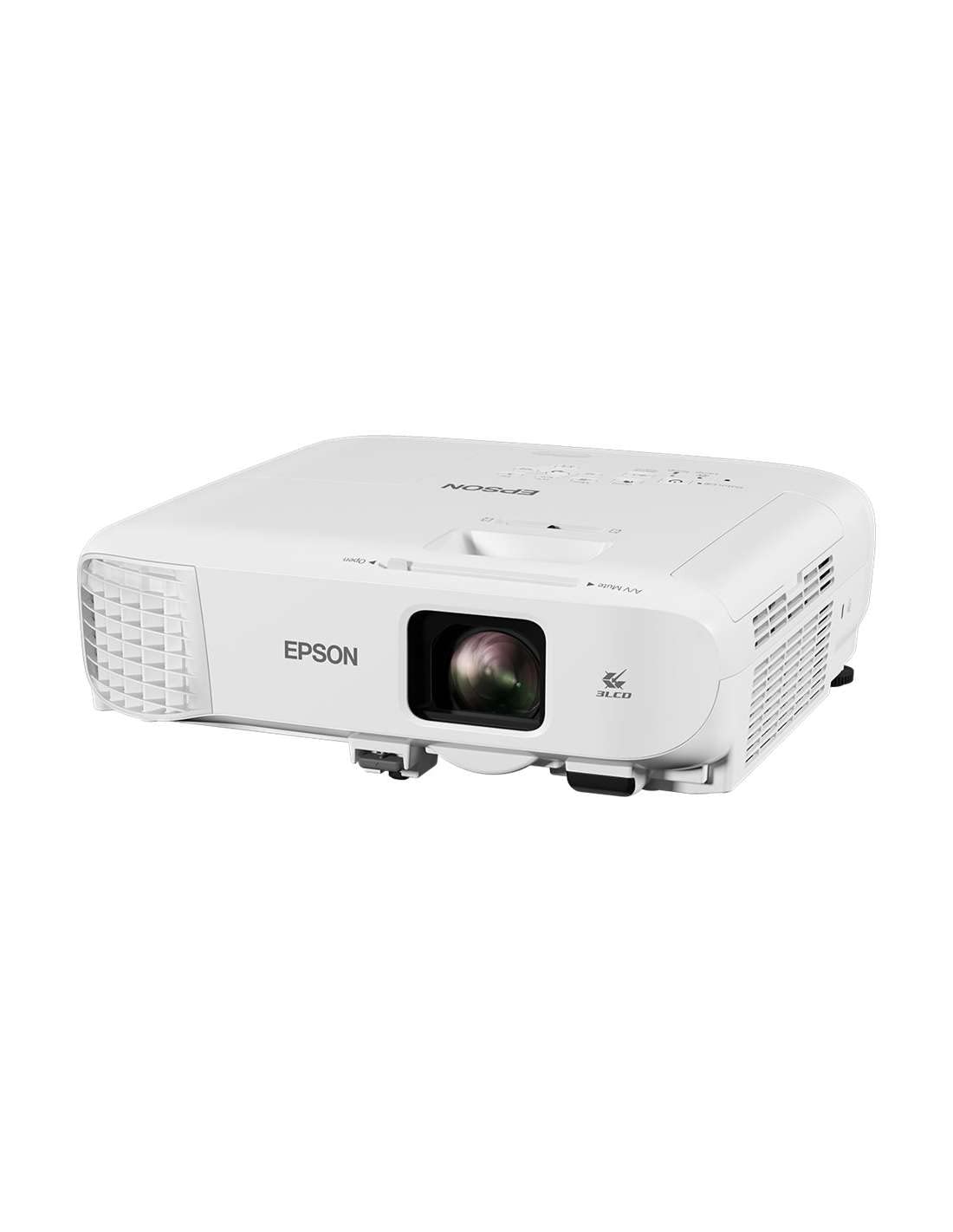
Figure 2.1: Front and Side View. This image displays the front and side of the Epson EB-X49 projector, highlighting the lens, ventilation grilles, and the Epson branding. The adjustable feet are visible at the bottom.
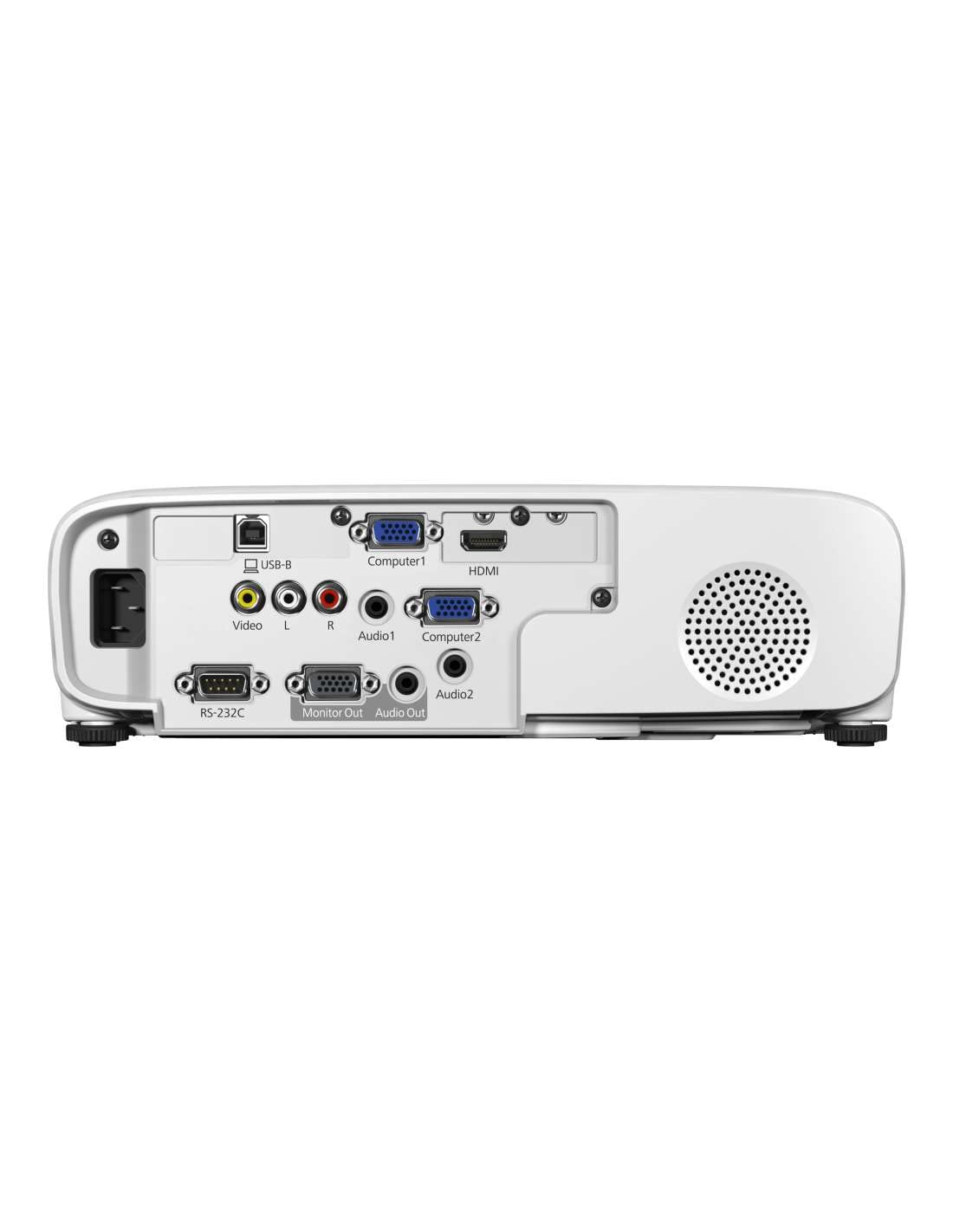
Figure 2.2: Rear Panel. This image shows the rear panel of the projector, detailing the various input and output ports including HDMI, VGA (Computer1, Computer2), USB-B, Video, Audio (L/R, Audio1, Audio2), Monitor Out, and RS-232C for control.

Figure 2.3: Top Control Panel. This image illustrates the top surface of the projector, featuring the control panel buttons for power, menu navigation, source selection, keystone correction, and status indicators for lamp and temperature.
3. Setup
3.1 Projector Placement
Place the projector on a stable, flat surface or mount it securely to a ceiling. Ensure the projector is positioned at an appropriate distance from the screen to achieve the desired image size. Avoid placing it in direct sunlight or near heat sources.
3.2 Power Connection
- Connect the supplied power cord to the projector's AC inlet.
- Plug the other end of the power cord into a grounded electrical outlet.
3.3 Connecting Input Sources
The EB-X49 projector supports various input sources:
- HDMI: For high-definition digital video and audio. Connect an HDMI cable from your source device (e.g., laptop, Blu-ray player) to the projector's HDMI port.
- VGA (Computer1, Computer2): For analog video input. Connect a VGA cable from your computer to either Computer1 or Computer2 port.
- USB-B: For USB display or control.
- Video (RCA): For standard definition analog video.
- Audio (L/R, Audio1, Audio2): For analog audio input.
- Ethernet: For network connectivity and control.
3.4 Optional Wi-Fi Setup
If your model includes optional Wi-Fi support, you may need to install a compatible wireless LAN adapter (sold separately) into the designated USB port. Refer to the adapter's documentation for specific installation and network connection instructions.
4. Operating the Projector
4.1 Powering On/Off
- To Power On: Press the power button on the projector's control panel or remote control. The status indicator will turn blue.
- To Power Off: Press the power button again. A confirmation message may appear. Press the power button a second time to confirm shutdown. Allow the projector to cool down before unplugging.
4.2 Selecting an Input Source
Press the Source Search button on the control panel or the corresponding input button on the remote control (e.g., HDMI, Computer) to cycle through available input sources.
4.3 Adjusting the Image
- Focus: Rotate the focus ring on the lens until the image appears sharp.
- Zoom: Adjust the zoom ring on the lens to change the image size.
- Keystone Correction: If the image is trapezoidal, use the keystone correction buttons (vertical and horizontal) on the control panel or remote to square the image. The EB-X49 features advanced keystone correction for easy adjustment.
4.4 Menu Navigation
Press the Menu button to access the projector's on-screen display (OSD) menu. Use the arrow buttons to navigate and the Enter button to select options. Press Esc to exit the menu.
5. Maintenance
Regular maintenance ensures optimal performance and extends the life of your projector.
5.1 Cleaning the Air Filter
The air filter prevents dust from entering the projector and affecting performance. Clean the air filter regularly (e.g., every 100 hours of use or as indicated by the projector). Remove the filter cover, gently remove the filter, and clean it with a small vacuum cleaner or soft brush. Replace the filter and cover securely.
5.2 Lamp Replacement
The projector lamp has a finite lifespan. When the lamp life is nearing its end, a warning message may appear, or the Lamp indicator on the control panel may illuminate. To replace the lamp:
- Turn off the projector and unplug the power cord.
- Allow the projector to cool completely (at least one hour).
- Locate the lamp cover (refer to your projector's diagram for exact location).
- Remove the screw(s) securing the lamp cover and open it.
- Loosen the screw(s) holding the lamp module in place and carefully pull out the old lamp.
- Insert the new genuine Epson replacement lamp, ensuring it is seated correctly.
- Tighten the lamp module screw(s) and replace the lamp cover.
- Plug in the power cord and reset the lamp timer through the projector's menu.
Note: Always use genuine Epson replacement lamps to ensure compatibility and safety.
5.3 General Cleaning
Wipe the projector's exterior with a soft, dry cloth. For stubborn dirt, use a cloth lightly dampened with water and a mild detergent. Do not use abrasive cleaners or solvents. Clean the lens gently with a lens cleaning cloth designed for optical surfaces.
6. Troubleshooting
This section addresses common issues you might encounter with your projector.
| Problem | Possible Cause | Solution |
|---|---|---|
| No image displayed |
|
|
| Image is distorted or blurry |
|
|
| "Temperature Error" message or projector shuts down |
|
|
| No sound |
|
|
| Remote control not working |
|
|
7. Specifications
| Feature | Specification |
|---|---|
| Model | V11H982040 |
| Display Type | LED |
| Resolution | 1024 x 768 (XGA) |
| Brightness | 3600 lumens |
| Aspect Ratio | 4:3 |
| Connectivity | HDMI, D-Sub (VGA), USB, Ethernet |
| Special Features | Portable, Optional Wi-Fi support |
| Product Dimensions (LxWxH) | 37.5 x 35 x 15.5 cm |
| Item Weight | 2.7 kg |
| Noise Level | 37 dB |
| Wattage | 327 Watts |
| Compatible Devices | Laptops, Smartphones, Gaming Consoles, Blu-ray Players, Desktop Computers, Tablets |
8. Warranty and Support
8.1 Warranty Information
The Epson EB-X49 Projector comes with a 1-year warranty from the date of purchase. Please retain your proof of purchase for warranty claims. The warranty covers manufacturing defects under normal use. It does not cover damage caused by misuse, accidents, unauthorized repairs, or consumable parts such as the lamp (which may have a separate warranty period).
8.2 Customer Support
For technical assistance, troubleshooting beyond this manual, or warranty service, please contact Epson customer support. You can find contact information and additional resources, including updated drivers and FAQs, on the official Epson website: www.epson.com/support.


