
Epson EB-992F
Epson EB-992F 3LCD Projector User Manual
Model: EB-992F (V11H988040)
Introduction
Maximise your presentations with this bright Full HD projector that's capable of producing a large and scalable screen size. The long-lasting lamp provides years of lessons before a replacement lamp is required or the air filter needs attention. It's easy to set up and offers a range of connectivity solutions, so you can quickly access content from multiple devices.
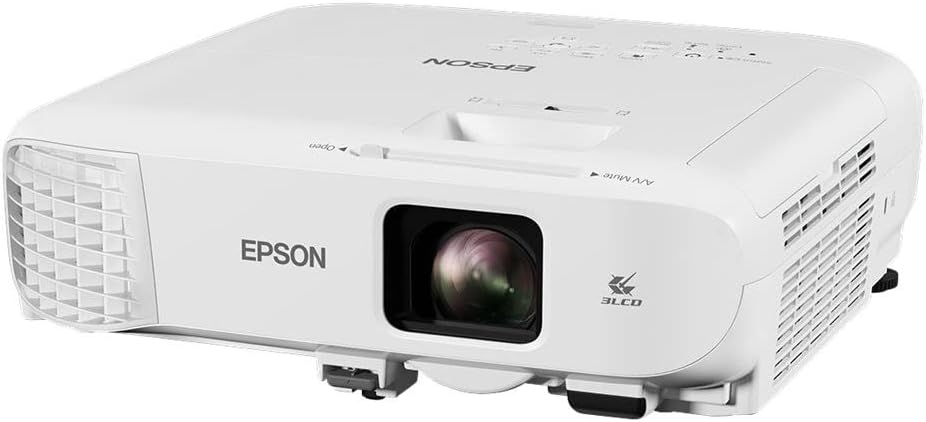
Figure 1: Front view of the Epson EB-992F 3LCD Projector.
Package Contents
Before you begin, ensure all items are present in the package:
- Computer cable
- Main unit
- Power cable
- Remote control incl. batteries
- User manual
- Warranty document
Setup
1. Placement
Position the projector on a stable, flat surface or mount it securely. Ensure adequate ventilation around the projector. For optimal image quality, place the projector perpendicular to the screen or wall.
2. Connecting Power
- Connect the power cable to the AC inlet on the projector.
- Plug the other end of the power cable into a grounded electrical outlet.
3. Connecting Input Sources
The EB-992F projector offers various connectivity options. Refer to the rear panel diagram below for port locations.

Figure 2: Rear panel of the Epson EB-992F showing various input and output ports.
- HDMI: Connect HDMI cables to HDMI 1 or HDMI 2 ports for digital video and audio.
- Computer (VGA): Use a VGA cable to connect to Computer 1 or Computer 2 ports for analog video.
- USB: Connect USB devices to the USB-A or USB-B ports. USB-A supports media playback, while USB-B is for computer connection.
- LAN: Connect an Ethernet cable to the LAN port for network connectivity.
- Audio In/Out: Use 3.5mm audio cables for audio input (Audio 1, Audio 2) or output (Audio Out).
- Video (RCA): Connect composite video and stereo audio cables to the Video (RCA) ports.
- RS-232C: For serial control.
Operating Instructions
1. Powering On/Off
Press the power button on the projector's control panel or the remote control to turn the projector on. Press it again to turn off. A confirmation message may appear; press the power button again to confirm shutdown.

Figure 3: Top view of the Epson EB-992F showing the control panel and lens adjustments.
2. Adjusting Image
- Focus: Rotate the focus ring on the lens to sharpen the image.
- Zoom: Adjust the zoom ring on the lens to change the image size.
- Keystone Correction: If the image appears trapezoidal, use the horizontal and vertical keystone correction sliders or buttons on the control panel/remote to square the image.
3. Selecting Input Source
Press the "Source Search" button on the control panel or remote control to cycle through available input sources (HDMI, Computer, USB, Video, LAN). Alternatively, use the dedicated input buttons if available on the remote.
4. Menu Navigation
Press the "Menu" button to access the projector's settings. Use the arrow keys to navigate and "Enter" to select options. Press "Esc" to go back or exit the menu.
Maintenance
1. Cleaning the Air Filter
Regularly clean the air filter to maintain optimal performance and prevent overheating. The filter is typically located on the side or bottom of the projector. Refer to the diagram below for the filter location.

Figure 4: Side view of the Epson EB-992F, highlighting the ventilation area where the air filter is located.
- Turn off the projector and unplug the power cable.
- Locate the air filter cover and open it.
- Remove the filter and clean it using a small vacuum cleaner or soft brush. Do not wash the filter with water.
- Reinsert the clean filter and close the cover securely.
2. Replacing the Lamp
The projector lamp has a long lifespan, but will eventually need replacement. A warning message will appear on screen when the lamp is nearing its end of life. Only use genuine Epson replacement lamps.
- Turn off the projector and unplug the power cable. Allow the projector to cool down for at least an hour.
- Locate the lamp cover (usually on the top or side) and remove the screw(s) securing it.
- Carefully remove the old lamp module.
- Insert the new lamp module, ensuring it is seated correctly.
- Replace the lamp cover and secure it with the screw(s).
- Reset the lamp timer through the projector's menu system (refer to the "Menu Navigation" section).
3. General Cleaning
Wipe the exterior of the projector with a soft, dry cloth. For stubborn marks, use a cloth lightly dampened with water. Do not use abrasive cleaners or solvents. Clean the lens gently with a lens cleaning cloth designed for optical surfaces.
Troubleshooting
| Problem | Possible Cause | Solution |
|---|---|---|
| No image projected |
|
|
| Image is blurry |
|
|
| Image is trapezoidal |
|
|
| Projector overheats and shuts down |
|
|
Specifications
- Model: EB-992F (V11H988040)
- Display Technology: 3LCD
- Brightness: 4000 lumens (white), 4000 lumens (colour)
- Native Resolution: 1920 x 1080
- Aspect Ratio: 16:9
- Connectivity: USB, HDMI, Miracast, 802.11n wireless
- Product Dimensions: 14.96 x 14.96 x 6.5 inches
- Item Weight: 6.82 pounds
- Special Feature: Built-in Speakers
- Recommended Uses: Office
- Brand: Epson
- Manufacturer: Epson
Warranty and Support
For warranty information and technical support, please refer to the warranty document included in your package or visit the official Epson support website. You can also find additional resources and FAQs on the Epson Store on Amazon.
Epson offers various protection plans for extended coverage. For details on 2-Year, 3-Year, or Complete Protect plans, please consult your retailer or the Epson website.
Related documentsEB-992F


Ask a question about this manual
Ask about setup, troubleshooting, compatibility, parts, safety, or missing instructions. Manuals+ will review the question and use this page’s manual context to help answer it.