
1. Product Overview
The ASRock B550M-ITX/AC is a Mini ITX motherboard designed to support 3rd Gen AMD AM4 Ryzen™ and future AMD Ryzen™ processors. It features robust components for stable power delivery and offers enhanced performance. This motherboard is compatible with Microsoft Windows 10 64-bit and Windows 11.
- Supports AMD AM4 Socket Ryzen 3000, 3000 G-Series, 4000 G-Series, 5000 and 5000 G-Series Desktop Processors (not compatible with AMD Athlon Processors).
- Supports DDR4 4733+ (OC) memory.
- Graphics Output: DisplayPort, HDMI.
- 7.1 CH HD Audio (Realtek ALC887 Audio Codec).

Figure 1: Top-down view of the ASRock B550M-ITX/AC motherboard.
2. Setup and Installation
Follow these steps for proper installation of your ASRock B550M-ITX/AC motherboard and associated components. Always ensure proper grounding and handle components with care to prevent electrostatic discharge (ESD).
2.1 Motherboard Layout
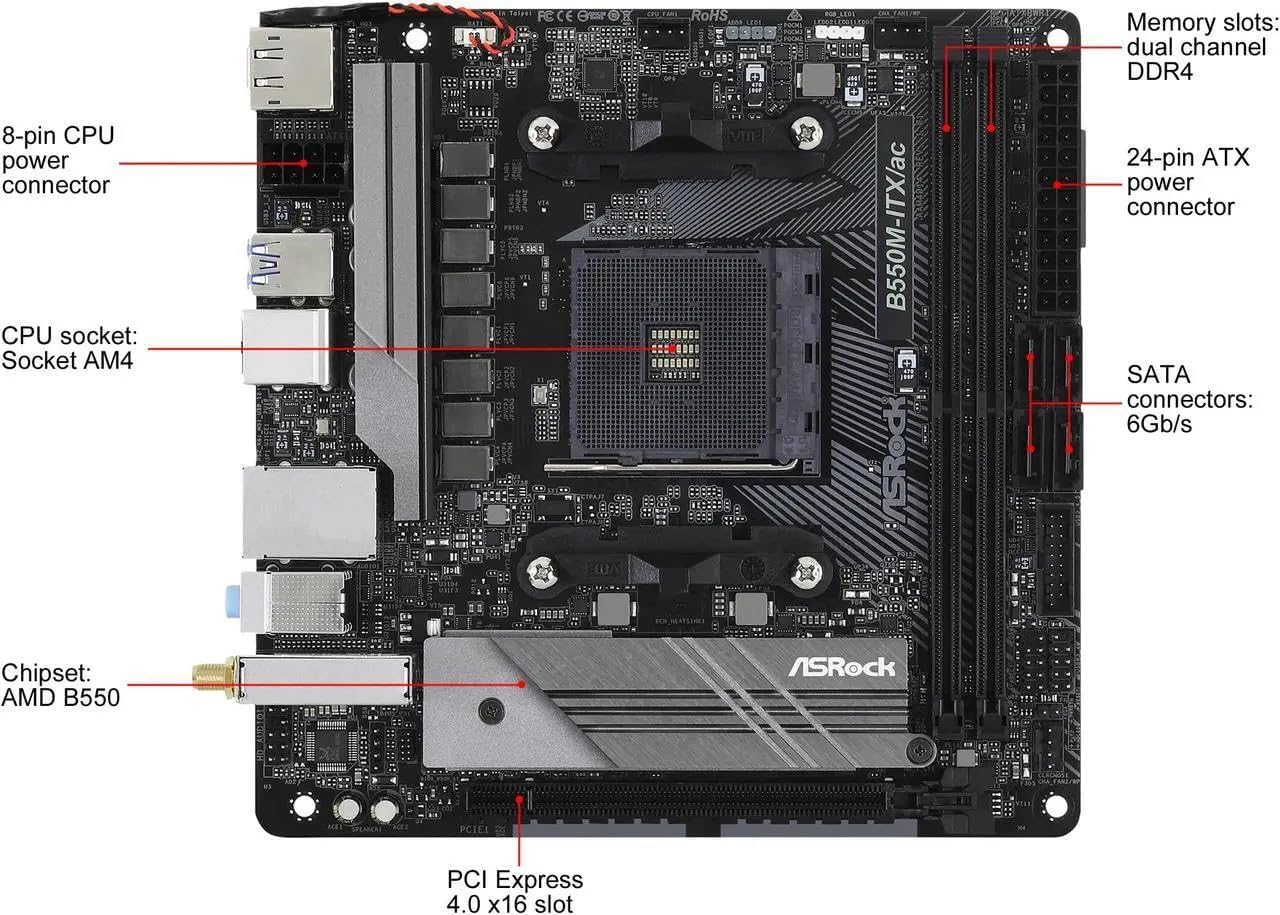
Figure 2: Labeled components of the ASRock B550M-ITX/AC motherboard, including CPU socket, memory slots, SATA connectors, and PCIe slot.
2.2 Rear I/O Panel

Figure 3: Rear I/O panel showing DisplayPort, HDMI, USB 3.2 Gen 1, USB 3.2 Gen 1 Type-C, USB 2.0, PS/2, RJ-45 Gigabit LAN, Analog audio, and Antenna ports.
2.3 Included Accessories

Figure 4: Typical accessories included with the motherboard, such as the Quick Installation Guide, Wi-Fi antenna, SATA cables, and Rear I/O panel shield.
2.4 Installation Steps
The following video demonstrates the installation process for various components onto the ASRock B550M-ITX/AC motherboard and into a PC case. It covers CPU, RAM, M.2 SSD, power supply, and graphics card installation, along with cable management.
Video 1: Installation guide for the ASRock B550M-ITX/AC motherboard and PC components.
- Prepare the Case: If upgrading, remove the old motherboard and any existing I/O shields. Install the new I/O shield for the B550M-ITX/AC.
- Install the CPU: Carefully align the CPU with the socket, matching the gold triangle on the CPU to the corresponding corner on the socket. Lower the CPU gently and secure it with the retention arm.
- Install RAM: Open the latches on the DDR4 memory slots. Align the RAM module with the slot, ensuring the notch on the module matches the key in the slot. Press down firmly until the latches click into place.
- Install M.2 SSD: Locate the M.2 slot. Remove the heatsink and its screw. Insert the M.2 SSD at an angle, then push it down and secure it with the small screw. Reattach the heatsink if applicable.
- Mount Motherboard: Carefully place the motherboard into the PC case, aligning it with the standoffs. Secure it with screws.
- Connect Power Supply: Connect the 24-pin ATX power cable and the 8-pin CPU power cable from your power supply to the motherboard.
- Connect Front Panel Cables: Connect the front panel audio, USB 3.0, USB 2.0, power button, reset button, and LED cables to their respective headers on the motherboard. Refer to the motherboard manual for exact pin layouts.
- Install CPU Cooler: Install your chosen CPU cooler (air cooler or AIO liquid cooler) according to its specific instructions. Ensure proper thermal paste application.
- Install Graphics Card: Insert the graphics card into the PCIe 4.0 x16 slot, ensuring it clicks securely. Fasten it to the case with a screw.
- Cable Management: Organize all cables to ensure proper airflow and a tidy build.
- Close Case: Reattach the side panels and any top covers to your PC case.
3. Operating System and Drivers
The ASRock B550M-ITX/AC motherboard supports Windows 10 (64-bit) and Windows 11. After assembling your system, install your preferred operating system.
3.1 Driver Installation
For optimal performance and stability, install all necessary drivers. These can typically be found on the ASRock support website for your specific motherboard model. Key drivers include:
- Chipset Drivers (AMD B550)
- Audio Drivers (Realtek ALC887)
- LAN Drivers
- Wi-Fi/Bluetooth Drivers
- Graphics Drivers (for integrated graphics if applicable, or your dedicated GPU)
4. Maintenance
Regular maintenance helps ensure the longevity and stable operation of your motherboard and PC system.
- Dust Removal: Periodically clean dust from inside your PC case, especially from fans, heatsinks, and ventilation areas, using compressed air.
- Cable Management: Ensure cables are neatly routed and do not obstruct airflow.
- Software Updates: Keep your operating system, drivers, and BIOS/UEFI firmware updated to benefit from performance improvements and security patches.
- Temperature Monitoring: Use monitoring software to keep an eye on CPU and system temperatures to prevent overheating.
5. Troubleshooting
If you encounter issues, consider the following troubleshooting steps:
- No Power: Check all power connections (24-pin ATX, 8-pin CPU, GPU power). Ensure the power supply switch is on.
- No Display: Verify that the monitor is connected to the correct graphics output (motherboard or dedicated GPU). Reseat the graphics card and RAM modules.
- System Instability/Crashes: This can be caused by various factors. Check for overheating, ensure RAM is properly seated, and verify driver compatibility. Run memory diagnostic tools.
- Peripheral Issues: If USB or audio ports are not working, ensure front panel cables are correctly connected and drivers are installed.
- BIOS/UEFI Issues: If the system fails to boot or enter BIOS, try clearing the CMOS (refer to the motherboard manual for the specific jumper or button location).
6. Specifications
| Feature | Specification |
|---|---|
| Brand | ASRock |
| Model Name | B550M-ITX/AC |
| CPU Socket | Socket AM4 |
| Compatible Processors | AMD Ryzen 3000, 3000 G-Series, 4000 G-Series, 5000, 5000 G-Series Desktop Processors |
| Chipset Type | AMD B550 |
| RAM Memory Technology | DDR4 |
| Memory Clock Speed | 2400 MHz (Supports up to 4733+ (OC)) |
| Memory Slots Available | 2 |
| RAM Memory Maximum Size | 64 GB |
| Graphics Output | DisplayPort, HDMI |
| Audio Codec | Realtek ALC887 (7.1 CH HD Audio) |
| Total USB Ports | 10 (including USB 2.0, USB 3.2 Gen 1, USB 3.2 Gen 1 Type-C) |
| Total SATA Ports | 4 |
| Total PCIe Ports | 1 (PCIe 4.0 x16) |
| Platform | Windows 10, Windows 11 |
| Item Weight | 425 Grams |
| Item Dimensions L x W x H | 5.8"L x 2.5"W x 11"H |
7. Warranty Information
The ASRock B550M-ITX/AC motherboard comes with a 3-year warranty. For detailed terms and conditions, please refer to the warranty card included with your product or visit the official ASRock website.
8. Support
For further assistance, technical support, driver downloads, or BIOS updates, please visit the official ASRock support website:
You can also visit the ASRock store on Amazon for product information and related accessories:


