
Product Overview
The Bestier L-Shaped Gaming Desk is designed for versatility and functionality, offering multiple setup configurations to suit various needs. It features integrated LED lighting, a monitor shelf, a convenient cup holder, and a headset hook. The desk's surface has a carbon fiber texture for durability and a modern aesthetic.

Image: The Bestier L-Shaped Gaming Desk configured for a multi-monitor gaming setup, illuminated by LED lights.

Image: A detailed view of the desk's features, including the integrated LED light strip, a cup holder, and a headset hook, designed for convenience during use.
Setup Instructions
This desk offers three primary assembly configurations: a 55-inch L-shaped desk, a 72-inch long desk, or two separate 36-inch small desks. The design is reversible, allowing the L-shape to be oriented to either the left or right side. Assembly is recommended for two adults and includes all necessary tools.
Assembly Video Tutorial
Video: A comprehensive assembly tutorial for the Bestier L-shaped computer desk, guiding users through each step of the setup process.
General Assembly Steps
- Unpack Components: Carefully remove all parts from the packaging and verify against the parts list.
- Assemble Frame: Connect the X-shaped legs and support bars using the provided screws and tools. Ensure all connections are secure.
- Attach Corner Piece: Secure the rounded corner piece to the frame, aligning screw holes carefully.
- Install Side Panels: Place the two rectangular desk panels onto the assembled frame and secure them with screws from underneath.
- Attach Monitor Shelf: Assemble the monitor shelf and attach it to the designated area on the desk. This shelf is designed to elevate your monitor to an ergonomic height.
- Install Accessories: Secure the cup holder and headset hook to either the left or right side of the desk as preferred.
- Connect LED Lights: Attach the LED light strip to the underside of the monitor shelf and connect it to a USB power source.

Image: Visual guide for attaching the desk legs and horizontal support bars, forming the base structure.

Image: Illustration of how to correctly position and secure the rounded corner section of the desk.

Image: Step-by-step diagram for attaching the main rectangular desk panels to the frame, completing the primary desk surface.
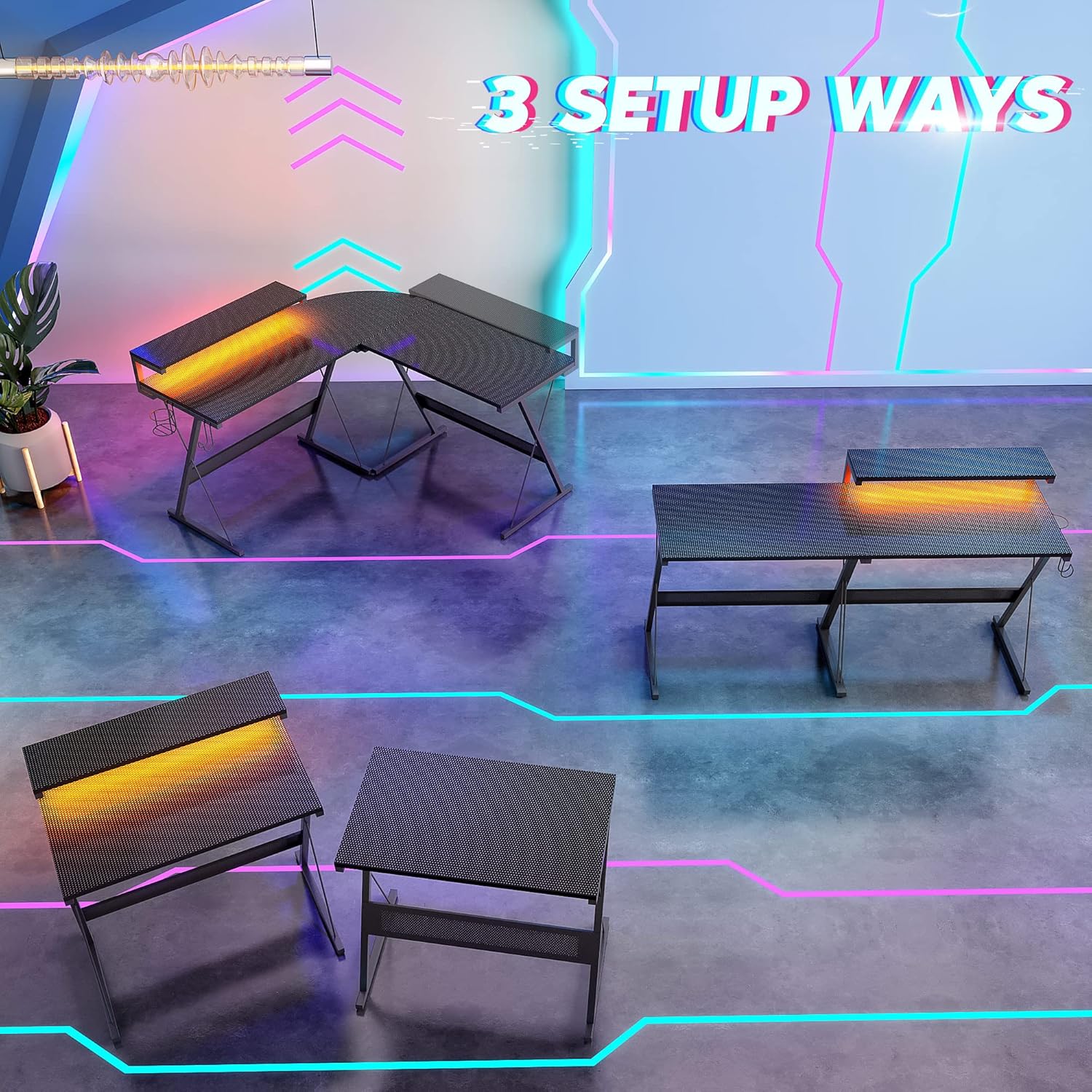
Image: This diagram visually explains the three versatile ways to configure your Bestier L-Shaped Gaming Desk: as a large L-shape, a long straight desk, or two individual desks.
Operating Instructions
LED Lighting System
The integrated LED light strip offers 7 main colors and 20 dynamic modes to customize your environment. Control the lights using the inline controller attached to the USB cable. Press the mode button to cycle through dynamic effects, and use the speed/brightness buttons to adjust the intensity or pace of the effects.
Video: An overview of the Bestier L-shaped computer desk, highlighting its features and design, including the LED lighting.
Monitor Shelf
The 36-inch monitor stand is designed to keep your screen at a comfortable eye-level height, promoting better posture and reducing neck strain during extended use.
Cup Holder and Headset Hook
The removable cup holder and headset hook can be attached to either side of the desk, providing convenient storage for beverages and headphones, keeping your main workspace clear.
Video: A demonstration of the Bestier 55-inch L-shaped Gaming Desk with LED, showcasing its features and how they enhance a gaming setup.
Maintenance
To maintain the quality and appearance of your Bestier L-Shaped Gaming Desk, follow these simple guidelines:
- Cleaning: Wipe the desk surface with a soft, damp cloth. Avoid using harsh chemicals or abrasive cleaners, which can damage the carbon fiber texture.
- Spills: Promptly clean any spills to prevent staining or damage to the engineered wood material.
- Tighten Fasteners: Periodically check and tighten all screws and fasteners to ensure the desk remains stable and secure.
- Weight Distribution: Distribute weight evenly across the desk surface. The desk has a maximum weight recommendation of 250 pounds.
Troubleshooting
If you encounter any issues with your Bestier L-Shaped Gaming Desk, please refer to the following common solutions:
- Desk Instability: Ensure all screws are securely tightened. Check that the desk is placed on a flat, even surface.
- LED Lights Not Working: Verify that the USB cable is properly connected to a power source. Check the inline controller for any damage or loose connections.
- Missing Parts: If any parts are missing or damaged upon arrival, please contact Bestier customer service immediately for assistance.
For further assistance, please refer to the Warranty and Support section.
Specifications
| Feature | Detail |
|---|---|
| Brand | Bestier |
| Model Number | 113-094 |
| Shape | L-Shape |
| Desk Design | Computer Desk |
| Product Dimensions (D x W x H) | 55.2" x 55.2" x 36" (Height includes monitor shelf) |
| Desk Surface Height | 30 inches |
| Color | Carbon Fiber Black |
| Style | Modern |
| Base Material | Engineered Wood |
| Top Material Type | Engineered Wood |
| Special Feature | Reversible L-Shape, LED Lighting |
| Recommended Uses | Gaming, Home Office |
| Included Components | Headphone Hook, Cup Holder, Monitor Shelf |
| Item Weight | 22.5 Kilograms |
| Tabletop Thickness | 15 Millimeters |
| Maximum Weight Recommendation | 250 Pounds |
| Required Assembly | Yes (2 adults recommended) |
| Includes All Assembly Tools | Yes |
Warranty and Support
Bestier offers a 1-year quality guarantee for this product. If you encounter any product issues or require assistance, please do not hesitate to contact our customer service team. We are committed to providing excellent and friendly support before and after your purchase, aiming to resolve any concerns within 24 hours to ensure your satisfaction.
For direct support, please visit the Bestier Store on Amazon or contact us through the platform.

Image: Bestier Customer Support is available to assist with any product-related inquiries.

