1. Important Safety Instructions
Read all instructions carefully before using the appliance. Retain this manual for future reference.
- Ensure the power supply voltage matches the rating label on the vacuum cleaner.
- Do not leave the vacuum cleaner unattended when plugged in. Unplug from outlet when not in use and before servicing.
- Do not use outdoors or on wet surfaces.
- Do not allow to be used as a toy. Close attention is necessary when used by or near children.
- Use only as described in this manual. Use only manufacturer's recommended attachments.
- Do not pull or carry by cord, use cord as a handle, close a door on cord, or pull cord around sharp edges or corners. Do not run appliance over cord. Keep cord away from heated surfaces.
- Do not unplug by pulling on cord. To unplug, grasp the plug, not the cord.
- Do not handle plug or vacuum cleaner with wet hands.
- Do not put any object into openings. Do not use with any opening blocked; keep free of dust, lint, hair, and anything that may reduce airflow.
- Keep hair, loose clothing, fingers, and all parts of body away from openings and moving parts.
- Do not pick up anything that is burning or smoking, such as cigarettes, matches, or hot ashes.
- Do not use to pick up flammable or combustible liquids, such as gasoline, or use in areas where they may be present.
- Do not use without dust bag and/or filters in place.
- Turn off all controls before unplugging.
- Use extra care when cleaning on stairs.
2. Product Overview
The Nikai NVC2302A1 is a compact and efficient 1400W vacuum cleaner designed for various floor types. It features multi-stage filtration, automatic cord rewinding, and a filter full indication system.

Image: The Nikai NVC2302A1 vacuum cleaner, showing the main unit, flexible hose, and floor cleaning tool.

Image: Front view of the vacuum cleaner unit, highlighting the power buttons and compact design.
3. Assembly Instructions
- Attach the Hose: Insert the flexible hose into the suction inlet on the main unit until it clicks securely into place.
- Connect Extension Wands: Connect the two extension wands together. Then, attach one end to the hose handle and the other end to the desired cleaning tool (e.g., floor brush).
- Select Cleaning Tool: Choose the appropriate cleaning tool for your task. The accessory kit includes a floor brush, crevice tool, and upholstery brush.
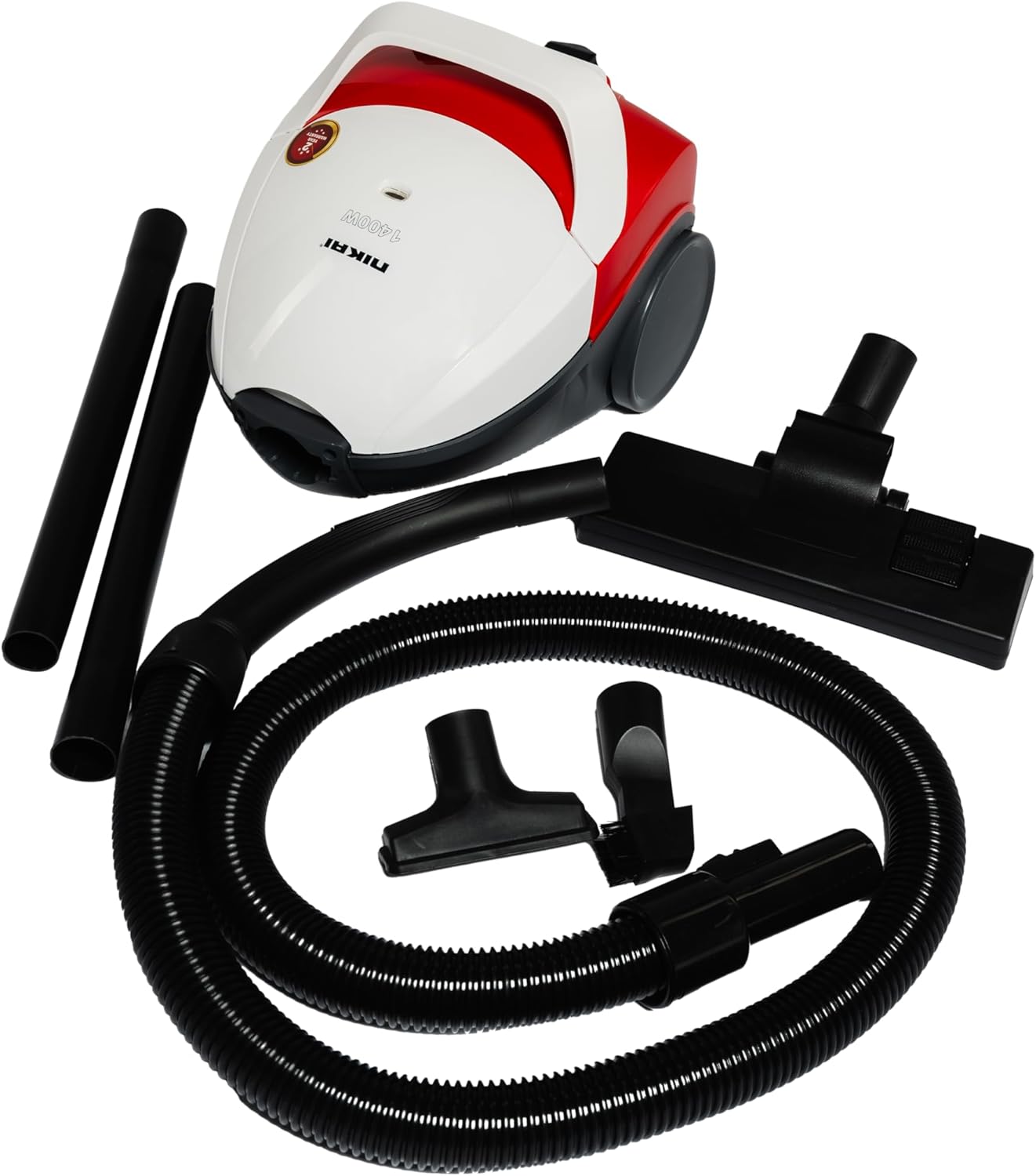
Image: All components of the Nikai NVC2302A1 vacuum cleaner, including the main unit, hose, extension wands, and various cleaning attachments.

Image: Close-up view of the three different brushes included with the vacuum cleaner, designed for various cleaning tasks.
4. Operating Instructions
- Power Connection: Extend the power cord from the back of the unit and plug it into a suitable electrical outlet.
- Power On/Off: Press the power button located on the main unit to turn the vacuum cleaner on or off.
- Maneuvering: The vacuum cleaner is equipped with sturdy 360° wheels for easy movement around furniture and obstacles.
- Automatic Cord Rewinding: After use, unplug the vacuum cleaner from the wall outlet. Press the cord rewind button to automatically retract the power cord into the unit.
- Filter Full Indication: The vacuum cleaner features a filter full indicator. When this indicator shows that the filter is full, it is time to clean or replace the dust bag and/or filters to maintain optimal suction performance.

Image: Detail of the sturdy 360-degree wheels on the Nikai NVC2302A1 vacuum cleaner, designed for effortless maneuverability.

Image: The Nikai NVC2302A1 vacuum cleaner in use, illustrating its powerful suction capability for thorough cleaning.
5. Maintenance
Regular maintenance ensures the longevity and optimal performance of your vacuum cleaner.
5.1 Emptying the Dust Bag
- Unplug the vacuum cleaner from the power outlet.
- Open the dust bag compartment.
- Carefully remove the full SMS cloth dust bag.
- Empty the contents of the bag into a waste bin. If the bag is disposable, replace it with a new one. If it's reusable, ensure it is thoroughly cleaned before reinserting.
- Reinsert the dust bag and close the compartment securely.
5.2 Cleaning Filters
The vacuum cleaner uses multi-stage filtration. Regularly check and clean the filters as indicated by the filter full indicator.
- Unplug the vacuum cleaner.
- Locate the filters (refer to the diagram in the product packaging for exact locations).
- Remove the filters and gently tap them to dislodge dust. For washable filters, rinse under cold water and allow them to air dry completely before reinserting. Do not use detergents or hot water.
- Replace filters if they are damaged or cannot be cleaned effectively.
6. Troubleshooting
| Problem | Possible Cause | Solution |
|---|---|---|
| Vacuum cleaner does not turn on. | Not plugged in; no power at outlet; power button not pressed. | Check power cord connection; check circuit breaker; press power button firmly. |
| Loss of suction. | Dust bag full; filters clogged; hose or attachments blocked. | Empty/replace dust bag; clean/replace filters; check hose and attachments for blockages. |
| Unusual noise. | Blockage in hose/attachments; motor issue. | Check for and remove blockages. If noise persists, contact customer support. |
| Filter full indicator remains on after cleaning. | Filters not properly cleaned or reinserted; sensor malfunction. | Ensure filters are clean and correctly seated. If issue persists, contact customer support. |
7. Specifications
| Brand | Nikai |
| Model Number | NVC2302A1 |
| Power / Wattage | 1400 watts |
| Voltage | 220 Volts |
| Noise Level | 72 Decibels |
| Item Weight | 4.25 Kilograms |
| Package Dimensions | 58 x 30 x 27 cm |
| Special Features | Compact, Automatic Cord Rewinding, Multi-Stage Filtration, Filter Full Indication |
| Filter Type | Disk (SMS Cloth Bag) |
| Surface Recommendation | All floors |
| Power Source | Corded Electric |
| Included Components | Accessory Kit (Floor brush, Crevice tool, Upholstery brush) |
8. Warranty and Support
This Nikai NVC2302A1 Vacuum Cleaner comes with a manufacturer's warranty. Please refer to the warranty card included in your product packaging for specific terms and conditions, including warranty duration and coverage details.
For technical support, service, or to inquire about replacement parts, please contact Nikai customer service through their official website or the contact information provided in your product documentation.
Keep your purchase receipt as proof of purchase for warranty claims.


