
Lufi XF-06
Contents
Lufi XF OBD2 Gauge Display User Manual
Model: XF-06
Brand: Lufi
1. Product Overview
The Lufi XF OBD2 Gauge Display is an advanced vehicle electronic combination instrument cluster designed to monitor various Engine Control Unit (ECU) data in real-time. It provides essential information such as water temperature, boost pressure, fuel consumption, and speed, enhancing your driving experience with critical insights and timely alerts.

Figure 1: Lufi XF OBD2 Gauge Display
2. Vehicle Compatibility
This OBD2 gauge is compatible with most vehicles that support the OBD2 protocol. Please refer to the following guidelines for specific compatibility:
- American Car Brands: Compatible with models produced after 2008.
- Japanese Car Brands: Compatible with models produced after 2005.
- European Car Brands: Compatible with models produced after 2005.
- Important Note: Not compatible with all pure electric vehicles.
It is crucial to check your car brand and production date to ensure compatibility. If the meter displays "Searching for protocol," it may not be compatible with your vehicle.
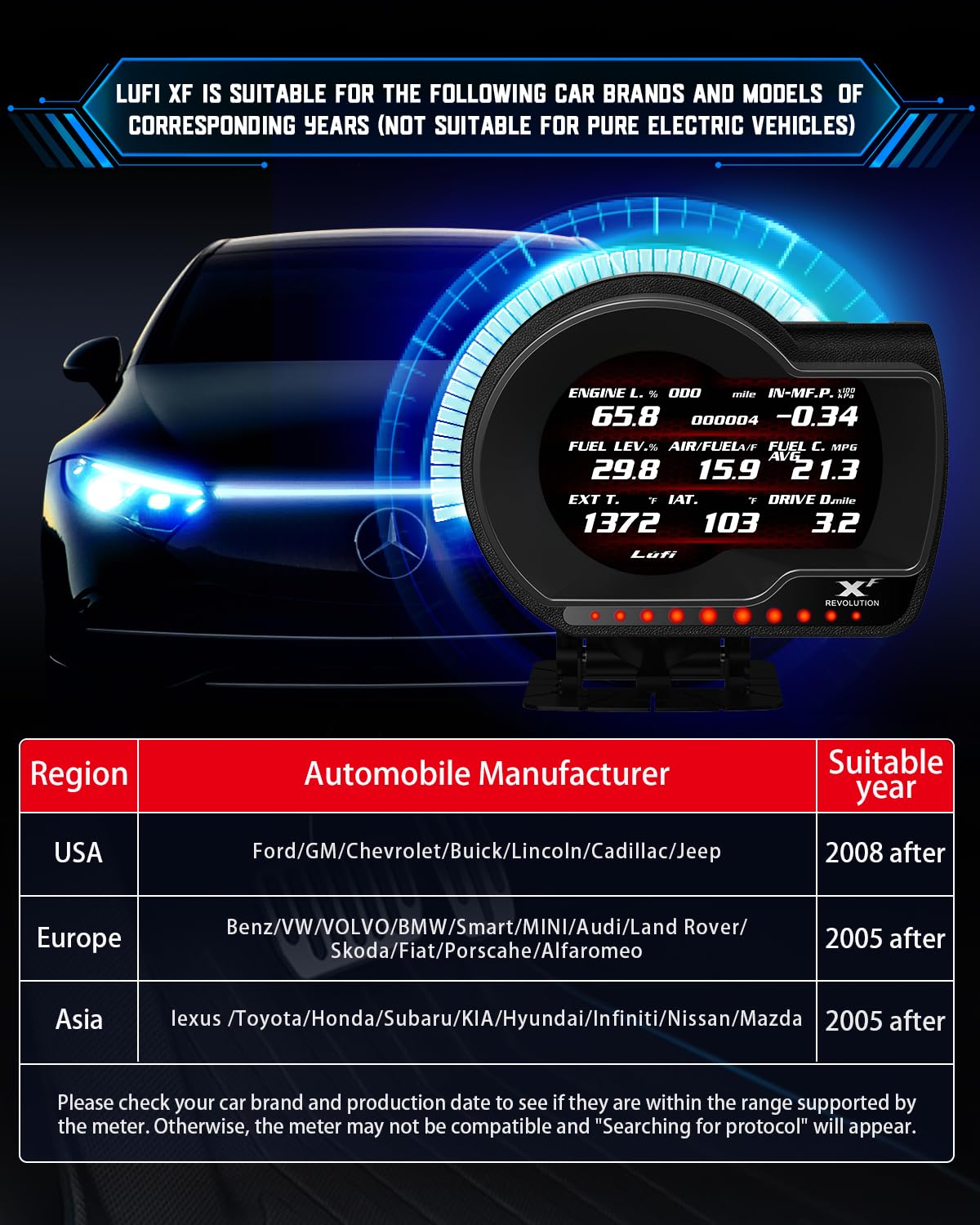
Figure 2: Vehicle Compatibility Chart
3. Key Features
The Lufi XF OBD2 Gauge Display offers a range of features to provide comprehensive vehicle data:
- Real-time Monitoring: Connects to your car's 16-pin OBD2 interface to monitor water temperature, boost pressure, fuel consumption, speed, and other ECU data. Data displayed is dependent on the presence of corresponding sensors in your vehicle.
- Visual and Auditory Alarms: Provides alerts through pop-up windows and sound alarms when critical ECU data (e.g., water temperature, turbo pressure, exhaust temperature) exceeds predefined safe values, helping prevent potential vehicle damage.
- Fault Code Clearing: Includes functions for reading and clearing common diagnostic trouble codes (DTCs).
- Ultimate Customization: Allows users to upgrade the instrument program, customize display data combinations, change display colors, and personalize with car logos.
- Mileage and Maintenance Reminders: Set maintenance mileage thresholds, and the instrument will remind you when service is due. It also functions as an odometer.
- Automatic Light Sensing: The display automatically adjusts brightness based on ambient light for clearer readings in various conditions.

Figure 3: Multi-Functional Capabilities

Figure 4: Customization Options
4. Setup and Installation
Follow these steps to install your Lufi XF OBD2 Gauge Display:
- Locate OBD2 Port: Identify your vehicle's 16-pin OBD2 diagnostic port, typically located under the dashboard on the driver's side.
- Connect Cable: Plug the provided OBD2 cable into the vehicle's OBD2 port and into the Lufi XF unit.
- Mount the Display: Secure the instrument base to your dashboard using the provided double-sided tape. Ensure the mounting location does not obstruct your view or interfere with driving controls. Note: Suction cups are not included due to potential issues with ambient temperature affecting adhesion.
- Cable Management: Route the cable neatly to avoid interference with pedals or other vehicle operations.

Figure 5: Installation and Automatic Light Sensing
5. Operating Instructions
Once installed, the Lufi XF display will power on with your vehicle. Navigate the menus and customize settings using the buttons on the unit.
5.1. Display Customization
- Data Selection: Choose which parameters (e.g., water temperature, boost, voltage, RPM, speed) to display on the main screen.
- Color Schemes: Adjust the display colors to match your vehicle's interior or personal preference.
- Car Logo: Personalize the display with your car's manufacturer logo.
5.2. System Selection
For certain car brands (VW, Honda, Mazda, Toyota, BMW), a dedicated system option is available for optimized performance. For other brands, select the Common system.
System selection path: SYSTEM SETUP > CHOOSE SYSTEM (Choose the corresponding system according to your car brand).
5.3. PID Customization and Updates
The device supports custom PID (Parameter ID) upgrades. If certain data (e.g., oil temperature, transmission temperature/pressure) is not displayed, contact Lufi engineers for assistance with custom PIDs. Program updates can be performed via PC.

Figure 6: Custom PID Upgrade via PC
6. Maintenance
The Lufi XF Gauge Display requires minimal maintenance. Keep the screen clean using a soft, dry cloth. Avoid using harsh chemicals or abrasive materials that could damage the display.
Utilize the built-in mileage/maintenance reminder function to set alerts for your vehicle's routine service needs.
7. Troubleshooting
- Display Not Turning On: Ensure the OBD2 cable is securely connected to both the vehicle's port and the Lufi XF unit. Check vehicle compatibility.
- "Searching for Protocol" Message: This indicates potential incompatibility with your vehicle's OBD2 system or production year. Refer to the compatibility section.
- Missing Data Readings: Not all car brands support reading all data points (e.g., oil temperature, transmission temperature/pressure). If specific data is missing, it might require custom PIDs. Contact Lufi technical support for assistance.
- Display Does Not Shut Off Automatically: In some vehicles, the OBD port may remain powered even when the ignition is off. If the unit does not power down automatically, there may be an additional wire on the OBD connector that can be wired to a "hot with key on" power source in your vehicle. Consult a professional if unsure.
- Inaccurate Readings: Compare readings with your vehicle's original dashboard or another diagnostic tool. Ensure the correct system (dedicated or common) is selected in the settings.
8. Specifications
| Specification | Detail |
|---|---|
| Model Number | XF-06 |
| Product Dimensions | 4.25 x 2.85 x 3.65 inches |
| Item Weight | 9.9 Ounces |
| Screen Size | 3.5 Inches |
| Material | Plastic Glass |
| Manufacturer | EPHIIONIY |
9. Warranty and Support
For warranty information, please refer to the product packaging or contact your point of purchase. For technical support, including assistance with custom PIDs or troubleshooting, please contact Lufi customer service or engineers directly.
Ask a question about this manual
Ask about setup, troubleshooting, compatibility, parts, safety, or missing instructions. Manuals+ will review the question and use this page’s manual context to help answer it.