
LIDER 2-Hour Countdown Timer Switch User Manual
Model: LTS-2H-WWP
1. Product Overview
The LIDER 2-Hour Countdown Timer Switch is designed to automatically turn off connected loads such as lighting or fans after a selected time interval. This helps conserve energy by preventing devices from being left on unintentionally. It features multiple countdown options and an intuitive LED indicator.

Image 1.1: Front view of the LIDER 2-Hour Countdown Timer Switch with included wall plate.
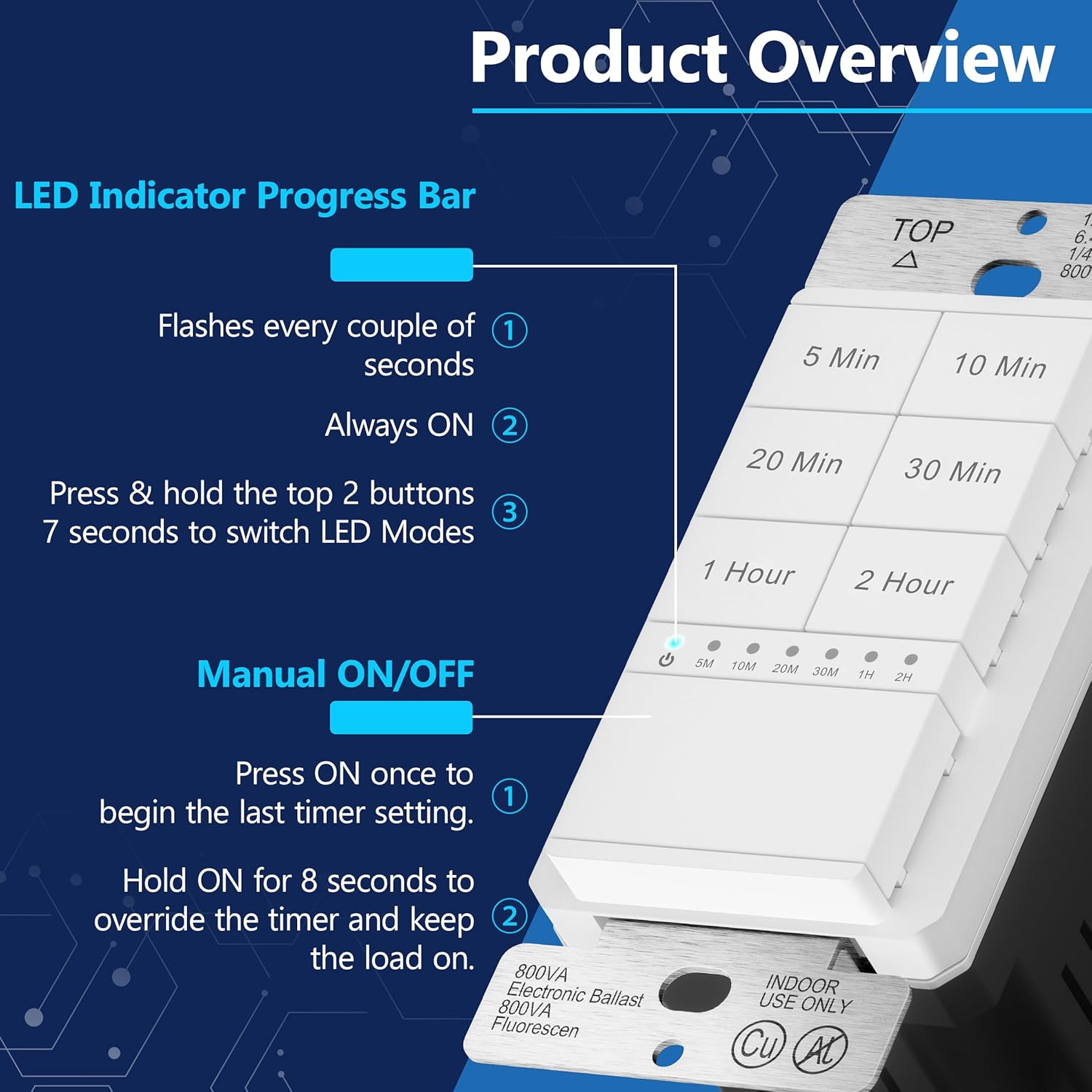
Image 1.2: Detailed view highlighting the LED indicator progress bar and manual ON/OFF button functionality.
2. Safety Information
Please read all instructions carefully before installation and use. Improper installation can lead to electric shock or fire. Always consult a qualified electrician if you are unsure about any part of the installation process.
- WARNING: Turn off power at the circuit breaker before installing or servicing the switch.
- NEUTRAL WIRE REQUIRED: This device requires a neutral wire for proper operation. Ensure your electrical box has a neutral wire available.
- GROUND WIRE REQUIRED: A ground wire connection is essential for safety.
- Do not use with loads exceeding the specified ratings.
- Operating temperature range: 32°F to 131°F (0°C to 55°C).
- This product is UL listed, ensuring it meets safety standards.
3. Installation
Tools Required: Screwdriver (Phillips and Flathead), Wire Strippers, Electrical Tape (optional).
- Turn off Power: Locate the circuit breaker controlling the switch location and turn off the power. Verify power is off using a voltage tester.
- Remove Old Switch: Carefully remove the existing wall plate and unscrew the old switch from the electrical box. Disconnect the wires, noting their connections.
- Identify Wires: Identify the Line (Hot), Load, Neutral, and Ground wires from your electrical box. The LIDER timer switch requires a neutral wire.
- Wire the New Switch: Connect the wires to the LIDER timer switch using the screw terminals. The switch features two guide holes per connection, allowing you to strip the wire approximately 1/2 inch and insert it. Tighten the screw to secure the wire.
- Connect the Line (Hot) wire to the terminal marked 'HOT'.
- Connect the Load wire (to the light/fan) to the terminal marked 'LOAD'.
- Connect the Neutral wire to the terminal marked 'NEUTRAL'.
- Connect the Ground wire to the terminal marked 'GROUND'.
- Mount the Switch: Gently push the wired switch into the electrical box and secure it with the provided screws.
- Install Wall Plate: Attach the included LIDER wall plate (LWP-31M-W) over the switch.
- Restore Power: Turn the power back on at the circuit breaker.
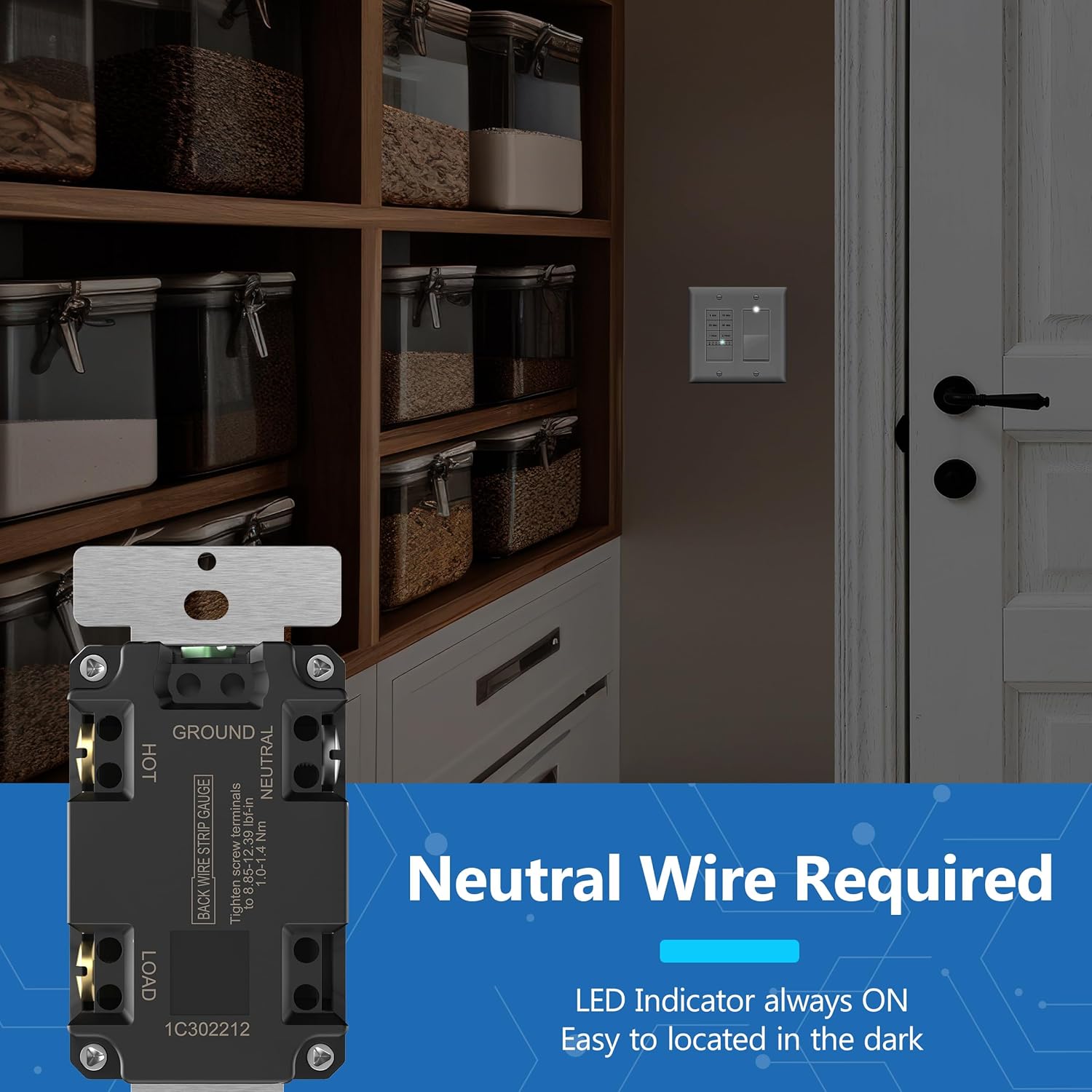
Image 3.1: Wiring diagram for the LIDER timer switch, illustrating the required neutral wire connection.
4. Operation
The LIDER timer switch offers six preset countdown options and a manual override.
4.1. Setting the Countdown Timer
Press one of the six buttons to select the desired countdown duration:
- 5 Minutes
- 10 Minutes
- 20 Minutes
- 30 Minutes
- 1 Hour
- 2 Hours
Once a button is pressed, the connected load will turn on and remain on for the selected duration, then automatically turn off.
4.2. Manual ON/OFF Override
The large button at the bottom of the switch serves as a manual ON/OFF control:
- Press the manual ON/OFF button once to activate the last used timer setting.
- To override the timer and keep the load on continuously, press and hold the manual ON/OFF button for approximately 8 seconds.
4.3. LED Indicator Modes
The blue LED indicators can operate in two modes:
- Mode 1 (Default): The LED flashes twice after setting a timer, then turns off.
- Mode 2: The LED remains illuminated during the entire selected time delay and then turns off when the timer expires.
To switch between LED modes, ensure the switch is ON, then press and hold the top two timer buttons (5 Min and 10 Min) simultaneously for 7 seconds. The LED indicator will flash 3 times to confirm the mode change.

Image 4.1: The timer switch is suitable for various applications, including living rooms for lighting or fans.

Image 4.2: Visual representation of the LED progress bar, indicating timer status.

Image 4.3: Examples of common installations in bathrooms and laundromats, ideal for exhaust fans or utility lighting.

Image 4.4: The timer switch helps conserve energy by ensuring lights or fans are not left on indefinitely, as shown in a closet setting.
5. Maintenance
The LIDER Countdown Timer Switch requires minimal maintenance.
- Cleaning: To clean the switch and wall plate, wipe gently with a soft, damp cloth. Do not use abrasive cleaners, solvents, or harsh chemicals, as these may damage the finish or internal components.
- No User-Serviceable Parts: There are no user-serviceable parts inside the switch. Do not attempt to open or repair the device. Any unauthorized tampering will void the warranty.
6. Troubleshooting
If you experience issues with your LIDER Countdown Timer Switch, please refer to the following common problems and solutions:
| Problem | Possible Cause | Solution |
|---|---|---|
| Switch does not turn on/off. | No power to the switch; incorrect wiring; faulty load. | Check circuit breaker. Verify all wiring connections (Line, Load, Neutral, Ground) are secure and correct. Test the connected load (light/fan) with a known working switch or direct power if safe to do so. |
| Timer function not working. | Incorrect timer selection; internal malfunction. | Ensure you have pressed a specific time button (5 min, 10 min, etc.). If the issue persists, contact customer support. |
| LED indicator behavior is unexpected. | LED mode setting. | Refer to Section 4.3 'LED Indicator Modes' to switch between default and always-on modes. |
| Switch stopped working after some time. | Product malfunction. | If troubleshooting steps do not resolve the issue, the unit may be faulty. Contact LIDER customer support for assistance under warranty. |
If the problem persists after attempting these solutions, please contact LIDER customer support.
7. Specifications
| Model Number | LTS-2H-WWP |
| Brand | LIDER |
| Color | White |
| Voltage | 120VAC, 60Hz |
| Max Load | 1200W, 15A, 1200VA, 1/2HP Motor |
| Operating Temperature | 32°F to 131°F (0°C to 55°C) |
| Certifications | UL Listed |
| Package Dimensions | 5.31 x 3.39 x 2.48 inches |
| Item Weight | 5.29 ounces |
| UPC | 883951850319 |
8. Warranty and Support
LIDER stands behind the quality of its products.
8.1. Warranty Information
This LIDER Countdown Timer Switch comes with a 1-year warranty from the date of purchase. This warranty covers defects in materials and workmanship under normal use. It does not cover damage resulting from improper installation, misuse, abuse, accidents, or unauthorized repairs.
8.2. Customer Support
For technical assistance, warranty claims, or any questions regarding your LIDER product, please contact LIDER customer support. You can find more information and contact details by visiting the official LIDER store on Amazon: