
EKO VB 933860
EKO Mirage Plus Sensor Recycler (Model VB 933860) Instruction Manual
Brand: EKO | Model: VB 933860
1. Product Overview
The EKO Mirage Plus Sensor Recycler is a 60-liter waste separation system designed for efficient and hygienic waste management. It features a durable brushed stainless steel construction with a matt silver finish, offering both functionality and a modern aesthetic. The unit includes three internal compartments: one 30-liter bin and two 15-liter bins, facilitating easy separation of general waste and recyclables. Its sensor mechanism allows for hands-free operation, and the lid incorporates a soft-close feature for quiet use. The exterior is treated with a fingerprint-proof coating for easy maintenance.
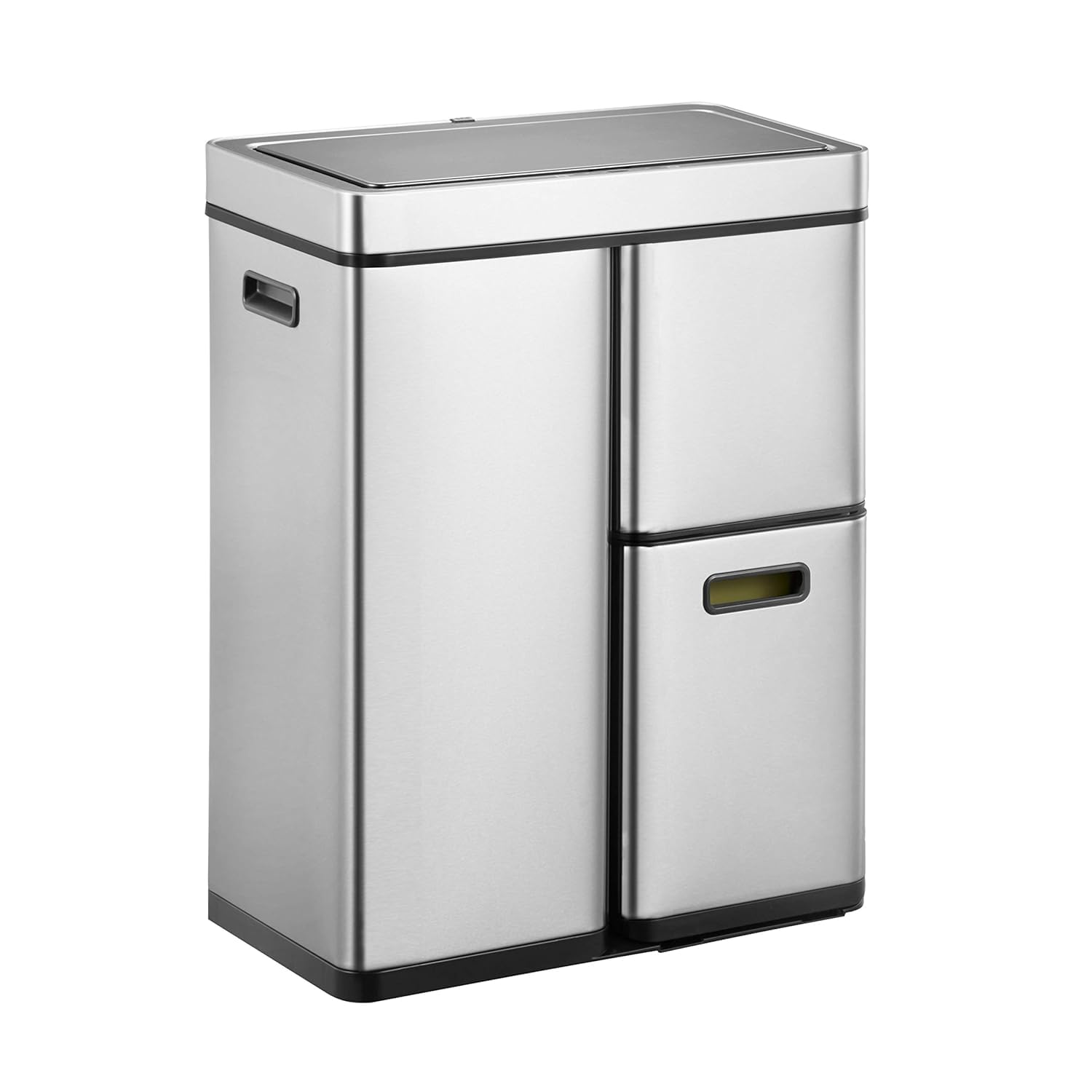
Image: Front view of the EKO Mirage Plus Sensor Recycler.
2. Key Features
- Total Capacity: 60 Liters (1 x 30 L, 2 x 15 L) for effective waste separation.
- Material: High-quality brushed stainless steel with a matt silver finish.
- Sensor Mechanism: Hands-free lid operation for hygienic use.
- Soft-Close Lid: Damper-controlled mechanism for smooth and silent closing.
- Fingerprint-Proof Coating: Resists smudges and makes cleaning easier.
- Removable Inner Buckets: Three plastic inner buckets for convenient waste disposal and cleaning.
- Anti-Slip Function: Ensures stability of the unit.
- Lower Compartment: A 15 L compartment accessible via a pull-out drawer, ideal for specific recyclables.
3. Setup Guide
- Unpacking: Carefully remove all components from the packaging. Ensure all parts are present: the main unit, lid, and three inner buckets.
- Battery Installation:
The sensor mechanism requires 6 x AA batteries (not included). Locate the battery compartment, usually on the underside of the lid or at the back of the unit. Insert the batteries, ensuring correct polarity (+/-). Close the battery compartment securely.
- Inner Bucket Placement:
Place the 30-liter inner bucket into the larger top compartment. Insert the two 15-liter inner buckets into the smaller top compartment and the pull-out lower drawer. Ensure they fit snugly.

Image: Sorting station with separate compartments for general waste and recyclables.
- Lid Attachment:
Carefully place the lid onto the main unit, aligning it correctly. Ensure it is securely seated.
- Power On:
Locate the power switch (often on the back or underside of the lid) and switch it to the 'ON' position. The sensor should now be active.
4. Operating Instructions
4.1 Sensor Operation (Auto Mode)
- Ensure the power switch is 'ON'.
- To open the lid, simply wave your hand or an object within 6 inches of the infrared sensor located on the front of the lid.
- The lid will automatically open.
- After approximately 5 seconds of no activity in the sensor area, the lid will automatically close softly.
4.2 Manual Operation (Stay Open Mode)
- For extended use, such as during cooking or when disposing of multiple items, you can activate 'Stay Open Mode'.
- Press the 'OPEN' button on the control panel (usually located near the sensor). The lid will open and remain open.
- To close the lid, press the 'CLOSE' button. The lid will then close softly.
- Alternatively, if left open in manual mode, the lid will automatically close after approximately 5 minutes.

Image: Features including stacked design, removable lid, automatic hands-free motion sensor operation with soft close, and side handles for easy carrying.
5. Maintenance and Care
- Cleaning the Exterior: The stainless steel exterior features a fingerprint-proof coating. Wipe with a soft, damp cloth and a mild, non-abrasive cleaner. Avoid harsh chemicals or abrasive pads that could damage the finish.
- Cleaning Inner Buckets: The plastic inner buckets are removable for easy cleaning. Wash with warm, soapy water and rinse thoroughly. Allow them to dry completely before returning them to the unit.
- Lid Care: The lid can be removed for thorough cleaning. Ensure the sensor area is kept clean and free from obstructions to maintain optimal performance.
- Battery Replacement: When the sensor operation becomes slow or inconsistent, it is time to replace the batteries. Use 6 x AA alkaline batteries for best performance.

Image: Soft-close lid with damper-controlled mechanism for smooth, silent operation and fingerprint resistant surface.
6. Troubleshooting
| Problem | Possible Cause | Solution |
|---|---|---|
| Lid does not open automatically. |
|
|
| Lid closes too quickly or slowly. |
|
|
| Lid does not close completely. |
|
|
7. Specifications
- Model Number: VB 933860
- Dimensions (W x D x H): 48.5 x 30.5 x 65.3 cm (19.1 x 12 x 25.7 inches)
- Height with Lid Open: Approximately 88.1 cm (34.7 inches)
- Total Capacity: 60 Liters (30 L + 15 L + 15 L)
- Material: Brushed Stainless Steel, Plastic
- Color: Matt Silver
- Power: 6 x AA Batteries (not included)
- Item Weight: 6.8 kg
- Special Features: Anti-slip, Fingerprint-proof, Inner bucket included, Quiet Close, Motion-Sensor
Image: Product dimensions including height with lid open.
8. Warranty and Support
For warranty information and customer support, please refer to the documentation included with your purchase or visit the official EKO website. Keep your proof of purchase for any warranty claims.
Related documentsVB 933860

Ask a question about this manual
Ask about setup, troubleshooting, compatibility, parts, safety, or missing instructions. Manuals+ will review the question and use this page’s manual context to help answer it.