
Western Digital WD161KRYZ
Western Digital WD Gold Enterprise Class Internal Hard Drive User Manual
Brand: Western Digital | Model: WD161KRYZ
Introduction
The Western Digital 16TB WD Gold Enterprise Class Internal Hard Drive is engineered to conquer tough workloads in demanding storage environments. This highly reliable solution provides up to 2.5 million hours MTBF, features vibration protection technology, and offers a low power draw thanks to HelioSeal technology (for 12TB and above models). Specifically designed for use in enterprise-class data centers and storage systems, the WD Gold SATA HDD delivers world-class performance for critical data storage needs.
Product Overview
Key Features
- Available in 1TB to 20TB capacities. (Note: 1GB = 1 billion bytes, 1TB = one trillion bytes. Actual user capacity may be less depending on operating environment.)
- Designed to handle workloads up to 550TB per year. (Workload Rate is defined as the amount of user data transferred to or from the hard drive. Workload Rate is annualized (TB transferred X (8760 / recorded power-on hours)). Workload Rate will vary depending on your hardware and software components and configurations.)
- Vibration protection technology for improved performance in multi-drive environments.
- HelioSeal technology delivers high capacities with a low power draw (12TB and above models).
- Energy-assisted magnetic recording (EAMR) and triple-stage actuator (TSA) (in 16TB capacities and above models).

Front view of the WD Gold 16TB Enterprise Class SATA HDD, highlighting the brand and capacity.
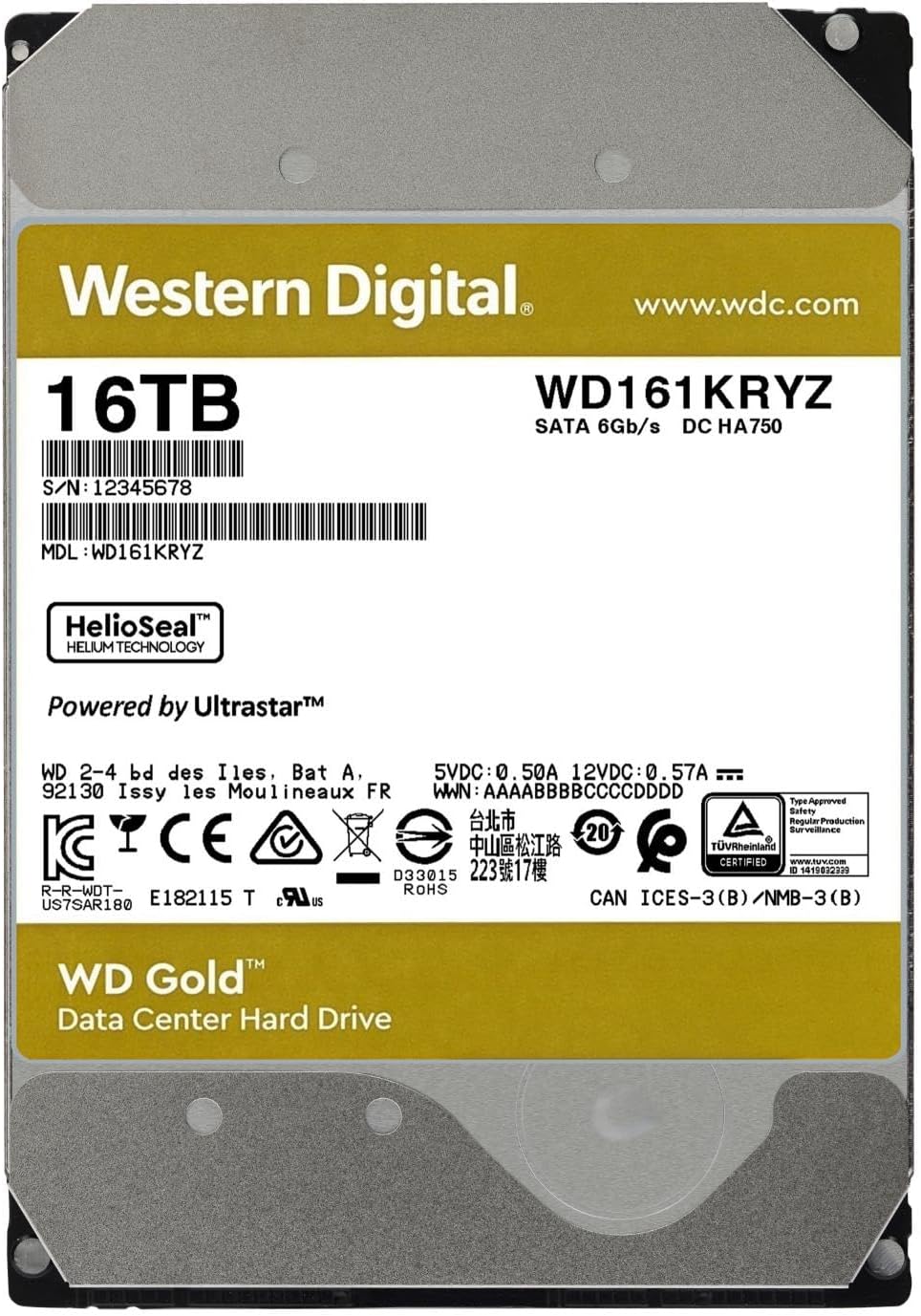
Rear view of the WD Gold 16TB HDD, showing the product label with model number WD161KRYZ and serial number.

An array of WD Gold drives, illustrating the range of available capacities from 1TB up to 24TB.

The WD Gold HDD featuring advanced vibration protection technology, crucial for stable performance in multi-drive systems.

The WD Gold HDD equipped with ArmorCache power loss protection technology, ensuring data integrity during unexpected power events (available in 22TB and 24TB models).

The WD Gold HDD featuring OptiNAND technology, an advanced capacity-enabling feature (available in 20TB and 24TB models).
Setup
Installing the WD Gold Internal Hard Drive requires careful handling and proper connection to your system. Please follow these general steps:
- Preparation: Ensure your computer or server is powered off and unplugged from the power source. Ground yourself to prevent electrostatic discharge (ESD).
- Mounting: Securely mount the hard drive into an available 3.5-inch drive bay in your computer case or server chassis using appropriate screws.
- Connections: Connect a SATA data cable from the hard drive to an available SATA port on your motherboard or RAID controller. Connect a SATA power cable from your power supply unit (PSU) to the hard drive.
- System Boot: Close your computer case, plug in the power, and boot your system.
- Initialization and Formatting: Once the system boots, you will need to initialize and format the new hard drive through your operating system's Disk Management utility (Windows) or Disk Utility (macOS/Linux). Refer to your operating system's documentation for detailed instructions.
For detailed installation instructions, please refer to the official Installation Manual (PDF).
Operating
After successful installation and formatting, your WD Gold hard drive is ready for use. It functions like any other internal storage device, providing high-capacity, reliable storage for your data.
- Data Storage: Use the drive to store large files, applications, databases, and other critical data.
- Server Applications: Ideal for enterprise-class data centers, cloud storage, and server applications requiring high reliability and performance.
- Workload Handling: Designed to handle demanding workloads, making it suitable for 24/7 operation in high-intensity environments.
- Data Transfer: Utilize standard file transfer methods within your operating system to move data to and from the drive.
Maintenance
To ensure the longevity and optimal performance of your WD Gold hard drive, consider the following maintenance practices:
- Regular Backups: Always maintain regular backups of your critical data. While WD Gold drives are highly reliable, no storage device is immune to failure.
- Temperature Control: Ensure adequate airflow and cooling within your computer case or server rack to prevent overheating, which can degrade drive performance and lifespan.
- Firmware Updates: Periodically check the Western Digital support website for any available firmware updates for your specific model. Firmware updates can improve performance, stability, and compatibility.
- Disk Health Monitoring: Utilize S.M.A.R.T. (Self-Monitoring, Analysis and Reporting Technology) tools to monitor the health status of your drive. Many operating systems and third-party utilities offer this functionality.
- Avoid Physical Shocks: Hard drives are sensitive to physical shocks. Ensure the drive is securely mounted and avoid moving the system while it is operating.
Troubleshooting
If you encounter issues with your WD Gold hard drive, consider the following troubleshooting steps:
- Drive Not Detected:
- Check all SATA data and power cable connections to ensure they are secure.
- Verify that the SATA port on your motherboard is enabled in the BIOS/UEFI settings.
- Try connecting the drive to a different SATA port or using different cables.
- Ensure your power supply unit (PSU) has sufficient wattage to power all components, including the new drive.
- Performance Issues:
- Check for background processes that might be heavily utilizing the drive.
- Ensure the drive is not excessively fragmented (for HDDs, defragmentation can improve performance).
- Monitor drive temperature to ensure it's within optimal operating ranges.
- Run disk error checking utilities (e.g., `chkdsk` on Windows) to identify and fix potential file system errors.
- Unusual Noises:
- Clicking, grinding, or repetitive noises can indicate a potential hardware failure. Immediately back up any accessible data and consider replacing the drive.
- Some enterprise drives may produce more audible operational sounds than consumer drives due to their design for high performance and reliability.
- Data Corruption:
- Run disk error checking utilities.
- Ensure your system's RAM is stable and not causing data integrity issues.
- Verify that your operating system and drivers are up to date.
If problems persist, consult the official Western Digital support resources or contact their customer service.
Specifications
| Feature | Detail |
|---|---|
| Hard Drive Capacity | 16 TB Mechanical Hard Disk |
| Brand | Western Digital |
| Series | WD Gold |
| Model Number | WD161KRYZ |
| Hardware Platform | PC, Mac |
| Item Weight | 1.47 pounds |
| Product Dimensions (LxWxH) | 5.79 x 4 x 1.03 inches |
| Color | Gold |
| Hard Drive Interface | Serial ATA-600 (SATA 6 Gb/s) |
| Hard Drive Rotational Speed | 7200 RPM |
| Special Feature | Shock Resistant |
| Hard Disk Form Factor | 3.5 Inches |
| Compatible Devices | Server, Storage System |
| Installation Type | Internal Hard Drive |
| What's in the Box | WD Gold HDD |
Warranty and Support
Western Digital Gold drives are backed by a comprehensive warranty, reflecting their enterprise-class reliability. For specific warranty terms and conditions, please refer to the official Western Digital website or the documentation included with your product.
- Official User Manual: For comprehensive details on product usage, features, and advanced configurations, please download the User Manual (PDF).
- Installation Guide: For step-by-step installation instructions, refer to the Installation Manual (PDF).
- Technical Support: For technical assistance, troubleshooting, or warranty claims, visit the official Western Digital support website or contact their customer service directly.
Related documentsWD161KRYZ


Ask a question about this manual
Ask about setup, troubleshooting, compatibility, parts, safety, or missing instructions. Manuals+ will review the question and use this page’s manual context to help answer it.