
Introduction
Thank you for choosing the KING PB1000 Antenna Power Injector Switch. This manual provides detailed instructions for the proper installation, operation, and maintenance of your device. Please read this manual thoroughly before use to ensure optimal performance and safety.
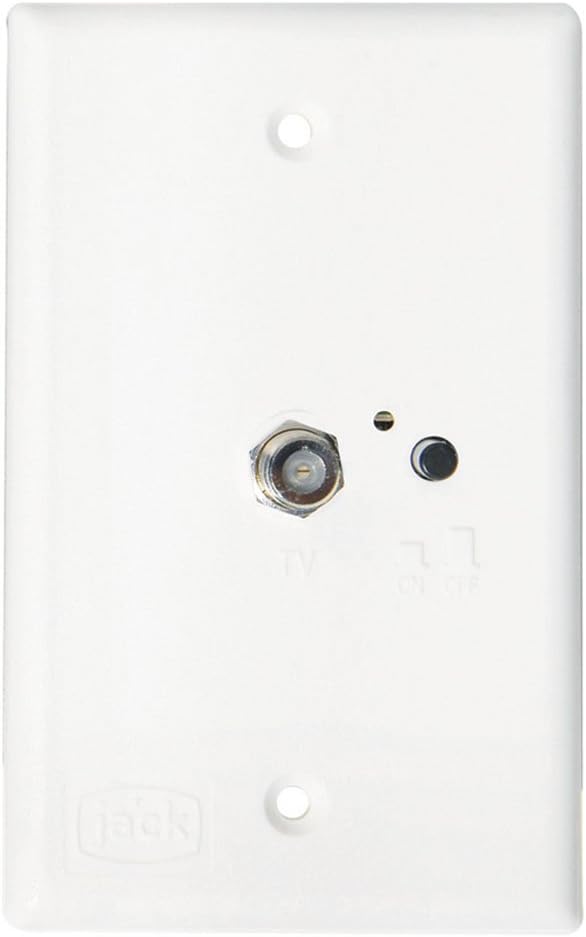
The KING PB1000 is a 12-volt DC power supply designed for amplified antennas. It features a flush wall mount plate, inputs for both TV antenna and cable, a built-in selector switch, and F-type connectors for two TV outputs.
Product Overview
The KING PB1000 combines an antenna power injector with a signal selector switch, allowing you to easily switch between an amplified antenna and a cable TV input. It provides power to your amplified antenna and distributes the signal to up to two televisions.
- Provides 12-volt DC power for amplified antennas.
- Includes inputs for both TV antenna and cable signals.
- Features a built-in selector switch for easy source selection.
- Equipped with F-type connectors for two TV outputs.
- Designed for flush wall mounting.
Package Contents
Verify that all items are present before proceeding with installation:
- 12VDC TV Antenna Power Switch/Wall Plate (White)
- Mounting Screws (typically included)
Safety Information
Please observe the following safety precautions during installation and operation:
- Ensure the 12V DC power source is disconnected before installation to prevent electrical shock.
- Do not expose the device to moisture or extreme temperatures.
- Use appropriate tools for installation.
- Verify all connections are secure to prevent signal loss or electrical issues.
- This device is designed for 12V DC systems only. Do not connect to other voltage sources.
Setup and Installation
The KING PB1000 is designed for flush wall mounting. Follow these steps for proper installation:
- Prepare Mounting Location: Select a suitable location for the wall plate, typically near your television(s) and where existing wiring can be accessed. Ensure adequate space behind the wall for connections.
- Disconnect Power: Before making any electrical connections, ensure the 12V DC power supply to the installation area is completely disconnected to prevent electrical shock.
- Wire Connections:
- 12V DC Power: Connect the 12V DC positive (+) wire to the designated power input terminal on the back of the switch. Connect the negative (-) wire (ground) to the corresponding terminal.
- Antenna Input: Connect the coaxial cable from your amplified TV antenna to the "ANTENNA" input F-connector on the back of the switch.
- Cable TV Input: If utilizing, connect the coaxial cable from your cable TV source to the "CABLE" input F-connector on the back of the switch.
- TV Outputs: Connect coaxial cables from the two "TV OUTPUT" F-connectors (one visible on the front plate, others typically on the back) to the antenna/cable input ports on your televisions.
- Mount the Switch: Carefully position the switch into the wall opening. Secure it using appropriate mounting screws. Avoid overtightening.
- Restore Power: Once all connections are secure and the switch is mounted, restore the 12V DC power supply.
Important: Ensure all coaxial connections are finger-tight to prevent signal loss and ensure optimal performance.
Operating Instructions
The KING PB1000 features a simple push-button selector switch on the front plate to manage your signal source and antenna power.
- Powering the Antenna: Press the push-button switch on the front plate. When the indicator light (typically an LED) illuminates, the amplified antenna is receiving 12V DC power, and its signal is being routed to the TV outputs.
- Selecting Cable TV: Press the push-button switch again. When the indicator light is off, the antenna power is disengaged, and the cable TV signal (if connected) is routed to the TV outputs.
- Television Tuning: After selecting your desired source (Antenna or Cable), use your television's remote control to scan for channels or select the appropriate input.
Note: For optimal antenna performance, ensure the indicator light is on when using the amplified antenna.
Maintenance
The KING PB1000 requires minimal maintenance to ensure continued performance.
- Cleaning: Periodically wipe the front plate with a soft, dry cloth. Do not use abrasive cleaners or solvents.
- Connections: Occasionally check all coaxial and power connections to ensure they remain secure. Loose connections can lead to signal degradation.
- Inspection: Inspect the device for any signs of physical damage. If damage is observed, discontinue use and consult a qualified technician.
Troubleshooting
| Problem | Possible Cause | Solution |
|---|---|---|
| No TV signal or poor picture quality. |
|
|
| Antenna indicator light does not illuminate. |
|
|
Specifications
| Feature | Detail |
|---|---|
| Brand | KING |
| Model Number | PB1000 |
| Power Input | 12V DC |
| Antenna Type Supported | Amplified TV Antenna |
| Inputs | TV Antenna, Cable TV |
| Outputs | 2 x F-type TV Outputs |
| Mounting | Flush Wall Mount |
| Color | White |
| Item Weight | 2.82 ounces |
| Product Dimensions | 7 x 4 x 3 inches |
| UPC | 660045124408 |
Warranty and Support
Specific warranty information for the KING PB1000 Antenna Power Injector Switch is not detailed in the provided product data. For warranty claims or detailed support, please refer to the official KING website or contact their customer service directly.
For technical assistance or further inquiries, please visit the KING Store on Amazon or the manufacturer's official website.


