
1. Introduction
This manual provides detailed instructions for assembling, operating, and maintaining your ROBOTIME DIY Miniature Dollhouse Kit, specifically the Carl's Fruit Shop model (DG142). This kit allows you to construct a highly detailed 1:24 scale miniature fruit shop. Please read all instructions carefully before beginning assembly.
The assembly process requires patience and attention to detail. The finished product is intended for display and decorative purposes, and can also be used for role-playing with 7-9 cm figure dolls.
2. Safety Information
- Recommended Age: This kit is recommended for individuals 14 years and up due to the intricate nature and small components.
- Small Parts Warning: The kit contains numerous small parts which may pose a choking hazard. Keep out of reach of small children and pets.
- Adhesives: Adhesives are typically required for assembly (not included). Use in a well-ventilated area and follow the adhesive manufacturer's safety guidelines.
- Batteries: Batteries for the LED lighting are not included due to customs policy. Please prepare them yourself according to the specifications in the assembly guide. Ensure correct polarity when inserting batteries.
- Tools: Basic tools such as scissors, tweezers, and a ruler are generally needed for assembly (not included). Handle sharp tools with care.
3. Package Contents
Upon opening the package, verify that all components are present. The kit typically includes:
- Pre-cut wooden pieces for the structure and furniture.
- Various miniature accessories (e.g., fruits, vegetables, baskets, signage).
- LED light components and wiring.
- Detailed, numbered instruction manual with illustrations.
- Sandpaper and other small finishing tools.
If any parts are missing or damaged, please refer to the Support section of this manual.

Image: The retail box for the ROBOTIME Carl's Fruit Shop DIY Miniature Dollhouse Kit, showing the assembled model on the front.
4. Setup and Assembly
Assembly of the Carl's Fruit Shop kit is a multi-step process. Follow the included detailed, numbered instruction manual for precise guidance. The general steps are outlined below:
4.1. Preparation
- Unpack all components and organize them. Familiarize yourself with the numbered pieces.
- Gather necessary tools: scissors, precision knife, tweezers, ruler, and appropriate adhesive (e.g., craft glue, quick-drying glue).
- Ensure a clean, well-lit workspace.
4.2. Step-by-Step Assembly
- Base Construction: Begin by assembling the main base structure of the fruit shop.
- Wall and Floor Panels: Attach the wall and floor panels according to the numbered diagrams.
- Furniture Assembly: Construct the various miniature furniture pieces, such as shelves, counters, and display stands.
- Detailing and Accessories: Add the small decorative elements, including fruits, vegetables, baskets, and signage.
- Electrical Wiring (LED Lights): Install the LED lighting system. This typically involves connecting wires and placing miniature bulbs. Ensure batteries are inserted correctly once wiring is complete.
- Final Touches: Apply any remaining decorative elements and ensure all parts are securely fastened.

Image: A front view of the fully assembled Carl's Fruit Shop miniature dollhouse, showcasing its detailed exterior with fruit displays and an illuminated interior.
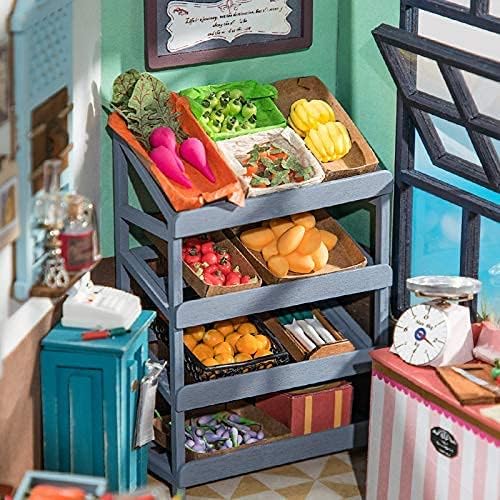
Image: A detailed interior view of the Carl's Fruit Shop miniature dollhouse, showing shelves stocked with miniature fruits and vegetables, a scale, and other shop elements.

Image: A close-up shot of a miniature fruit display within the Carl's Fruit Shop dollhouse, featuring tiny crates filled with various colorful fruits and price tags.
Video: An overview video showcasing the design process and various finished ROBOTIME miniature dollhouse kits, including Carl's Fruit Shop, highlighting the intricate details and assembly experience.
5. Operating the Dollhouse
Once assembled, your Carl's Fruit Shop miniature dollhouse is ready for display and interaction.
5.1. LED Lighting
The kit includes an LED lighting system to illuminate the miniature shop. To operate the lights:
- Ensure batteries are correctly installed in the designated battery box (batteries not included).
- Locate the power switch, typically a small button or toggle, and turn it on to activate the lights.
- Turn off the lights when not in use to conserve battery life.
5.2. Display and Interaction
The miniature dollhouse is designed as a decorative piece. You can arrange the miniature items as desired. The 1:24 scale is compatible with 7-9 cm figure dolls, allowing for imaginative role-playing scenarios.
6. Maintenance
Proper maintenance will ensure the longevity and appearance of your miniature dollhouse.
- Dusting: Regularly dust the dollhouse with a soft, dry brush or a can of compressed air to remove accumulated dust from intricate areas.
- Cleaning: For stubborn dirt, gently wipe surfaces with a slightly damp cloth. Avoid excessive moisture, which can damage wooden or paper components. Do not use harsh chemicals or abrasive cleaners.
- Storage: If storing the dollhouse, place it in a dry, cool environment away from direct sunlight and extreme temperature fluctuations. Consider covering it to protect from dust.
- Battery Replacement: Replace LED light batteries as needed. Always use the specified battery type.
7. Troubleshooting
Here are solutions to common issues you might encounter:
7.1. LED Lights Not Working
- Check Batteries: Ensure batteries are correctly inserted with the proper polarity and are not depleted. Replace if necessary.
- Wiring Connections: Verify that all wires are securely connected according to the assembly instructions. Loose connections can prevent lights from functioning.
- Switch Position: Confirm the power switch is in the "ON" position.
7.2. Missing or Damaged Parts
If you discover any missing or damaged parts during assembly, please contact customer service immediately. Refer to the Support section for contact information.
7.3. Difficulty Assembling a Specific Part
Refer to the detailed, numbered diagrams in your instruction manual. If you are still experiencing difficulty, review the steps carefully or seek assistance from the manufacturer's support channels.
8. Specifications
| Feature | Detail |
|---|---|
| Product Model | DG142 (Carl's Fruit Shop) |
| Brand | ROBOTIME |
| Scale | 1:24 |
| Assembled Dimensions (L x W x H) | 9.4 x 9.3 x 9 inches (approximately 23.9 x 23.6 x 22.9 cm) |
| Item Weight | 2.51 pounds (approximately 1.14 kg) |
| Recommended Age | 14 years and up |
| Lighting | LED (batteries not included) |

Image: A visual representation of the assembled Carl's Fruit Shop dollhouse with its dimensions labeled: 8.27 inches (width), 9.37 inches (depth), and 9.06 inches (height).
9. Warranty Information
Specific warranty details for ROBOTIME products may vary. Please refer to the documentation included with your purchase or visit the official ROBOTIME website for the most current warranty policy. Retain your proof of purchase for any warranty claims.
10. Support
For any questions, assistance with assembly, or to request replacement parts, please contact ROBOTIME customer service. Their team is available 24/7 to assist you.
- Online Support: Visit the official ROBOTIME website for FAQs, assembly tips, and contact forms.
- Email Support: Refer to your product packaging or the ROBOTIME website for the customer service email address.
When contacting support, please have your product model (DG142) and purchase information readily available.


