Introduction
Thank you for choosing the HOMIDEC Computer Desk with Bookshelf. This manual provides essential information for the safe assembly, operation, and maintenance of your new desk. Please read these instructions carefully before beginning assembly and retain them for future reference.
This desk features a two-in-one design combining a spacious desktop with a four-tier bookshelf, offering ample storage and a functional workspace. The bookshelf can be configured on either the left or right side to suit your preference and room layout.
Safety Information
Important Safety Precautions:
- Always assemble and anchor the desk properly to ensure stability.
- Be cautious of sharp edges during assembly and use to prevent injury.
- Do not overload the desk or shelves beyond the recommended weight capacity.
- Keep small parts away from children during assembly to prevent choking hazards.
- Ensure all screws and fasteners are tightened securely before use. Periodically check and re-tighten as needed.
Setup and Assembly
The HOMIDEC Computer Desk is designed for straightforward assembly. Each part and plate is numbered to correspond with the detailed instruction manual included in the packaging. Follow the steps carefully for proper installation.
Assembly Steps:
- Unpack all components and verify against the parts list provided in your package.
- Identify the main frame components and begin assembling the desk frame according to the diagrams.
- Attach the desktop to the assembled frame, ensuring proper alignment.
- Assemble the four-tier shelving unit.
- Reversible Shelves: The shelving unit can be installed on either the left or right side of the desk to best fit your space and needs. Decide your preferred orientation before securing the shelves to the main desk frame.
- Secure all connections firmly. Do not overtighten screws.
- Attach the non-slip and anti-scratch protectors to the bottom of the legs to protect your floor.

Figure 1: Illustration of the reversible bookshelf installation, allowing placement on either the left or right side of the desk.

Figure 2: An example of the HOMIDEC Computer Desk set up in a home office, demonstrating its functional design.
Operating Instructions
The HOMIDEC Computer Desk is designed for versatile use in various settings such as bedrooms, study rooms, and home offices. Its spacious desktop and integrated shelving provide ample room for your work and storage needs.
Desktop Usage:
The large desktop (140cm x 60cm) can comfortably accommodate laptops, desktop computers, keyboards, and other office accessories. Its smooth surface is designed for comfortable use.
Bookshelf Usage:
The four-tier bookshelf offers significant storage space for books, documents, potted plants, storage boxes, and other items, keeping them organized and within easy reach. The open design allows for quick access to your essentials.

Figure 3: Detailed view of the 4-tier storage shelves, illustrating how they can be used to organize various items.
Maintenance and Care
To ensure the longevity and appearance of your HOMIDEC Computer Desk, follow these maintenance guidelines:
- Cleaning: The desktop and steel frame feature a special protective layer that is anti-scratch and waterproof. Wipe surfaces with a soft, damp cloth. Avoid abrasive cleaners or harsh chemicals that could damage the finish.
- Spills: Promptly wipe up any spills to prevent water damage, especially on the wood surfaces.
- Stability Check: Periodically check all screws and fasteners to ensure they remain tight. Re-tighten as necessary to maintain desk stability.
- Protection: The non-slip and anti-scratch protectors under the legs help prevent floor damage and reduce noise. Ensure they are intact and properly positioned.

Figure 4: The desk's premium desktop surface, highlighting its waterproof and easy-clean features.
Troubleshooting
If you encounter any issues with your HOMIDEC Computer Desk, please refer to the following common solutions:
- Desk Wobbles:
- Ensure all screws and bolts are securely tightened.
- Check that the desk is placed on a level surface. Adjust the leveling feet if present.
- Verify that the frame components are correctly assembled according to the instructions.
- Parts Missing or Damaged:
- Carefully check all packaging materials. If parts are genuinely missing or damaged, contact HOMIDEC customer service immediately.
- Difficulty Assembling:
- Review the assembly instructions and diagrams carefully. Ensure you are using the correct parts for each step.
- Do not force parts together. If a part does not fit, re-check the orientation or step.

Figure 5: The triangle-style design of the desk frame, engineered for enhanced stability and support.
Specifications
| Feature | Detail |
|---|---|
| Model Number | FY-SJDNZ140-BK |
| Product Dimensions (D x W x H) | 55.12" x 23.62" x 43.31" (140cm x 60cm x 110cm) |
| Desktop Height | 29.5" (75cm) |
| Material | E1 Grade Solid Particle Wood Board, Steel Frame |
| Color | Black |
| Number of Shelves | 4 (Reversible) |
| Item Weight | 18 kg (39.6 lbs) |
| Maximum Weight Recommendation | 242.5 lbs (110 kg) |
| Assembly Required | Yes |
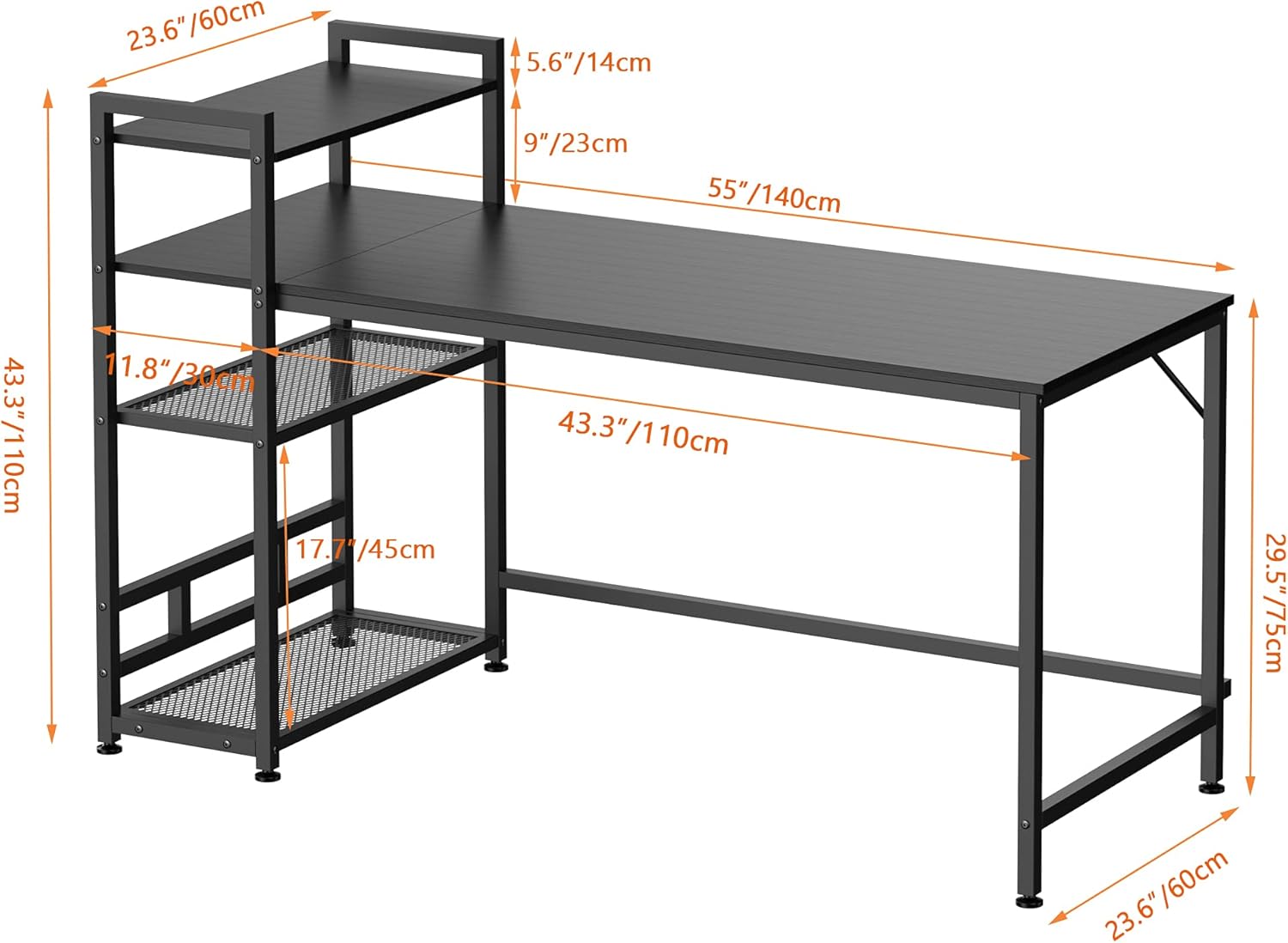
Figure 6: Detailed dimensions of the HOMIDEC Computer Desk.
Warranty and Support
HOMIDEC is committed to providing high-quality products and excellent customer service.
Warranty Information:
This product comes with a 12-month free return and exchange warranty from the date of purchase. This warranty covers manufacturing defects and issues arising from normal use.
Customer Support:
If you encounter any problems during assembly or use, or if you have questions regarding your product, please do not hesitate to contact our professional service team. We aim to reply as soon as possible, typically within 24 hours.
For support, please refer to the contact information provided with your purchase or visit the official HOMIDEC website.


