
1. Introduction
This manual provides comprehensive instructions for the CATIGA CD-2775 Desktop Calculator. Designed for home and office use, this 12-digit LCD display calculator offers essential arithmetic and memory functions. Please read this manual thoroughly to ensure proper operation and longevity of your device.

Front view of the CATIGA CD-2775 desktop calculator, showing the 12-digit LCD display and button layout.
2. Setup
2.1 Power Source
The CATIGA CD-2775 calculator operates using a dual power system, combining solar power and a pre-installed LR44 battery. This ensures reliable operation in various lighting conditions.
- Solar Power: The calculator utilizes ambient light for power. Ensure the solar panel is exposed to sufficient light for optimal performance.
- Battery Power: An LR44 battery is pre-installed to provide power in low-light conditions or when solar power is insufficient.

Image illustrating the dual power sources of the CATIGA CD-2775 calculator: solar power and a pre-installed LR44 battery.
2.2 Initial Use
Upon first use, remove any protective film from the display screen. The calculator is ready for immediate use, powered by its dual power system.
3. Operating Instructions
3.1 Basic Operations
The calculator features a standard layout for basic arithmetic functions. Input numbers using the numeric keypad and select the desired operation.
- ON/C-CE: Press once to turn on the calculator or clear the last entry (CE). Press twice to clear all entries and memory (C).
- OFF: Turns the calculator off. The calculator also features an auto-power off function after a period of inactivity to conserve power.
- +: Addition
- -: Subtraction
- x: Multiplication
- /: Division
- =: Equals, displays the result of the calculation.
- %: Percentage calculation.
- +/-: Changes the sign of the displayed number (positive to negative, or vice versa).

Close-up view of the CATIGA CD-2775 calculator, highlighting the 12-digit LCD screen and responsive buttons.
3.2 Memory Functions
The calculator includes memory functions for storing and recalling values.
- M+: Adds the displayed value to the memory.
- M-: Subtracts the displayed value from the memory.
- MRC: Press once to recall the memory value (MR). Press twice to clear the memory (MC).
- MU (Mark Up): Used for calculating mark-ups and profit margins.
3.3 Grand Total (GT)
The GT button accumulates the results of all calculations performed since the last GT clear. Pressing GT will display the grand total.
4. Maintenance
Proper maintenance ensures the longevity and optimal performance of your calculator.
- Cleaning: Use a soft, dry cloth to clean the calculator's surface. For stubborn dirt, lightly dampen the cloth with water. Avoid using harsh chemicals or abrasive cleaners.
- Battery Replacement: If the display becomes dim or unresponsive in low light, the LR44 battery may need replacement. To replace, carefully open the battery compartment on the back of the calculator, remove the old battery, and insert a new LR44 battery with the correct polarity.
- Storage: Store the calculator in a cool, dry place away from direct sunlight and extreme temperatures.
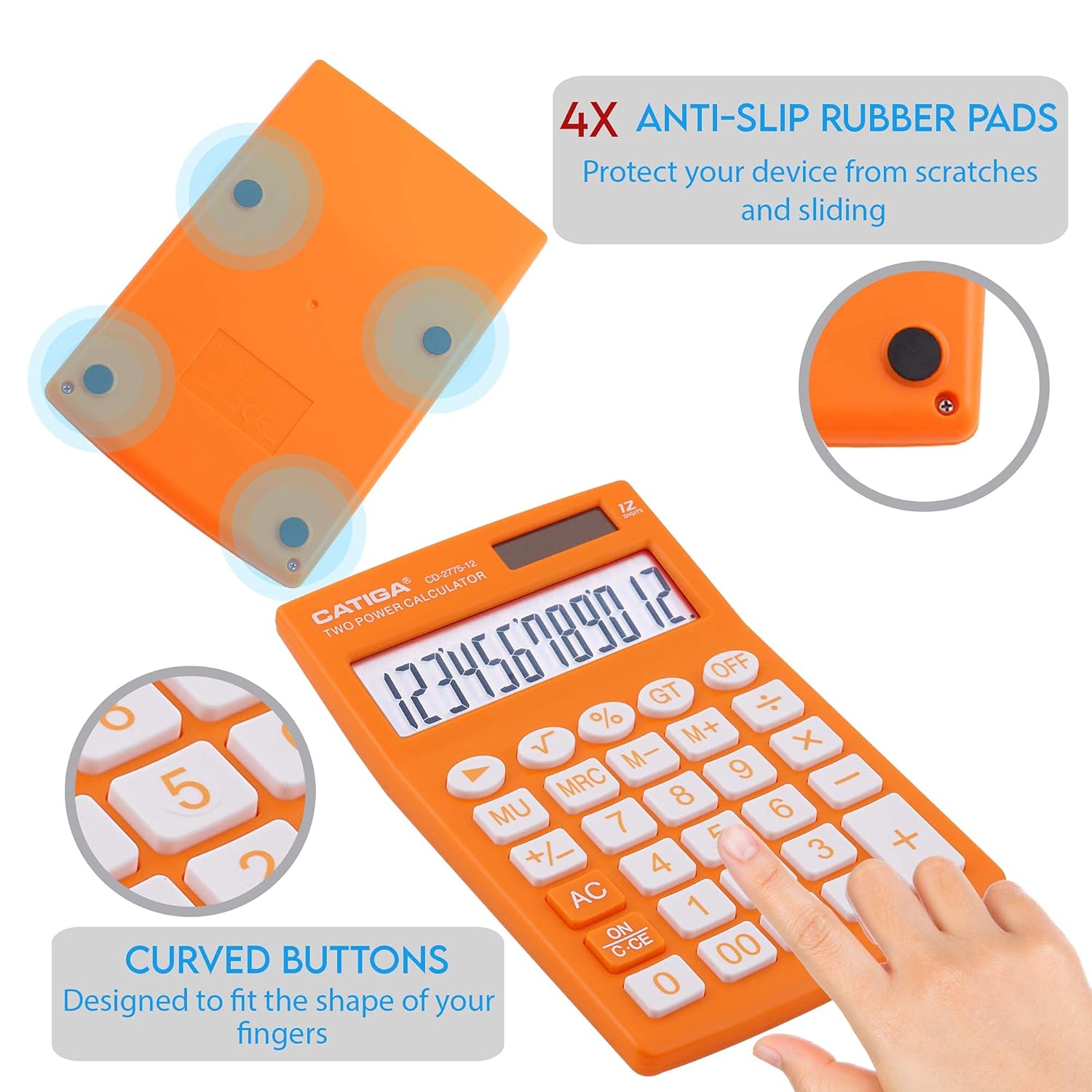
Underside view of the CATIGA CD-2775 calculator, showing the four anti-slip rubber pads designed to prevent sliding and the curved buttons for comfortable use.
5. Troubleshooting
If you encounter issues with your CATIGA CD-2775 calculator, refer to the following common problems and solutions:
- Display is blank or dim:
- Ensure the solar panel is exposed to sufficient light.
- Replace the LR44 battery if the issue persists in adequate lighting.
- Incorrect calculations:
- Press the ON/C-CE button twice to clear all previous entries and memory.
- Verify that the correct operation buttons are being pressed.
- Buttons are unresponsive:
- Ensure the calculator is powered on.
- Check for any debris lodged around the buttons.
6. Specifications
| Feature | Detail |
|---|---|
| Brand | CATIGA |
| Model | CD-2775 |
| Display Type | LCD |
| Number of Digits | 12 |
| Power Source | Solar & 1 x LR44 Battery (included) |
| Item Weight | 161 g |
| Package Dimensions | 17.3 x 11.5 x 3 cm |
| UPC | 813629029525 |

Diagram showing the dimensions (165mm x 108mm x 25mm) and ergonomic screen inclination of the CATIGA CD-2775 calculator for better viewing.
7. Warranty and Support
For information regarding warranty coverage and customer support for your CATIGA CD-2775 calculator, please refer to the warranty card included with your purchase or visit the official CATIGA website. Keep your proof of purchase for any warranty claims.
For further assistance, please contact CATIGA customer service through their official channels.
