
1. Introduction and Overview
The Sena Outrush Modular Smart Helmet integrates advanced communication technology with essential head protection. This helmet allows for seamless connection to your smartphone via Bluetooth for music playback, phone calls, and GPS navigation. It also features an HD intercom system for communication with other riders. Constructed with a multi-density EPS liner and a lightweight, DOT-rated shell, the Outrush prioritizes both safety and user convenience. Key features include a quick-release ratchet strap system, an integrated drop-down sun visor, and a clear face shield. This helmet complies with Federal Motor Vehicle Safety Standard 218 (FMVSS 218).

Figure 1.1: Front-side view of the Sena Outrush Modular Smart Helmet in Gloss White.
2. Package Contents
Verify that all components are present in your Sena Outrush Modular Smart Helmet package:
- Sena Outrush Modular Smart Helmet
3. Safety Information
Your Sena Outrush helmet is designed for rider safety and complies with Federal Motor Vehicle Safety Standard 218 (FMVSS 218). Always ensure the helmet fits correctly and the chin strap is securely fastened before riding. The modular design allows for versatility, but the chin bar should be fully lowered and locked when riding at speed. Regularly inspect your helmet for any signs of damage to the shell, liner, or strap system. Do not modify the helmet in any way, as this can compromise its protective capabilities.

Figure 3.1: Riders demonstrating safe helmet use on motorcycles.
4. Setup
4.1 Helmet Fitting
Proper helmet fit is crucial for safety and comfort. Refer to the size guide below to determine the correct size for your head circumference. A well-fitting helmet should be snug all around your head without causing pressure points. It should not move freely when you shake your head.
| Brand Size | Head Circumference (in) |
|---|---|
| S | 21.5 - 21.9 |
| M | 22.3 - 22.6 |
| L | 23 - 23.5 |
| XL | 23.9 - 24.3 |
| 2XL | 24.6 - 25 |
4.2 Initial Charging
Before first use, fully charge your Sena Outrush helmet. The helmet provides approximately 15 hours of talk time on a single charge. Connect the helmet to a power source using the provided charging cable.
4.3 Smartphone Pairing
To utilize the helmet's smart features, pair it with your smartphone via Bluetooth. Refer to your helmet's quick start guide for specific pairing instructions. Once paired, you can stream music, receive GPS directions, and make phone calls directly through the helmet's integrated system.
5. Operating Instructions
5.1 Controls
The Sena Outrush helmet features a jog-dial for intuitive control of various functions, including volume adjustment. Specific button presses and rotations correspond to different commands. Consult the detailed user guide for a complete list of controls.

Figure 5.1: Side view of the helmet highlighting the jog-dial control.
5.2 Intercom Communication
The helmet supports HD Intercom Mode, providing clear audio communication with another rider. To initiate intercom conversations, pair your helmet with another Sena Outrush user via Bluetooth Intercom. The range for intercom communication is up to 800 meters in open terrain.

Figure 5.2: Riders communicating using Sena helmets.
5.3 Phone, Music, and GPS
Once paired with your smartphone, you can manage phone calls, listen to music, and receive turn-by-turn GPS directions directly through the helmet's speakers. Use the jog-dial and other controls to answer/end calls, adjust volume, and navigate tracks.
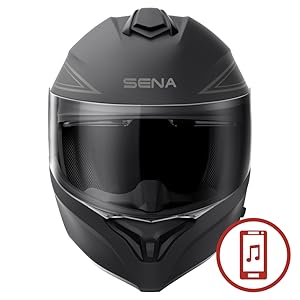
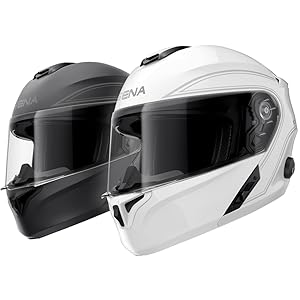
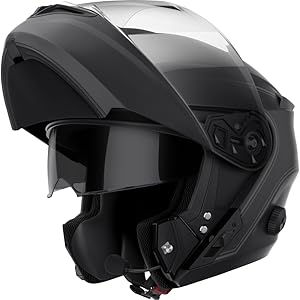
Figure 5.3: Visual indicators for music, phone, and GPS functions.
6. Maintenance
To ensure the longevity and performance of your Sena Outrush helmet, follow these maintenance guidelines:
- Cleaning the Shell: Use a soft, damp cloth and mild soap to clean the exterior. Avoid abrasive cleaners or solvents.
- Visor Care: Clean the face shield and sun visor with a soft cloth and water. Do not use harsh chemicals that could scratch or damage the visor coating.
- Interior Cleaning: Removable interior padding can often be hand-washed with mild soap and air-dried. Refer to the full manual for specific instructions.
- Storage: Store the helmet in a cool, dry place away from direct sunlight and extreme temperatures.
- Battery Care: For optimal battery life, charge the helmet regularly, especially if storing for extended periods.
7. Troubleshooting
If you encounter issues with your Sena Outrush helmet, consider the following general troubleshooting steps:
- No Power: Ensure the helmet is fully charged. Connect it to a power source and check the charging indicator.
- Bluetooth Pairing Issues: Ensure the helmet is in pairing mode and your smartphone's Bluetooth is enabled. Try restarting both devices.
- Intercom Not Connecting: Verify that both helmets are within range and in intercom pairing mode.
- Audio Problems: Check volume levels on both the helmet and your connected device. Ensure speakers are properly positioned.
For more detailed troubleshooting or persistent issues, please visit the official Sena support website or contact customer service.
8. Specifications
| Feature | Detail |
|---|---|
| Brand | Sena |
| Model Name | Outrush |
| Color | Gloss White |
| Size | Large |
| Age Range | Adult |
| Outer Material | Acrylonitrile Butadiene Styrene (ABS) |
| Inner Material | Expanded Polystyrene |
| Item Weight | 3.81 pounds (61 Ounces) |
| Product Dimensions (L x W x H) | 14.7 x 11.2 x 11 inches |
| Bluetooth Version | 3.0 |
| Intercom Range | Up to 2 riders, 800 meters (0.5 miles) in open terrain |
| Operating Temperature | 14°F - 131°F (-10°C - 55°C) |
| Talk Time | 15 hours |
| Battery Type | Lithium Polymer (included) |
| Safety Standard | Complies with Federal Motor Vehicle Safety Standard 218 (FMVSS 218) |
9. Warranty and Support
For information regarding warranty coverage, product registration, or technical assistance, please refer to the official Sena website or contact Sena customer support directly. Keep your purchase receipt as proof of purchase for warranty claims.
10. Official Product Videos
No official seller videos were provided in the product data for embedding in this manual.


