
1. Product Overview
The Aputure Nova P300c is a 300W RGBWW LED soft light panel designed for professional lighting applications. It offers extensive color control and high light output for various production needs.
Key Features:
- Tunable CCT: Fully adjustable Correlated Color Temperature from 2,000K to 10,000K.
- Green-Magenta Adjustment: Fine-tune green-magenta shift in CCT mode for precise color matching.
- RGB Color Control: Offers full RGB color tunability with HSI, RGB, and industry-standard X,Y color controls, supporting over 1 billion color combinations.
- Built-in Presets: Includes over 300 industry-standard gel presets.
- Lighting Effects: Features 15 built-in lighting effects for creative scenarios.
- Dimming Control: Stepless dimming from 0% to 100%.
- DMX512 Interface: Onboard 5-pin DMX512 interface for professional control.
- SidusLink App Compatibility: Remote control via the SidusLink mobile application.
- Integrated Power Supply: Built-in power supply reduces fixture weight and simplifies setup.
- Robust Design: Features a lightweight aluminum shell and yoke, with a dual junior/baby pin for versatile mounting.
The Nova P300c delivers over 9,000 lux at 1 meter with a wide 120-degree beam angle, making it suitable for illuminating large areas. It achieves high color accuracy with a tungsten SSI score of 85 and a D55 daylight SSI score of 74, along with CRI and TLCI values of 95+ across its color temperature range.
2. Package Contents
Verify that all items listed below are included in your package:
- Aputure Nova P300c LED Soft Light Panel
- Control Box
- Head Cable
- Power Cable
- Quick Release Clamp
- Carrying Case

Figure 2.1: Aputure Nova P300c light panel, control box, and included cables.
3. Setup Instructions
Follow these steps to set up your Aputure Nova P300c light panel.
3.1. Mounting the Light Panel
- Attach the Nova P300c light panel to a compatible light stand using its integrated dual junior/baby pin receiver. Ensure the stand is stable and capable of supporting the light's weight (approximately 37.4 pounds).
- Secure the light panel in place by tightening the locking knob on the stand.
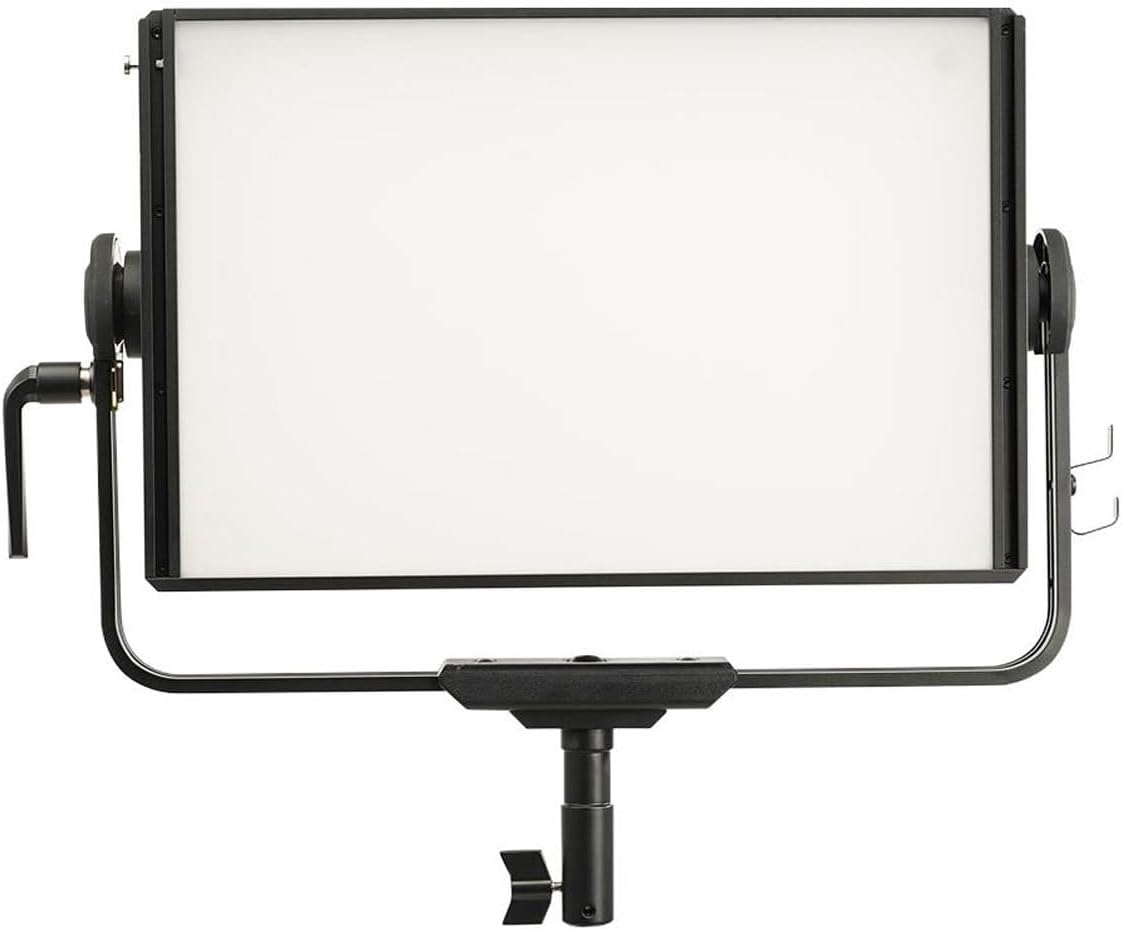
Figure 3.1: Front view of the Aputure Nova P300c light panel securely mounted on a light stand.
3.2. Connecting the Control Box
- Mount the control box to the light stand using the included quick-release clamp. Position it at a convenient height for operation.
- Connect one end of the head cable to the 'CONTROLLER' port on the back of the light panel.
- Connect the other end of the head cable to the corresponding port on the control box. Ensure connections are secure.

Figure 3.2: The control box attached to a light stand via the quick-release clamp, with cables connected.
3.3. Power Connection
- Connect the power cable to the 'POWER' input on the control box.
- Plug the other end of the power cable into a suitable AC power outlet.
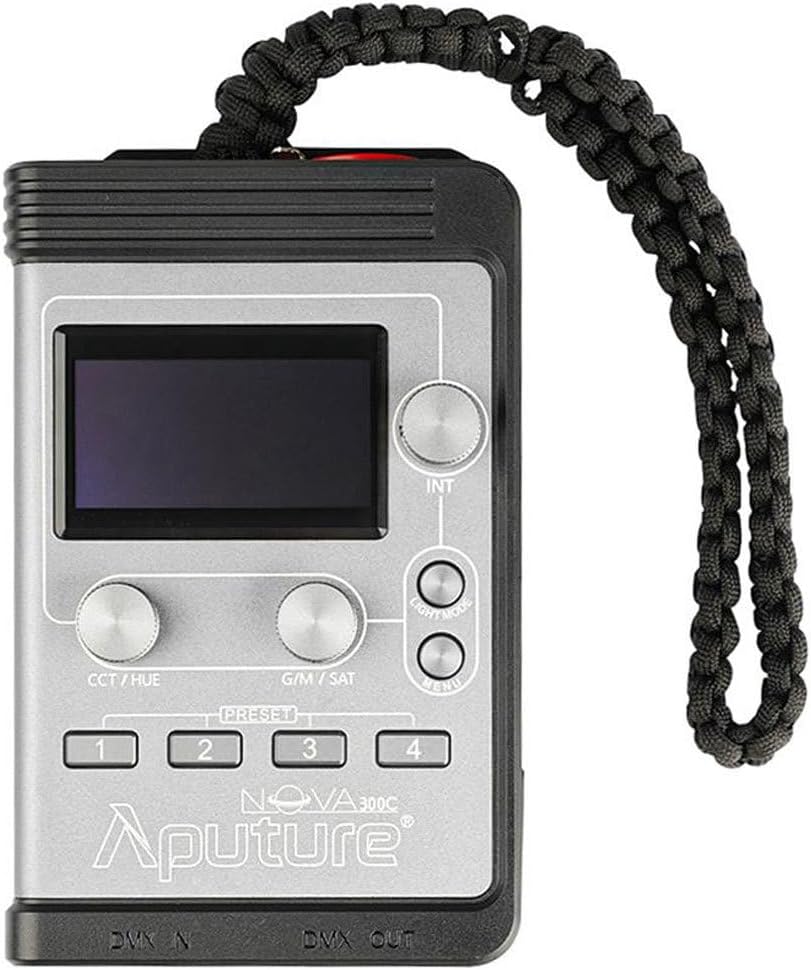
Figure 3.3: The power cable for the Aputure Nova P300c.
4. Operating Instructions
The Nova P300c can be operated directly from its control box or via the SidusLink app.
4.1. Control Box Overview
The control box features a display screen, intensity knob, light mode button, menu button, CCT/Hue knob, G/M/Sat knob, and four preset buttons.

Figure 4.1: Close-up of the Aputure Nova P300c control box interface.
4.2. Basic Operation
- Power On/Off: Press the power button on the control box to turn the light on or off.
- Adjusting Intensity: Rotate the 'INT' (Intensity) knob to adjust the brightness from 0% to 100%.
- Changing Light Modes: Press the 'LIGHT MODE' button to cycle through different modes such as CCT, HSI, RGB, X,Y, FX (Effects), and GEL.
- CCT Mode: In CCT mode, use the 'CCT/HUE' knob to adjust the color temperature (2,000K-10,000K) and the 'G/M/SAT' knob for green-magenta adjustment.
- HSI Mode: In HSI mode, use the 'CCT/HUE' knob to adjust the hue and the 'G/M/SAT' knob to adjust saturation.
- FX Mode: Select 'FX' mode to access 15 built-in lighting effects. Use the 'INT' knob to scroll through effects and the 'CCT/HUE' and 'G/M/SAT' knobs to modify effect parameters.
- Presets: Use the 'PRESET' buttons (1-4) to quickly recall saved lighting configurations. To save a preset, configure your desired settings, then press and hold one of the preset buttons until the screen indicates it has been saved.
4.3. SidusLink App Control
The Nova P300c is compatible with the SidusLink app for advanced wireless control. Download the app from your device's app store and follow the in-app instructions to connect and control your light.
5. Maintenance
Regular maintenance ensures optimal performance and longevity of your Aputure Nova P300c.
- Cleaning: Use a soft, dry cloth to clean the light panel and control box. Avoid using abrasive cleaners or solvents.
- Storage: When not in use, store the light panel and accessories in the provided carrying case in a cool, dry place.
- Cable Inspection: Periodically inspect all cables for any signs of wear, damage, or fraying. Replace damaged cables immediately.
- Ventilation: Ensure the light panel's ventilation openings are clear and unobstructed during operation to prevent overheating.
6. Troubleshooting
If you encounter issues with your Nova P300c, refer to the following common troubleshooting steps:
- Light Not Turning On:
- Check if the power cable is securely connected to both the control box and the AC outlet.
- Verify that the AC outlet is functioning correctly.
- Ensure the head cable connecting the light panel to the control box is properly seated.
- No Control from Control Box:
- Confirm the head cable is securely connected.
- Restart the light panel and control box.
- SidusLink App Connection Issues:
- Ensure Bluetooth is enabled on your mobile device.
- Make sure the light panel is powered on and within range.
- Try restarting both the light and the app.
- Abnormal Light Output or Color:
- Check the selected light mode and parameters on the control box or SidusLink app.
- Perform a factory reset if issues persist (refer to the full manual for specific steps).
For persistent issues, contact Aputure customer support.
7. Specifications
| Specification | Value |
|---|---|
| Model Number | NOVAP300C |
| Product Dimensions | 26.75 x 14.8 x 24.54 inches |
| Item Weight | 37.4 pounds |
| Power Output | 300W |
| Color Temperature Range | 2,000K to 10,000K |
| Color Accuracy | CRI 95+, TLCI 95+ |
| Battery Requirement | 1 Lithium Ion battery (not included, for specific accessories) |
| Manufacturer | Aputure |
| Date First Available | June 4, 2020 |
8. Warranty and Support
For warranty information, please refer to the official Aputure website or the documentation included with your product. Aputure provides customer support for product inquiries, technical assistance, and service requests.
You can visit the official Aputure store for additional product information and support resources: Aputure Store on Amazon.


