
Metra 95-8732B
Metra Mercedes E Class (W211) 2003-2009 Radio Installation Kit Manual
Model: 95-8732B
Product Overview
This manual provides instructions for the installation of the Metra 95-8732B dash kit, designed to facilitate the installation of an aftermarket ISO DDIN radio into select Mercedes-Benz E-Class (W211) vehicles from 2003 to 2009. This kit ensures a seamless and professional integration of your new car stereo into the vehicle's dashboard.

Image: Overview of the Metra 95-8732B dash kit, showing the main radio bezel and the two side mounting brackets.
Compatibility
This Metra dash kit is specifically designed for the following vehicle:
- Mercedes-Benz E-Class (W211): 2003, 2004, 2005, 2006, 2007, 2008, 2009 models.
Ensure your vehicle matches these specifications for proper fitment.
What's in the Box
The Metra 95-8732B kit typically includes the following components:
- ISO DDIN Radio Provision Bezel (Painted scratch-resistant matte black)
- Left and Right Mounting Brackets
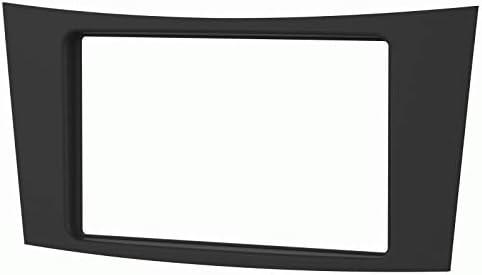
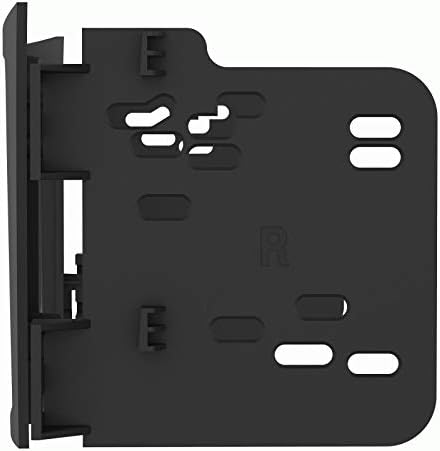
Image: Left: Front view of the main dash kit bezel. Right: A detailed view of one of the mounting brackets.
Note: Wiring harnesses and antenna connections are sold separately and are not included with this dash kit.
Features
- ISO DDIN radio provision
- Painted scratch-resistant matte black finish
- Easy installation
- Durable and long-lasting construction
Safety Information
Always prioritize safety during installation. Improper installation can lead to vehicle damage, electrical issues, or personal injury. If you are unsure about any step, consult a qualified professional installer.
- Disconnect the vehicle's negative battery terminal before beginning any electrical work to prevent short circuits and damage.
- Wear appropriate personal protective equipment, such as safety glasses.
- Ensure all connections are secure and properly insulated to prevent electrical shorts.
- Do not force components into place. If a part does not fit, re-check the instructions and compatibility.
- Keep all small parts and tools away from children.
Setup and Pre-installation
- Gather Tools: Ensure you have the necessary tools for your vehicle's dashboard disassembly and radio installation, which may include panel removal tools, screwdrivers, wire strippers, crimpers, and electrical tape.
- Disconnect Battery: Before starting any work, disconnect the negative terminal of your vehicle's battery.
- Remove Factory Radio: Carefully remove the factory radio and any associated trim panels from the dashboard. Refer to your vehicle's service manual for specific instructions on removing the factory radio.
- Prepare Wiring: If you have purchased a separate wiring harness and antenna adapter, connect them to your new aftermarket radio according to the radio's instructions and the harness's color codes.
Installation Instructions
Follow these steps to install your new aftermarket radio using the Metra 95-8732B dash kit:
- Attach Brackets to Radio: Secure the left and right mounting brackets to your new aftermarket ISO DDIN radio using the screws provided with your radio. Ensure the radio is centered and flush with the front of the brackets.
- Attach Bezel to Radio/Brackets: Slide the assembled radio and brackets into the Metra dash kit bezel. The bezel should snap or screw into place, securing the radio within the new dash opening.
- Connect Wiring: Connect the aftermarket radio's wiring harness to the vehicle's factory wiring harness (using the separately purchased adapter). Also, connect the antenna adapter.
- Test Connections: Before fully installing the radio, temporarily reconnect the vehicle's battery and test the radio's functionality (power, audio, fader, balance, etc.) to ensure all connections are correct. Disconnect the battery again after testing.
- Install Assembled Unit: Carefully slide the entire assembled radio and dash kit into the vehicle's dashboard opening. Ensure all wires are tucked away and not pinched.
- Secure and Reassemble: Secure the dash kit and radio assembly to the vehicle's dashboard using the factory mounting points or screws. Reinstall any removed trim panels.
- Reconnect Battery: Reconnect the negative terminal of the vehicle's battery.
- Final Test: Turn on the vehicle and perform a final test of the radio and all its functions.

Image: Rear view of the dash kit bezel, illustrating the attachment points for the radio and mounting brackets.
Maintenance
The Metra dash kit requires minimal maintenance. To keep it looking new:
- Clean the surface with a soft, damp cloth.
- Avoid using harsh chemicals, abrasive cleaners, or solvents, as these can damage the matte black finish.
- Do not apply excessive pressure when cleaning.
Troubleshooting
If you encounter issues during or after installation, consider the following common problems and solutions:
- Kit Does Not Fit Properly:
- Double-check the compatibility section to ensure your vehicle's year and model are correct for this kit.
- Verify that the aftermarket radio is indeed an ISO DDIN size. Some radios may have slightly different dimensions.
- Ensure all factory mounting points are clear and that no wires are obstructing the kit's seating.
- If the opening for the radio seems too small, confirm the radio's dimensions against the kit's specifications.
- Radio Not Powering On / No Sound:
- Check all wiring connections, especially power, ground, and accessory wires.
- Ensure the vehicle's battery is fully reconnected and charged.
- Check vehicle fuses and the radio's inline fuse.
- Missing Brackets or Parts:
- Carefully inspect all packaging for any small components that may have been overlooked.
- Contact the retailer or Metra customer support if parts are genuinely missing.
Specifications
| Attribute | Detail |
|---|---|
| Brand | Metra |
| Model Number | 95-8732B |
| Product Dimensions (L x W x H) | 15.5 x 7.75 x 0.5 inches |
| Item Weight | 4.2 ounces |
| Material | High-grade ABS Plastic |
| Exterior Finish | Machined (Matte Black) |
| Radio Provision | ISO DDIN |
| UPC | 086429401376 |
Warranty and Support
For specific warranty information regarding your Metra 95-8732B dash kit, please refer to the documentation included with your purchase or visit the official Metra Electronics website. Metra provides technical support for their products.
Metra Electronics Official Website: www.metraonline.com
Note: Warranty terms and support availability may vary.
Related documents95-8732B


Ask a question about this manual
Ask about setup, troubleshooting, compatibility, parts, safety, or missing instructions. Manuals+ will review the question and use this page’s manual context to help answer it.