
1. Introduction
This manual provides detailed instructions for the installation, operation, and maintenance of your Maclean MCE291 LED Wall Light with Infrared Motion Sensor. Please read this manual thoroughly before installation and use to ensure safe and efficient operation. Keep this manual for future reference.
The Maclean MCE291 is a practical and energy-efficient LED lamp designed for both indoor and outdoor use. It features an integrated infrared motion detector and a twilight sensor for automatic illumination. With a neutral white light of 4000K and 1100 lumens at 15W, it provides ample lighting for various applications. Its IP54 rating ensures dust and splash resistance, making it suitable for diverse environments.
2. Safety Information
- Electrical Safety: Installation must be performed by a qualified electrician in accordance with local wiring regulations. Always disconnect power at the main circuit breaker before installation, maintenance, or cleaning.
- Product Integrity: Do not modify or disassemble the product. Any unauthorized modifications may void the warranty and pose safety risks.
- Environmental Conditions: Ensure the product is installed in an environment suitable for its IP54 rating. Avoid direct high-pressure water jets.
- Heat: The LED light source generates heat. Do not cover the lamp or place flammable materials near it.
- Eye Protection: Do not stare directly into the LED light source when it is illuminated, as this may cause eye strain or damage.
3. Product Overview
The Maclean MCE291 is a circular LED wall light with an integrated infrared motion sensor and light sensor. It is constructed from durable polycarbonate (PC) and designed for wall mounting.

Figure 1: Maclean MCE291 LED Wall Light (Grey)
This image shows the front view of the Maclean MCE291 LED Wall Light in a grey finish. The circular light panel is prominent, with the infrared motion sensor discreetly located at the bottom center.
Key Features:
- Integrated Infrared Motion Sensor (PIR)
- Adjustable Twilight Sensor (LUX)
- Adjustable Lighting Duration (TIME)
- Adjustable Motion Sensor Sensitivity (SENS)
- IP54 Weatherproof Rating for outdoor use
- 1100 Lumens, 15W, 4000K Neutral White Light

Figure 2: IP54 Weather Resistance
The image displays the Maclean MCE291 LED Wall Light mounted on an exterior wall during rainy weather, emphasizing its IP54 rating for protection against dust and water splashes.
4. Setup & Installation
4.1 Package Contents
- Maclean MCE291 LED Wall Light
- Mounting hardware (screws, wall plugs)
- Instruction Manual
4.2 Tools Required
- Screwdriver
- Drill
- Pencil
- Wire strippers
- Voltage tester
4.3 Installation Steps
- Safety First: Turn off the main power supply at the circuit breaker before beginning any electrical work.
- Choose Location: Select a suitable wall-mounting location, considering the desired coverage area for the motion sensor. The sensor has a 140° detection angle and up to 9m range.
- Mark Drilling Points: Use the mounting bracket of the lamp to mark the drilling points on the wall.
- Drill Holes: Drill holes at the marked points and insert appropriate wall plugs.
- Wiring: Connect the electrical wires (Live, Neutral, Earth) from your power supply to the corresponding terminals on the lamp. Ensure all connections are secure. If unsure, consult a qualified electrician.
- Mount the Lamp: Secure the lamp to the wall using the provided screws.
- Restore Power: Once installation is complete and all connections are secure, restore power at the circuit breaker.

Figure 3: Product Dimensions
This technical drawing illustrates the dimensions of the Maclean MCE291 LED Wall Light, with a diameter of 210mm, a height of 191mm, and a depth of 49mm from the wall.
4.4 Sensor Adjustments
The motion sensor has three adjustable settings, typically located on the sensor unit itself (may require a small screwdriver for adjustment):
- LUX (Ambient Light Sensitivity): This setting determines the ambient light level at which the sensor will activate the lamp. Turn towards 'sun' for activation during both day and night, or towards 'moon' for activation only in low light conditions (dusk/night).
- TIME (Lighting Duration): This controls how long the lamp remains illuminated after motion is detected and then ceases. Adjust to your preferred duration.
- SENS (Sensitivity): This adjusts the detection range of the motion sensor. Turn to increase or decrease the distance at which motion is detected.
5. Operation
Once installed and configured, the Maclean MCE291 LED Wall Light operates automatically based on its motion and light sensors.
5.1 Automatic Lighting
The lamp will automatically turn on when motion is detected within its range and angle, provided the ambient light level (LUX setting) allows for activation. After the detected motion ceases, the lamp will remain on for the set 'TIME' duration before turning off.

Figure 4: Motion Sensor Activation
This image shows the Maclean MCE291 LED Wall Light illuminating an area near a staircase, with visual cues indicating the motion sensor's activation upon detecting a person.
5.2 Motion Sensor Performance
- Detection Range: Up to 9 meters.
- Detection Angle: 140 degrees.
Optimal performance is achieved when the sensor is unobstructed and positioned to cover the desired area. Factors like temperature, object size, and speed of movement can influence detection.

Figure 5: Motion Sensor Range
The image depicts the Maclean MCE291 LED Wall Light providing illumination in an outdoor setting, with an overlay illustrating the motion sensor's effective detection range of up to 9 meters.

Figure 6: Motion Sensor Angle
This image shows the Maclean MCE291 LED Wall Light in an indoor environment, with an overlay demonstrating the 140-degree wide detection angle of its integrated motion sensor.

Figure 7: 1100 Lumens Brightness
The image displays the Maclean MCE291 LED Wall Light mounted on a wall, showcasing its bright illumination and highlighting its 1100 lumens output.

Figure 8: Versatile Applications
This collage illustrates the Maclean MCE291 LED Wall Light's suitability for various locations, including bathrooms, hallways, garages, and garden entrances, demonstrating its versatility for both indoor and outdoor use.
6. Maintenance
The Maclean MCE291 LED Wall Light requires minimal maintenance.
- Cleaning: Ensure the power is off before cleaning. Wipe the lamp with a soft, damp cloth. Do not use abrasive cleaners or solvents, as these can damage the finish or electronic components.
- Inspection: Periodically check the lamp for any signs of damage or loose connections. If any issues are found, disconnect power and consult a qualified technician.
- Sensor Cleanliness: Keep the motion sensor lens clean and free from obstructions (e.g., dirt, spiderwebs) to ensure optimal detection performance.
7. Troubleshooting
If you encounter issues with your Maclean MCE291 LED Wall Light, refer to the following common problems and solutions:
| Problem | Possible Cause | Solution |
|---|---|---|
| Lamp does not turn on. | No power supply; LUX setting too high (daylight); faulty wiring. | Check circuit breaker; adjust LUX setting towards 'moon'; verify wiring connections (consult electrician). |
| Lamp stays on continuously. | Continuous motion detected; TIME setting too long; LUX setting too low (always dark). | Ensure no constant motion in detection area; adjust TIME setting; adjust LUX setting towards 'sun'. |
| Motion sensor not detecting. | Sensor obstructed; SENS setting too low; incorrect mounting height/angle. | Clear obstructions; increase SENS setting; reposition lamp for optimal coverage. |
| Lamp flickers. | Unstable power supply; loose wiring connection. | Check power source stability; tighten wiring connections (consult electrician). |
If the problem persists after attempting these solutions, please contact customer support.
8. Specifications
| Feature | Detail |
|---|---|
| Brand | Maclean |
| Model Number | MCE291 GR |
| Dimensions (L x W x H) | 21 x 21 x 4.9 cm |
| Weight | 500 grams |
| Material | Polycarbonate (PC) |
| Color | Grey |
| Power | 15 Watts |
| Luminous Flux | 1100 lm |
| Color Temperature | 4000 Kelvin (Neutral White) |
| Light Source Type | LED |
| Voltage | 240 Volts |
| Ingress Protection (IP) Rating | IP54 |
| Special Features | Infrared Motion Sensor, Twilight Sensor |
| Motion Sensor Detection Angle | 140° |
| Motion Sensor Detection Range | Up to 9 meters |
| Average Lifespan | 30000 Hours |
| Installation Type | Wall Mount |
| Energy Efficiency Rating | F |
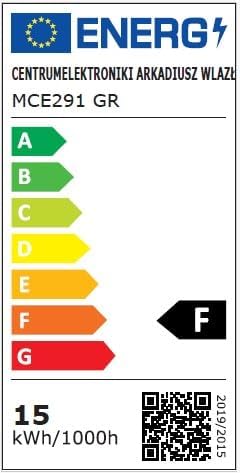
Figure 9: Energy Efficiency Label
This image displays the EU Energy Label for the Maclean MCE291 GR, showing its energy efficiency class as F and energy consumption of 15 kWh per 1000 hours.
9. Warranty & Support
Maclean products are designed for quality and reliability. This product comes with a standard manufacturer's warranty against defects in materials and workmanship. Please refer to your purchase documentation or contact your retailer for specific warranty terms and conditions.
For technical support, troubleshooting assistance, or to inquire about replacement parts, please contact Maclean customer service through their official website or the retailer where the product was purchased. Ensure you have your model number (MCE291) and proof of purchase available when contacting support.

