SuperEQ S8 Active Noise Cancelling Headphones User Manual
Model: 1103DELISE-de-390
Introduction
Thank you for choosing SuperEQ S8 Active Noise Cancelling Headphones. These on-ear Bluetooth headsets are designed to provide an immersive audio experience with advanced noise cancellation, built-in microphone, and versatile wired/wireless connectivity. This manual will guide you through the setup, operation, and maintenance of your new headphones to ensure optimal performance and longevity.

Image: SuperEQ S8 Active Noise Cancelling Headphones in black, showcasing their sleek design and comfortable earcups.
What's in the Box
Please check the package contents to ensure all items are present:
- 1 x SuperEQ S8 Headphones
- 1 x 3.5mm AUX Audio Cable
- 1 x USB Charging Cable
- 1 x Carrying Bag
- 1 x User Manual
- 1 x Airplane Adapter (if included in your specific package)

Image: A visual representation of all items included in the SuperEQ S8 headphone package, neatly laid out.
Product Overview
Familiarize yourself with the various parts and controls of your SuperEQ S8 headphones.
Key Features:
- Hi-Fi Sound Quality: Equipped with 40mm Neodymium magnet drivers for balanced audio from bass to high range.
- Active Noise Cancellation (ANC): Reduces ambient noise by up to 75% (25dB) for clearer listening.
- CVC 8.0 Hands-Free Control: Built-in microphone with noise reduction for clear calls and online learning.
- Long Playtime: Up to 18 hours in Bluetooth mode, 12 hours with ANC on, and 40 hours in ANC-only mode.
- Dual Mode: Supports both wireless Bluetooth 5.0 and wired 3.5mm AUX connections.
- Ergonomic Design: Soft protein leather earpads, adjustable headband, and foldable design for comfort and portability.

Image: An exploded diagram illustrating the internal components of the SuperEQ S8 headphones, highlighting the 40mm drivers responsible for impressive sound.
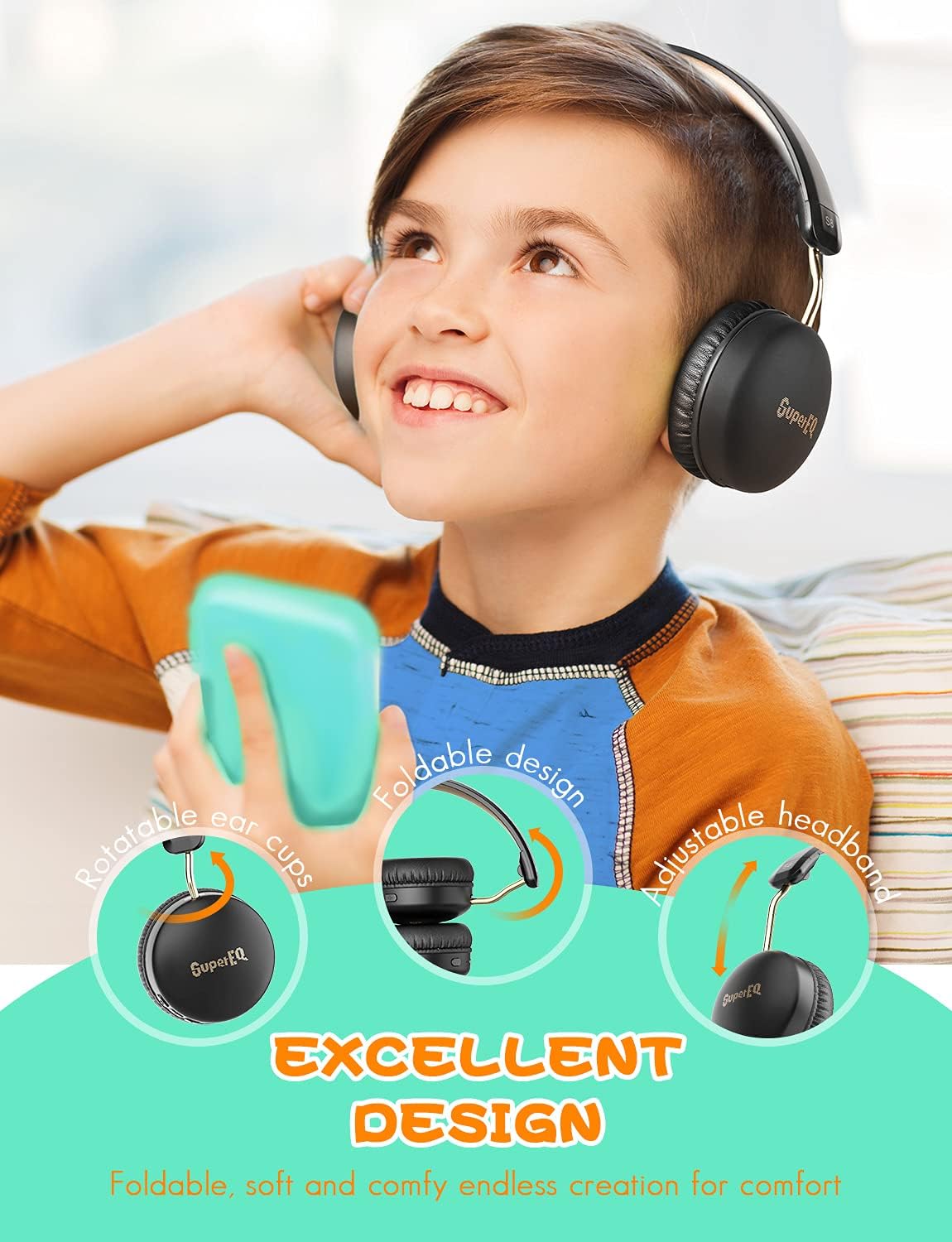
Image: Demonstrates the excellent design features of the SuperEQ S8 headphones, including rotatable ear cups, foldable design, and adjustable headband for comfort and portability.
Setup
1. Charging the Headphones
Before first use, fully charge your headphones. Use the provided USB charging cable and connect it to a USB power adapter (not included) or a computer's USB port.
- The LED indicator will glow red during charging.
- Once fully charged (approximately 2.5 hours), the LED indicator will turn blue or off.

Image: Illustrates the impressive 18-hour battery life of the SuperEQ S8 headphones, along with charging time and playtime durations for different modes (ANC, Bluetooth, ANC+Bluetooth).
2. Powering On/Off
- Power On: Press and hold the Multi-function Button (MFB) for 3 seconds until the LED indicator flashes blue.
- Power Off: Press and hold the MFB for 3 seconds until the LED indicator flashes red and then turns off.
3. Bluetooth Pairing
Pair your headphones with your Bluetooth-enabled device (smartphone, tablet, laptop, etc.).
- Ensure the headphones are powered off.
- Press and hold the MFB for 5 seconds until the LED indicator flashes red and blue alternately, indicating pairing mode.
- On your device, enable Bluetooth and search for "SuperEQ S8" in the list of available devices.
- Select "SuperEQ S8" to connect. Once connected, the LED indicator will slowly flash blue.
Note: The headphones will automatically attempt to reconnect to the last paired device when powered on.

Image: A close-up view highlighting the Bluetooth V5.0 chip inside the SuperEQ S8 headphones, emphasizing intelligent and high-speed wireless connection.
4. Wired Connection (AUX Mode)
You can use the headphones in wired mode even if the battery is depleted.
- Connect one end of the 3.5mm AUX audio cable to the headphone's audio jack.
- Connect the other end to your audio source's 3.5mm output.
- In wired mode, Bluetooth and ANC functions may operate differently or be unavailable depending on battery level.
Operating Instructions
Active Noise Cancellation (ANC)
The ANC feature reduces ambient noise for a more focused listening experience.
- Turn ANC On/Off: Locate the ANC switch on the earcup and slide it to the ON or OFF position.
- The ANC indicator light will illuminate when ANC is active.

Image: A graphic illustrating the 25dB noise reduction capability of the SuperEQ S8 headphones, showing how external noise and anti-noise sound waves combine to create silence.
Music Playback Controls
| Action | Button/Control |
|---|---|
| Play/Pause | Press the MFB once |
| Volume Up | Press the "+" button |
| Volume Down | Press the "-" button |
| Next Track | Press and hold the "+" button for 2 seconds |
| Previous Track | Press and hold the "-" button for 2 seconds |
Call Management
| Action | Button/Control |
|---|---|
| Answer/End Call | Press the MFB once |
| Reject Call | Press and hold the MFB for 2 seconds |
| Redial Last Number | Double-press the MFB |
The built-in CVC 8.0 microphone technology helps reduce ambient noise during calls, making it ideal for online learning and communication.

Image: A young person using SuperEQ S8 headphones while engaged in online learning on a laptop, demonstrating their utility as a "Learning Helper" by eliminating ambient noise for better concentration.
Maintenance
Cleaning
- Wipe the headphones with a soft, dry, lint-free cloth.
- Do not use abrasive cleaners, alcohol, or chemical solvents.
- Keep the charging port and audio jack free of dust and debris.
Storage
- Store the headphones in the provided carrying bag when not in use to protect them from dust and scratches.
- Avoid storing in extreme temperatures or high humidity.
Battery Care
- To preserve battery life, charge the headphones at least once every 3 months if not used regularly.
- Avoid fully depleting the battery frequently.
Troubleshooting
If you encounter any issues, please refer to the following common problems and solutions:
| Problem | Possible Solution |
|---|---|
| Headphones won't power on | Ensure the headphones are charged. Press and hold the MFB for 3 seconds. |
| Cannot pair via Bluetooth |
|
| No sound in Bluetooth mode |
|
| ANC not working effectively |
|
| Microphone not working |
|
Specifications
| Feature | Detail |
|---|---|
| Model Name | 1103DELISE-de-390 |
| Noise Control | Active Noise Cancellation (ANC) |
| Connectivity Technology | Wired (3.5mm AUX), Wireless (Bluetooth) |
| Wireless Communication Technology | Bluetooth 5.0 |
| Audio Driver Type | Dynamic Driver (40mm Neodymium magnet) |
| Frequency Range | 20Hz - 20kHz |
| Impedance | 32 Ohm |
| Battery Life (Bluetooth) | Up to 18 hours (at 60% volume) |
| Battery Life (Bluetooth + ANC) | Up to 12 hours |
| Battery Life (ANC Only) | Up to 40 hours |
| Charging Time | Approx. 2.5 hours |
| Microphone | Built-in with CVC 8.0 technology |
| Material | Leather (earpads) |
| Item Weight | 150 Grams (5.3 ounces) |
| Product Dimensions | 0.6 x 0.4 x 0.6 inches |
Warranty and Support
SuperEQ products are designed and manufactured to the highest quality standards. For detailed warranty information and customer support, please refer to the warranty card included with your purchase or visit the official SuperEQ website.
If you experience any issues not covered in this manual, please contact SuperEQ customer service for assistance. Please have your model number (1103DELISE-de-390) and purchase details ready.
Online Support: www.supereq.com


