
1. Introduction
This manual provides essential information for the safe operation, maintenance, and troubleshooting of your PowerSmart 2500-Watt Portable Inverter Generator. Please read this manual thoroughly before operating the generator to ensure proper use and to prevent injury or damage.

Figure 1.1: PowerSmart 2500-Watt Portable Inverter Generator.
2. Safety Information
WARNING: Carbon Monoxide Hazard. Using a generator indoors CAN KILL YOU IN MINUTES. Generator exhaust contains carbon monoxide (CO), a poisonous gas you cannot see or smell. NEVER use in an enclosed area or partially enclosed area. Always use outdoors far away from windows, doors, and vents.
- Operate the generator only in well-ventilated outdoor areas.
- Keep children and pets away from the generator during operation.
- Do not operate the generator in rain or wet conditions.
- Ensure the generator is on a level surface to prevent fuel spills.
- Allow the generator to cool completely before refueling.
- Do not connect the generator to a building's electrical system unless an approved transfer switch has been installed by a qualified electrician.
- The CO Protect feature automatically shuts down the generator if carbon monoxide levels become dangerously high. Do not disable or bypass this safety feature.

Figure 2.1: CO Protect feature for enhanced safety.
3. Package Contents
Verify that all items are included in your package:
- PowerSmart 2500-Watt Portable Inverter Generator
- Oil funnel
- User Manual (this document)
- Spark Plug Wrench
4. Setup
4.1 Adding Engine Oil
Before first use, the generator requires engine oil. Use 10W-30 synthetic blend oil. The oil fill is located on the side of the generator. Use the provided oil funnel to add oil to the upper limit indicated on the dipstick.

Figure 4.1: Use appropriate engine oil.
4.2 Adding Fuel
Use fresh, unleaded gasoline with an octane rating of 87 or higher. Do not use E85 or any other ethanol blend exceeding 10% ethanol. The fuel tank capacity is 1.05 gallons.

Figure 4.2: Fuel switch and cap location.
4.3 Initial Start Procedure
- Ensure the generator is on a level, outdoor surface.
- Add oil and fuel as described above.
- Turn the ventilation knob on the fuel cap to the 'ON' position.
- Turn the 2-in-1 switch (fuel valve and engine switch) to the 'CHOKE' position.
- Pull the recoil starter handle slowly until resistance is felt, then pull rapidly to start the engine.
- Once the engine starts, slowly move the 2-in-1 switch to the 'RUN' position.

Figure 4.3: Recoil starter for manual engine start.
5. Operating Instructions
5.1 Control Panel Overview
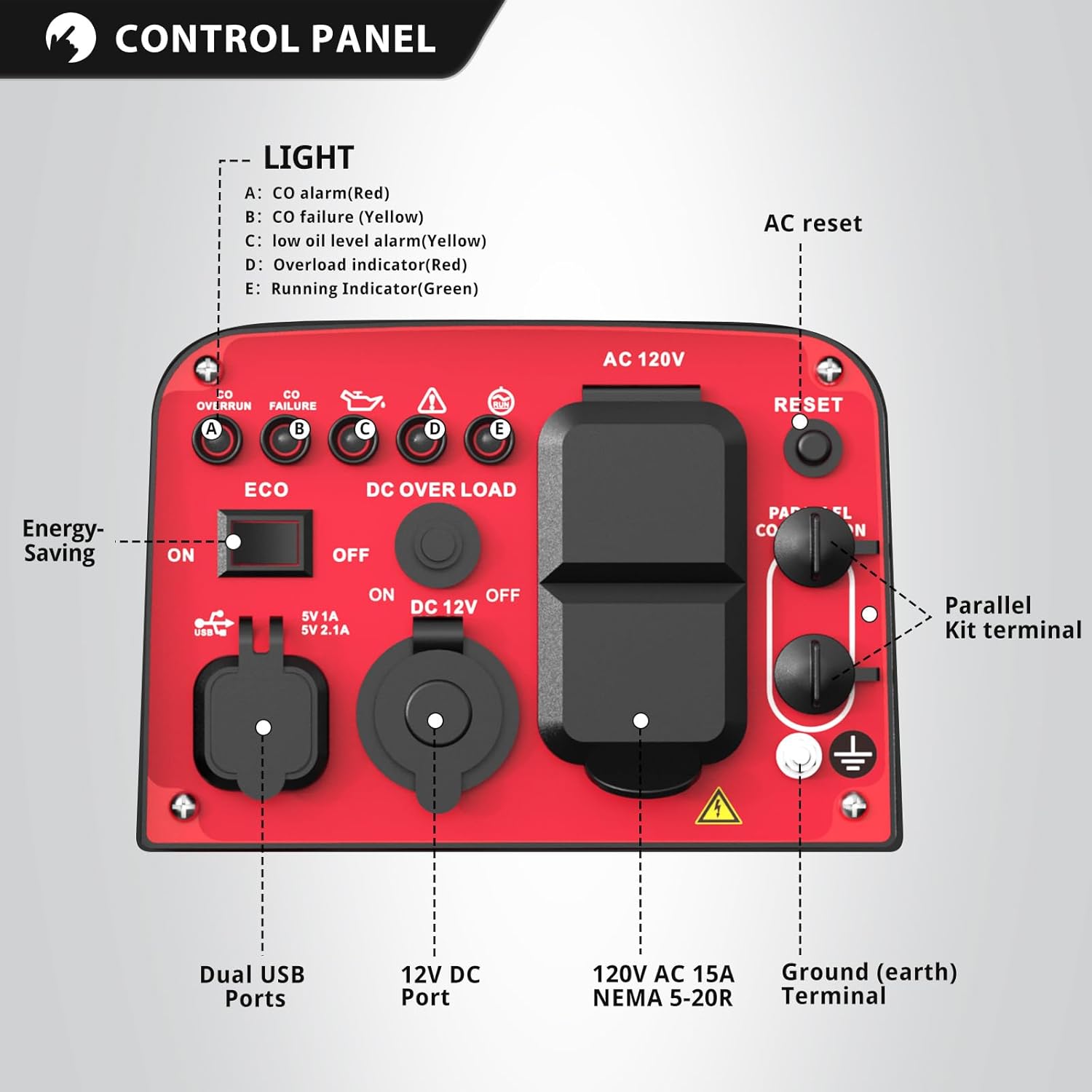
Figure 5.1: Detailed view of the generator's control panel.
The control panel features two three-prong 120V 15A receptacles, one 12V DC Outlet, and two 5V USB ports for versatile power options.
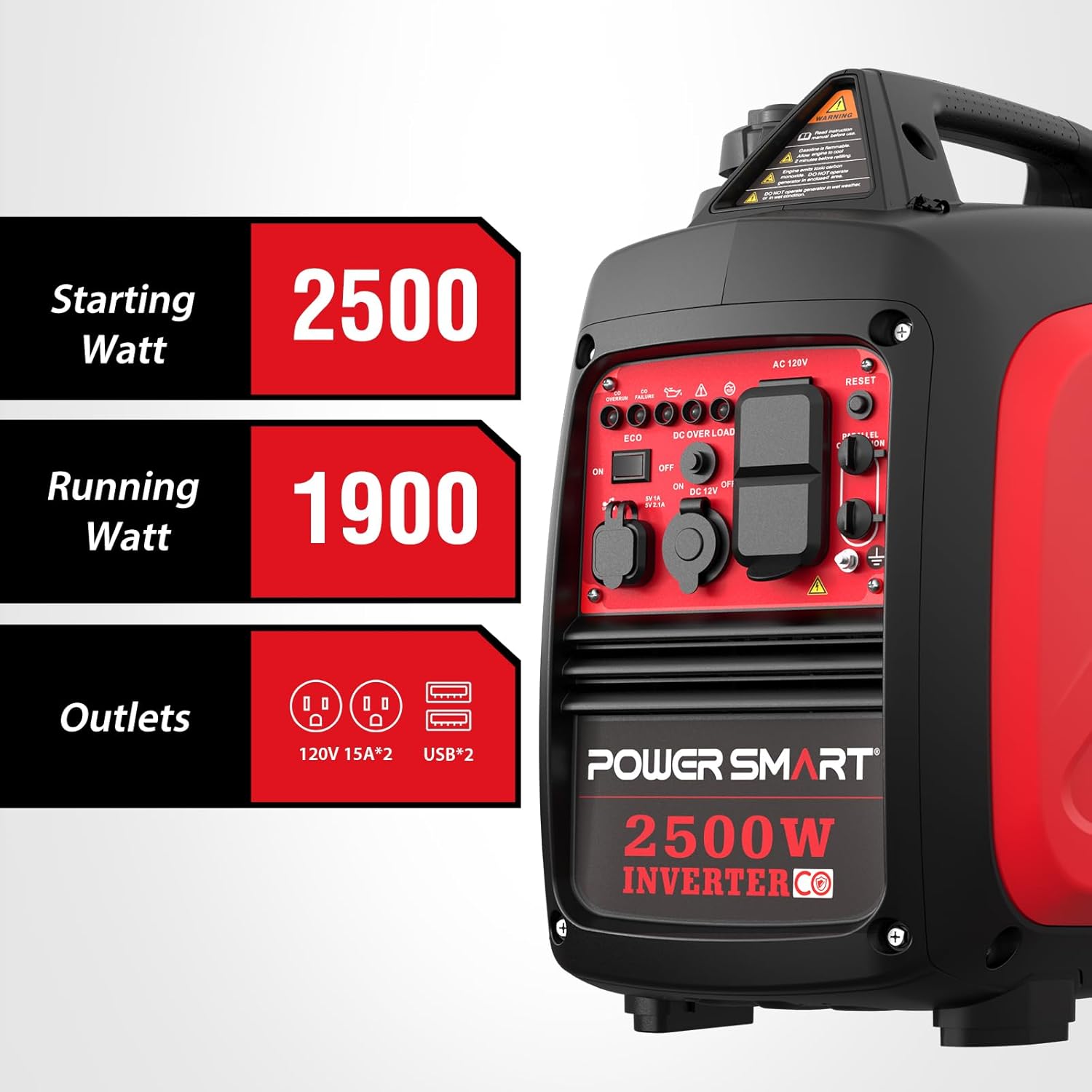
Figure 5.2: Generator power output (2500 starting watts, 1900 running watts) and available outlets.
5.2 Connecting Devices
Once the generator is running stably, you can connect your electrical devices to the appropriate outlets. Ensure the total wattage of connected devices does not exceed the generator's running wattage (1900W) to prevent overload.

Figure 5.3: Examples of common appliances and their typical power consumption.
5.3 Eco Mode Operation
The Eco Mode switch allows the generator to automatically adjust engine speed to match the load, improving fuel efficiency and reducing noise levels. For light loads, switch to Eco Mode 'ON'. For heavy loads or when starting high-demand appliances, switch Eco Mode 'OFF'.

Figure 5.4: Eco Mode switch for fuel efficiency and quiet operation.

Figure 5.5: The generator operates quietly at 52 dBA at 25% load.
5.4 Parallel Operation
This generator is parallel capable, allowing you to connect two PowerSmart inverter generators together for increased power output. A parallel kit (sold separately) is required for this function. Refer to the parallel kit's instructions for proper connection.
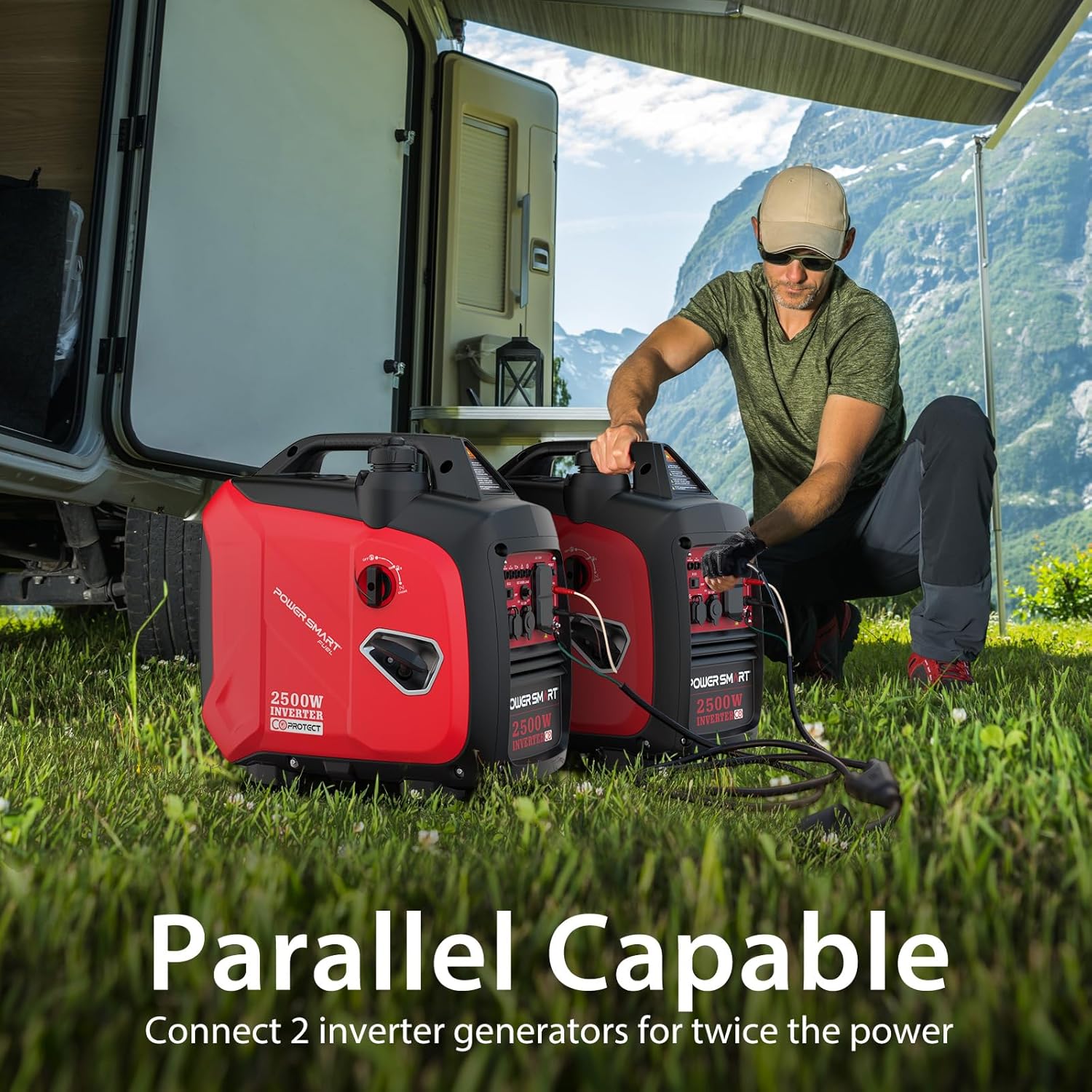
Figure 5.6: Two PowerSmart generators connected for parallel operation.
5.5 Stopping the Generator
- Disconnect all electrical devices from the generator.
- Turn the 2-in-1 switch to the 'OFF' position.
- Turn the ventilation knob on the fuel cap to the 'OFF' position.
- Allow the generator to cool before storing.
6. Maintenance
Regular maintenance ensures the longevity and reliable operation of your generator.
6.1 Engine Oil Change
Change the engine oil after the first 10 hours of operation. Subsequent oil changes should occur every 50 hours, and then every 100 hours thereafter. Refer to Section 4.1 for oil specifications.
6.2 Spark Plug Inspection
Inspect the spark plug periodically. Clean or replace it if it is fouled or damaged. Use the provided spark plug wrench for removal and installation.
6.3 Air Filter Cleaning
Clean the air filter regularly, especially when operating in dusty conditions. A dirty air filter can reduce engine performance and increase fuel consumption.
6.4 Storage
For long-term storage, drain the fuel tank and carburetor, or add a fuel stabilizer. Store the generator in a clean, dry place, away from direct sunlight and extreme temperatures.
7. Troubleshooting
This section addresses common issues you might encounter with your generator.
- Generator will not start:
- Check fuel level.
- Check engine oil level (low oil shutdown prevents starting).
- Ensure fuel valve and engine switch are in the correct 'ON' or 'RUN' position.
- Verify the spark plug is clean and properly connected.
- Check if the CO Protect system has activated (red CO alarm light). Move generator to a well-ventilated area.
- No power output:
- Check if the circuit breaker has tripped (reset if necessary).
- Ensure total connected load does not exceed running wattage.
- Verify all connections are secure.
- Engine runs rough or stalls:
- Check for stale fuel; use fresh gasoline.
- Clean or replace the air filter.
- Inspect the spark plug.
8. Specifications
| Feature | Specification |
|---|---|
| Brand | PowerSmart |
| Model Name | Portable Inverter Generator (HB5020C) |
| Starting Wattage | 2500 Watts |
| Running Wattage | 1900 Watts |
| Fuel Type | Gasoline |
| Tank Volume | 1.05 Gallons |
| Runtime (50% load) | 5.5 hours |
| Noise Level (23 ft, 25% load) | 52 dBA |
| Engine Displacement | 79 Cubic Centimeters |
| Product Dimensions (L x W x H) | 18.7" x 12.6" x 18.1" |
| Item Weight | 39 Pounds |
| Total Harmonic Distortion (THD) | Less than 3% |
| Special Features | CO Protect, Eco Mode, Low Oil Shutdown, Overload Reset, Cold Start Technology |

Figure 8.1: Key dimensions and weight of the generator.

Figure 8.2: Generator runtime at 50% load and CO Protect feature.
9. Official Product Videos
9.1 PowerSmart 2500 Watt Portable Inverter Generator (HB5020C)
Video 9.1: An official overview of the PowerSmart 2500-Watt Portable Inverter Generator, highlighting its features and benefits.
9.2 2500W Super Quiet Inverter Generator
Video 9.2: A demonstration showcasing the quiet operation of the 2500W PowerSmart Inverter Generator.
10. Warranty and Support
PowerSmart products are manufactured by Amerisun Inc. and are backed by a warranty to ensure your satisfaction.
10.1 Warranty Information
This PowerSmart generator comes with a 2-year warranty. Please retain your proof of purchase for warranty claims.

Figure 10.1: The generator is covered by a 2-year warranty.
10.2 Customer Support
PowerSmart maintains over 500 certified repair centers across the U.S. and provides full replacement parts through its Illinois headquarters. For any issues or support inquiries, please contact PowerSmart customer service.


