
BOMAZ Universal Remote Control
Universal Replacement Remote Control User Manual
Model: Universal Remote Control
1. Introduction
This manual provides instructions for the BOMAZ Universal Replacement Remote Control, designed for use with various Element Smart LED TV models. This remote offers a straightforward solution for controlling your compatible television without complex setup procedures.
Compatible Element Smart LED TV Models:
- E4SFT5517
- E2SW5018
- E4SW5518
- ELST3216H
- ELSJ4016
- ELST5016S
- ELSJ5017
- ELSW3917BF
- E4STA5017
- E4SFT5017
2. Product Features
- Universal compatibility with specified Element Smart LED TV models.
- No setup or programming required; functions directly out of the box.
- Equipped with dedicated quick-access buttons for Netflix, YouTube, VUDU, and Pandora.
- Features soft-touch buttons for comfortable use.
- Fast response time, less than 0.2 seconds.
- Durable construction, supporting over 150,000 clicks.
- Operable distance of more than 8 meters.
- Constructed from ABS material.
3. Setup
3.1 Battery Installation
The remote control requires two (2) AAA batteries (not included) for operation.
- Locate the battery compartment on the back of the remote control.
- Slide the battery compartment cover downwards or press the latch and lift to open.
- Insert two AAA batteries, ensuring the positive (+) and negative (-) terminals align correctly with the markings inside the compartment.
- Replace the battery compartment cover, ensuring it clicks securely into place.

Figure 3.1: Battery compartment with two AAA battery slots.
3.2 Initial Use
This universal replacement remote control is designed to work out of the box with compatible Element Smart LED TVs. No programming or pairing is required. Once batteries are installed, point the remote towards your television and begin operation.

Figure 3.2: Remote control in use, demonstrating no setup is needed.
4. Operating Instructions
The remote control utilizes infrared (IR) technology. Ensure a clear line of sight between the remote's emitter and the TV's IR receiver for optimal performance.
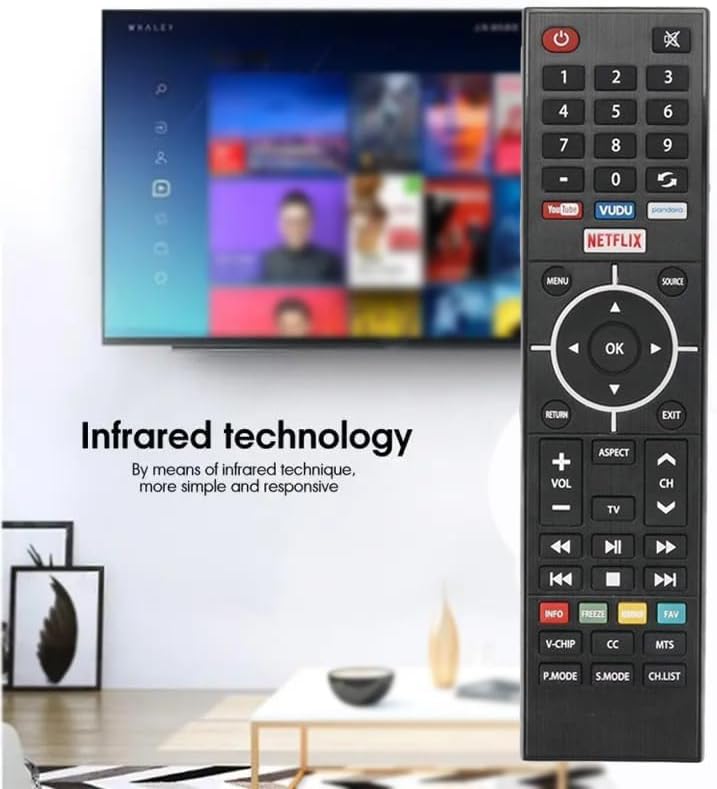
Figure 4.1: Remote control using infrared technology.
4.1 Button Functions Overview

Figure 4.2: Front view of the remote control.
| Button | Function |
|---|---|
| Power (⏻) | Turns the TV on or off. |
| Mute (🔇) | Mutes or unmutes the TV audio. |
| Number Buttons (0-9) | Direct channel selection. |
| Netflix | Direct access to the Netflix application. |
| YouTube | Direct access to the YouTube application. |
| VUDU | Direct access to the VUDU application. |
| Pandora | Direct access to the Pandora application. |
| MENU | Opens the TV's main menu. |
| SOURCE | Selects input source (HDMI, AV, etc.). |
| Navigation Pad (Up, Down, Left, Right) | Navigates through menus and options. |
| OK | Confirms selections. |
| RETURN | Goes back to the previous screen or menu. |
| EXIT | Exits the current menu or application. |
| VOL +/- | Adjusts the volume level. |
| CH ▲/▼ | Changes channels up or down. |
| ASPECT | Adjusts the screen aspect ratio. |
| TV | Switches to TV mode. |
| Playback Controls (Rewind, Play/Pause, Fast Forward, Previous, Stop, Next) | Controls media playback. |
| INFO | Displays program information. |
| FREEZE | Freezes the current screen. |
| CC | Activates or deactivates Closed Captions. |
| MTS | Selects Multi-channel Television Sound options. |
| V-CHIP | Accesses V-Chip parental controls. |
| P.MODE | Cycles through picture modes. |
| S.MODE | Cycles through sound modes. |
| CH.LIST | Displays the channel list. |
5. Maintenance
5.1 Battery Replacement
Replace batteries when the remote's response becomes sluggish or it stops functioning. Always replace both AAA batteries at the same time with new ones. Do not mix old and new batteries, or different types of batteries.
5.2 Cleaning
To clean the remote control, use a soft, dry cloth. For stubborn dirt, lightly dampen the cloth with water or a mild, non-abrasive cleaner. Avoid using harsh chemicals or abrasive materials, as these can damage the remote's surface or internal components.
5.3 Storage
If the remote control will not be used for an extended period, it is recommended to remove the batteries to prevent leakage and potential damage to the device.
6. Troubleshooting
6.1 Remote Not Responding
- Check Batteries: Ensure batteries are inserted correctly with the correct polarity (+/-). Replace with fresh AAA batteries if necessary.
- Line of Sight: Verify there is a clear path between the remote control and the TV's infrared sensor. Obstructions can block the signal.
- Distance: Ensure you are within the effective operating range (typically up to 8 meters).
- TV Power: Confirm that the TV is powered on and not in standby mode.
6.2 Specific Buttons Not Working
- If only certain buttons are unresponsive, try replacing the batteries. Low battery power can sometimes affect specific functions before total failure.
- Ensure the remote is clean and there is no debris lodged under the buttons.
7. Specifications
| Feature | Detail |
|---|---|
| Brand | BOMAZ |
| Compatible Devices | Element Smart LED Televisions |
| Connectivity Technology | Infrared (IR) |
| Special Feature | No Programming Required |
| Max Number of Supported Devices | 1 (Television) |
| Batteries Required | 2 AAA batteries (not included) |
| Item Weight | 3.2 ounces |
| Package Dimensions | 9.61 x 4.37 x 1.14 inches |
| Material | ABS |
| Operable Distance | More than 8 meters |
8. Warranty and Support
This product includes a warranty for return and replacement exchange service for 365 days from the date of purchase. For support or warranty claims, please refer to your purchase documentation or contact the retailer.
Related documentsUniversal Remote Control

Ask a question about this manual
Ask about setup, troubleshooting, compatibility, parts, safety, or missing instructions. Manuals+ will review the question and use this page’s manual context to help answer it.