
1. Introduction
This manual provides detailed instructions for the safe and efficient operation, setup, and maintenance of your Gaggia Cadorna Barista Plus Super-Automatic Espresso Machine. Please read this manual thoroughly before first use and retain it for future reference. The Gaggia Cadorna Barista Plus is designed to deliver a variety of coffee beverages with ease, featuring 6 pre-programmed options and the ability to save up to 4 personalized user profiles.

Figure 1: Gaggia Cadorna Barista Plus Super-Automatic Espresso Machine.
2. Product Overview and Features
The Gaggia Cadorna Barista Plus is engineered for convenience and quality, offering a range of features to enhance your coffee experience.
Key Features:
- 6 Pre-Programmed Beverages: Easily prepare Ristretto, Espresso, Espresso Lungo, Coffee, Americano, and Hot Water.
- 4 Personalized Profiles: Create and save custom beverage settings for up to four users, ensuring consistent results.
- Quick Heat Boiler: Equipped with a lightweight aluminum and durable stainless steel boiler for rapid heating.
- Commercial-Style Steam Wand: Designed for manual milk frothing, allowing for creation of lattes, cappuccinos, and flat whites.


3. Setup
Follow these steps for initial setup of your espresso machine.
3.1 Unpacking and Placement
- Carefully remove all packaging materials and protective films from the machine.
- Place the machine on a stable, level surface, away from heat sources and water splashes. Ensure adequate ventilation around the unit.
- Ensure the power cord is easily accessible and not obstructed.
3.2 Initial Preparation
- Water Tank: Remove the water tank, rinse it, and fill it with fresh, cold water up to the MAX level. Insert the included water filter if desired. Reinsert the tank securely.
- Bean Hopper: Open the bean hopper lid and fill it with whole coffee beans. Do not use ground coffee in the bean hopper.
- Power Connection: Plug the machine into a grounded electrical outlet.
- Initial Rinse Cycle: Follow the on-screen prompts for the initial rinse cycle. This primes the system and cleans internal components. Place a container under the dispensing spout during this process.

Figure 5: Side view of the machine, illustrating components like the water tank.
4. Operating Instructions
Learn how to brew your favorite coffee beverages and utilize the machine's features.
4.1 Brewing Coffee
- Turn on the machine using the power button. Wait for the machine to complete its self-test and heating cycle.
- Place a cup under the dispensing spout.
- Select your desired beverage from the control panel (e.g., Espresso, Coffee, Americano).
- Adjust coffee strength or volume if prompted, or if using a personalized profile.
- Press the Start/Stop button to begin brewing.

Figure 6: Machine dispensing espresso into two cups.
4.2 Using the Steam Wand
- Fill a pitcher with cold milk.
- Select the 'Steam' function on the control panel.
- Once the machine indicates it's ready, immerse the steam wand tip just below the surface of the milk.
- Open the steam valve to begin frothing. Move the pitcher up and down to create desired foam texture.
- Close the steam valve when finished. Clean the steam wand immediately after use with a damp cloth.
4.3 Grinder Adjustment
Important: Adjust the grinder only while the grinder is operating. Adjusting the grinder when it is not running can damage the grinding mechanism. Make adjustments one click at a time to avoid damage.
- Locate the grinder adjustment knob inside the bean hopper.
- While the machine is grinding beans for a beverage, turn the knob one click towards a finer (smaller number) or coarser (larger number) setting.
- Brew a few coffees to observe the change in extraction and taste before making further adjustments.
5. Maintenance
Regular maintenance ensures optimal performance and longevity of your Gaggia Cadorna Barista Plus.
5.1 Daily Cleaning
- Drip Tray: Empty and rinse the drip tray and coffee grounds container daily.
- Steam Wand: Wipe the steam wand immediately after each use to prevent milk residue buildup.
- Water Tank: Rinse and refill the water tank with fresh water daily.
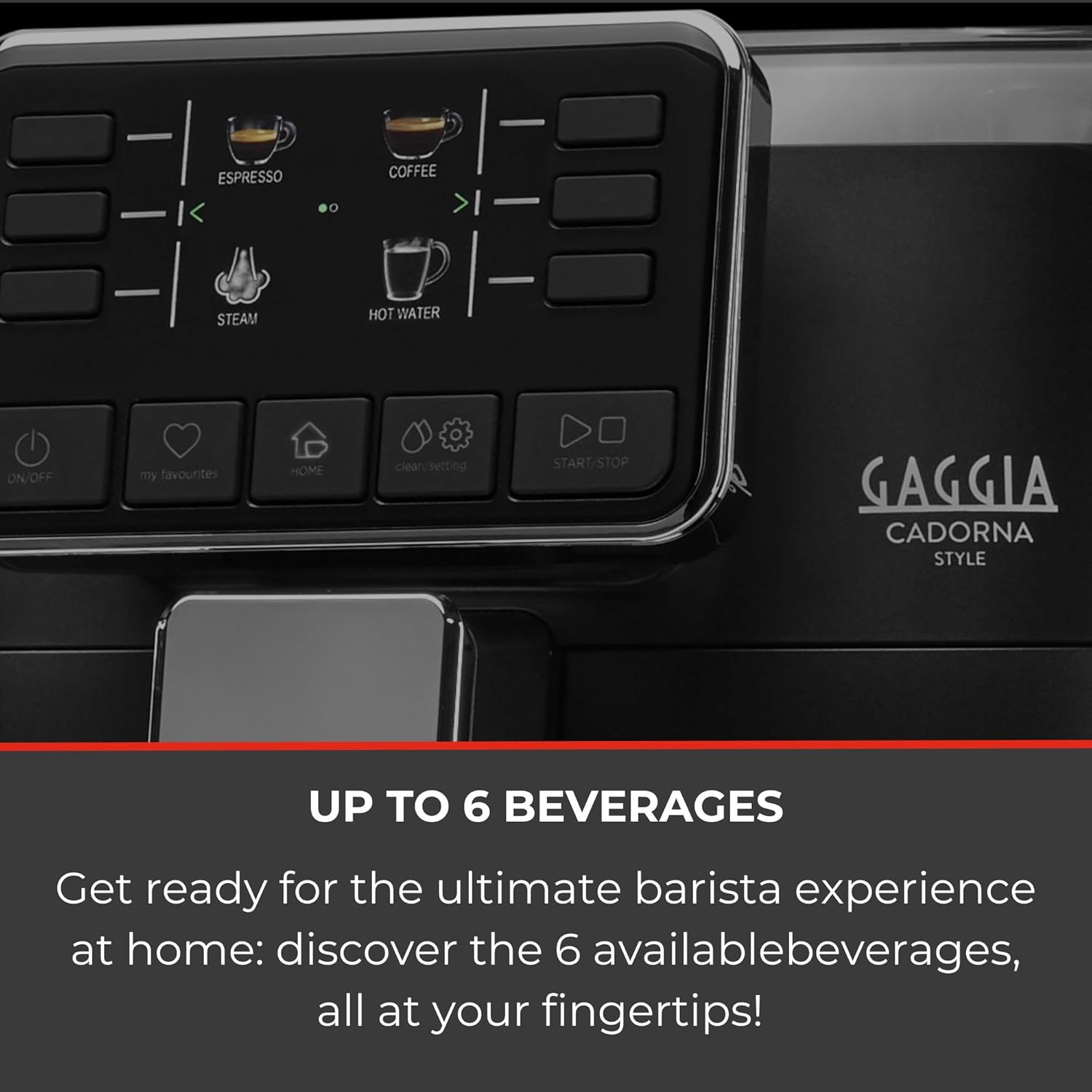
Figure 7: Espresso tray and drip tray for daily cleaning.
5.2 Weekly/Bi-Weekly Cleaning
- Brew Group: Remove the brew group (refer to the machine's display for instructions), rinse it under lukewarm water, and allow it to air dry before reinserting. Apply the included group lubricant as needed.
- Coffee Spout: Clean the coffee dispensing spout with a damp cloth.
5.3 Descaling
The machine will prompt you when descaling is required. Use Gaggia descaling solution and follow the on-screen instructions carefully. Regular descaling prevents mineral buildup and maintains machine efficiency.
5.4 Water Filter
Replace the water filter approximately every two months, or as indicated by the machine, to ensure optimal water quality and reduce descaling frequency.
6. Troubleshooting
This section addresses common issues you might encounter with your Gaggia Cadorna Barista Plus.
| Problem | Possible Cause | Solution |
|---|---|---|
| Machine does not turn on | No power, power outage, internal fault. | Check power cord connection and wall outlet. If issue persists after a power outage, contact customer support. |
| Water container difficult to remove/leaks | Improper seating, damaged seal, or internal component issue. | Ensure the water tank is seated correctly. Inspect seals for damage. If leaking persists, contact customer support. |
| Coffee is watery or weak | Grinder setting too coarse, insufficient coffee dose, old beans. | Adjust grinder to a finer setting (one click at a time while grinding). Use fresh, quality beans. Check coffee strength settings. |
| No coffee dispensing | Water tank empty, brew group clogged, descaling needed. | Refill water tank. Clean brew group. Perform descaling if prompted. |
| Steam wand not producing steam | Wand clogged, machine not heated to steam temperature. | Clean steam wand nozzle. Wait for machine to reach steam temperature. |
For issues not listed here or if solutions do not resolve the problem, please refer to the warranty and support section.
7. Specifications
| Brand | Gaggia |
| Model Name | Cadorna Barista Plus Super-Automatic Espresso Machine |
| Item Model Number | RI9601/47 |
| Color | Black |
| Product Dimensions | 17.2"D x 10.2"W x 15"H (43.7cm D x 25.9cm W x 38.1cm H) |
| Item Weight | 21 pounds (9.5 kg) |
| Voltage | 110V |
| Operation Mode | Fully Automatic |
| Coffee Input Type | Whole Beans |
| Human Interface Input | Buttons |
| Included Components | Espresso Machine, Group Lubricant, Grinder Adjustment Key/Scoop, Water Filter, Water Hardness Test Strip |
| UPC | 075020086754 |
8. Warranty and Support
Your Gaggia Cadorna Barista Plus Super-Automatic Espresso Machine comes with a 1-year warranty. This warranty is handled directly by Gaggia. For warranty claims, technical assistance, or further support, please contact Gaggia customer service. Keep your proof of purchase for warranty validation.


