
1. Introduction
This manual provides detailed instructions for the installation, operation, and maintenance of your Electriq iQool12 12000 BTU Smart WiFi Wall Split Air Conditioner. Please read this manual thoroughly before using the appliance to ensure safe and efficient operation. Keep this manual for future reference.
The Electriq iQool12 is a versatile unit offering cooling, heating, and dehumidifying functions, equipped with Smart WiFi connectivity for convenient control via your smartphone.
2. Safety Information
Important Safety Notice:
- The unit must be installed by an F-Gas qualified AC engineer.
- Ensure the qualified fitter reads this user manual in full before installation.
- These units contain a gas (R-32) which is governed by F-Gas regulations. The gas must be handled by qualified F-Gas personnel only.
- Do not attempt to install or service this unit yourself if you are not F-Gas certified. Improper installation can lead to gas leaks, electric shock, fire, or serious injury.
- Always disconnect power before performing any maintenance or cleaning.
- Keep children away from the unit during operation and maintenance.
3. Product Features
The Electriq iQool12 air conditioner is designed with advanced features for comfort and efficiency:
- 3-in-1 Functionality: Cooling, Heating, and Dehumidifying modes.
- Smart WiFi Connectivity: Control your unit remotely via smartphone.
- Energy Efficiency: A+++ rating for cooling and A++ for heating (ERP Certified).
- DC Inverter Technology: Super DC Inverter with GMCC Compressor for efficient and stable operation.
- Ultra-Quiet Operation: Designed for minimal noise output.
- Digital LED Display: Clear white LED display for temperature and function.
- 24 Hour Timer: Program the unit to turn on or off automatically.
- Self-Diagnostic Function: Helps identify operational issues.
- Sleep Mode: Adjusts temperature for comfortable sleep and energy saving.
- Auto Restart: Automatically resumes previous settings after a power outage.
- Follow Me Mode (IFEEL): Remote control senses temperature at its location for precise comfort.
- Child Lock: Prevents unintended changes to settings.
- Antibacterial Ioniser: Improves air quality.
- Easy Fit Design: Includes a 5-meter pre-gassed pipe and cable kit for simplified installation.
4. Setup and Installation
Proper installation is critical for the performance and safety of your air conditioner. This unit requires professional installation.
4.1 Professional Installation Requirement
As stated in the safety information, installation must be carried out by an F-Gas qualified engineer. This ensures compliance with regulations regarding refrigerants and proper system setup.
4.2 Package Contents
- Indoor Unit
- Outdoor Unit
- Remote Control
- 5-meter pre-gassed pipe and cable kit
- User Manual
4.3 Unit Dimensions
Consider the following dimensions for planning the installation location:
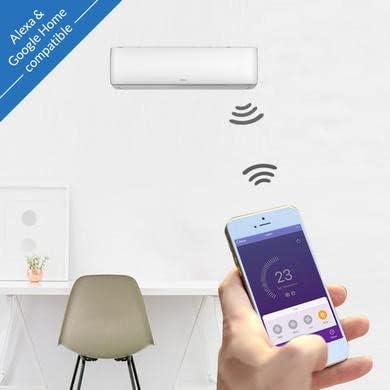
Image: Diagram showing the dimensions of the Electriq iQool12 indoor and outdoor units. The indoor unit measures approximately 80cm (width) x 27cm (height) x 19.7cm (depth). The outdoor unit measures approximately 78cm (width) x 56cm (height) x 27cm (depth). The internal unit weighs 7.5kg and the outdoor unit weighs 23.5kg.
- Indoor Unit: W83.8 x D28.5 x H20.7 cm
- Outdoor Unit: W76 x D55.2 x H25.6 cm
4.4 Electrical Connection
The unit operates on 240 Volts. Ensure the electrical supply meets the requirements and is installed by a qualified electrician.
5. Operating Instructions
Your Electriq iQool12 can be operated using the included remote control or via the Smart WiFi function on your smartphone.
5.1 Remote Control Operation
Refer to the remote control guide included in the packaging for detailed button functions. Common functions include:
- Power On/Off
- Mode Selection (Cool, Heat, Dry/Dehumidify, Fan)
- Temperature Adjustment
- Fan Speed Control
- Timer Settings
- Sleep Mode Activation
- Follow Me (IFEEL) Function
5.2 Smart WiFi Control
The built-in Wi-Fi allows you to control your air conditioner from anywhere using a compatible smartphone app. This feature enables you to adjust settings, monitor temperature, and manage fan speed remotely.

Image: A smartphone screen displaying the control interface for the Electriq air conditioner. The app shows a set temperature of 23 degrees Celsius, with options for fan speed (High, Mid, Low, Auto) and various modes (Mode, Fan, Function, Timer).

Image: An Electriq air conditioner mounted on a wall, with a smartphone in the foreground showing the control app. Text indicates compatibility with Alexa and Google Home, highlighting the smart control capabilities.
Follow the instructions provided with the unit or in the app store to download and set up the Electriq smart home app. The unit is also compatible with voice assistants like Alexa and Google Home.
5.3 Operating Modes
- Cooling: Reduces room temperature to your desired setting.
- Heating: Increases room temperature using heat pump technology.
- Dehumidifying: Removes excess moisture from the air, improving comfort.
- Fan: Circulates air without cooling or heating.

Image: A visual representation of the Electriq air conditioner's three main functions: air conditioning (cooling), dehumidifying, and heating, shown with different color gradients (blue for cool, neutral for dehumidify, red for heat) across a room setting.
6. Maintenance
Regular maintenance ensures optimal performance and extends the lifespan of your air conditioner.
6.1 Filter Cleaning
The air filters should be cleaned regularly to maintain air quality and unit efficiency. Refer to the detailed instructions in the full product manual for filter removal and cleaning procedures. Optional advanced air filters are available for enhanced air purification.
6.2 Self-Cleaning Function
Utilize the unit's self-cleaning function as recommended to prevent mold and bacteria buildup within the indoor unit.
6.3 Annual Service
For continued optimal performance and to maintain the extended parts warranty, an annual service by a qualified F-Gas engineer is required.
7. Troubleshooting
If you encounter issues with your air conditioner, refer to the following basic troubleshooting steps. For complex problems, contact a qualified technician.
- Unit not turning on: Check power supply, circuit breaker, and ensure the remote control batteries are functional.
- Insufficient cooling/heating: Verify correct mode selection, temperature setting, and ensure air filters are clean. Check for obstructions to airflow.
- Unusual noises: Minor noises during operation are normal. If loud or unusual, contact service.
- Self-diagnostic function: The unit features a self-diagnostic function that may display error codes. Consult the full manual for error code interpretations.
8. Specifications
| Feature | Specification |
|---|---|
| Brand | Electriq |
| Model Name | Electriq IQool12Plus |
| Model Number | iQool12 |
| Cooling Power | 12000 BTU (3.5 kW) |
| Efficiency Rating | A+++ (Cooling), A++ (Heating) |
| Noise Level (Indoor) | 52 Decibels |
| Noise Level (Outdoor) | 64 Decibels |
| Refrigerant | R-32 |
| Indoor Unit Dimensions (D x W x H) | 28.5D x 83.8W x 20.7H cm |
| Indoor Unit Weight | 10 kg |
| Outdoor Unit Dimensions (D x W x H) | 25.6D x 76W x 55.2H cm |
| Outdoor Unit Weight | 32 kg |
| Power Source | Corded Electric |
| Voltage | 240 Volts |
| Compressor Type | GMCC |
| Recommended Floor Area | Up to 30 Square Meters |
| Special Features | Auto Restart, Dehumidifier, Self Diagnostic Function, Sleep Mode, Wi-Fi, Follow Me Mode, Child Lock, Antibacterial Ioniser |

Image: An energy efficiency label for the Electriq iQool12Plus-V2. It shows a SEER (Seasonal Energy Efficiency Ratio) of 8.5, corresponding to an A+++ rating for cooling, and a SCOP (Seasonal Coefficient of Performance) of 4.6, corresponding to an A++ rating for heating. Noise levels are indicated as 52dB for the indoor unit and 64dB for the outdoor unit.
9. Warranty and Support
9.1 Warranty Information
- A 2-year warranty is provided, subject to commissioning by qualified F-Gas engineers.
- An extended 5-year parts warranty is available, subject to annual service by a qualified F-Gas engineer.
- Retain your proof of purchase and installation documentation for warranty claims.
9.2 Customer Support
For technical assistance, warranty claims, or to locate a qualified service engineer, please contact Electriq customer support. Refer to the product packaging or the official Electriq website for contact details.


