1. Introduction
This manual provides instructions for the installation, operation, and maintenance of the White-Rodgers 1F79-111 Digital Non-Programmable Heat Pump Thermostat. This thermostat is designed for 24 VAC heat pump systems with 2 heat / 1 cool stages. It features a large, lighted digital display for clear temperature readings and easy adjustments.
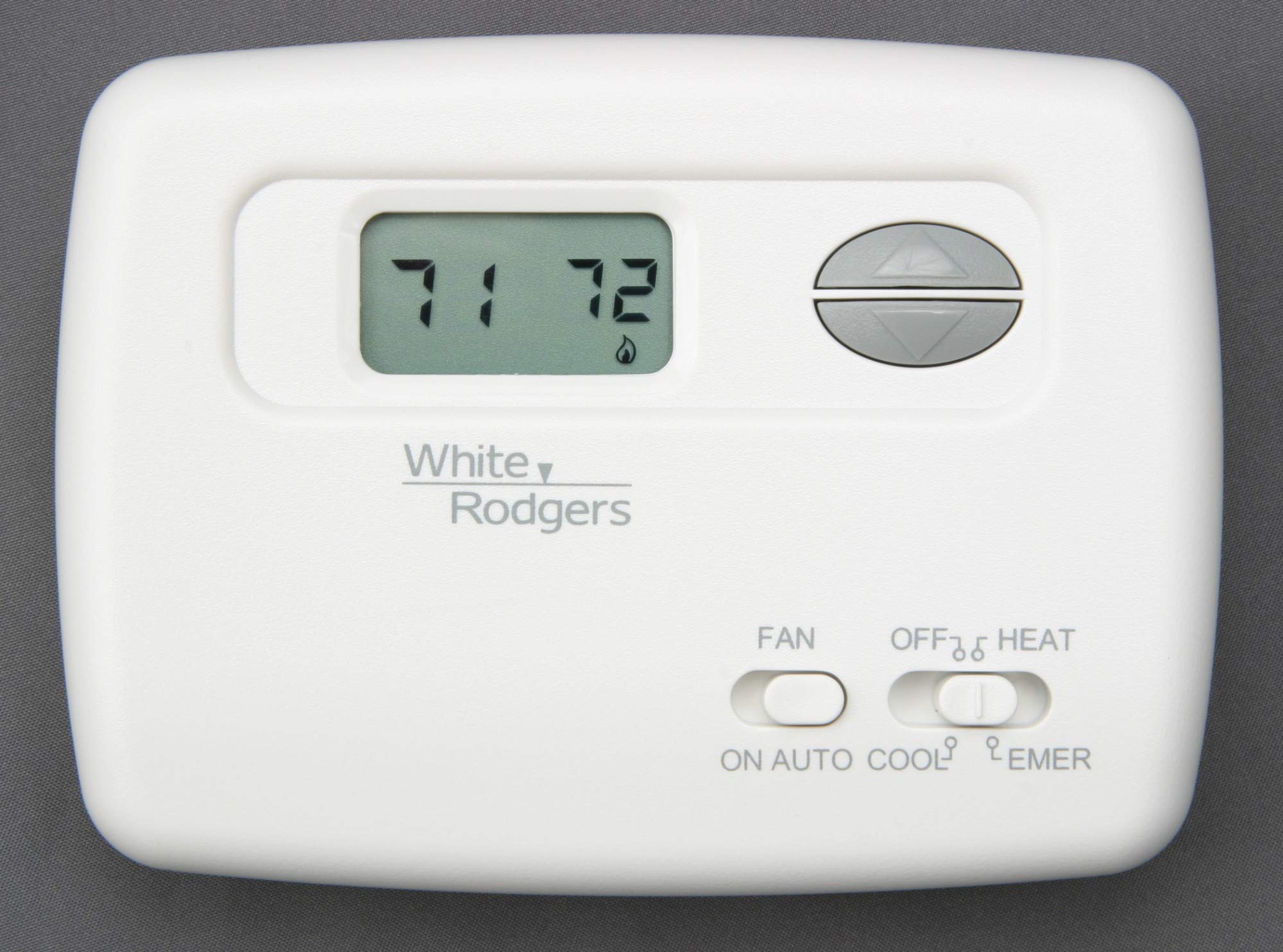
Front view of the White-Rodgers 1F79-111 thermostat, showing the digital temperature display, up/down adjustment buttons, and slide switches for fan operation (ON/AUTO) and system mode (OFF/HEAT/COOL/EMER).
2. Safety Information
- Electrical Hazard: Disconnect power to the heating/cooling system before installing or servicing the thermostat to prevent electrical shock and equipment damage.
- Professional Installation: If you are unfamiliar with thermostat wiring, it is recommended to have a qualified HVAC technician install this device.
- System Compatibility: Ensure this thermostat is compatible with your heat pump system (2 Heat / 1 Cool, 24 VAC) before installation.
- Proper Disposal: Dispose of old thermostats and batteries according to local regulations.
3. Setup and Installation
The White-Rodgers 1F79-111 thermostat is designed for wall mount installation and is hardwired into your 24 VAC heat pump system. It includes a backlight and a temperature sensor. The design is intended to cover wall marks left by most mechanical thermostats, potentially eliminating the need for an extra wall plate.
Installation Steps (General Guidance):
- Power Disconnection: Turn off power to your heating and cooling system at the main circuit breaker or fuse box.
- Remove Old Thermostat: Carefully remove the old thermostat from the wall. Note the wiring connections. It is advisable to label each wire with the terminal designation it was connected to.
- Mount New Thermostat Base: Secure the new thermostat's mounting base to the wall using the provided screws. Ensure it is level.
- Wire Connections: Connect the system wires to the corresponding terminals on the new thermostat base. Refer to the wiring diagram provided with the product packaging for specific connections. This thermostat supports 2 Heat / 1 Cool heat pump configurations.
- Attach Thermostat Body: Once wiring is complete and secure, attach the thermostat body to the mounted base.
- Restore Power: Turn the power back on to your heating and cooling system.
Note: If you are unsure about any step of the installation process, consult a qualified HVAC professional.
4. Operating Instructions
The White-Rodgers 1F79-111 thermostat features a digital display and button controls for easy temperature management.
Controls Overview:
- Digital Display: Shows the current room temperature and the setpoint temperature. The display is lighted for visibility in low-light conditions.
- Up/Down Buttons: Used to adjust the desired temperature setpoint. Press the 'Up' button to increase the temperature and the 'Down' button to decrease it.
- FAN Switch: This slide switch controls the fan operation.
- ON: The fan runs continuously, regardless of whether the heating or cooling system is active.
- AUTO: The fan runs only when the heating or cooling system is actively operating.
- SYSTEM Mode Switch: This slide switch selects the operating mode for your heating and cooling system.
- OFF: Turns off the heating and cooling system.
- HEAT: Activates the heating function. The thermostat will maintain the setpoint temperature by turning on the heat pump.
- COOL: Activates the cooling function. The thermostat will maintain the setpoint temperature by turning on the heat pump.
- EMER (Emergency Heat): Activates the auxiliary or emergency heating system, bypassing the heat pump compressor. Use this mode only when the heat pump is not functioning or during extreme cold conditions where the heat pump cannot keep up.
Temperature Display Units:
The thermostat allows selection between Celsius and Fahrenheit temperature display. Refer to the full installation manual for instructions on how to change this setting, typically found in the installer setup menu.
5. Maintenance
The White-Rodgers 1F79-111 thermostat requires minimal maintenance.
- Cleaning: Periodically wipe the exterior of the thermostat with a soft, damp cloth. Do not use abrasive cleaners or solvents.
- Airflow: Ensure that the thermostat's vents are not obstructed by dust or debris, as this can affect temperature sensing accuracy.
- System Filters: Regularly check and replace your HVAC system's air filters as recommended by the system manufacturer to ensure optimal performance and efficiency.
6. Troubleshooting
If you experience issues with your thermostat, try the following steps before contacting a service professional:
- No Display/No Power:
- Check the circuit breaker for your heating/cooling system.
- Ensure all wiring connections are secure at the thermostat and the HVAC system.
- System Not Responding (Heating/Cooling):
- Verify the SYSTEM mode switch is set to HEAT or COOL.
- Ensure the temperature setpoint is above the current room temperature for heating, or below for cooling.
- Check if the FAN switch is set to AUTO; if so, the fan will only run when the system is actively heating or cooling. Try setting it to ON to test fan operation.
- Allow a few minutes for the system to respond after making changes, as some systems have built-in delays.
- Inaccurate Temperature Reading:
- Ensure the thermostat is not exposed to direct sunlight, drafts, or heat sources (e.g., lamps, appliances) that could affect its sensor.
- Clean any dust or debris from the thermostat's vents.
- Emergency Heat (EMER) Not Working:
- Confirm the SYSTEM mode switch is firmly in the EMER position.
- Check the circuit breaker for the auxiliary heating system.
If these steps do not resolve the issue, contact a qualified HVAC service technician.
7. Specifications
| Brand | White-Rodgers |
| Model Number | 1F79-111 |
| System Type | Heat Pump (2 Heat / 1 Cool) |
| Voltage | 24 Volts AC |
| Power Source | Corded Electric (Hardwired) |
| Display Type | Digital, Lighted |
| Control Type | Button Control (Push Button) |
| Mounting Type | Wall Mount |
| Color | White |
| Item Weight | 3 pounds |
| UPC | 786710104565 |
8. Warranty and Support
Warranty Information:
For detailed warranty information, please refer to the documentation included with your White-Rodgers 1F79-111 thermostat or visit the official White-Rodgers website. Warranty terms and conditions may vary.
Customer Support:
If you require technical assistance, have questions about your thermostat, or need to report a problem, please contact White-Rodgers customer support. Contact information can typically be found on the manufacturer's website or in the product packaging.


