
1. Important Safety Information
Read and understand all safety information before using this product. Failure to follow these instructions may result in electric shock, fire, or serious injury.
General Safety Precautions
- Keep children and unauthorized persons away from the unit.
- Wear eye protection and protective clothing when operating the unit.
- Do not operate the unit if it is damaged or malfunctioning.
- Ensure the work area is well-ventilated.
Battery Safety
- This unit contains a lead-acid battery. Do not dispose of in fire.
- Do not short-circuit the battery terminals.
- Avoid contact with battery acid. If contact occurs, flush with water immediately and seek medical attention.
- Recharge the unit regularly to maintain battery health, especially after each use or every two months when in storage.
Air Compressor Safety
- Do not exceed the maximum pressure rating of the item being inflated.
- Do not leave the compressor unattended while in operation.
- Allow the compressor to cool down after extended use to prevent overheating.
2. Product Overview
The CARTMAN 900 Peak Amp Portable Power Station is a versatile device designed for emergency vehicle jump starting, tire inflation, and portable power. It integrates a jump starter, air compressor, USB charging port, and 12V DC power outlets.

Figure 1: Product diagram illustrating key components such as Jumper Cables, ON/OFF Main Power Pack Switch, 12 Volt Power Outlet Sockets, Built-in Storage Compartment for Compressor Hose, DC Adapter, Air Compressor Gauge, and LED Worklight.
Key Features
- 900 Peak Amps Jump Starter: Provides sufficient power to jump start most cars, trucks, and SUVs.
- 150 PSI Air Compressor: Inflates vehicle tires, bicycle tires, sports balls, and other inflatables.
- 5V/2.4A USB Port: Charges smartphones, tablets, and other USB-powered devices.
- 12V DC Power Outlets: Powers 12V appliances like inverters, vacuum cleaners, or mini-fridges.
- Built-in LED Worklight: Illuminates your work area in low-light conditions.
- Battery Level Indicator: LEDs display the current battery capacity.
3. Charging the Unit
Before first use, fully charge the unit for at least 24 hours. Regular charging is crucial for maintaining battery life and ensuring the unit is ready for use when needed.
Charging with AC Adapter (Home)
- Ensure the main power switch on the unit is in the OFF position.
- Connect the AC adapter to the unit's DC charging port.
- Plug the AC adapter into a standard 120V AC wall outlet.
- The battery level indicator LEDs will illuminate, showing the charging progress. Charge until all LEDs are solid green.
Charging with DC Adapter (Car)
- Ensure the main power switch on the unit is in the OFF position.
- Connect the DC adapter to the unit's DC charging port.
- Plug the DC adapter into your vehicle's 12V accessory outlet (cigarette lighter socket).
- The battery level indicator LEDs will show charging progress.
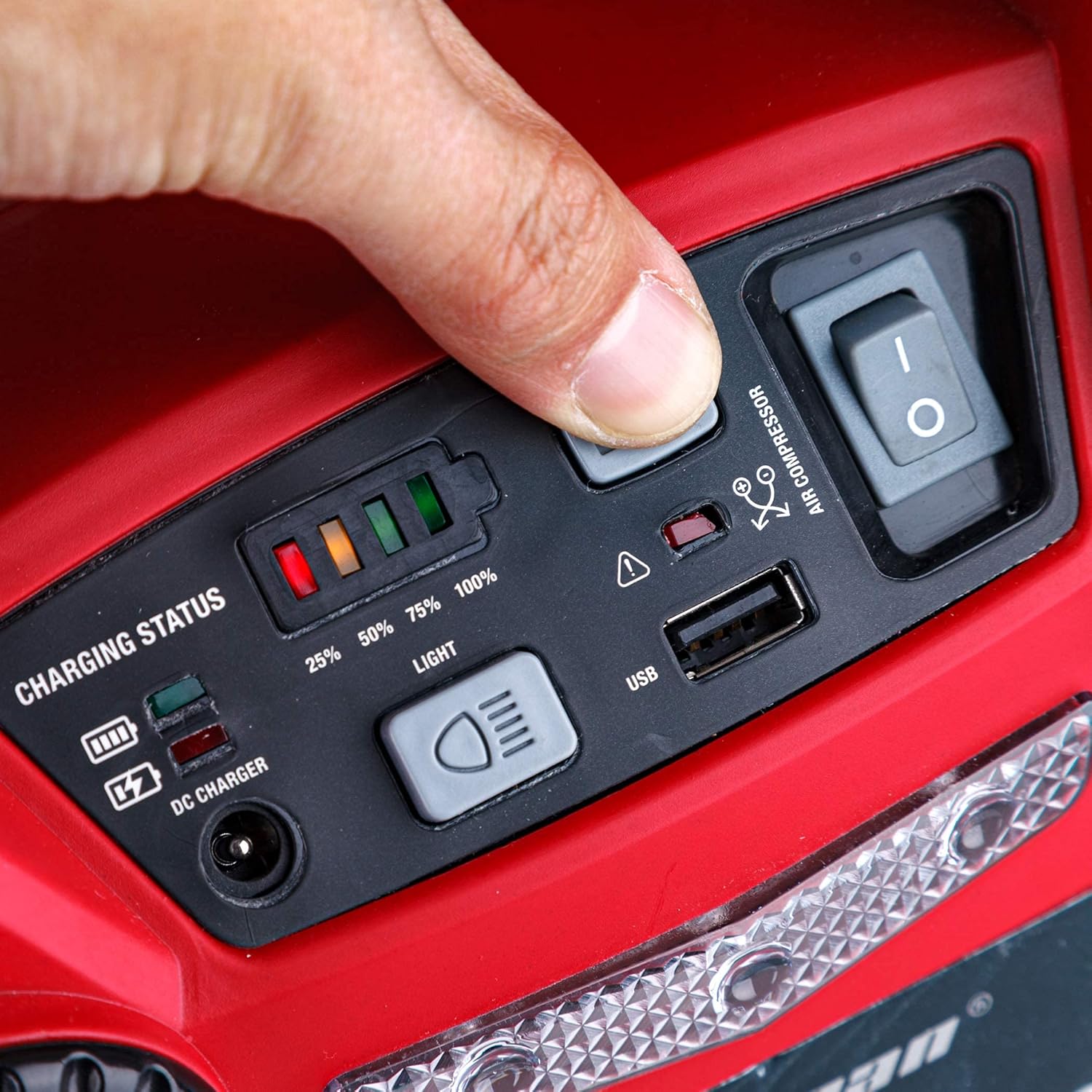
Figure 2: The control panel displays the battery charging status via LED indicators. The USB port is also visible.
Battery Maintenance Tips
- Recharge the battery as soon as possible after each use.
- If stored, recharge the unit every two months to prolong battery life.
- Avoid leaving the unit in a discharged state for extended periods, as this can cause battery failure.
- Store the unit in a cool, dry place.
4. Jump Starting a Vehicle
This unit provides 900 peak amps for jump starting 12V vehicle batteries. Always follow these steps carefully to ensure safe operation.
- Ensure the vehicle's ignition is OFF and all accessories (lights, radio, etc.) are turned off.
- Place the CARTMAN unit on a stable, flat surface near the vehicle's battery.
- Connect the RED positive (+) clamp to the positive (+) terminal of the vehicle's discharged battery.
- Connect the BLACK negative (-) clamp to a clean, unpainted metal part of the vehicle's chassis, away from the battery and fuel lines. Do not connect directly to the negative battery terminal.
- Turn the main power switch on the CARTMAN unit to the ON position.
- Attempt to start the vehicle. If it does not start within 5-8 seconds, wait at least 3 minutes before trying again.
- Once the vehicle starts, immediately turn the CARTMAN unit's main power switch to OFF.
- Disconnect the BLACK negative (-) clamp first, then disconnect the RED positive (+) clamp.
- Recharge the CARTMAN unit as soon as possible after use.

Figure 3: The CARTMAN unit positioned on the vehicle's engine bay, with jumper cables correctly connected to the car battery terminals for jump starting.
5. Using the Air Compressor
The integrated 150 PSI air compressor can inflate various items. Always check the recommended pressure for the item you are inflating.
- Locate the air compressor hose and attachments stored on the unit.
- Select the appropriate nozzle adapter for the item you wish to inflate.
- Securely attach the nozzle adapter to the item's valve stem.
- Connect the air compressor hose to the unit's air outlet.
- Turn the air compressor switch to the ON position.
- Monitor the pressure gauge on the unit. Inflate to the recommended pressure. The compressor can inflate a regular car tire to 30 PSI in approximately 6-8 minutes.
- Once the desired pressure is reached, turn the air compressor switch to OFF.
- Disconnect the hose and store all attachments.

Figure 4: The CARTMAN unit positioned next to a car tire, with the air hose connected to the tire valve for inflation.

Figure 5: A detailed view of the analog air compressor pressure gauge, indicating pressure in PSI, kPa, and kg/cm².
6. Using the Power Outlets
The unit provides both a USB port and 12V DC power outlets for charging and powering various electronic devices.
USB Charging Port (5V/2.4A)
- Connect your USB charging cable to the unit's 5V/2.4A USB port.
- Connect the other end of the cable to your smartphone, tablet, or other USB-powered device.
- The unit will begin charging your device.

Figure 6: The CARTMAN unit actively charging a smartphone via its integrated USB port.
12V DC Power Outlets
- Ensure the 12V appliance you wish to power is rated for 12V DC input.
- Plug the 12V appliance's power cord into one of the unit's 12V DC power outlet sockets.
- Turn on the appliance if it has its own power switch.
LED Worklight
The unit includes a built-in LED worklight for illumination in dark environments.
- Press the 'LIGHT' button on the control panel to turn the LED worklight ON.
- Press the 'LIGHT' button again to turn the LED worklight OFF.

Figure 7: The CARTMAN unit with its LED worklight activated, providing illumination.
7. Maintenance and Storage
Proper maintenance and storage will extend the life of your CARTMAN Portable Power Station.
Battery Care
- Recharge the unit as soon as possible after each use.
- For optimal battery life, recharge the unit every two months when not in use.
- Avoid storing the unit in a completely discharged state for extended periods.
- Use only the charging adapters provided with this unit.
Cleaning
- Wipe the unit with a dry, soft cloth.
- Do not use abrasive cleaners or solvents.
Storage
- Store the unit in a cool, dry place, away from direct sunlight and moisture.
- Keep out of reach of children.
8. Troubleshooting
If you encounter issues with your CARTMAN Portable Power Station, refer to the following common problems and solutions.
| Problem | Possible Cause | Solution |
|---|---|---|
| Unit does not charge | Charging adapter not connected properly; Faulty adapter; Internal battery issue. | Ensure connections are secure. Try a different outlet. Contact customer support if issue persists. |
| Vehicle does not jump start | Incorrect clamp connection; Vehicle battery severely discharged; Unit's battery low. | Verify clamp connections (positive to positive, negative to chassis). Recharge the CARTMAN unit. Allow vehicle battery to charge for a few minutes before attempting to start again. |
| Air compressor not working | Compressor switch off; Hose not connected; Unit's battery low. | Ensure compressor switch is ON. Check hose connections. Recharge the CARTMAN unit. |
| USB port not charging devices | USB cable faulty; Device not compatible; Unit's battery low. | Try a different USB cable. Ensure device is compatible with 5V/2.4A charging. Recharge the CARTMAN unit. |
9. Specifications
- Model: CM-JS164B-9
- Brand: CARTMAN
- Peak Amperage: 900 Amps
- Battery Type: 12V Lead Acid (included)
- Air Compressor: 150 PSI
- USB Output: 5V/2.4A
- DC Output: 12 Volts
- Item Weight: Approximately 3.52 ounces (unit weight, not shipping)
- Package Dimensions: 13.25 x 11.1 x 9.5 inches
- Vehicle Service Type: Passenger Car
10. Warranty and Support
Specific warranty details and customer support contact information are not provided within this manual. For warranty claims, technical assistance, or replacement parts, please refer to the product packaging or contact CARTMAN customer service directly through their official website or the retailer where the product was purchased.