1. Introduction and Overview
This manual provides detailed instructions for the installation, operation, maintenance, and troubleshooting of the ASRock 760GM-HDV Rev: 1.01 Desktop Motherboard. This motherboard is designed for AMD AM3/AM3+ processors and supports DDR3 memory, offering a reliable foundation for personal computer systems.
Key features include an AMD 760G/SB710 chipset, support for up to 32GB DDR3 RAM, and integrated graphics with HDMI, VGA, and DVI outputs. It also provides USB and SATA 3GB/s connectivity.
2. Setup and Installation
Before beginning installation, ensure your workspace is clean, well-lit, and static-free. Always handle the motherboard by its edges and use an anti-static wrist strap to prevent electrostatic discharge (ESD) damage.
2.1 Motherboard Layout
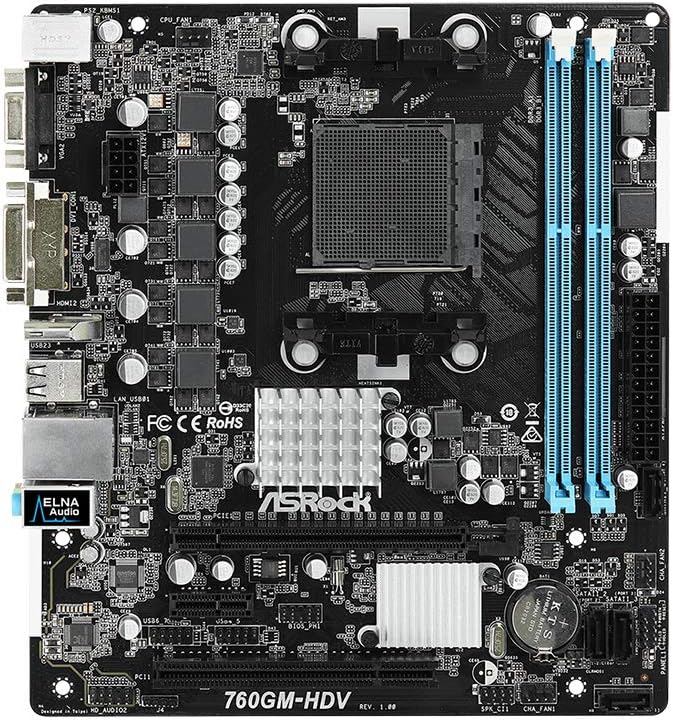
Figure 1: Top view of the ASRock 760GM-HDV motherboard, showing the CPU socket, RAM slots, PCIe slots, and various connectors.
2.2 Component Installation Steps
- Prepare the Case: Install the I/O shield into the rear opening of your computer case. Ensure standoffs are correctly aligned and installed for the Micro ATX form factor.
- Install the CPU: Open the CPU socket lever. Carefully align your AMD AM3/AM3+ processor with the socket, ensuring the golden triangle on the CPU matches the triangle on the socket. Gently place the CPU into the socket without force. Close the lever to secure the CPU.
- Install the CPU Cooler: Apply thermal paste to the CPU (if not pre-applied on the cooler). Mount the CPU cooler according to its manufacturer's instructions, ensuring it is securely fastened and the fan cable is connected to the CPU_FAN header on the motherboard.
- Install RAM: Open the clips on both ends of the DDR3 DIMM slots. Align the memory module's notch with the slot's key. Press down firmly on both ends of the module until the clips snap into place. This motherboard supports dual-channel DDR3 memory.
- Mount the Motherboard: Carefully place the motherboard into the case, aligning the screw holes with the standoffs. Secure the motherboard with screws.
- Connect Power Supply: Connect the 24-pin ATX power connector and the 4-pin ATX 12V power connector from your power supply to the corresponding ports on the motherboard.
- Connect Storage Devices: Connect SATA data cables from your hard drives or SSDs to the SATA 3GB/s ports on the motherboard. Connect power cables from the power supply to your storage devices.
- Connect Front Panel Cables: Connect the power button, reset button, HDD LED, power LED, and front USB/audio headers from your case to the corresponding pins on the motherboard. Refer to the motherboard's silkscreen labels for correct orientation.
- Install Expansion Cards: If using a dedicated graphics card or other PCIe expansion cards, insert them into the appropriate PCIe slots and secure them with the case's retention mechanism.
3. Operating Instructions
3.1 Initial Power-On and BIOS Access
- After all components are installed and connected, connect your monitor, keyboard, and mouse to the appropriate ports.
- Power on your system. During the boot process, repeatedly press the DEL or F2 key to enter the BIOS/UEFI setup utility.
- In the BIOS, you can configure boot order, system time, and various hardware settings. Save changes before exiting.
3.2 Connecting Peripherals
The ASRock 760GM-HDV motherboard offers a range of rear I/O ports for connecting external devices:

Figure 2: Rear I/O panel of the ASRock 760GM-HDV motherboard, showing PS/2, VGA, DVI, HDMI, USB, LAN, and audio ports.
- PS/2 Ports: For connecting legacy PS/2 keyboards and mice.
- VGA, DVI, HDMI Ports: For connecting displays. Use one port at a time for integrated graphics output.
- USB Ports: For connecting USB devices such as keyboards, mice, external drives, and printers.
- LAN Port: For connecting to a wired network using an Ethernet cable.
- Audio Jacks: For connecting speakers, headphones, and microphones.
3.3 Driver Installation
After installing your operating system, install the necessary drivers for the motherboard's chipset, integrated graphics, audio, and LAN. These drivers are typically provided on a support CD or can be downloaded from the ASRock official website for your specific model.
4. Maintenance
- Dust Cleaning: Regularly clean dust from inside your computer case, especially around the CPU cooler, chipset heatsink, and fan vents. Use compressed air and ensure the system is powered off and unplugged.
- BIOS Updates: Periodically check the ASRock website for BIOS updates. BIOS updates can improve system stability, compatibility, and performance. Follow the update instructions carefully to avoid system damage.
- Component Checks: Ensure all cables are securely connected and no components are loose. Check for any signs of physical damage or overheating.
5. Troubleshooting
- No Power/No POST:
- Verify all power cables (24-pin ATX, 4-pin 12V) are securely connected.
- Ensure the CPU and RAM are correctly seated.
- Try booting with only essential components (CPU, one RAM stick, GPU if no integrated graphics).
- Clear CMOS by removing the CMOS battery for a few minutes or using the clear CMOS jumper.
- No Display:
- Ensure the monitor is connected to the correct video output (motherboard's integrated graphics or a dedicated graphics card).
- Check monitor power and input selection.
- If using a dedicated graphics card, ensure it is properly seated and has power.
- Operating System Not Booting:
- Check boot order in BIOS to ensure the correct drive is selected.
- Verify SATA data and power connections to the boot drive.
- Run a diagnostic check on the storage drive.
6. Specifications
| Feature | Specification |
|---|---|
| Manufacturer | ASRock |
| Model Number | 760GM-HDV |
| Chipset Type | AMD 760G / SB710 |
| CPU Socket | AM3 / AM3+ |
| Compatible Processors | AMD Athlon, AMD Sempron (AM3/AM3+ series) |
| RAM Memory Technology | DDR3 |
| RAM Memory Maximum Size | 32 GB |
| Memory Clock Speed | Up to 3400 MHz (OC) |
| Integrated Graphics | AMD Radeon HD 3000 (on 760G chipset) |
| Video Output Ports | VGA, DVI, HDMI |
| SATA Ports | SATA 3GB/s |
| USB Ports | USB 2.0 (rear and internal headers) |
| LAN | Gigabit LAN |
| Form Factor | Micro ATX |
| Main Power Connector | 24-pin ATX |
| CPU Power Connector | 4-pin ATX 12V |
7. Warranty and Support
For detailed warranty information, please refer to the warranty card included with your product or visit the official ASRock website. ASRock provides technical support for its products. For assistance, please visit the ASRock support page or contact their customer service department.
ASRock Official Website: www.asrock.com


