
1. Introduction
Thank you for purchasing the AMTAST WT0124 Wireless Solar Pool Thermometer. This device is designed to provide accurate temperature readings for various water bodies such as swimming pools, hot tubs, aquariums, and ponds. It features a wireless floating sensor and an indoor receiver for convenient monitoring. Please read this manual thoroughly before use to ensure proper operation and longevity of your device.
2. Safety Information
- Do not expose the receiver unit to direct water or extreme humidity.
- Ensure batteries are inserted with correct polarity. Incorrect insertion can damage the device.
- Do not mix old and new batteries, or different types of batteries.
- Keep batteries out of reach of children.
- Dispose of used batteries according to local regulations.
- Do not attempt to disassemble or repair the device yourself. Contact customer support if issues arise.
3. Package Contents
- 1 x Wireless Floating Pool Sensor (Transmitter)
- 1 x Indoor Receiver Unit
- 1 x Instruction Manual
Note: Batteries are not included and must be purchased separately.
4. Product Overview
The AMTAST WT0124 system consists of two main components: a floating sensor for water temperature measurement and an indoor receiver for displaying data.
4.1. Components and Dimensions

Image 1: Sensor and Receiver Dimensions. The sensor measures 6" x 3.5" x 3.5" (150 x 88 x 88mm) and the receiver measures 5" x 3" x 1" (125 x 75 x 25mm).
4.2. Key Features
- Wireless transmission up to 300 feet (100 meters).
- Solar-powered floating sensor with battery backup.
- Indoor receiver with LCD display for water and indoor temperatures.
- Temperature accuracy: ±1.0°C.
- Multi-functional display: calendar, time, alarm.

Image 2: Multiple Functions. The device offers solar power, indoor temperature monitoring, pool temperature monitoring, a calendar, and an alarm clock.
5. Setup
5.1. Battery Installation
- For the Wireless Floating Sensor (Transmitter):
Unscrew the top cap of the floating sensor. Insert 2 x AA 1.5V Alkaline batteries, ensuring correct polarity (+/-). If using rechargeable batteries, ensure the solar function is activated. For alkaline batteries, the solar function should be turned off for optimal performance. Securely re-attach the top cap, ensuring the waterproof seal is properly seated. - For the Indoor Receiver Unit:
Open the battery compartment cover on the back of the receiver. Insert 2 x AAA 1.5V Alkaline batteries, ensuring correct polarity (+/-). Close the battery compartment cover.
Important: Always install the outdoor sensor battery first, followed by the indoor monitor battery. Failing to do this in the correct order may prevent connection or display of readings.
5.2. Synchronization and Initial Display
After installing batteries in the correct order, place the sensor and receiver close to each other. The receiver will attempt to synchronize with the sensor. Do not press any buttons on the indoor monitor until it displays data from the outdoor transmitter. Once the water temperature appears on the receiver, synchronization is complete, and you can proceed with settings and adjustments.
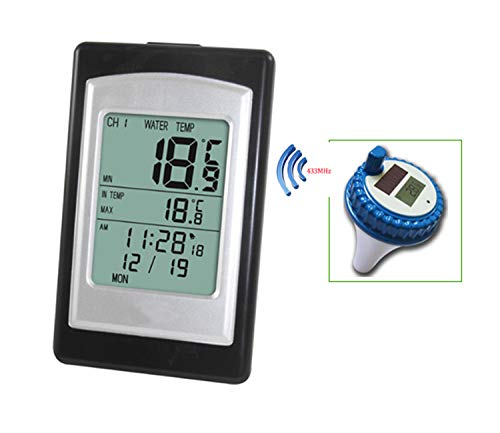
Image 3: Receiver and Sensor Communication. The receiver displays data transmitted wirelessly from the sensor via a 433MHz frequency.
5.3. Placement
- Floating Sensor: Place the sensor directly into the water body you wish to monitor (e.g., pool, pond, hot tub). Ensure it floats freely and is not obstructed.
- Indoor Receiver: Place the receiver unit indoors, within the specified transmission range of 300 feet (100 meters) from the sensor. Avoid placing it near large metal objects, electronic devices, or thick walls that may interfere with the wireless signal.

Image 4: Transmission Distance. The thermometer supports a transmission distance of up to 300 feet (100 meters) between the floating sensor and the indoor receiver.
6. Operating Instructions
6.1. Reading Temperatures
The indoor receiver displays both the water temperature (from the floating sensor) and the indoor ambient temperature. The large digits typically show the water temperature, while smaller digits show the indoor temperature. The display also shows the minimum and maximum temperatures recorded.
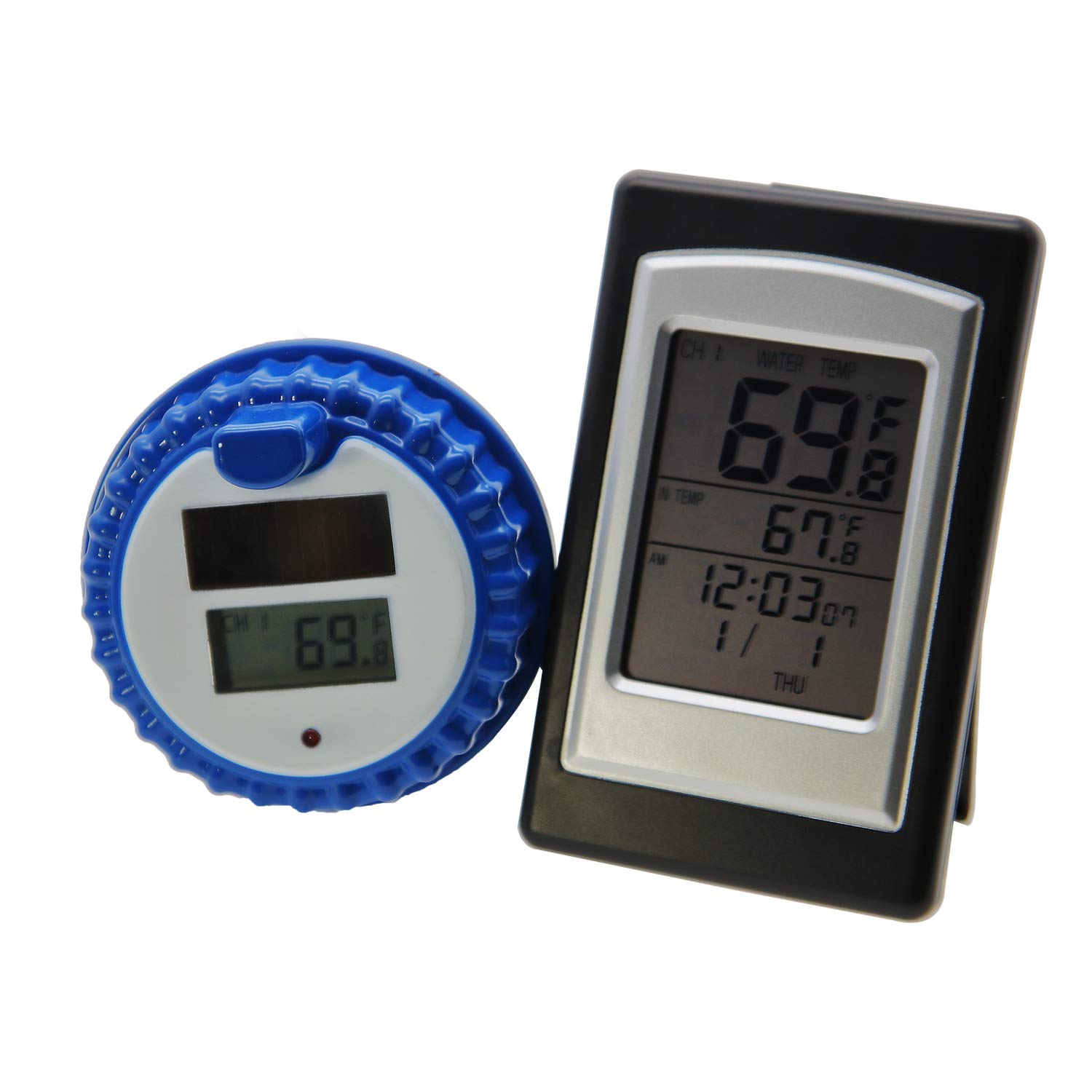
Image 5: Display Readings. The receiver shows water temperature, indoor temperature, time, and date.
6.2. Setting Temperature Units (°C/°F)
Locate the °C/°F button on the receiver unit. Press this button to toggle between Celsius and Fahrenheit temperature displays.
6.3. Time and Calendar Settings
Refer to the specific buttons on your receiver (e.g., MODE, SET, UP, DOWN) to adjust the time, date, and calendar settings. Follow the on-screen prompts to set the current time and date.
6.4. Alarm Function
The receiver includes an alarm function. Use the designated buttons (e.g., ALARM, SET) to set and activate an alarm. Consult the display icons to confirm alarm activation.
7. Maintenance
7.1. Cleaning
- Wipe the receiver unit with a soft, dry cloth. Do not use abrasive cleaners or immerse in water.
- The floating sensor can be wiped clean with a damp cloth. Ensure the battery compartment is sealed before cleaning.
7.2. Battery Replacement
Replace batteries in both the sensor and receiver when the low battery indicator appears on the display, or if the display becomes dim or unresponsive. Always replace all batteries in a unit at the same time with new ones of the same type.
7.3. Storage
If the device will not be used for an extended period, remove all batteries from both units to prevent leakage and damage. Store the units in a cool, dry place away from direct sunlight.
8. Troubleshooting
| Problem | Possible Cause | Solution |
|---|---|---|
| No display on receiver | Dead or incorrectly installed batteries. | Check battery polarity and replace with fresh batteries. |
| No water temperature reading (dashes on display) | Sensor and receiver not synchronized; out of range; interference; dead sensor batteries. | Ensure sensor batteries are fresh and installed first. Bring sensor and receiver closer. Avoid sources of interference. Re-synchronize by removing and re-inserting batteries in the correct order. |
| Inaccurate temperature readings | Sensor placed in direct sunlight (for water temp); sensor or receiver near heat/cold sources. | Relocate sensor to a shaded area if possible. Ensure both units are away from extreme temperature sources. |
| Short battery life | Low-quality batteries; frequent use of backlight (if applicable). | Use high-quality alkaline batteries. Reduce backlight usage. Ensure solar function is on for rechargeable batteries and off for alkaline batteries in the sensor. |
9. Specifications
- Outdoor Temperature Range: -40°C to 60°C (-40°F to 140°F)
- Indoor Temperature Range: 0°C to 50°C (32°F to 122°F)
- Temperature Accuracy: ±1.0°C
- Material: Acrylonitrile Butadiene Styrene (ABS)
- Data Interval: 48 seconds
- Remote Distance: Up to 300 feet (100 meters) in open air
- Receiver Power: 2 x AAA 1.5V Alkaline batteries (not included)
- Transmitter Power: 2 x AA 1.5V Alkaline batteries (not included), Solar Powered
- Connectivity Technology: 433MHz RF
- Display Type: LCD

Image 6: Precision Sensing. The thermometer provides accurate temperature readings with an accuracy of ±1.0°C, covering indoor temperatures from 0°C to 50°C and outdoor temperatures from -40°C to 60°C.
10. Warranty and Support
AMTAST products are designed for reliability and performance. For any questions, technical support, or warranty inquiries, please contact your retailer or AMTAST customer service. Please retain your proof of purchase for warranty claims.
