
Suz S102
Suz S102 Table Tennis Robot User Manual
Model: S102
Introduction
This manual provides comprehensive instructions for the setup, operation, maintenance, and troubleshooting of your Suz S102 Table Tennis Robot. Please read this manual thoroughly before using the product to ensure proper function and longevity.
The Suz S102 is an automatic table tennis ball machine designed for training, featuring wireless remote control and compatibility with 40mm+ table tennis balls.
Package Contents
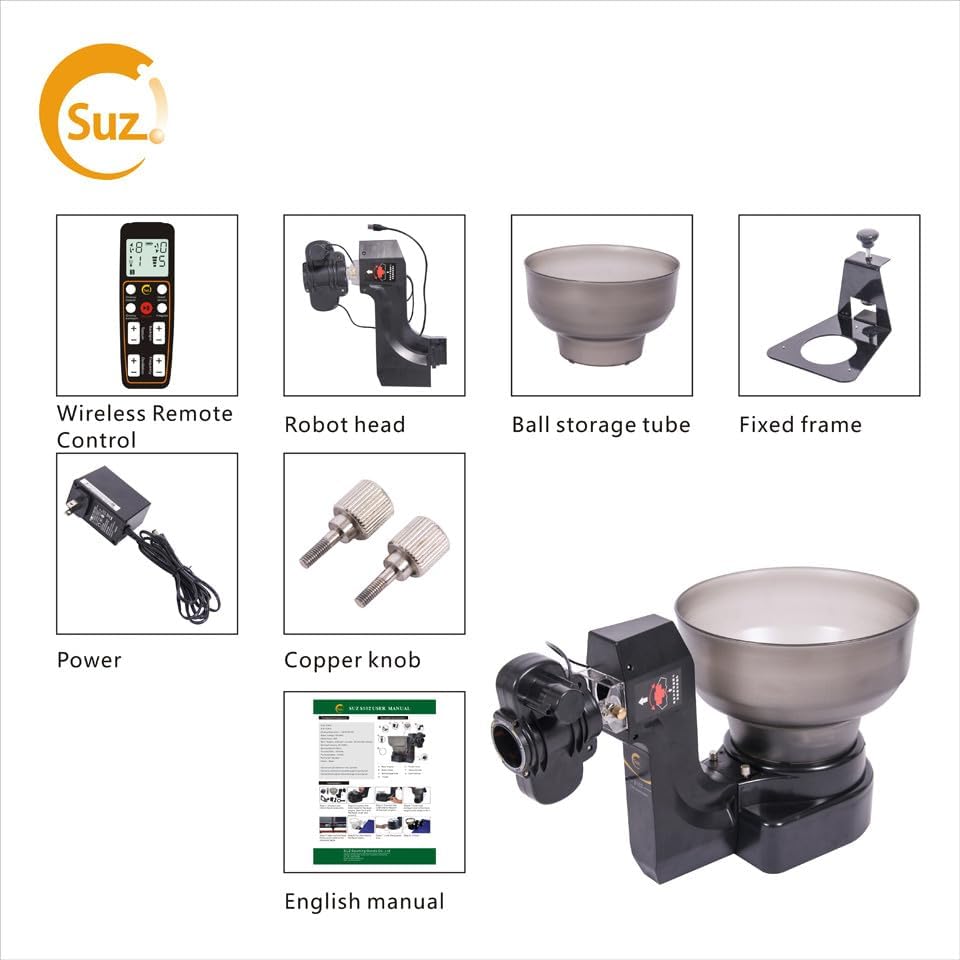
Image Description: This image displays all the components included in the Suz S102 Table Tennis Robot package. From left to right, top to bottom, the items are: Wireless Remote Control, Robot Head, Ball Storage Tube, Fixed Frame, Power Adapter, Copper Knobs, and the English Manual. These are the essential parts required for assembly and operation of the robot.
Verify that all the following components are present in your package:
- Suz S102 Robot Head
- Ball Storage Tube
- Fixed Frame for table attachment
- Wireless Remote Control
- Power Adapter (100V-240V)
- Copper Knobs (2 pcs)
- English User Manual
Setup Instructions
- Table Compatibility: Ensure your table tennis table is less than 2.5 inches thick. The robot's fixed frame is designed for tables within this thickness.
- Assembly:
- Attach the robot head to the main unit.
- Secure the ball storage tube onto the robot head.
- Mount the fixed frame to the edge of your table tennis table.
- Carefully place the assembled robot onto the fixed frame, ensuring it is stable.
- Power Connection: Connect the power adapter to the robot and plug it into a suitable electrical outlet (100V-240V).
- Remote Control Batteries: The wireless remote control does not contain batteries upon purchase. Please install the required batteries (not included) before use.
- Ball Loading: Load at least 20 table tennis balls (40mm+) into the storage tube. The robot requires a minimum of 20 balls to function properly.
Operating Instructions
The Suz S102 Table Tennis Robot offers various settings to customize your training experience. All adjustments are made via the wireless remote control.

Image Description: This diagram illustrates the functions of the Suz S102 remote control. It highlights buttons for adjusting topspin, underspin, oscillation, and serving frequency. It also shows one-key buttons for direct service and irregular service, along with their corresponding display settings on the remote's screen.
Remote Control Functions:
- Power: Turn the robot ON/OFF.
- Topspin/Underspin: Adjust the spin level.
- For direct serve (ball bounces once): Set topspin to 6 and backspin to 2 or 3.
- For indirect serve (ball bounces twice): Set topspin to 4 and backspin to 3.
- Oscillation: Controls the side-to-side movement of the robot head for varied ball placement.
- Serving Frequency: Adjusts the rate at which balls are served (40-70 balls per minute). Ensure frequency is at least 1 for proper operation.
- Direct Service: One-button setting for a quick, consistent serve.
- Irregular Service: One-button setting for varied, random serves.
Adjusting Ball Trajectory and Spin:

Image Description: This image illustrates the eight different types of spin the Suz S102 robot can produce. It shows the robot head at the center, with arrows and labels indicating topspin, underspin, leftspin, rightspin, left side spin, right side spin, left underspin, and right underspin, demonstrating the versatility of the machine's spin capabilities.

Image Description: This diagram visually explains various ball trajectories the robot can achieve. It shows examples of a high drop, an attack shot, a "one jump ball" (where the ball bounces once on the table before being hit), and a "two jump ball" (where the ball bounces twice on the table before being hit), demonstrating the adjustable height and bounce patterns.
The robot supports various spin patterns including no spin, topspin, backspin, and side spin. You can also adjust the robot head up and down to achieve different ball trajectories, such as direct serve (one bounce) or indirect serve (two bounces).
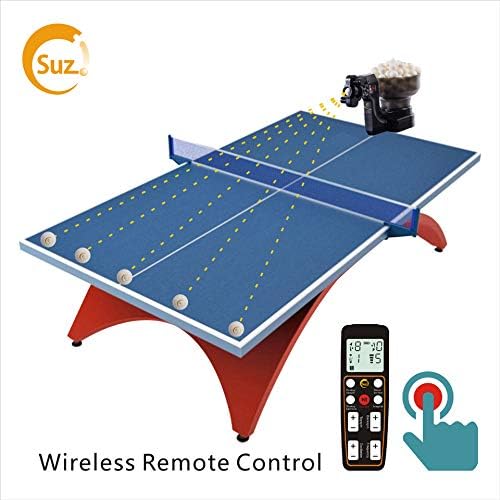
Image Description: This image shows the Suz S102 Table Tennis Robot positioned on a table tennis table, with its wireless remote control nearby. Dotted lines illustrate various ball trajectories across the table, indicating the robot's ability to distribute balls to different areas for comprehensive training.
Maintenance
- Cleaning: If the robot is not used for a long time, clean it thoroughly to prevent dust accumulation.
- Storage: Store the robot in its original box or a protective bag when not in use to keep it free from dust and damage.
- Motor Wheels and Balls: Regularly clean the motor wheels and the table tennis balls to ensure optimal performance and prevent issues with ball ejection.
Troubleshooting
| Problem | Possible Cause | Solution |
|---|---|---|
| Robot not serving properly / No balls ejected. | Insufficient balls in storage tube; Ball frequency set too low. | Ensure at least 20 balls are in the storage tube. Set ball frequency on remote control to at least 1. |
| Balls come out very weak / Cannot go over the net. | USB connection issue; Incorrect spin settings. | Unplug and re-plug the USB connection (refer to installation Step 3 in the manual). Set topspin to 4 and backspin to 3 on the remote control. |
| Oscillation not working or behaving irregularly. | Oscillation setting too low; Motor needs assistance. | Turn Oscillation "+" to 9. Gently help the robot head turn left and right with your hand to initiate movement. Give the machine a little power to help its head wiggle. If still too fast at lowest setting, consider a 9V-3A adapter (original is 12V-3A). |
| Product stopped working after initial use. | Remote control batteries depleted or not installed; USB connection issue. | Check and replace batteries in the wireless remote control. Unplug and re-plug the USB connection. Ensure remote "Frequency" is at least 1. |
| Robot not powering up. | Power adapter issue; Internal connection. | Ensure the power adapter is securely connected to both the robot and the power outlet. If the issue persists, contact customer support. |
Important Safety Note: Adult supervision is required for children using the Suz table tennis robot. A child might be hit by balls and get hurt if the ball frequency is accidentally set too high.
Specifications
| Feature | Detail |
|---|---|
| Model | Suz S102 |
| Rated Voltage | 100V-240V |
| Rated Power | 36W |
| Ball Frequency | 40-70 balls per minute |
| Ball Speed | 4-35 m/s |
| Spin Patterns | No spin, topspin, backspin, side spin |
| Ball Trajectory | Fixed or random |
| Dimensions (Robot) | Approx. L 17 x W 15 x H 16 inches |
| Package Dimensions | 18.5 x 15.5 x 14.5 inches |
| Package Weight | 5.13 Kilograms |
| Color | Black |
| Compatible Ball Size | 40mm+ table tennis balls |
Warranty and Support
Warranty Information:
The manufacturer provides free replacement parts for any damage caused by normal wear and tear within one year from the purchase date of your Suz table tennis robot.
Customer Support:
For any assistance, questions, or help with installation, please email the manufacturer. The manufacturer's email address can be found in this manual or on the product packaging. Please refer to the original manual for specific contact details.
You can also visit the official Suz store on Amazon for more information: Suz Store
Ask a question about this manual
Ask about setup, troubleshooting, compatibility, parts, safety, or missing instructions. Manuals+ will review the question and use this page’s manual context to help answer it.