Introduction
The SAMSUNG AirDresser is an innovative clothing care system designed to refresh, sanitize, and dry your garments at home. This manual provides essential information for the proper setup, operation, maintenance, and troubleshooting of your AirDresser, ensuring optimal performance and longevity.

Figure 1: Front view of the SAMSUNG AirDresser.
Setup and Installation
The AirDresser is designed for easy installation, requiring minimal effort to get started.
Unpacking
- Carefully remove the AirDresser from its packaging.
- Ensure all packing materials are removed from inside and outside the unit.
- Verify that all accessories, including the weight kit and hangers, are present.
Placement
- Place the AirDresser on a flat, stable surface.
- Ensure adequate clearance around the unit for proper ventilation and door opening.
- The AirDresser can be placed in various locations such as a closet or laundry room.
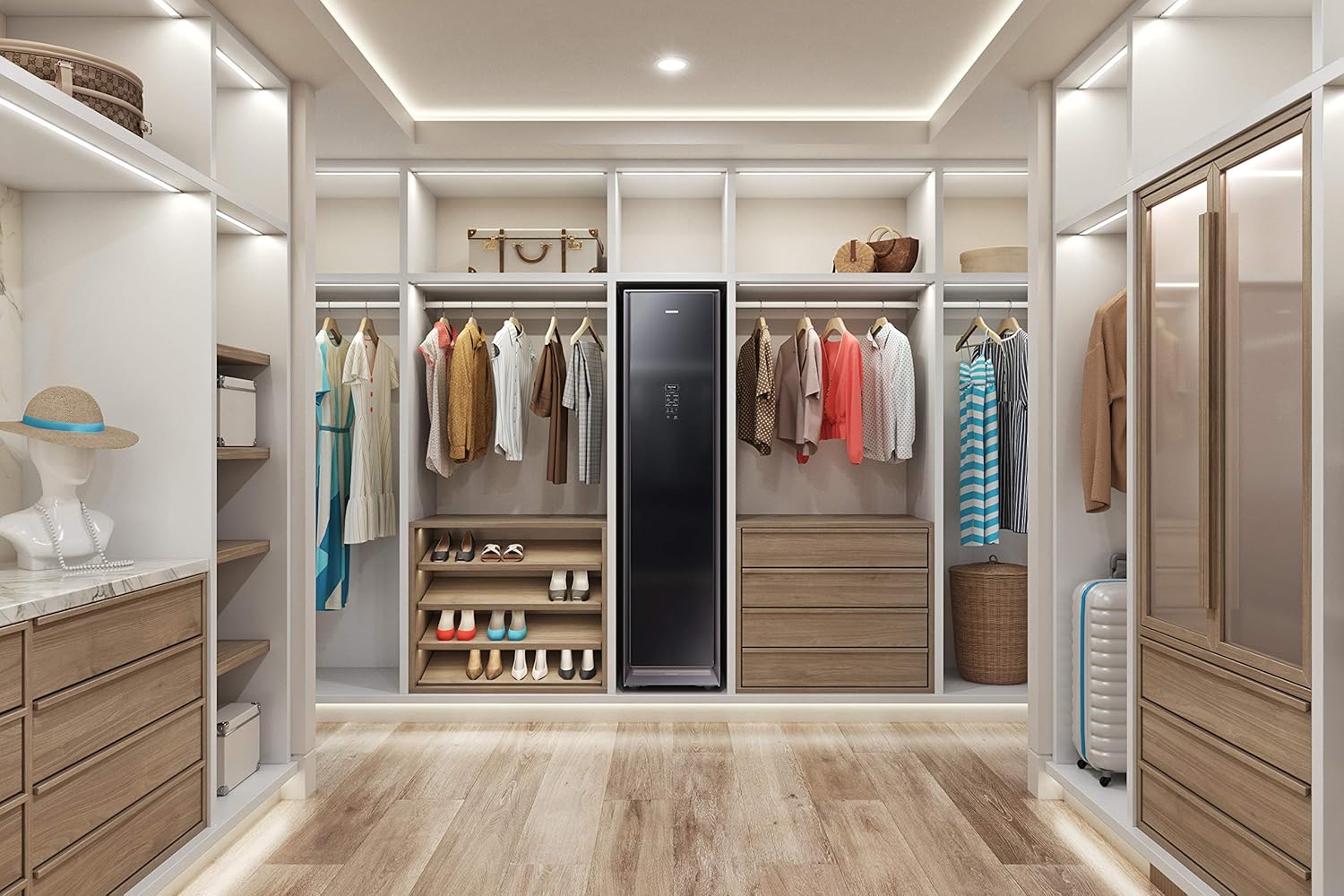
Figure 2: AirDresser placed within a walk-in closet.

Figure 3: AirDresser in a laundry room setting.
Power Connection
The AirDresser requires a standard 120V outlet. No special wiring or plumbing is necessary.
- Plug the power cord into a grounded 120V electrical outlet.
- Avoid using extension cords or adapters.
Water Tanks
The AirDresser utilizes a refill tank for clean water and a drain tank for collected wastewater.
- Locate the refill tank and drain tank at the bottom of the unit.
- Fill the refill tank with distilled or demineralized water up to the MAX line.
- Ensure the drain tank is empty before starting operation.

Figure 4: Refill and Drain Tanks.
Operating Instructions
Learn how to effectively use your AirDresser for various clothing care needs.
Loading Garments
- Hang garments on the provided Air Hangers. The AirDresser features three Air Hangers for optimal steam and air circulation.
- For pants, use the included weight kit to help smooth out wrinkles.
- Ensure garments are not overcrowded to allow for proper air and steam flow.

Figure 5: Loading garments into the AirDresser.

Figure 6: AirDresser interior with garments and accessories.
Control Panel Overview
The intuitive control panel allows you to select various care modes and settings.

Figure 7: AirDresser Control Panel.
Selecting a Cycle
The AirDresser offers 22 different cycles to cater to various fabric types and care needs. Common cycles include:
- Normal: For everyday refreshing and light wrinkle relaxation.
- Sanitize: Utilizes high-temperature steam to penetrate and sanitize clothes, eliminating 99% of certain odors and bacteria.
- Delicates: Gentle care for sensitive fabrics.
- Quick: A shorter cycle for quick refreshes.
- Drying: Gentle, low-heat drying using Heat Pump Drying technology to reduce the risk of heat damage and shrinking.
To select a cycle, use the navigation buttons on the control panel and press 'Hold to Start' to begin.
Smart Features (Wi-Fi Connectivity)
The AirDresser features built-in Wi-Fi connectivity, allowing remote control and monitoring via a smartphone app (available on Android and iOS devices). A Wi-Fi connection and a Samsung account are required.
- Start or pause cycles remotely.
- Receive notifications on cycle completion.
- Get cycle recommendations based on garment type.
Deodorizing and Scent
- The built-in deodorizing filter eliminates 99% of stubborn odors that linger in fabrics caused by smoke, perspiration, and food.
- To add a fresh scent, insert your favorite scented dryer sheet into the Fresh Finish Compartment before starting a cycle.

Figure 8: Deodorizing Filter and Fresh Finish Compartment.
Maintenance
Regular maintenance ensures the optimal performance and longevity of your AirDresser.
Self Clean Technology
The AirDresser features Self Clean technology to eliminate odors and buildup inside the unit. Run the Self Clean cycle periodically as indicated by the appliance or as needed.
Water Tank Management
- Refill Tank: Always ensure the refill tank has sufficient distilled or demineralized water before starting a cycle.
- Drain Tank: Empty the drain tank after each cycle or when prompted by the unit. This prevents water overflow and maintains hygiene.
- Cleaning Tanks: Periodically clean both tanks with mild soap and water to prevent mineral buildup or mold growth.
Deodorizing Filter Care
The deodorizing filter is designed to be long-lasting. Refer to the on-screen prompts or the full user manual for specific cleaning or replacement instructions if necessary.
Exterior Cleaning
Wipe the exterior surfaces of the AirDresser with a soft, damp cloth. Avoid abrasive cleaners or solvents.
Troubleshooting
This section provides solutions to common issues you might encounter with your AirDresser. For more complex problems, please contact customer support.
| Problem | Possible Cause | Solution |
|---|---|---|
| Unit does not power on. | Power cord not securely plugged in; no power at outlet. | Ensure power cord is fully inserted. Check household circuit breaker. |
| Steam not generated or insufficient. | Refill tank is empty or not properly seated. | Fill the refill tank with water and ensure it is correctly inserted. |
| Clothes are still wrinkled after cycle. | Overcrowding of garments; incorrect cycle selected. | Reduce the number of garments. Select a more intensive cycle if needed. Ensure garments are properly hung. |
| Unpleasant odor from unit. | Drain tank needs emptying/cleaning; unit needs Self Clean cycle. | Empty and clean the drain tank. Run the Self Clean cycle. |
Specifications
Detailed technical specifications for the SAMSUNG AirDresser Model DF60R8200DG.
| Attribute | Value |
|---|---|
| Brand | Samsung |
| Model Number | DF60R8200DG/A1 |
| Colour | Dark Black |
| Product Dimensions (L x W x H) | 61.47 x 44.45 x 184.91 cm |
| Item Weight | 88.9 kg |
| Voltage | 120 Volts |
| Wattage | 1300 watts |
| UPC | 887276369044 |
| Manufacture Year | 2020 |
Warranty and Support
For warranty information, technical support, or service requests, please contact Samsung Customer Service. Keep your proof of purchase and model number handy when contacting support.
You can find more information and support resources on the official Samsung website or by visiting the Samsung Store on Amazon.


