
Product Overview
This manual provides instructions for the proper installation, operation, and maintenance of the Epson WorkForce Enterprise WF-C21000 Magenta Ink Cartridge (Model: C13T02Y300).

Image: The Epson WorkForce Enterprise WF-C21000 Magenta Ink Cartridge, a long, rectangular cartridge with a magenta-colored section at one end, designed for high-volume printing.
The Epson WorkForce Enterprise WF-C21000 Magenta Ink Cartridge is an original Epson consumable designed to deliver vibrant magenta color output for your Epson WorkForce Enterprise series printer. For optimal performance and print quality, always use genuine Epson ink cartridges.
Setup and Installation
Follow these steps to correctly install the ink cartridge into your compatible Epson WorkForce Enterprise printer.
- Prepare the Printer: Ensure your printer is turned on and the print head is in the correct position for cartridge replacement. Refer to your printer's specific user manual for detailed instructions on opening the ink cartridge compartment.
- Unpack the Cartridge: Carefully remove the new Epson WorkForce Enterprise WF-C21000 Magenta Ink Cartridge from its packaging. Avoid touching the electrical contacts or the ink nozzle area.
- Remove Protective Materials: Gently remove any protective tape or caps from the cartridge as indicated on the packaging or the cartridge itself. Do not shake the cartridge vigorously after removing protective materials.
- Insert the Cartridge: Align the cartridge with the corresponding slot in the printer. The magenta cartridge will fit into the slot designated for magenta ink. Push the cartridge firmly until it clicks securely into place.
- Close the Compartment: Close the ink cartridge compartment cover. The printer will typically perform an initial ink charge or alignment process. Wait for this process to complete before proceeding.
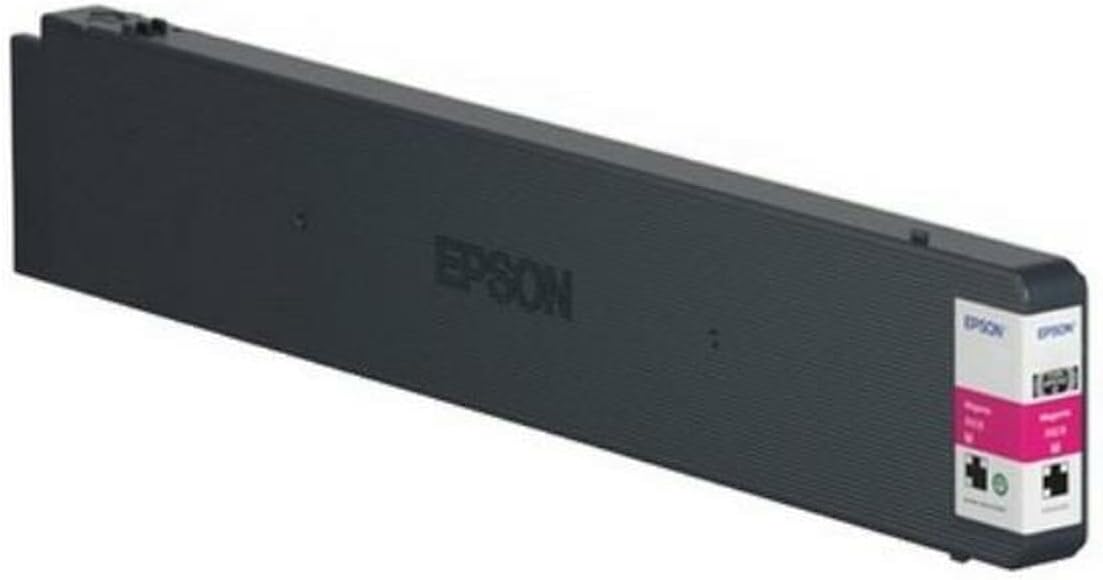
Image: A closer view of the Epson WorkForce Enterprise WF-C21000 Magenta Ink Cartridge, highlighting the Epson branding and the magenta color indicator, ready for installation.
Operating Instructions
Once the ink cartridge is installed, your printer is ready for operation. The printer will automatically detect the new cartridge and update ink levels.
- Printing: Initiate print jobs from your computer or device as usual. The printer will draw ink from the installed cartridge as needed.
- Ink Level Monitoring: Monitor ink levels through your printer's software utility or the printer's control panel. Replace the cartridge when the printer indicates low ink or when print quality deteriorates significantly.
- Print Quality: For best print quality, ensure you are using appropriate paper types and printer settings for your specific print job.
Maintenance and Storage
Proper maintenance and storage can extend the life of your ink cartridges and ensure consistent print quality.
- Storage: Store unused ink cartridges in their original sealed packaging in a cool, dry place, away from direct sunlight and extreme temperatures.
- Handling: Avoid touching the ink cartridge's electrical contacts or print head nozzles. If you need to handle the cartridge, hold it by its sides.
- Printer Maintenance: Regularly perform printer maintenance tasks such as print head cleaning and nozzle checks as recommended by your printer's manual. This helps prevent clogs and ensures optimal ink flow.
- Disposal: Dispose of empty ink cartridges responsibly according to local environmental regulations. Many manufacturers and retailers offer recycling programs for used cartridges.
Troubleshooting
If you encounter issues with your ink cartridge or print quality, consider the following common solutions:
- Cartridge Not Recognized:
- Ensure the cartridge is fully seated in its slot. Remove and reinsert it firmly until it clicks.
- Check for any protective tape or caps that may not have been fully removed.
- Clean the electrical contacts on the cartridge and in the printer with a lint-free cloth if necessary (ensure printer is off and unplugged).
- Restart the printer and your computer.
- Poor Print Quality (Streaks, Faded Prints, Incorrect Colors):
- Run a nozzle check and print head cleaning cycle from your printer's utility software or control panel. Perform this multiple times if needed.
- Verify that the correct paper type and print quality settings are selected in your printer driver.
- Check ink levels. If the magenta cartridge is low or empty, replace it.
- Ensure you are using genuine Epson ink cartridges.
- "Low Ink" or "Empty" Warning Appears Prematurely:
- This can sometimes occur if the cartridge was not fully seated or if the printer's internal counter is out of sync. Try reinserting the cartridge.
- If the issue persists and print quality is good, you may be able to continue printing until quality degrades, but be prepared to replace the cartridge soon.
If these steps do not resolve the issue, consult your printer's user manual or contact Epson customer support.
Specifications
| Feature | Detail |
|---|---|
| Brand | Epson |
| Model Name | WorkForce Enterprise WF-C21000 Magenta |
| Model Number | C13T02Y300 |
| Ink Color | Magenta |
| Product Dimensions | 60 x 60 x 85 cm (approximate package dimensions) |
| Item Weight | 1.16 kg (approximate package weight) |
| Compatible Devices | Epson WorkForce Enterprise series printers (e.g., WF-C21000) |
| First Available Date | May 1, 2020 |
Note: Dimensions and weight refer to the packaged product. Actual cartridge dimensions may vary slightly.
Warranty and Support
Specific warranty information for this ink cartridge is typically provided with the product packaging or can be found on the official Epson website. For technical support, troubleshooting assistance, or warranty claims, please contact Epson customer service directly.
Visit the official Epson support website for the most up-to-date contact information and resources.