
1. Introduction
Thank you for choosing the Sami S9950A Square Alarm Clock. This classic, silent alarm clock is designed for reliability and ease of use, featuring a green backlight, snooze function, and an ascending alarm sound. Please read this manual carefully to ensure proper setup and operation.
2. Product Features
- Silent Operation: Equipped with a silent sweep second hand for undisturbed sleep.
- Alarm Function: Reliable alarm to wake you up.
- Snooze Function: Allows for temporary suspension of the alarm.
- Green Backlight: Illuminates the dial for easy viewing in low light conditions.
- Ascending Alarm Sound: Alarm volume gradually increases.
- Classic Design: Square shape with a clear, easy-to-read dial.
- Battery Powered: Operates on one AA battery (not included).

This image displays the Sami S9950A square alarm clock from a slight angle, highlighting its classic design. The clock features a clear white dial with large, easy-to-read black Arabic numerals. The hour, minute, and second hands are black, with the Sami brand logo positioned below the 12 o'clock mark. The clock's casing is a light blue color with a silver-toned bezel, and it has a silent sweep second hand.
3. Setup
3.1 Battery Installation
- Locate the battery compartment cover on the back of the clock.
- Remove the cover by sliding or gently prying it open.
- Insert one AA battery, ensuring the positive (+) and negative (-) terminals match the indicators inside the compartment.
- Replace the battery compartment cover securely.
3.2 Setting the Time
- On the back of the clock, locate the time setting knob (usually labeled 'TIME SET' or similar).
- Rotate the knob in either direction to move the hour and minute hands until the correct time is displayed.
4. Operating Instructions
4.1 Setting the Alarm
- Locate the alarm setting knob (usually labeled 'ALARM SET') on the back of the clock.
- Rotate this knob to move the alarm hand to your desired wake-up time.
4.2 Activating/Deactivating the Alarm
- To activate the alarm, slide the alarm ON/OFF switch (often located on the side or back) to the 'ON' position.
- To deactivate the alarm, slide the switch to the 'OFF' position.
4.3 Snooze Function
- When the alarm sounds, press the snooze button (typically a large button on top of the clock).
- The alarm will temporarily stop and sound again after a few minutes (e.g., 5-7 minutes).
- To fully turn off the alarm, slide the alarm ON/OFF switch to 'OFF'.
4.4 Green Backlight
To illuminate the clock face in the dark, press the backlight button (often integrated with the snooze button or a separate button on top). The green backlight will activate for a few seconds, allowing you to read the time.
4.5 Ascending Alarm Sound
The alarm sound starts softly and gradually increases in volume, providing a gentle wake-up experience.
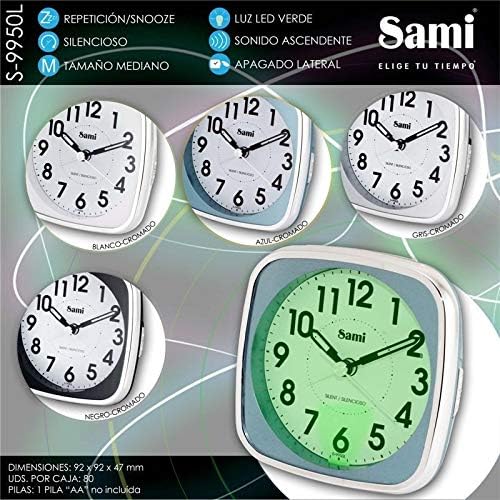
This diagram illustrates various features and specifications of the Sami S-9950L (similar to S9950A) alarm clock. Key features highlighted are: Snooze/Repetition function, Green LED backlight, Silent operation, Ascending sound, Medium size, and a side power off switch. The image also shows the clock in different color variations (white, blue, grey, black) and demonstrates the green backlight activated. Dimensions are provided as 92 x 92 x 47 mm, and it indicates that one AA battery is required (not included).
5. Maintenance
5.1 Cleaning
To clean the clock, wipe it with a soft, dry cloth. Do not use abrasive cleaners, solvents, or immerse the clock in water.
5.2 Battery Replacement
When the clock's display dims, the alarm weakens, or the clock stops functioning, it is time to replace the battery. Follow the battery installation steps in Section 3.1.
6. Troubleshooting
- Clock not working: Ensure the battery is inserted correctly with the correct polarity and is not depleted. Replace the battery if necessary.
- Alarm not sounding: Check that the alarm is set to the correct time and the alarm ON/OFF switch is in the 'ON' position. Ensure the battery has sufficient power.
- Backlight not working: Check the battery level. If the battery is low, the backlight may not function or appear dim.
7. Specifications
| Model Number | S9950A |
| Brand | Sami |
| Material | Plastic |
| Dimensions (L x W x H) | 92 x 92 x 47 mm |
| Power Source | 1 x AA Battery (not included) |
| Special Features | Alarm, Snooze, Silent Sweep Second Hand, Green Backlight, Ascending Sound |
8. Warranty and Support
For information regarding warranty, returns, or technical support, please refer to the retailer where the product was purchased or visit the official Sami website. Keep your purchase receipt as proof of purchase.