1. Introduction
This manual provides detailed instructions for the ATOTO S8 Pro Double DIN Android Autoradio, designed to enhance your in-car entertainment and connectivity experience. Please read this manual thoroughly before installation and operation to ensure proper use and optimal performance of your device.
2. Product Overview
The ATOTO S8 Pro (Gen 2) is an advanced Android car stereo featuring a 10.1-inch QLED display. It integrates a powerful UNISOC 7862 ARM Cortex Octa-Core CPU and runs on ATOTO AICE UI 11.0, based on Android Q (10.0). This unit offers comprehensive connectivity options, including wireless CarPlay and Android Auto, dual Bluetooth, and an integrated 4G cellular modem.

Image: The ATOTO S8 Pro head unit with its 10.1-inch QLED display, showing the main interface with various application icons.
3. Key Features
- 10.1-inch QLED Display: Full HD 1280x720 capacitive touchscreen with 600cd/m2 brightness, offering a 178° full viewing angle and high contrast.
- Wireless CarPlay & Android Auto: Seamless smartphone integration for navigation, music, calls, and messages.
- Dual Bluetooth: BT1 (Qualcomm Bluetooth 5.0) with aptX and aptX HD codec for high-quality audio streaming and hands-free calling. BT2 (Bluetooth 4.1) for internet tethering and connecting other BT devices.
- Integrated 4G Cellular Modem: Supports major European and Asian frequency bands for direct internet access (SIM card not included).
- Advanced Audio Processing: Built-in Digital Signal Processor (DSP) with 32-band EQ, 9 preset EQ modes, signal delay adjustment, bass boost, and bass filter. BTL Max 4*49W / RMS 4*29W amplifier.
- DriveChat AI Assistant: Voice control for managing the car radio, answering calls, and controlling music, with customizable wake words.
- Virtual Surround-View (VSV) & Live Rear-View (LRV): Requires ATOTO AC-HD03LR camera (not included) for enhanced parking and driving visibility.
- Speed Compensated Volume Control (SCVC): Automatically adjusts volume based on vehicle speed to counteract road noise.
- Multiple Internet Access Options: WiFi, Bluetooth tethering, USB tethering, and integrated 4G modem.
- Quick System Boot & Split Screen Display: Efficient operation and multitasking capabilities.

Image: The DriveChat GenAI Assistant interface on the ATOTO S8 Pro screen, highlighting AI-powered voice control and various chatbot functionalities.
4. Package Contents
Verify that all items listed below are included in your product package. If any items are missing or damaged, please contact customer support.
- ATOTO S8 Pro Head Unit (10.1-inch display)
- 20-Pin Wire Harness
- RCA Cable Set
- 4-in-1 Antenna (WiFi/GPS/Cellular Network)
- 2-in-1 USB Cable (External Storage & Phone Link)
- External Microphone
- DIN Pocket
- DIN Sleeve 1
- DIN Sleeve 2
- Mounting Brackets
- Mounting Screws
- Online Resources Quick Guide
- Product Online Support Card

Image: A visual representation of all components included in the ATOTO S8 Pro package, such as the head unit, wiring harnesses, antennas, USB cables, microphone, mounting hardware, and documentation.
5. Setup and Installation
5.1. Installation Guidelines
The ATOTO S8 Pro uses a DAH10D mounting style, which is a double DIN adaptive head unit for a 10.1-inch floating screen. The 10.1-inch screen (252x155 mm) extends from the double DIN base (178x100 mm), allowing for height and viewing angle adjustments. Ensure that the screen does not obstruct vehicle controls or air vents after installation. Professional installation is recommended.
5.2. Wiring Diagram
Refer to the following diagram for correct wiring connections. Incorrect wiring can damage the unit or vehicle electrical system.

Image: Detailed wiring diagram for the ATOTO S8 Pro, showing connections for power, speakers, RCA outputs, USB, microphone, GPS/4G antenna, and steering wheel controls.
5.3. Display Module Installation
When installing the display module, ensure all screw holes are properly aligned and tightened. Failure to do so may result in display issues such as scratches, frozen screens, or blurry images.
6. Operating Instructions
6.1. System Navigation
The unit runs on ATOTO AICE UI 11.0. Navigate through applications and settings using the 10.1-inch capacitive touchscreen. The system supports multi-finger gestures for quick access to multitasking menus, EQ modes, and brightness adjustments.

Image: Illustration of two-finger and three-finger touch gestures for quick access to various functions on the ATOTO S8 Pro screen.
6.2. Connectivity
- Internet Access: Connect to the internet via built-in WiFi, Bluetooth tethering from your phone, USB tethering, or by inserting a 4G SIM card into the integrated cellular modem.
- Bluetooth: BT1 (Bluetooth 5.0) handles phone calls and high-quality audio streaming with aptX HD. BT2 (Bluetooth 4.1) is for internet tethering and connecting other Bluetooth devices like OBDII scanners.
- Phone Integration (CarPlay/Android Auto): Connect your iPhone or Android smartphone wirelessly or via USB for seamless access to navigation, music, messaging, and calls directly from the S8 Pro display.
- GPS Navigation: The integrated GPS module with an external antenna uses Google Maps as the default navigation application. Offline map data can be downloaded for use without an internet connection.

Image: Diagram illustrating the multiple network options (4G, WiFi, Bluetooth, USB tethering) and seamless IoT hub capabilities of the ATOTO S8 Pro, showing connections to various Bluetooth-enabled devices.
6.3. Audio Settings
Utilize the built-in DSP to fine-tune your audio experience. Adjust the 32-band equalizer, select from 9 preset EQ modes, set signal delays, and control bass boost and filter settings. The unit provides 4-channel RCA audio output and a separate sub-woofer output for connecting external amplifiers.

Image: Visual representation of the ATOTO S8 Pro's high-fidelity audio features, including Speed Compensated Volume Control (SCVC), Digital Signal Processor (DSP), 36-band EQ, and 4V RCA outputs for a sophisticated audio system.
6.4. Camera Features
When connected to an ATOTO AC-HD03LR camera (sold separately), the S8 Pro supports HD Virtual Surround-View (VSV) and Live Rear-View (LRV). VSV provides a virtual panoramic view for parking, while LRV allows you to see the rear view while driving forward, reducing blind spots caused by vehicle structures or passengers.
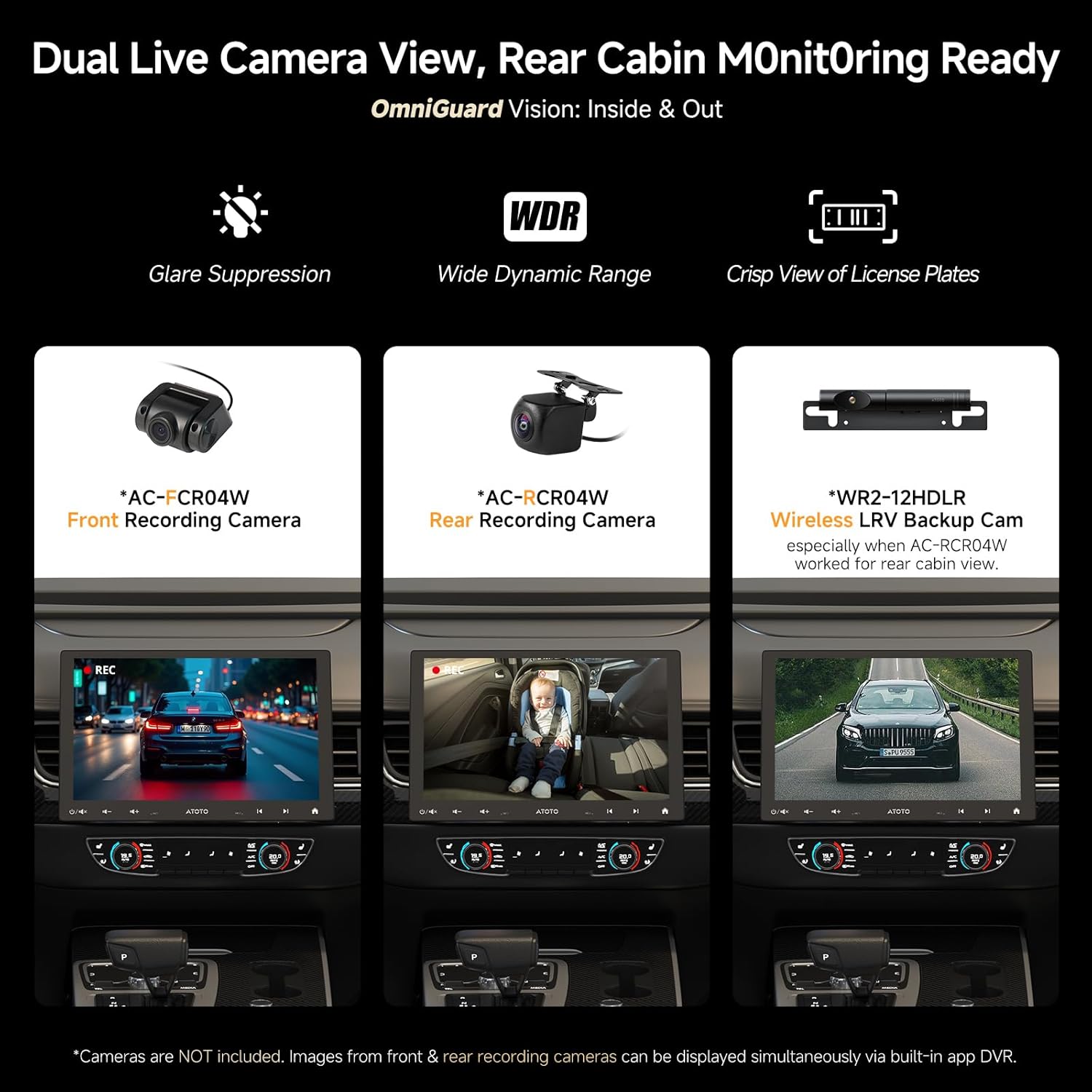
Image: Display showing the dual live camera view feature of the ATOTO S8 Pro, including front and rear recording camera feeds, with benefits like glare suppression, wide dynamic range, and crisp license plate views.
6.5. Other Functions
- Digital Photo Frame: Display memorable photos on the large HD screen.
- USB Network Tethering: Share your phone's internet data with the S8 unit via a USB connection.
7. Maintenance
To ensure the longevity and optimal performance of your ATOTO S8 Pro, follow these maintenance guidelines:
- Cleaning: Use a soft, dry cloth to clean the screen and unit. Avoid abrasive cleaners or solvents.
- Software Updates: Regularly check for and install system firmware updates available via OTA (Over-The-Air) through the FindApps application. Updates often include performance improvements and new features.
- Environmental Conditions: Avoid exposing the unit to extreme temperatures, direct sunlight for prolonged periods, or excessive moisture.
8. Troubleshooting
If you encounter issues with your ATOTO S8 Pro, refer to the following common troubleshooting tips:
- Display Issues (Scratches, Frozen Screen, Blurry): Ensure the display module is securely installed with all screws tightened. Loose connections can cause these problems.
- No Power: Check all power connections according to the wiring diagram. Verify vehicle's fuse for the stereo.
- No Sound: Check speaker connections and ensure the volume is not muted or set too low. Verify amplifier connections if applicable.
- Connectivity Problems (Bluetooth/WiFi/4G): Ensure antennas are properly connected. For 4G, verify SIM card insertion and activation. For Bluetooth/WiFi, ensure devices are within range and correctly paired/connected.
- CarPlay/Android Auto Not Connecting: Ensure your smartphone is compatible and its operating system is up to date. Try both wired and wireless connections. A system firmware update on the S8 Pro may be required.
- Screen Blocking Vehicle Controls: Due to the floating screen design, in some vehicles, the screen edge might block air vents or buttons. If this is unacceptable, consider alternative ATOTO models with different mounting styles.
For persistent issues, consult the online support resources or contact ATOTO customer service.
9. Specifications
| Brand | ATOTO |
| Model Number | S8G2104PR-A (Item Model Number: S8G1104MS) |
| Screen Size | 10.1 Inches |
| Display Type | QLED, 1280x720 Full HD Capacitive Touchscreen |
| Processor | UNISOC 7862 ARM Cortex Octa-Core (up to 1.8 GHz) |
| Operating System | ATOTO AICE UI 11.0 (based on Android Q 10.0) |
| Connectivity Technology | 4G LTE, Dual Bluetooth (5.0 & 4.1), Wi-Fi (2.4G/5G), USB |
| Special Features | Wireless CarPlay & Android Auto, aptX HD Bluetooth, GPS Tracking, HD Virtual Surround-View (VSV), Live Rear-View (LRV), DriveChat AI, DSP, SCVC |
| Audio Output | 4*49W Max / 4*29W RMS, 4-channel RCA, Sub-woofer output, SPDIF Optical Output |
| Compatible Devices | Amplifier, Speaker |
| Storage | 3GB RAM + 32GB ROM (Micro SD slot up to 512GB) |
| USB Interfaces | 5 (4 for data/phone link, 1 for fast charging) |
10. Warranty and Support
ATOTO offers comprehensive support for its products:
- Product Care: Enjoy 12 months of standard product care, extendable by an additional 6 months upon registration.
- Software Updates: Continuous system firmware updates are available via OTA (Over-The-Air) through the FindApps application, ensuring your unit stays current with the latest features and improvements.
- Customer Support: For any inquiries, technical assistance, or warranty claims, please refer to the online resources quick guide or contact ATOTO support directly. Contact information can typically be found on the product online support card or the official ATOTO website.

Image: Information regarding ATOTO's 12+6 months product care, OTA updates via FindApps, and options to request help, indicating comprehensive customer support.


