
1. Introduction
The FUNMILY Walking Pad TR71206 is a compact and portable under-desk treadmill designed for walking and light jogging. This manual provides essential information for safe operation, setup, maintenance, and troubleshooting to ensure optimal performance and user safety.

Image 1.1: A user walking on the FUNMILY Walking Pad TR71206, demonstrating its compact design and functionality.
2. Safety Information
Please read all safety instructions carefully before using the treadmill. Failure to follow these instructions may result in injury or damage to the product.
- Maximum Weight Capacity: The treadmill supports a maximum user weight of 300 lbs (136 kg). Do not exceed this limit.
- Speed Range: The adjustable speed range is 0.5 to 4 MPH. This treadmill is designed for walking and light jogging, not high-speed running.
- Running Surface: The spacious 17" x 42" running surface provides ample room. Ensure you maintain proper balance and stay centered on the belt during use.
- Shock Absorption: The 7-layer anti-slip running belt, 6 silicone shock absorbers, and 2 soft rubber cushions are designed to reduce impact on joints.
- Remote Control: The treadmill is controlled exclusively via the remote control. Keep the remote accessible and ensure its battery is functional. There is no manual control panel on the unit itself.
- No Safety Key: This model does not include a safety key feature. Exercise caution and be aware of your surroundings.
- Stability: Place the treadmill on a flat, stable surface. Ensure adequate clear space around the treadmill (at least 2 feet on all sides and 6 feet behind) to prevent accidents.
- Support: If using as an under-desk treadmill, ensure your desk or a nearby stable object provides adequate support if needed.
- Footwear: Always wear appropriate athletic footwear when using the treadmill.
- Medical Advice: Consult a physician before starting any exercise program. Stop exercising immediately if you feel faint, dizzy, or experience pain.
3. Package Contents
Verify that all items are present in the package:
- FUNMILY Walking Pad TR71206 Treadmill
- Remote Control (requires 1x CR2032 battery, not always included)
- User Manual
- Tool Kit
- Treadmill Lubricant (2 bottles)
4. Setup Instructions
The FUNMILY Walking Pad TR71206 requires no assembly and is ready for use directly out of the box.
4.1 Initial Lubrication
Before first use, it is crucial to lubricate the running belt. The treadmill comes with two bottles of lubricant. Apply lubricant to the underside of the running belt as instructed in the maintenance section to ensure smooth operation and prevent damage.
4.2 Placement
Place the treadmill on a firm, level surface. Ensure there is sufficient space around the unit for safe operation and to prevent obstruction.
5. Operating Instructions
5.1 Powering On/Off
Connect the power cord to a grounded electrical outlet. Locate the main power switch on the treadmill (typically at the front or rear) and switch it to the 'ON' position. To power off, switch the main power switch to 'OFF' and unplug the unit.
5.2 Using the Remote Control
The remote control is your primary interface for operating the treadmill. Ensure the CR2032 battery is correctly installed.
- Start Key: Press to begin the treadmill belt movement.
- Stop Key: Press to stop the treadmill belt movement.
- Speed +: Press to increase the treadmill speed.
- Speed -: Press to decrease the treadmill speed.

Image 5.1: The remote control for the FUNMILY Walking Pad TR71206, showing buttons for Start, Stop, Speed+, and Speed-. The LED display shows workout metrics.
5.3 LED Display
The integrated LED display shows important workout metrics, cycling through them automatically:
- Time: Duration of your workout.
- Speed: Current speed in MPH.
- Distance: Total distance covered.
- Calories Burned: Estimated calories expended.
5.4 Workout Programs
The treadmill offers 12 built-in workout programs. Refer to the specific program details in the included user manual for instructions on how to select and utilize these programs to vary your exercise routine.
5.5 Recommended Usage Speeds
- Working (Under Desk): 0.5 - 1.5 MPH
- Walking: 1.5 - 2.5 MPH
- Jogging: 2.5 - 4.0 MPH

Image 5.2: Visual guide illustrating recommended speed ranges for different activities: working, walking, and jogging.
6. Maintenance
Regular maintenance ensures the longevity and safe operation of your treadmill.
6.1 Lubrication
The running belt requires regular lubrication to reduce friction and wear. Use the provided silicone oil. Lift the edge of the running belt and apply a small amount of lubricant evenly to the center of the deck beneath the belt. Run the treadmill at a low speed (e.g., 1 MPH) for 5 minutes after lubrication to distribute the oil. Lubricate every 30-50 hours of use, or as needed if the belt feels dry or makes unusual noises.
6.2 Cleaning
Wipe down the treadmill surface with a damp cloth after each use to remove sweat and dust. Do not use abrasive cleaners or solvents. Keep the area around the motor clean and free of dust buildup.
6.3 Belt Adjustment
If the running belt shifts to one side or slips, it may need adjustment. Use the included tool kit to adjust the tension bolts at the rear of the treadmill. Turn the bolts in small increments (quarter turns) and test the belt until it is centered and properly tensioned. Refer to the detailed instructions in the included user manual for precise belt adjustment procedures.
7. Troubleshooting
If you encounter issues with your treadmill, refer to the following common problems and solutions:
- Treadmill does not power on:
- Ensure the power cord is securely plugged into a working outlet.
- Check that the main power switch is in the 'ON' position.
- Verify the circuit breaker has not tripped.
- Remote control is unresponsive:
- Replace the CR2032 battery in the remote control.
- Ensure there are no obstructions between the remote and the treadmill's receiver.
- Running belt slips or hesitates:
- The belt may require lubrication. Refer to Section 6.1.
- The belt tension may be too loose. Refer to Section 6.3 for adjustment.
- Unusual noises during operation:
- Check for foreign objects under the belt or near the motor.
- Lubricate the running belt if it sounds dry.
- Ensure the treadmill is on a level surface.
- LED display is not working correctly:
- Power cycle the treadmill (turn off, unplug, wait 30 seconds, plug in, turn on).
- If the issue persists, contact customer support.
8. Specifications
| Attribute | Specification |
|---|---|
| Brand | FUNMILY |
| Model | TR71206 |
| Motor Horsepower | 2.5 HP |
| Speed Range | 0.5 - 4 MPH |
| Maximum Weight Capacity | 300 lbs |
| Running Surface (L x W) | 42" x 17" |
| Product Dimensions (D x W x H) | 47.24" x 22.44" x 6.1" |
| Item Weight | 40.6 lbs |
| Material | Alloy Steel |
| Display Type | LED |
| Input Power | 1500 Watts |
| Metrics Measured | Calories Burned, Distance, Speed, Time |
| Included Components | User Manual, Tool Kit |

Image 8.1: Illustration of the 2.5 HP quiet motor, highlighting its low noise operation (under 45dB) and 300 lbs weight capacity.
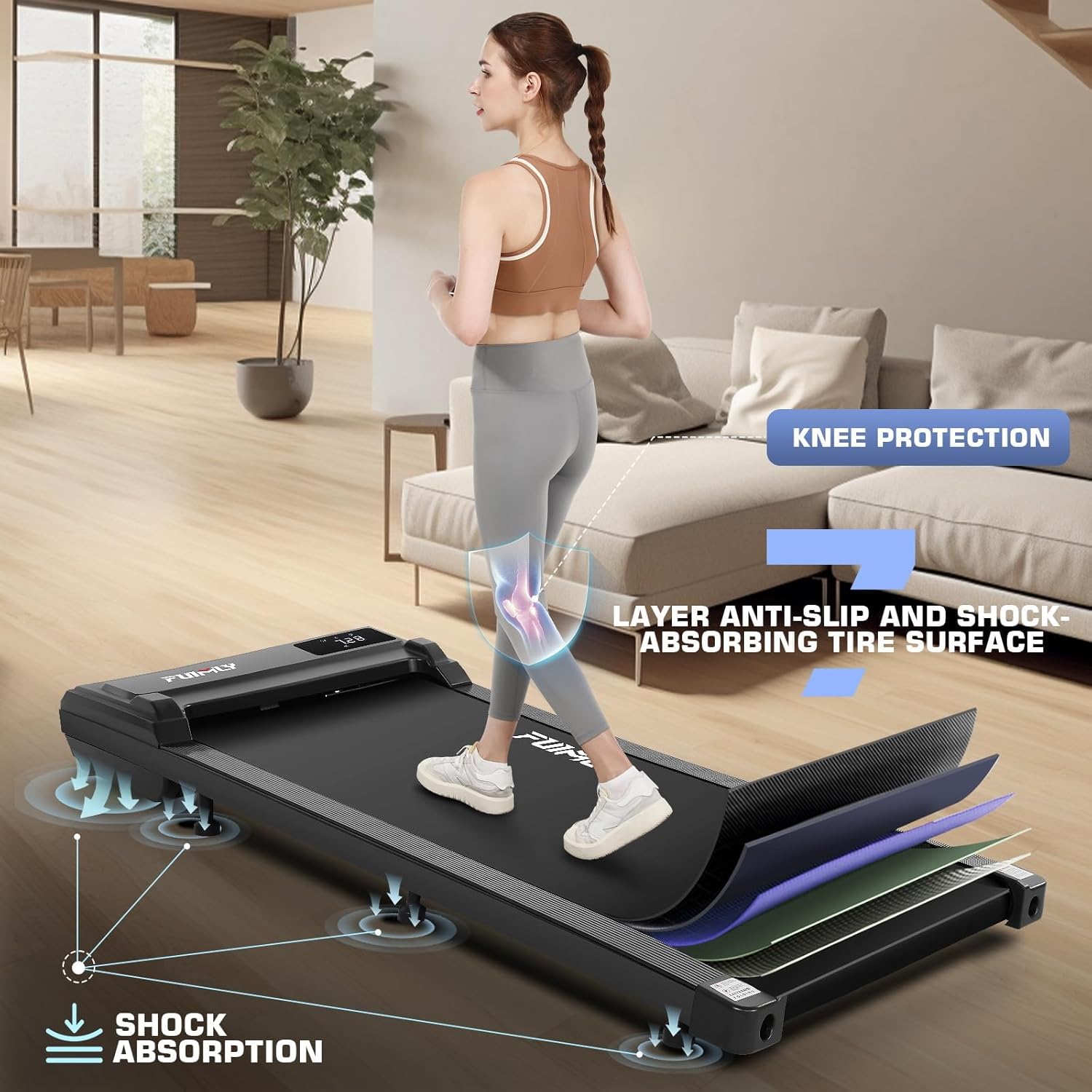
Image 8.2: Diagram showing the multi-layer anti-slip and shock-absorbing running surface designed for knee protection.

Image 8.3: Comparison illustrating the wide 16-inch running track for comfortable strides.

Image 8.4: Demonstrates the transport wheels for easy movement and various space-saving storage methods, such as under a sofa or upright against a wall.
9. Warranty and Support
The FUNMILY Walking Pad TR71206 comes with a one-year warranty, which includes free part replacement during the warranty period. We are committed to product quality and customer satisfaction.
If you have any questions, concerns, or require assistance with your treadmill, please contact FUNMILY customer support. Refer to the contact information provided in your product packaging or on the official FUNMILY website.