
1. Introduction
The ASUS L406MA-WH02 is a compact and lightweight 14-inch laptop designed for productivity and portability. It features an Intel Celeron N4000 processor, 4GB RAM, and 64GB eMMC flash storage, making it suitable for everyday tasks. This manual provides essential information for setting up, operating, maintaining, and troubleshooting your device.

Figure 1: ASUS L406MA-WH02 Laptop, Slate Gray
2. What's in the Box
Verify that all items are present in the package:
- ASUS L406MA-WH02 Laptop
- Power Adapter
- User Guide
- Warranty Card
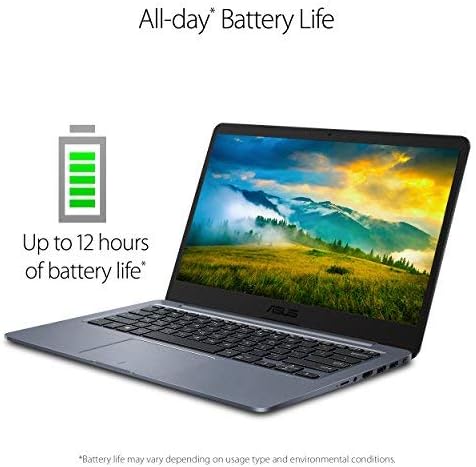
Figure 2: Laptop and accessories as packaged
3. Setup Guide
3.1 Initial Power-On and Charging
- Unpack the laptop and power adapter from the box.
- Connect the power adapter to the laptop's charging port and then to a power outlet.
- Open the laptop lid. The laptop may power on automatically or you may need to press the power button.
- Follow the on-screen instructions to complete the initial Windows 10 setup.
3.2 Windows 10 in S Mode
Your laptop comes with Windows 10 Home in S mode, which is designed for security and performance by exclusively using apps from the Microsoft Store. If you need to install apps from outside the Microsoft Store, you can switch out of S mode. This is a one-way process and cannot be reversed.
To switch out of S mode:
- Go to Settings > Update & Security > Activation.
- In the Switch to Windows 10 Home or Switch to Windows 10 Pro section, select Go to the Store.
- On the Switch out of S mode (or similar) page that appears in the Microsoft Store, select the Get button.
4. Operating Instructions
4.1 Key Features
- Display: 14.0'' HD (1366x768) matte display with ASUS NanoEdge Bezel for an immersive viewing experience.
- Portability: Thin and lightweight design, measuring 0.7 inches thin and weighing 2.87 lbs, ideal for users on the go.
- Keyboard: Ergonomic chiclet keyboard for comfortable typing.
- Connectivity: Lightning-fast Wi-Fi 5 (802.11ac) ensures stable and quick internet access.
- Storage & Performance: 64GB eMMC flash storage and 4GB LPDDR4 RAM provide fast boot times and efficient application performance.

Figure 3: The thin and light design of the ASUS L406MA-WH02 laptop.
4.2 MyASUS Application
The MyASUS application provides a suite of features to enhance your laptop experience, including system updates, diagnostics, and customization options. It allows you to manage various settings such as battery health, fan profiles, display settings (Splendid Eye Care, Tru2Life), noise cancellation, and Wi-Fi SmartConnect.
Video 1: Official MyASUS Product Video. This video demonstrates the features and benefits of the MyASUS application, including system updates, diagnostics, and customization options for your ASUS laptop.
5. Maintenance
5.1 General Care
- Keep the laptop clean by regularly wiping the screen and keyboard with a soft, lint-free cloth.
- Avoid exposing the laptop to extreme temperatures, direct sunlight, or high humidity.
- Do not place heavy objects on the laptop.
5.2 Battery Care
To maximize battery lifespan, avoid constantly keeping the laptop plugged in at 100% charge. Periodically discharge the battery and recharge it. The MyASUS application offers battery health management features to optimize battery longevity.

Figure 4: The ASUS L406MA-WH02 offers up to 10 hours of battery life, depending on usage.
6. Troubleshooting
6.1 Common Issues and Solutions
- Laptop not powering on: Ensure the power adapter is securely connected and the battery has sufficient charge. Try pressing and holding the power button for 15-20 seconds.
- Slow performance: Close unnecessary applications, check for Windows updates, or consider switching out of Windows 10 S mode if you require more flexibility with software.
- Wi-Fi connectivity issues: Restart your router and laptop. Ensure Wi-Fi is enabled in Windows settings.
- Screen issues: If the screen is blank or flickering, try connecting an external monitor to determine if the issue is with the laptop's display or graphics driver.
For more detailed troubleshooting or persistent issues, refer to the MyASUS application's diagnostic tools or contact ASUS support.
7. Specifications
| Feature | Detail |
|---|---|
| Brand | ASUS |
| Model Name | ASUS Laptop L406 |
| Screen Size | 14 Inches |
| Color | Slate Gray |
| Hard Disk Size | 64 GB eMMC |
| CPU Model | Intel Celeron N4000 (up to 2.6 GHz) |
| RAM Memory Installed Size | 4 GB LPDDR4 |
| Operating System | Windows 10 Home in S mode |
| Graphics Coprocessor | Intel UHD Graphics 600 |
| Item Weight | 2.9 Pounds |
| Item Dimensions (L x W x Thickness) | 12.8"L x 8.9"W x 0.7"Th |
| Total USB Ports | 2 |
| Total Number of HDMI Ports | 1 |
| Display Resolution Maximum | 1366x768 pixels |
| Battery Life | Up to 10 Hours |
| Wireless Technology | Bluetooth, Wi-Fi (802.11ac) |
8. Warranty & Support
8.1 Warranty Information
This ASUS laptop comes with a 1-year International warranty, including a 30-Day Zero Bright Dot guarantee and 2-way FREE shipping for standard warranty repair. Please refer to the included Warranty Card for full terms and conditions.
8.2 Customer Support
For technical assistance, product inquiries, or to submit a repair request, you can utilize the MyASUS application on your laptop. The application provides direct access to ASUS customer support and diagnostic tools.


