
TYC A-USB Fan-0423-358
TYC Universal Ceiling Fan Remote Control Kit User Manual
Model: A-USB Fan-0423-358
Product Overview
The TYC Universal Ceiling Fan Remote Control Kit is designed to convert traditional ceiling fan lights into wireless control units. This kit provides convenient remote operation for your ceiling fan, allowing you to adjust fan speeds and control the light without needing to reach for pull chains or wall switches. It features separate buttons for three fan speeds and light control, along with a timer function for added convenience.

Image: The TYC Universal Ceiling Fan Remote Control Kit, featuring the remote control and the receiver module.
Setup and Installation
This kit is designed for easy installation, converting your existing ceiling fan into a remote-controlled unit. Ensure you have sufficient space within your ceiling fan's canopy or housing to accommodate the receiver module.
Installation Steps:
- Safety First: Before beginning installation, ensure the power to the ceiling fan circuit is turned off at the circuit breaker.
- Access Wiring: Remove the canopy or housing of your ceiling fan to access the existing wiring.
- Connect Receiver: The receiver module requires connection of only three wires. Connect the receiver to the fan's wiring and then to the household wiring. Follow the wiring diagram provided with the product carefully.
- Secure Receiver: Carefully place the receiver module inside the fan's canopy, ensuring it fits without obstruction.
- Reassemble Fan: Reattach the fan canopy or housing.
- Restore Power: Turn the power back on at the circuit breaker.
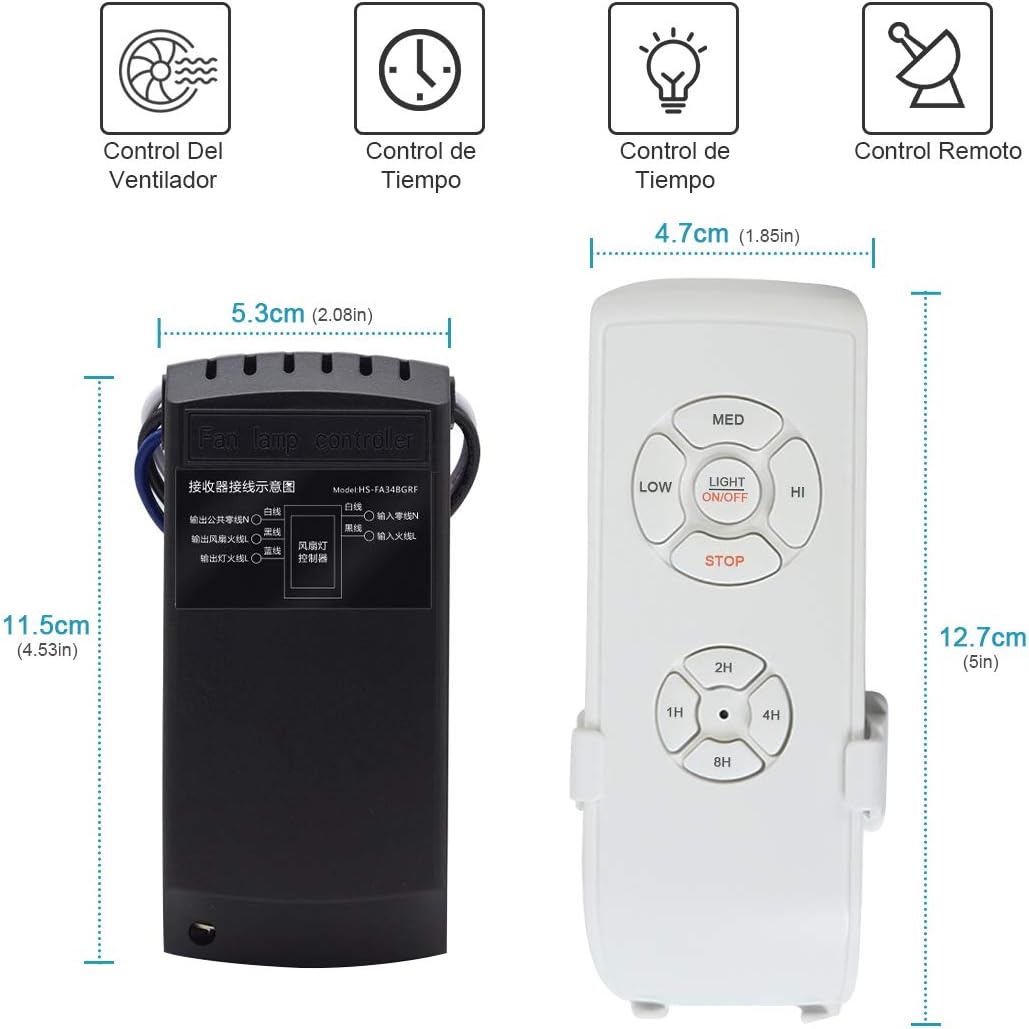
Image: Visual guide illustrating the wiring and placement of the receiver module during installation.
Important Note: If your ceiling fan has a pull chain for speed control, ensure the fan motor is set to its highest speed via the pull chain before relying solely on the remote control for speed adjustments. The receiver does not have a reverse function for the fan.
Operating Instructions
The remote control provides intuitive operation for your ceiling fan and light. Each command sent from the remote will typically be accompanied by a small "beep" sound from the receiver, confirming the command has been received.

Image: Detailed diagram of the remote control and receiver, highlighting key functions and wiring connections.
Remote Control Functions:
- LIGHT ON/OFF: Press this button to toggle the fan light on or off.
- LOW: Sets the fan speed to low.
- MED: Sets the fan speed to medium.
- HI: Sets the fan speed to high.
- STOP: Turns the fan off.
- Timer Buttons (1H, 2H, 4H, 8H): Press these buttons to set the fan to automatically turn off after 1, 2, 4, or 8 hours, respectively.

Image: Illustration of the time switch function, allowing users to set the fan to turn off after a specified duration.
Maintenance
To ensure the longevity and optimal performance of your TYC Universal Ceiling Fan Remote Control Kit, follow these general maintenance guidelines:
- Cleaning: Wipe the remote control and visible parts of the receiver with a soft, dry cloth. Do not use abrasive cleaners or solvents.
- Battery Replacement: If the remote control's range decreases or it becomes unresponsive, replace the batteries. The remote control is powered by batteries.
- Connection Check: Periodically, or if issues arise, ensure all wiring connections are secure and free from corrosion. (Only if comfortable and safe to do so, with power off).
- Environmental Conditions: Avoid exposing the remote and receiver to extreme temperatures, humidity, or direct sunlight.
Troubleshooting
If you encounter issues with your TYC Universal Ceiling Fan Remote Control Kit, please refer to the following common troubleshooting steps:
- Remote Not Responding:
- Check if the remote control batteries need replacement.
- Ensure there are no obstructions between the remote and the fan receiver.
- Verify that the power to the fan is on at the wall switch and circuit breaker.
- Fan Not Responding to Speed Commands:
- If your fan has a pull chain for speed control, ensure it is set to the highest speed. The remote controls the fan's speed based on this initial setting.
- Confirm the receiver is correctly wired to the fan motor.
- Light Not Responding:
- Check if the light bulb is securely screwed in and not burnt out.
- Verify the light wiring connection to the receiver.
- Receiver Module Does Not Fit:
- The receiver module is compact, but some fan canopies may have limited space. Carefully assess the available space before installation. In some cases, creative placement within the fan's housing might be necessary.
- Fan Speed Seems Too Low (especially on "LOW" setting):
- Some users have noted that the "LOW" speed setting might be very subtle depending on the fan model. This is a characteristic of the product's speed control.
Specifications

Image: Dimensions of the remote control and receiver module.
| Feature | Detail |
|---|---|
| Brand | TYC |
| Model Number | A-USB Fan-0423-358 |
| Voltage | 85-265V |
| Wattage | 1000W (1E+3) |
| Power Source | Battery (for remote) |
| Material | Acrylonitrile Butadiene Styrene |
| Product Dimensions (Receiver) | 5.3 cm (W) x 11.5 cm (L) |
| Product Dimensions (Remote) | 4.7 cm (W) x 12.7 cm (L) |
| Number of Speeds | 3 (Low, Medium, High) |
| Controller Type | Remote Control |
| Mounting Type | Ceiling Mount |
Warranty and Support
Warranty Information: Specific warranty details for the TYC Universal Ceiling Fan Remote Control Kit are not provided in the available product data. Please refer to the product packaging or the manufacturer's official website for the most accurate and up-to-date warranty policy.
Customer Support: For technical assistance, troubleshooting beyond this manual, or inquiries regarding your product, please contact the seller or manufacturer directly through their official support channels.
Ask a question about this manual
Ask about setup, troubleshooting, compatibility, parts, safety, or missing instructions. Manuals+ will review the question and use this page’s manual context to help answer it.