
1. Introduction
Thank you for choosing HD Ridez Aluminum Armor Side Steps. This manual provides essential information for the proper installation, operation, and maintenance of your new side steps. Please read this manual thoroughly before installation and retain it for future reference. These side steps are designed to provide a secure stepping surface and additional rocker panel protection for your vehicle.
Product Compatibility
These HD Ridez Aluminum Armor Side Steps (Model HDR-IA37S9882) are specifically designed for:
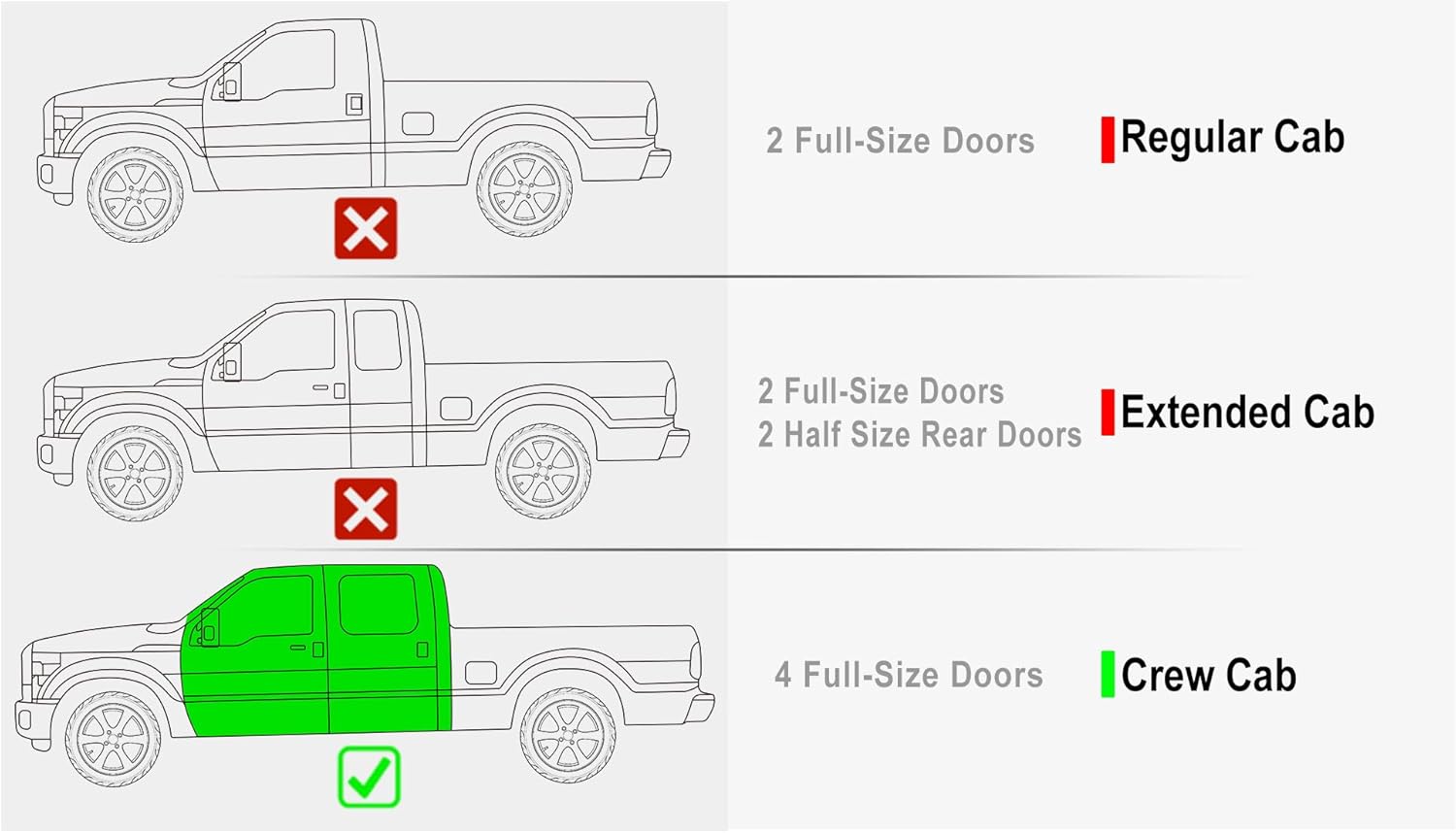
- Ford F-250 Super Duty (1999-2016) Crew Cab (4 Full Size Doors)
- Ford F-350 Super Duty (1999-2016) Crew Cab (4 Full Size Doors)
Important: Verify your vehicle's cab configuration matches the 'Crew Cab' type as shown in the diagram below to ensure proper fitment. These steps are not compatible with Regular Cab or Extended Cab models.

Key Features
- Hybrid Function: Functions as both side steps for easy entry/exit and rock sliders for rocker panel protection.
- Aggressive Design: Features a square tube and slanted grille plate design.
- Aluminum Construction: Offers enhanced all-weather protection against salt, ice, and rust compared to steel rocker steps.
- Lightweight & Strong: Lighter than traditional steel, contributing to potential fuel savings, while maintaining a 300 lbs load capacity.
- Easy Installation: Designed for a straightforward DIY installation with included brackets and hardware.
2. Safety Information
Always prioritize safety during installation and use. Failure to follow these instructions could result in injury or damage to your vehicle.
- Professional Installation Recommended: If you are not confident in your mechanical abilities, seek professional installation.
- Wear Safety Gear: Always wear appropriate personal protective equipment, including safety glasses and gloves, during installation.
- Secure Vehicle: Ensure the vehicle is parked on a level surface, the parking brake is engaged, and the engine is off before beginning installation.
- Check Fasteners: Periodically inspect all mounting hardware for tightness. Loose fasteners can lead to product failure and potential injury.
- Weight Limit: Do not exceed the maximum weight capacity of 300 lbs per side step.
- Clearance: Be aware of reduced ground clearance after installation, especially when driving off-road or over obstacles.
3. Parts List
Before beginning installation, verify that all components are present and undamaged. If any parts are missing or damaged, contact customer support immediately.
- Driver Side Step Bar (1)
- Passenger Side Step Bar (1)
- Mounting Brackets (Quantity varies by vehicle, typically 3 per side)
- Hardware Kit (Bolts, Washers, Nuts)


4. Setup (Installation)
Follow these steps carefully for proper installation. It is recommended to have a second person assist during certain stages of installation.
Tools Required:
- Socket Wrench Set
- Torque Wrench
- Measuring Tape
- Safety Glasses
- Gloves
Installation Steps:
- Prepare Vehicle: Park your Ford F-250/F-350 Super Duty Crew Cab on a level surface. Engage the parking brake and turn off the engine.
- Locate Mounting Points: Identify the factory mounting points along the rocker panel of your vehicle. These are typically pre-drilled holes in the vehicle's frame or pinch weld.
- Attach Brackets: Secure the mounting brackets to the vehicle's frame using the provided hardware. Ensure the brackets are oriented correctly (driver side vs. passenger side, front/middle/rear). Hand-tighten all bolts initially.
- Position Side Step: With assistance, carefully lift the side step bar and align it with the attached mounting brackets.
- Secure Side Step: Attach the side step bar to the brackets using the remaining hardware. Again, hand-tighten all bolts.
- Adjust and Align: Adjust the position of the side step to ensure it is level and properly aligned with the vehicle.
- Final Tightening: Once satisfied with the alignment, fully tighten all mounting hardware to the manufacturer's recommended torque specifications (refer to your vehicle's service manual for specific torque values if not provided with the side steps).
- Repeat for Other Side: Repeat the entire process for the opposite side of the vehicle.
- Final Inspection: Double-check all connections to ensure they are secure and that there is no interference with any vehicle components.
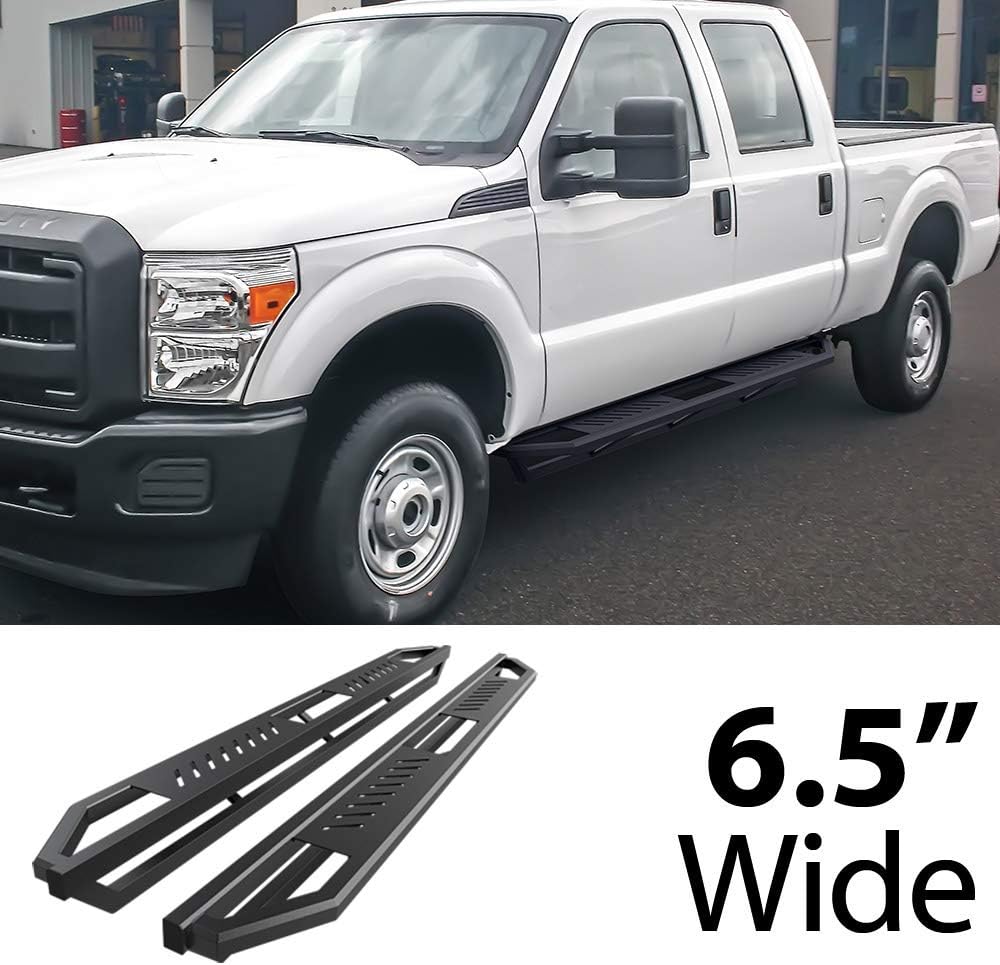
Installation Videos:
Video 4.1: Square Tube Running Boards Installation Overview

This video provides a general overview of installing square tube running boards, demonstrating the process of attaching brackets and the step bar to a truck. It shows the components and the final appearance.
Video 4.2: 6 Inch Running Boards V6 Installation

This video demonstrates the installation of 6-inch running boards, including securing the brackets and the main step component. It highlights the ease of installation and the sturdy result.
Video 4.3: Pair Running Board Nerf Bar Compatible With Ford Installation

This video specifically shows the installation of running board nerf bars compatible with Ford trucks, providing a visual guide for the mounting process and demonstrating the product's functionality.
5. Operating Instructions
The HD Ridez Aluminum Armor Side Steps are designed for straightforward use.
- Entry/Exit: Use the side steps as a stable platform to assist in entering and exiting your vehicle. Place your foot firmly on the step surface.
- Weight Distribution: Distribute your weight evenly when stepping onto the bar. Avoid placing excessive weight on a single small area.
- Rocker Panel Protection: The robust design of these side steps also provides a layer of protection for your vehicle's rocker panels against road debris and minor impacts.
6. Maintenance
Regular maintenance will ensure the longevity and optimal performance of your HD Ridez Side Steps.
- Regular Cleaning: Clean the side steps regularly with mild soap and water. Avoid abrasive cleaners or harsh chemicals that could damage the finish. Rinse thoroughly and dry to prevent water spots.
- Inspect Fasteners: Periodically (e.g., every 3-6 months or after off-road use) inspect all mounting bolts and nuts. Re-tighten any loose fasteners to ensure the steps remain securely attached to the vehicle.
- Check for Damage: Inspect the step bars and brackets for any signs of damage, corrosion, or wear. Address any issues promptly to prevent further deterioration.
- Winter Care: In areas with heavy snow or road salt, clean the steps more frequently to prevent salt buildup and potential corrosion.


7. Troubleshooting
If you encounter issues with your HD Ridez Side Steps, refer to the following common problems and solutions:
| Problem | Possible Cause | Solution |
|---|---|---|
| Side step feels loose or wobbly | Loose mounting hardware. | Inspect all bolts and nuts. Re-tighten to recommended torque specifications. |
| Difficulty installing brackets | Incorrect bracket orientation or wrong mounting points. | Refer to the installation section and diagrams to ensure correct bracket placement and orientation. Verify vehicle compatibility. |
| Side step does not align properly | Brackets or step bar not correctly positioned before final tightening. | Loosen all hardware, adjust the step bar and brackets for proper alignment, then re-tighten. |
| Unusual noises (squeaking, rattling) | Loose hardware or contact with other vehicle components. | Check all fasteners for tightness. Inspect for any points where the step bar or brackets might be rubbing against the vehicle's body or frame. Adjust as necessary. |
If the problem persists after attempting these solutions, please contact HD Ridez customer support.
8. Specifications
| Feature | Detail |
|---|---|
| Model Number | HDR-IA37S9882 |
| Material | Stainless Steel (Nerf Bars) + Steel (Brackets) |
| Exterior Finish | Aluminum (as per product description, though material lists Stainless Steel for Nerf Bars) |
| Color | Black |
| Product Dimensions (L x W x H) | 215.9 x 16.51 x 15.24 cm (85 x 6.5 x 6 inches) |
| Item Weight | 20.26 kg (44.67 lbs) |
| Weight Limit | 500 Pounds (226.8 kg) |
| Vehicle Service Type | Truck |
| UPC | 647297186422 |
Note: The product description mentions "Aluminum Armor" while specifications list "Stainless Steel (Nerf Bars) + Steel (Brackets)". For clarity, the primary stepping surface is likely aluminum or aluminum-clad, with underlying structural components being steel/stainless steel.
9. Warranty & Support
HD Ridez is committed to providing quality products. For specific warranty details, please refer to the documentation included with your purchase or contact HD Ridez customer service directly.
- Spare Part Availability: EU Spare Part Availability Duration: 5 Years.
- Customer Support: For technical assistance, missing parts, or warranty claims, please contact your retailer or HD Ridez customer support. Have your model number (HDR-IA37S9882) and purchase information ready.