
1. Product Overview
The Ginour 18V Cordless Drill (Model CD503) is a versatile and powerful tool designed for a wide range of drilling and screwdriving tasks. It features three primary functions: electric screwdriver, electric drill, and hammer drill, making it suitable for materials such as wood, ceramic tiles, metal plates, walls, and concrete.
Equipped with two 2000mAh lithium-ion batteries and a rapid charger, this drill ensures extended working times and minimal downtime. Its ergonomic design, including a soft rubber handle and an integrated LED light, enhances user comfort and visibility in various working conditions.
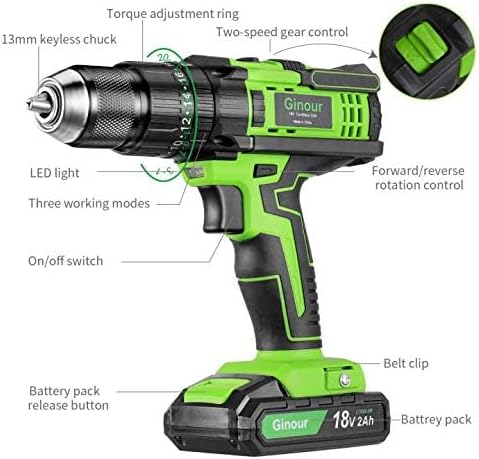
Figure 1.1: Key components of the Ginour 18V Cordless Drill. This diagram highlights the 13mm keyless chuck, torque adjustment ring, two-speed gear control, forward/reverse rotation control, on/off switch, LED light, three working modes selector, belt clip, and battery pack release button.
2. What's in the Box
Your Ginour 18V Cordless Drill package includes a comprehensive set of accessories to support various applications. Please verify all items are present upon unboxing:
- 1 x Ginour 18V Cordless Drill
- 2 x 2000mAh Lithium-ion Batteries
- 1 x Rapid Charger
- 37 x Screwdriver Bits (32 x 25mm, 5 x 50mm)
- 17 x Drill Bits (6 x Twist Drill Bits, 3 x Wood Drill Bits, 3 x Hammer Drill Bits, 3 x Glass/Tile Drill Bits, 1 x Wood Flat Drill Bit)
- 9 x Socket Wrenches (5-13mm)
- 1 x Extension Bar
- 1 x Flexible Shaft
- 1 x Belt Clip
- 1 x Carrying Case
- 1 x User Manual

Figure 2.1: Overview of the included accessories with the Ginour 18V Cordless Drill. This image displays the carrying case, metal hook, charger, two batteries, various drill bits (wood, glass/tiles, concrete, conventional), screwdriver bits (50mm and 25mm), socket wrenches, and a flexible shaft.
3. Setup and Assembly
3.1 Battery Charging and Installation
- Charging the Battery: Connect the rapid charger to a power outlet. Insert the battery pack into the charger. The battery will fully charge in approximately one hour. Ensure the battery is fully charged before first use.
- Installing the Battery: Align the battery pack with the base of the drill handle. Slide the battery into place until it clicks securely.
- Removing the Battery: Press the battery pack release button (refer to Figure 1.1) and slide the battery out of the drill handle.
3.2 Bit Installation
- Opening the Chuck: Rotate the 13mm keyless chuck counter-clockwise until the jaws are wide enough to insert the desired drill bit or screwdriver bit.
- Inserting the Bit: Insert the shank of the bit fully into the chuck jaws.
- Tightening the Chuck: Rotate the chuck clockwise firmly by hand until the bit is securely clamped. For optimal grip, you may hear a clicking sound as it tightens.
- Using the Flexible Shaft: For hard-to-reach areas, attach the flexible shaft to the chuck, then insert the desired bit into the flexible shaft's end.
4. Operating Your Cordless Drill
4.1 Power On/Off and Speed Control
- On/Off Switch: The drill is activated by pressing the trigger switch. The speed is continuously variable based on how far the trigger is pressed.
- Two-Speed Gear Control: Use the gear selector switch located on top of the drill (refer to Figure 1.1) to choose between two speed ranges:
- Speed 1 (0-400 RPM): Ideal for screwdriving and applications requiring higher torque and lower speed.
- Speed 2 (0-1400 RPM): Suitable for drilling and tasks requiring higher speed.
- Forward/Reverse Rotation Control: The direction of rotation is controlled by the switch located above the trigger (refer to Figure 1.1). Push the switch to the left for forward rotation (tightening screws, drilling) and to the right for reverse rotation (loosening screws). Center position locks the trigger for safety.
4.2 Function Selection (Screwdriver, Drill, Hammer Drill)
The Ginour Cordless Drill offers three distinct operating modes, selected via the mode selector ring near the chuck:
- Screwdriver Function: Use this mode for tightening or loosening various types of screws. The torque adjustment ring (see 4.3) should be set appropriately for the screw size and material.
- Electric Drill Function: This mode is suitable for drilling into materials such as wood, ceramic tiles, and metal plates.
- Hammer Drill Function: Engage this mode for drilling into harder materials like walls, concrete, and ceilings, utilizing the impact frequency of 0-22500 BPM.

Figure 4.1: Visual representation of the three operational functions: Screwdriver, Electric Drill, and Hammer Drill. Each function is designed for specific material types and tasks.
4.3 Torque Adjustment
The drill features a 20+3 torque setting, allowing you to select the appropriate torque for your application. The maximum torque is 45 Nm.
- Torque Ring: Rotate the torque adjustment ring (refer to Figure 1.1) to select a setting from 1 to 20 for screwdriving tasks. Lower numbers are for smaller screws or softer materials, while higher numbers are for larger screws or harder materials.
- Drill/Hammer Modes: When in drill or hammer drill mode, the torque setting is bypassed, and the drill operates at maximum power for drilling.
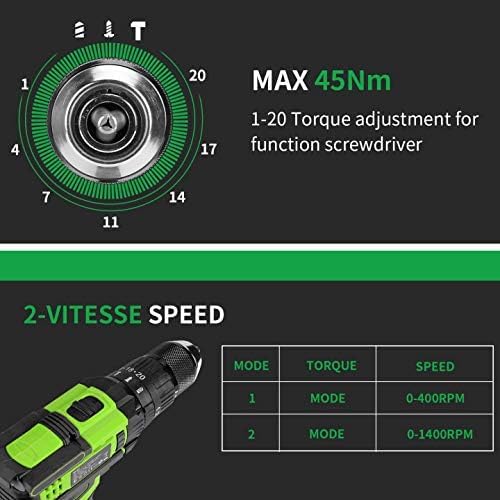
Figure 4.2: Detailed view of the torque adjustment ring (1-20 settings) and the two-speed modes with their respective RPM ranges (0-400 RPM for Mode 1, 0-1400 RPM for Mode 2).
4.4 Integrated LED Light
The drill is equipped with an LED light located above the trigger. This light automatically illuminates when the trigger is pressed, providing improved visibility in dimly lit working environments.
4.5 Ergonomics and Handling
The drill's handle is designed with a soft rubber grip for enhanced comfort and reduced fatigue during prolonged use. The compact design allows for easy maneuverability.

Figure 4.3: Demonstrating the Ginour Cordless Drill in use for drilling into wood, highlighting its ergonomic design and ease of handling.

Figure 4.4: The flexible shaft accessory in use, demonstrating its utility for reaching and working in confined or awkward spaces.
5. Maintenance and Care
5.1 Cleaning
- Always disconnect the battery pack before cleaning.
- Wipe the tool's exterior with a soft, damp cloth. Do not use harsh chemicals or abrasive cleaners.
- Keep the ventilation openings clear of dust and debris to prevent overheating. Use compressed air if necessary.
5.2 Battery Care
- Store batteries in a cool, dry place away from direct sunlight and extreme temperatures.
- Do not store fully discharged batteries for extended periods. Recharge them periodically if not in use.
- Avoid exposing batteries to water or moisture.
5.3 Storage
When not in use, store the drill and its accessories in the provided carrying case in a dry, secure location, out of reach of children.
6. Troubleshooting Common Issues
| Problem | Possible Cause | Solution |
|---|---|---|
| Drill does not turn on. | Battery is not charged or not properly installed. Trigger lock is engaged. | Ensure battery is fully charged and securely installed. Disengage the forward/reverse switch from the center (locked) position. |
| Loss of power during operation. | Battery charge is low. Overload protection activated. | Recharge the battery. Reduce pressure on the drill or use a sharper bit. Allow the tool to cool down if it feels hot. |
| Bit wobbles or falls out. | Chuck not tightened sufficiently. Bit shank is dirty or damaged. | Ensure the chuck is tightened firmly. Clean the bit shank. Replace damaged bits. |
| Drill overheats. | Continuous heavy use. Blocked ventilation slots. | Allow the drill to cool down. Clear any debris from the ventilation slots. Avoid excessive pressure during drilling. |
7. Technical Specifications
| Specification | Value |
|---|---|
| Model Number | CD503 |
| Voltage | 18 Volt (DC) |
| Battery Type | Lithium-ion |
| Battery Capacity | 2000mAh (2.0Ah) |
| Max Torque | 45 Newton Meters (Nm) |
| No-Load Speed (Speed 1) | 0-400 Revolutions per minute (RPM) |
| No-Load Speed (Speed 2) | 0-1400 Revolutions per minute (RPM) |
| Impact Frequency | 0-22500 BPM (in hammer drill mode) |
| Chuck Size | 13mm Keyless Metal Chuck |
| Torque Settings | 20+3 |
| Product Dimensions | 22 x 6 x 34 cm |
| Product Weight | 3.87 Kilograms |
| Color | Green Black |
8. Warranty and Customer Support
Ginour is committed to providing high-quality products and excellent customer service. Your Ginour 18V Cordless Drill comes with lifetime service support.
If you have any questions, concerns, or require assistance with your product, please do not hesitate to contact our customer support team:
Email: support@ginour.com
Please provide your model number (CD503) and a detailed description of your inquiry when contacting support to ensure a prompt and efficient resolution.