
DEWALT DCL077B
DEWALT 12V/20V MAX Work Light Instruction Manual
Model: DCL077B
Brand: DEWALT
Introduction
The DEWALT DCL077B 12V/20V MAX Compact Task LED Work Light is designed to provide powerful and versatile illumination for various job site conditions. Its compact and lightweight design ensures easy portability and storage, making it an essential tool for professionals.
Key features include:
- 360-degree handle for multiple orientation use.
- Powerful 2,000 lumen output.
- Natural daylight hue for accurate color rendering.
- IP54 Rated for water and dust ingress protection.
- Compact and lightweight at only 2.8 lbs (tool only).
- Tripod mountable with 5/8 inch-11 and 1/4 inch-20 threads.
- Compatible with all DEWALT 12V MAX, 20V MAX, and FLEXVOLT batteries.
Safety Information
Always read and understand all safety warnings and instructions before operating this product. Failure to follow the warnings and instructions may result in electric shock, fire, and/or serious injury.
- Eye Protection: Always wear appropriate eye protection when operating or maintaining the work light.
- Battery Safety: Use only DEWALT 12V MAX, 20V MAX, or FLEXVOLT batteries. Do not expose batteries to water or extreme temperatures.
- Light Source: Do not stare directly into the light beam. The intense light can cause eye damage.
- Flammable Materials: Do not operate the work light near flammable liquids, gases, or dust.
- Ventilation: Ensure adequate ventilation around the light during operation to prevent overheating.
- Storage: Store the work light and batteries in a cool, dry place away from direct sunlight and out of reach of children.
Components
Familiarize yourself with the main components of your DEWALT DCL077B Work Light:
- LED Light Head: The primary light source, providing up to 2000 lumens.
- Power Button: Located on the top of the unit, used to turn the light on/off and cycle through brightness settings.
- 360-Degree Handle: A robust handle that rotates fully around the light, allowing for versatile positioning and carrying.
- Battery Interface: Located at the base, where compatible DEWALT 12V/20V MAX or FLEXVOLT batteries are inserted.
- Tripod Mounts: Two threaded mounts (5/8 inch-11 and 1/4 inch-20) on the base for secure attachment to tripods or other stands.

Image: Front view of the DEWALT DCL077B Work Light, showing the LED head, power button, and handle.

Image: Angled view of the DEWALT DCL077B Work Light, highlighting its compact design and handle.

Image: Bottom view of the DEWALT DCL077B Work Light, illustrating the two tripod mounting points.
Setup
Battery Installation
- Ensure the work light is turned off.
- Align the battery pack with the battery interface on the base of the work light.
- Slide the battery pack into the interface until it clicks securely into place. Do not force the battery.
- To remove the battery, press the battery release button (if present on your battery model) and slide the battery pack out.

Image: The DEWALT DCL077B Work Light is compatible with all DEWALT 12V MAX, 20V MAX, and FLEXVOLT batteries.
Tripod Mounting
The DCL077B features two standard tripod mounting threads (5/8 inch-11 and 1/4 inch-20) on its base for stable positioning.
- Select a stable tripod or stand with a compatible mounting screw.
- Align the appropriate tripod mount on the work light with the screw on the tripod.
- Carefully screw the work light onto the tripod until it is securely fastened. Do not overtighten.
Operating Instructions
Turning On/Off and Brightness Settings
The work light features a single power button that controls both power and brightness levels.
- To Turn On: Press the power button once. The light will illuminate at its lowest brightness setting.
- To Adjust Brightness: Press the power button repeatedly to cycle through the three brightness settings (Low, Medium, High).
- To Turn Off: After cycling through the highest brightness setting, pressing the button one more time will turn the light off. Alternatively, holding the power button down for a few seconds will also turn the light off from any setting.
Handle Adjustment
The 360-degree rotating handle allows for flexible positioning of the light beam.
- Simply grasp the handle and rotate it to the desired angle. The handle will click into various positions to hold the light steady.
- This feature allows the light to be hung, stood on its base, or angled to direct light precisely where needed.
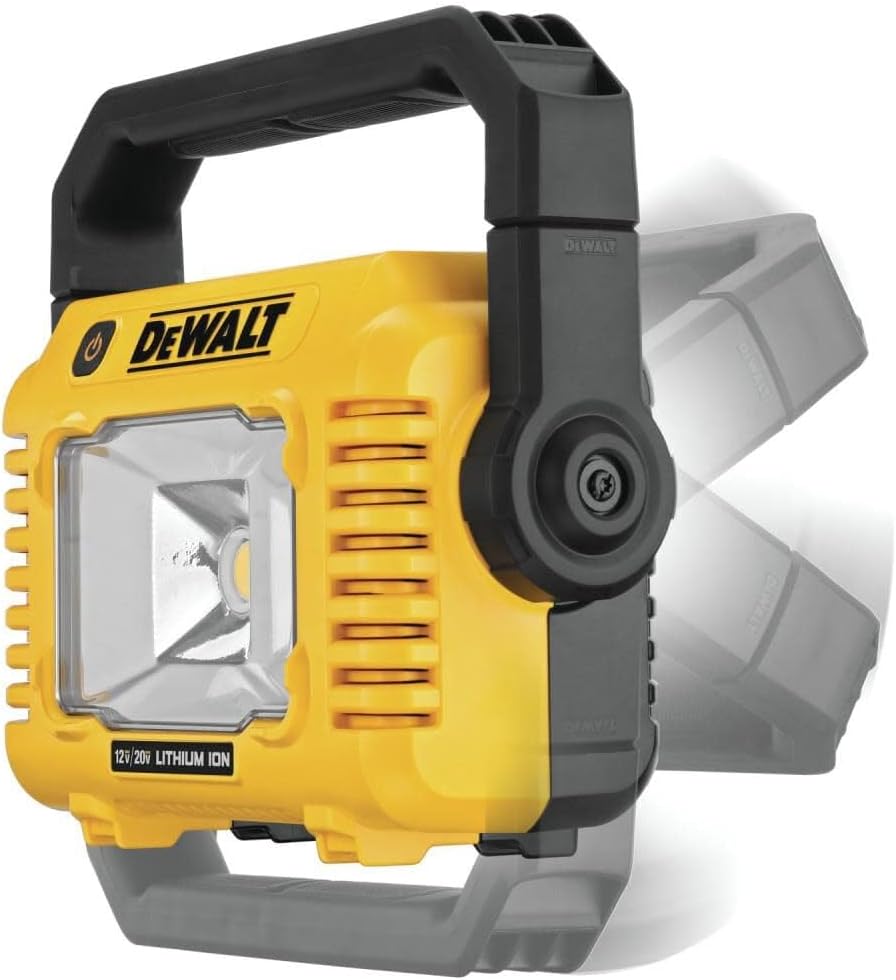
Image: The DEWALT DCL077B Work Light demonstrating the 360-degree rotation of its handle for versatile positioning.

Image: The DEWALT DCL077B Work Light effectively illuminating a dark job site area.

Image: Visual representation of the DEWALT DCL077B Work Light's 2000 lumens maximum output for illuminating dark areas.

Image: The DEWALT DCL077B Work Light features a 4000K light temperature, producing a natural daylight hue for true color assisting.
Maintenance
Cleaning
- Disconnect the battery pack before cleaning.
- Use a soft, damp cloth to wipe down the exterior of the work light. Do not use harsh chemicals or abrasive cleaners.
- Keep the lens clean for optimal light output. Gently wipe with a clean, soft cloth.
- Periodically clean any debris from the battery interface to ensure good electrical contact.
Storage
- Store the work light in a cool, dry place, away from direct sunlight and moisture.
- Remove the battery pack from the work light before storing for extended periods.
- Store batteries in a charged state, but not fully charged if storing for very long periods (refer to DEWALT battery manual for specific long-term storage recommendations).
Troubleshooting
| Problem | Possible Cause | Solution |
|---|---|---|
| Light does not turn on. | Battery not inserted correctly. Battery is discharged. Power button malfunction. | Ensure battery is fully seated and clicked into place. Charge the battery pack. Contact DEWALT service for repair. |
| Light is dim or flickers. | Battery is low. Lens is dirty. | Charge the battery pack. Clean the light lens with a soft cloth. |
| Light gets hot during use. | Normal operation. Obstructed ventilation. | Some heat is normal for high-output LEDs. Ensure ventilation fins are not blocked. Do not cover the light. |
Specifications
| Model Number | DCL077B |
| Voltage Compatibility | 12V MAX, 20V MAX, FLEXVOLT (Battery Sold Separately) |
| Light Output | Up to 2000 Lumens |
| Light Temperature | 4000K (Natural Daylight Hue) |
| Ingress Protection Rating | IP54 (Dust and Water Resistant) |
| Weight (Tool Only) | 2.8 lbs (1.36 kg) |
| Dimensions (L x W x H) | 25.65 x 13.18 x 20.32 cm (approx. 10.1 x 5.2 x 8 inches) |
| Tripod Mounts | 5/8 inch-11 and 1/4 inch-20 |
| Bulb Type | LED |
| Country of Origin | China |

Image: Diagram showing the approximate dimensions of the DEWALT DCL077B Work Light.
Warranty and Support
DEWALT stands behind its products with comprehensive warranty coverage:
- 3-Year Limited Warranty: Covers defects in material or workmanship for three years from the date of purchase.
- 1-Year Free Service: DEWALT will maintain the tool and replace worn parts caused by normal use, for free, any time during the first year after purchase.
- 90-Day Money Back Guarantee: If you are not completely satisfied with the performance of your DEWALT Power Tool, Laser, or Nailer for any reason, you can return it within 90 days from the date of purchase for a full refund.
For warranty claims, service, or technical support, please visit the official DEWALT website or contact their customer service department. Keep your proof of purchase for warranty validation.

Image: Summary of DEWALT's tool warranty: 3-Year Limited Warranty, 1-Year Free Service, and 90-Day Money Back Guarantee.
Related documentsDCL077B


Ask a question about this manual
Ask about setup, troubleshooting, compatibility, parts, safety, or missing instructions. Manuals+ will review the question and use this page’s manual context to help answer it.