
1. Introduction
Thank you for purchasing the NutriChef NCFP8 Food Processor. This appliance is designed to simplify your food preparation tasks with its versatile functions and powerful motor. Please read this manual thoroughly before first use to ensure safe and efficient operation. Keep this manual for future reference.

Image 1.1: The NutriChef NCFP8 Food Processor main unit.
2. Important Safety Instructions
When using electrical appliances, basic safety precautions should always be followed to reduce the risk of fire, electric shock, and/or injury to persons, including the following:
- Read all instructions before operating the appliance.
- To protect against electric shock, do not immerse the motor base, cord, or plug in water or other liquids.
- Close supervision is necessary when any appliance is used by or near children.
- Unplug from outlet when not in use, before assembling or disassembling parts, and before cleaning.
- Avoid contact with moving parts. Blades are sharp. Handle with care.
- Do not operate any appliance with a damaged cord or plug, or after the appliance malfunctions or has been dropped or damaged in any manner.
- The use of attachments not recommended or sold by the manufacturer may cause fire, electric shock, or injury.
- Do not use outdoors.
- Do not let cord hang over edge of table or counter, or touch hot surfaces.
- Keep hands and utensils away from moving blades while processing food to prevent the risk of severe personal injury and/or damage to the food processor. A scraper may be used but only when the food processor is not running.
- Ensure the lid is securely locked in place before operating the appliance. The unit will not start if the lid and bowl are not correctly aligned and locked.
- Do not attempt to defeat the lid interlock mechanism.
- This appliance is equipped with electronic overload protection to prevent motor overheating. The unit may automatically shut off after approximately 1 minute of continuous use. Allow it to cool down before resuming operation.
- The silicone rubber bottom suctions are designed to hold the unit securely on countertops during use. Ensure the surface is clean and dry for optimal suction.
3. Product Components
The NutriChef NCFP8 Food Processor comes with the following components:
- Motor Base Unit
- Food Processing Bowl (12-cup dry / 9-cup liquid capacity)
- Lid with Food Pusher
- Shredding/Slicing Blade Disc
- Masher Blade Disc
- Top-rated S Blade (Chopper Blade)
- Kneading Dough Blade
- Emulsifying Blade
- Citrus Juicer Attachment
- Power Cable

Image 3.1: All included components and attachment blades.
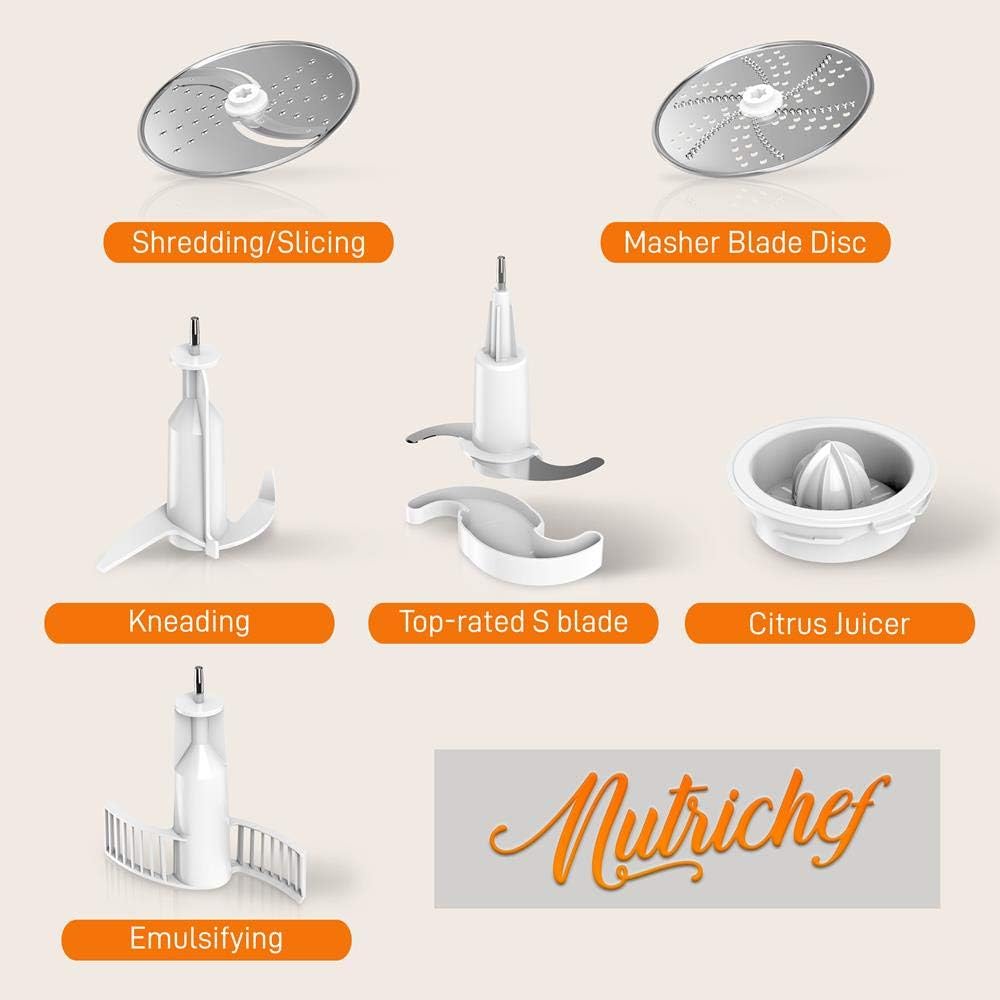
Image 3.2: Close-up of the various attachment blades.
4. Assembly and Setup
- Place the motor base unit on a clean, dry, and stable countertop. Ensure the silicone feet are making good contact with the surface to prevent slippage.
- Place the food processing bowl onto the motor base. Align the handle of the bowl with the corresponding slot on the base and twist clockwise until it locks into place.
- Select the desired blade or disc for your task. Carefully place the blade onto the central spindle inside the bowl. Ensure it is seated firmly.
- Add your ingredients to the bowl. Do not exceed the maximum capacity of 12 cups for dry ingredients or 9 cups for liquid ingredients.
- Place the lid onto the food processing bowl. Align the arrow on the lid with the arrow on the bowl handle and twist clockwise until it clicks and locks securely. The unit will not operate if the lid is not properly locked.
- Insert the food pusher into the feed tube on the lid if you are using a disc blade for slicing or shredding.
- Plug the power cable into a standard AC120V, 60Hz electrical outlet.
5. Operating Instructions
Once the food processor is assembled and plugged in, you can begin processing food.
5.1. Speed Control
The NutriChef NCFP8 features a pre-set speed function with two control knobs:
- On/Off Knob: Turn this knob to the 'ON' position to start the motor. Turn to 'OFF' to stop.
- Speed Knob: Adjust this knob to select your desired processing speed, typically ranging from 0 to 15.

Image 5.1: The control panel with On/Off and Speed knobs.
5.2. Using Attachment Blades
Each blade is designed for specific tasks:
- Shredding/Slicing Blade Disc: Ideal for uniformly shredding or slicing vegetables like carrots, cabbage, or cheese. Insert ingredients through the feed tube using the food pusher.
- Masher Blade Disc: Used for mashing cooked vegetables such as potatoes or sweet potatoes.
- Top-rated S Blade (Chopper Blade): Best for chopping, mincing, pureeing, and mixing. Use for nuts, herbs, meat, or making sauces.
- Kneading Dough Blade: Designed for mixing and kneading dough for bread, pizza, or pastries.
- Emulsifying Blade: Used for creating emulsions like mayonnaise or dressings, and for whipping cream.
- Citrus Juicer Attachment: Place this attachment on the spindle, then press halved citrus fruits onto the reamer to extract juice.

Image 5.2: Food processor in operation, demonstrating its use for processing ingredients.

Image 5.3: The food processor bowl filled with vegetables, illustrating its 2-liter capacity.
Note: The motor is designed for short-term operation. Do not operate continuously for more than 1 minute to prevent overheating. Allow the unit to rest for a few minutes between cycles if prolonged processing is required.
6. Cleaning and Maintenance
Proper cleaning ensures the longevity and hygiene of your food processor.
- Always unplug the appliance from the power outlet before cleaning.
- Carefully remove the lid, blades/discs, and food processing bowl from the motor base.
- All removable parts (bowl, lid, blades, food pusher, attachments) are dishwasher safe. Alternatively, wash them by hand with warm, soapy water. Exercise extreme caution when handling sharp blades.
- Wipe the motor base unit with a damp cloth. Do not immerse the motor base in water or any other liquid.
- Ensure all parts are thoroughly dry before reassembling or storing the appliance.
7. Troubleshooting
| Problem | Possible Cause | Solution |
|---|---|---|
| Appliance does not turn on. | Power cord not plugged in. Lid or bowl not properly locked. Overload protection activated. | Ensure the power cord is securely plugged into a working outlet. Verify that the food processing bowl and lid are correctly aligned and locked into place (listen for a click). If the unit recently stopped, allow it to cool down for several minutes before attempting to restart. |
| Motor stops during operation. | Overload protection activated due to continuous use or too much load. | Unplug the unit and remove some ingredients if the bowl is overloaded. Allow the motor to cool down for at least 10-15 minutes before resuming operation. Do not operate for more than 1 minute continuously. |
| Ingredients are not processed evenly. | Too many ingredients in the bowl. Incorrect blade used. | Process smaller batches of ingredients. Ensure the correct blade is selected for the task (e.g., S-blade for chopping, disc for slicing). |
8. Specifications
- Model: NCFP8
- Construction Material: ABS Housing, AS Cup
- Voltage: AC120V, 60Hz
- Power Output: 600W
- Load Capacity: 12 Cups (Dry Ingredients), 9 Cups (Liquid Ingredients)
- Continuous Use: ≤1 minute
- Power Cable Length: 3.28 ft.
- Product Dimensions (L x W x H): 13.78'' x 7.48'' x 13.58'' inches
- Item Weight: 12.38 pounds
- Blade Material: Stainless Steel

Image 8.1: Product dimensions for the NutriChef NCFP8 Food Processor.
9. Warranty and Support
For information regarding warranty coverage, technical support, or service, please refer to the documentation included with your product or visit the official NutriChef website. You may also contact customer support through the retailer where the product was purchased.
10. Additional Resources
A downloadable PDF version of this user guide is available for your convenience: