
ABUS 88689
Contents
ABUS Alarm Box D-58292 User Manual
Model: 88689
Introduction
Thank you for choosing the ABUS Alarm Box. This device is designed to provide additional security for your valuable possessions such as bicycles, strollers, garden barbecues, or electric scooters. Featuring a 3D position detector and a loud 100 dB alarm, it deters theft by drawing attention to any unauthorized movement. This manual provides essential information for the proper setup, operation, and maintenance of your alarm box.

Image: Front view of the ABUS Alarm Box, showcasing its compact, black design with the ABUS logo.
Product Features
- 3D Position Detector: Advanced sensors detect the smallest shocks and movements in all three dimensions.
- High-Volume Alarm: Emits a loud 100 dB alarm to deter thieves and alert bystanders.
- Intelligent Warning Function: Small, short vibrations trigger a quick warning signal, while strong vibrations activate the full 15-second alarm.
- Integrated Quality Cylinder: For secure activation and deactivation using a key.
- Durable Construction: Made with robust materials for reliable performance.
- Versatile Attachment: Includes shortenable metal strips for flexible mounting on various objects.
- Included Accessories: Comes with 2 reversible keys and a CR2 battery.
Setup and Installation
- Unpack Contents: Carefully remove the ABUS Alarm Box, 2 reversible keys, and the CR2 battery from the packaging.
- Battery Installation: The CR2 battery is typically pre-installed. If not, locate the battery compartment (refer to the diagram below) and insert the CR2 battery, ensuring correct polarity.
- Choose Mounting Location: Select a secure and stable location on the object you wish to protect (e.g., bicycle frame, stroller chassis, grill leg, scooter stem). Ensure the alarm box is not easily accessible for tampering.
- Attach the Alarm Box: Use the provided metal strips to securely fasten the alarm box to the chosen object. The strips can be shortened if necessary for a snug fit. Ensure the alarm box is firmly attached and does not wobble.
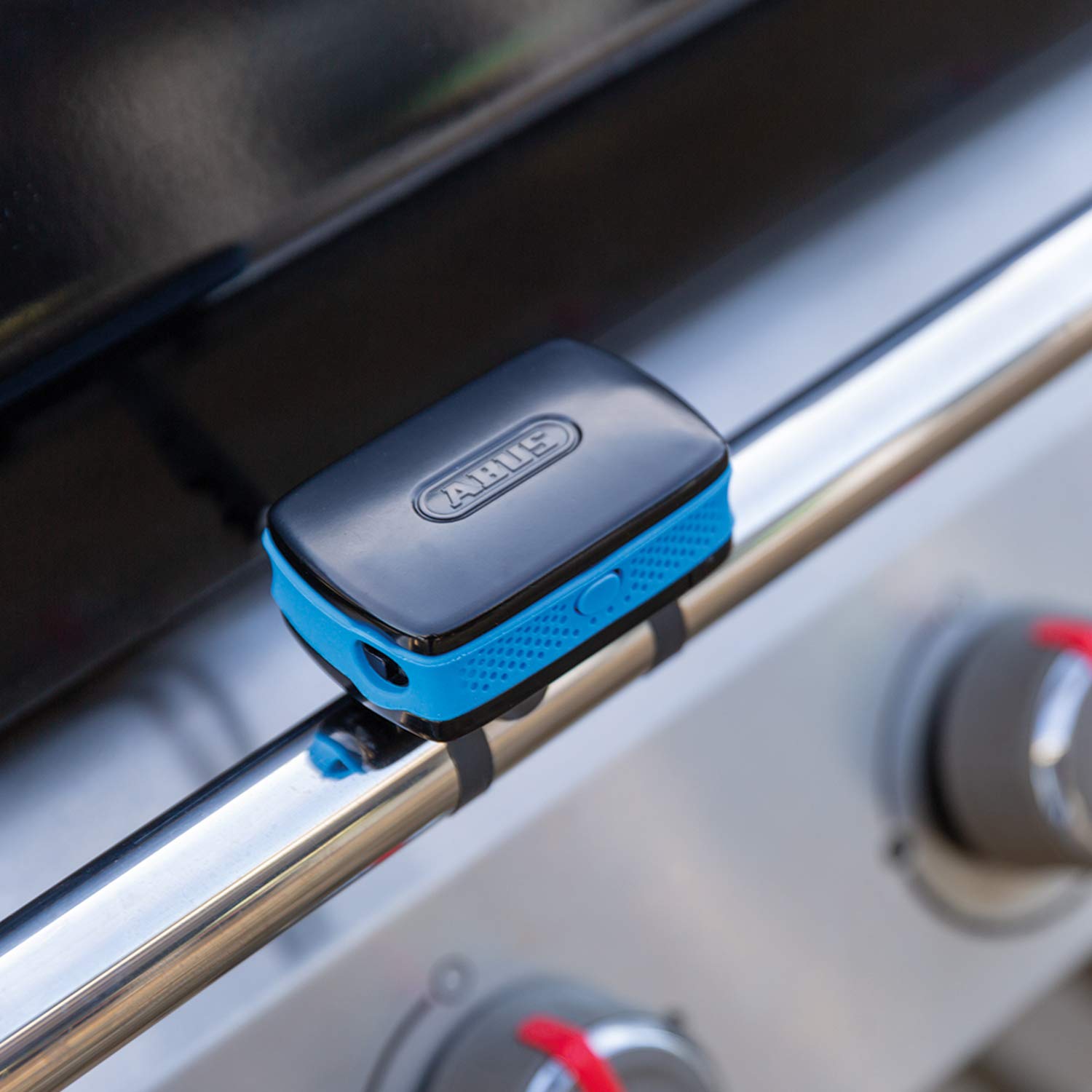
Image: The ABUS Alarm Box securely attached to the frame of a barbecue grill using the metal strips.

Image: The ABUS Alarm Box mounted on the stem of an electric scooter, demonstrating a typical installation.
Operating Instructions
Activating the Alarm
- Insert one of the provided keys into the integrated cylinder on the alarm box.
- Turn the key to the "ON" position (usually indicated by a symbol or click).
- The alarm box will emit a confirmation sound, indicating it is now armed.
- Remove the key. The alarm system is now active and monitoring for movement.

Image: One of the two reversible keys provided with the ABUS Alarm Box, used for arming and disarming.
Alarm Behavior (3D Position Detector)
- Warning Signal: If the alarm box detects small, short vibrations (e.g., a light bump, a ball rolling against the protected object), it will emit a quick warning signal. This is designed to alert potential handlers without triggering a full alarm for minor disturbances.
- Full Alarm: In case of strong or sustained vibrations, the alarm box will trigger its full 100 dB alarm. This alarm will sound for 15 seconds before resetting. If further strong vibrations are detected after resetting, the alarm will sound again.
Deactivating the Alarm
- Insert the key into the integrated cylinder.
- Turn the key to the "OFF" position.
- The alarm will cease, and the system will be disarmed.
- Remove the key.
Maintenance
Battery Replacement
The ABUS Alarm Box uses a CR2 battery. When the battery level is low, the device may indicate this with a specific sound or light pattern (refer to future product updates for specific indicators). To replace the battery:
- Ensure the alarm is disarmed.
- Locate the battery compartment. This is typically secured with a small screw or latch.
- Open the compartment and carefully remove the old CR2 battery.
- Insert a new CR2 battery, observing the correct polarity (+/-).
- Close the battery compartment securely.
- Test the alarm by arming and disarming it.
Note: Dispose of old batteries responsibly according to local regulations.
General Care
- Keep the alarm box clean by wiping it with a soft, damp cloth. Avoid abrasive cleaners or solvents.
- Do not expose the device to extreme temperatures or prolonged direct sunlight.
- Ensure the metal strips remain secure. Periodically check their tightness.
Troubleshooting
| Problem | Possible Cause | Solution |
|---|---|---|
| Alarm does not activate. | Battery is dead or incorrectly inserted. Key not fully turned. | Check battery polarity and charge. Ensure key is turned to the "ON" position. Replace battery if necessary. |
| Alarm triggers too easily (false alarms). | Device is not securely mounted. Extreme vibrations from environment. | Ensure the alarm box is firmly attached and does not wobble. Consider repositioning if environmental factors (e.g., strong winds, heavy traffic) are causing false alarms. |
| Alarm is too quiet or distorted. | Low battery. Speaker obstructed. | Replace the battery. Check if the speaker grille is blocked by dirt or debris. |
| Key does not turn or is stuck. | Debris in cylinder. Incorrect key. | Ensure you are using one of the original ABUS keys. Gently try to clear any debris from the keyhole. Do not force the key. |
If you experience issues not covered here, please contact ABUS customer support.
Specifications
| Feature | Detail |
|---|---|
| Model Number | 88689 |
| Alarm Volume | 100 dB |
| Battery Type | 1 x CR2 Lithium Polymer (included) |
| Detection | 3D Position Detector |
| Color | Black |
| Compatible Devices | Bicycles, Strollers, Barbecues, Electric Scooters, etc. |
| Origin | Made in Germany |
Warranty and Support
ABUS products are manufactured with high-quality standards. For information regarding warranty coverage and terms, please refer to the warranty card included with your product or visit the official ABUS website. For technical support, troubleshooting assistance, or spare parts, please contact ABUS customer service through their official channels.
ABUS Official Website: www.abus.com
Safety Information
- Do not attempt to disassemble or modify the alarm box. This may void the warranty and cause malfunction.
- Keep the device out of reach of small children.
- The alarm produces a loud sound (100 dB). Avoid prolonged exposure to the alarm at close range to prevent hearing damage.
- Ensure the alarm box is securely mounted to prevent it from falling and causing injury or damage.
- Use only the specified CR2 battery.
Ask a question about this manual
Ask about setup, troubleshooting, compatibility, parts, safety, or missing instructions. Manuals+ will review the question and use this page’s manual context to help answer it.