
Aigostar 300002NVA
Aigostar 3-in-1 Sandwich Maker, Panini Press, and Waffle Maker Instruction Manual
Model: 300002NVA | Brand: Aigostar
1. Important Safety Information
Please read all instructions carefully before using this appliance. Failure to follow these instructions may result in electric shock, fire, or serious injury.
- Always ensure the appliance is unplugged from the power outlet before cleaning, assembling, or disassembling parts.
- Do not touch hot surfaces. Use handles or knobs. Always use oven mitts or heat-resistant gloves when handling hot plates.
- To protect against electrical hazards, do not immerse the cord, plugs, or appliance in water or any other liquid.
- Close supervision is necessary when the appliance is used by or near children.
- Do not operate any appliance with a damaged cord or plug, or after the appliance malfunctions or has been damaged in any manner.
- This appliance is for household use only. Do not use outdoors.
- Ensure the appliance is placed on a stable, heat-resistant surface.
- The appliance has a polarized plug (one blade is wider than the other). To reduce the risk of electric shock, this plug is intended to fit into a polarized outlet only one way. If the plug does not fit fully into the outlet, reverse the plug. If it still does not fit, contact a qualified electrician. Do not attempt to modify the plug in any way.

2. Product Overview
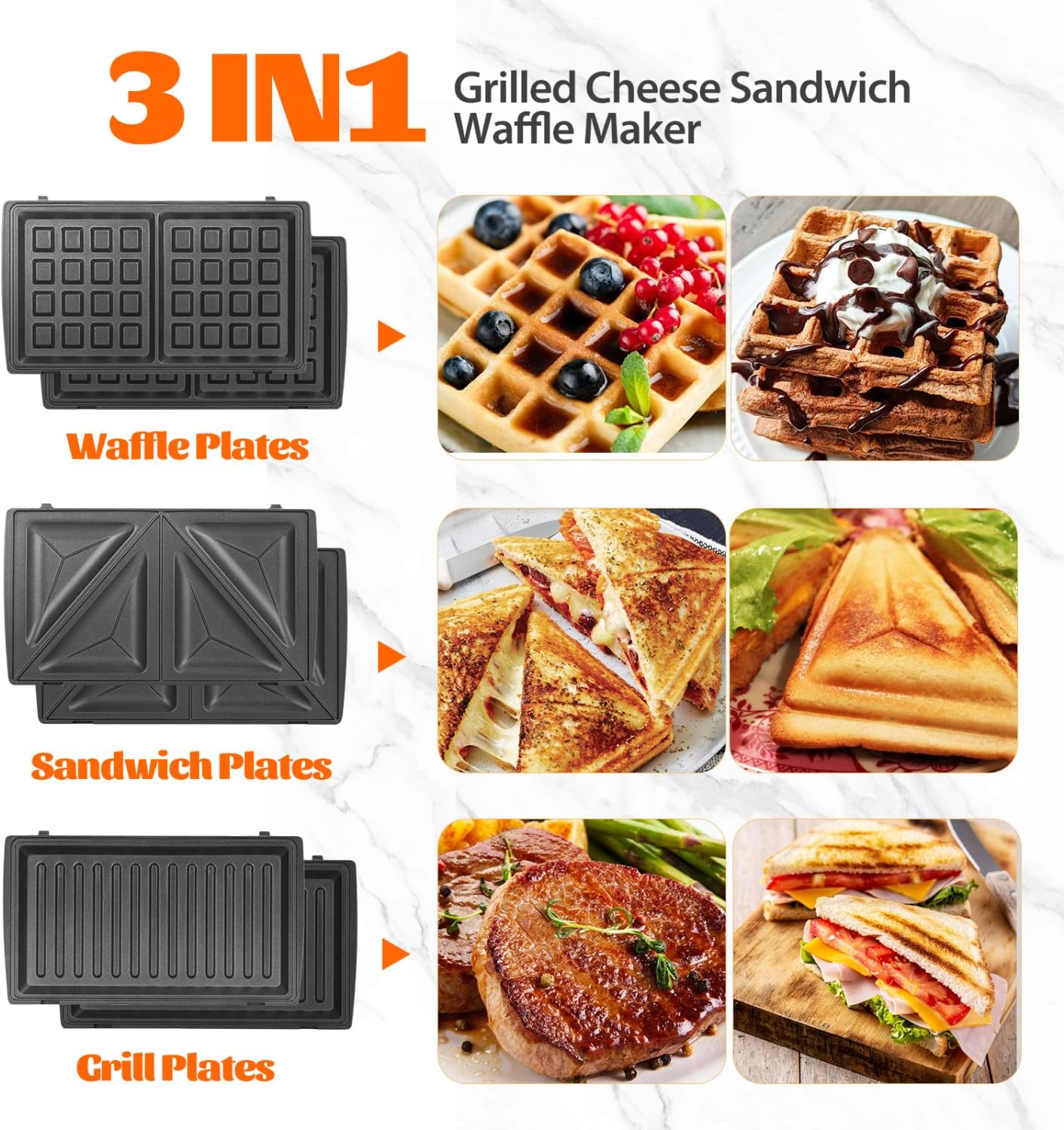
The Aigostar 3-in-1 appliance is designed for versatility, allowing you to prepare sandwiches, waffles, and grilled items with ease. It features removable non-stick plates for convenient cleaning and operation.
2.1 Components
- Main Unit with Power and Preheat Indicator Lights
- Removable Sandwich Plates (2 sets)
- Removable Waffle Plates (2 sets)
- Removable Grill Plates (2 sets)
- User Manual

3. Setup
3.1 Before First Use
- Unpack the appliance and all accessories. Remove any packaging materials, stickers, or labels.
- Wipe the exterior of the appliance with a damp cloth.
- Wash the removable cooking plates (sandwich, waffle, grill) with warm, soapy water. Rinse thoroughly and dry completely.
- Lightly grease the cooking plates with a small amount of cooking oil or butter before first use to condition the non-stick surface.
3.2 Attaching and Removing Plates
The appliance features a simple mechanism for changing plates:
- Ensure the appliance is cool and unplugged.
- To remove a plate, locate the release button on the side of the plate. Press the button and gently lift the plate out.
- To attach a plate, align the plate with the hinges and press down until it clicks securely into place.

4. Operating Instructions
4.1 General Operation
- Plug the appliance into a 120V power outlet. The red power indicator light will illuminate.
- The green preheat indicator light will illuminate, indicating the appliance is heating up.
- Once the appliance reaches the desired temperature, the green light will turn off, indicating it is ready for use. The green light will cycle on and off during cooking to maintain the temperature.
4.2 Making Sandwiches
- Install the sandwich plates.
- Preheat the appliance as described in 4.1.
- Place your prepared sandwiches onto the bottom plate. Do not overfill.
- Close the lid and latch the handle. Cook for 3-5 minutes, or until golden brown and the filling is heated through.
- Carefully open the lid and remove the sandwiches using a heat-resistant spatula.

4.3 Making Waffles
- Install the waffle plates.
- Preheat the appliance as described in 4.1.
- Pour approximately 1/2 cup of waffle batter onto the center of each waffle plate.
- Close the lid and latch the handle. Cook for 3-6 minutes, or until the waffles are golden brown and crispy.
- Carefully open the lid and remove the waffles using a heat-resistant spatula.

4.4 Grilling
- Install the grill plates.
- Preheat the appliance as described in 4.1.
- Place your food (e.g., meat, vegetables) onto the bottom grill plate.
- Close the lid and latch the handle. Cook for the desired time, turning food if necessary, until cooked through.
- Carefully open the lid and remove the grilled food using heat-resistant tongs or a spatula.
5. Maintenance and Cleaning
Proper cleaning ensures the longevity and performance of your appliance.
- Always unplug the appliance and allow it to cool completely before cleaning.
- Remove the cooking plates as described in Section 3.2.
- Wash the removable plates with warm, soapy water. The non-stick coating allows for easy cleanup. Avoid using abrasive cleaners or metal scouring pads, as these can damage the non-stick surface.
- Rinse the plates thoroughly and dry them completely before storing or reattaching.
- Wipe the exterior of the appliance with a damp cloth. Do not use harsh chemicals or abrasive materials.
- Do not immerse the main unit in water or any other liquid.

6. Troubleshooting
If you encounter any issues with your Aigostar 3-in-1 appliance, please refer to the table below for common problems and solutions.
| Problem | Possible Cause | Solution |
|---|---|---|
| Appliance does not turn on. | Not plugged in or power outlet issue. | Ensure the appliance is securely plugged into a working power outlet. Check the circuit breaker. |
| Food sticks to the plates. | Plates not properly greased or non-stick coating is worn. | Lightly grease plates with oil or butter before each use. Ensure plates are clean and free of residue. |
| Food is not cooking evenly. | Uneven food distribution or insufficient preheating. | Distribute food evenly on the plates. Allow the appliance to fully preheat until the green indicator light turns off. |
| Smoke or unusual odor during first use. | Residual manufacturing oils burning off. | This is normal for first use. Ensure good ventilation. If it persists, discontinue use and contact support. |
7. Specifications
| Feature | Detail |
|---|---|
| Brand | Aigostar |
| Model Number | 300002NVA |
| Wattage | 750 watts |
| Voltage | 120 Volts |
| Material | Aluminum |
| Special Features | Cool Touch, Manual, Non Stick Coating, Removable Sandwich, Waffle, Panini Press Plates, Removable Surface |
| Product Dimensions | 9.45"D x 8.74"W x 4"H |
| Item Weight | 4 Pounds |
| UPC | 718356205238 |
8. Warranty and Support
All products purchased from Aigostar come with a standard 1-year warranty.
- For warranty claims or technical support, please contact Aigostar customer service.
- Aigostar after-sales service is available 24 hours a day. Refer to the contact information provided with your purchase or visit the official Aigostar website for assistance.
Related documents300002NVA


Ask a question about this manual
Ask about setup, troubleshooting, compatibility, parts, safety, or missing instructions. Manuals+ will review the question and use this page’s manual context to help answer it.