
1. Product Overview
The 3nh HG60S is an economical gloss meter designed for precise measurement of gloss levels at a 60° angle. It is suitable for various materials including paint, ink, coatings, wood products, marble, granite, vitrified polished tile, pottery brick, porcelain, plastic, paper, and hardware. This device complies with international standards such as ISO 2813, GB/T 9754, ASTM D 523, and ASTM D 2457, ensuring reliable and accurate measurements.

Image 1: Front view of the 3nh HG60S Economical Gloss Meter. The device is blue and gray, featuring a display screen and a measurement button.
2. Package Contents
Upon unboxing, please verify that all standard accessories are present and in good condition.
- HG60S Gloss Meter Unit
- Power Adapter (1 pc)
- USB Cable (for data transfer and charging)
- User Manual (this document)
- Calibration Standard Plate (typically included with gloss meters for calibration)
3. Setup and Initial Use
3.1 Charging the Battery
The HG60S is powered by a 3200mAh Li-ion battery. Before first use, fully charge the device using the provided power adapter and USB cable. Connect the power adapter to a suitable power source and the USB cable to the device's charging port. The display will indicate the charging status.
3.2 Powering On/Off
- To power on: Press and hold the power button (usually located near the display or on the side) until the screen illuminates.
- To power off: Press and hold the power button until the shutdown prompt appears, then confirm.
3.3 Initial Calibration
For accurate measurements, it is crucial to perform an initial calibration. Place the gloss meter on its calibration standard plate. Follow the on-screen instructions to initiate and complete the calibration process. Refer to the device's display for specific prompts.

Image 2: The 3nh HG60S Gloss Meter separated from its calibration base. The base contains a standard plate for calibration.
4. Operating Instructions
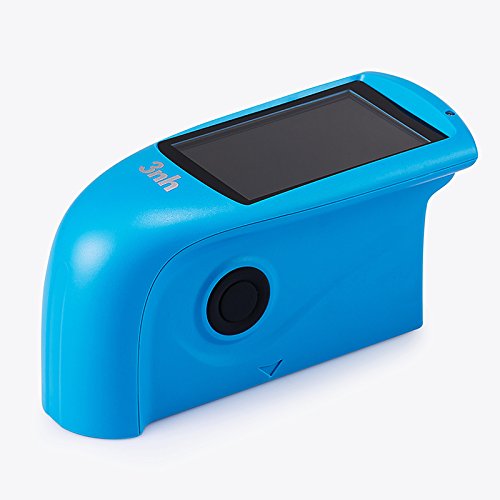
Image 3: Side view of the 3nh HG60S Gloss Meter, showing the display and the measurement button from a different angle.
4.1 Basic Measurement Procedure
- Ensure the device is calibrated.
- Place the measurement aperture (9x15mm) of the gloss meter firmly and flatly onto the surface of the material to be measured.
- Press the measurement button. The measurement takes approximately 0.5 seconds.
- The gloss value will be displayed on the 3.5-inch TFT screen. The device can display up to 5 sets of measurement data for comparison.
- Repeat the measurement at different points on the surface for a comprehensive assessment.
4.2 Language Selection
The device supports both Chinese and English languages. Navigate through the system settings on the display to select your preferred language.
4.3 Data Storage and Transfer
The HG60S can store up to 1000 measurement data points in basic mode. Data can be transferred to a computer using the provided USB cable or via the RS-232 interface. Refer to the device's menu for data management options.
5. Maintenance and Care
5.1 Cleaning
- Regularly clean the measurement aperture with a soft, lint-free cloth to ensure accurate readings.
- Wipe the exterior of the device with a dry or slightly damp cloth. Do not use abrasive cleaners or solvents.
5.2 Storage
Store the HG60S in a clean, dry environment within the specified temperature and humidity ranges:
- Storage Temperature: -20°C to 50°C (-4°F to 122°F)
- Humidity: <85% relative humidity, non-condensing
Avoid exposing the device to direct sunlight, extreme temperatures, or high humidity for prolonged periods.
5.3 Battery Care
To prolong battery life, avoid fully discharging the battery frequently. Recharge the device when the battery level is low. If storing the device for an extended period, ensure the battery is partially charged (around 50%) and recharge it every few months.
6. Troubleshooting
- Device does not power on:
- Ensure the battery is sufficiently charged. Connect the device to the power adapter and try again.
- Verify the power button is pressed and held correctly.
- Inaccurate or inconsistent readings:
- Perform a calibration using the standard plate.
- Clean the measurement aperture to remove any dust or debris.
- Ensure the device is placed flat and firmly on the measurement surface.
- Check if the measurement surface is clean and free of defects.
- Display is blank or frozen:
- Try restarting the device by holding the power button.
- If unresponsive, allow the battery to fully discharge and then recharge before attempting to power on again.
- Data transfer issues:
- Ensure the USB cable is securely connected to both the device and the computer.
- Verify that the correct drivers (if required) are installed on your computer.
- Check the device's settings for data transfer mode.
7. Technical Specifications
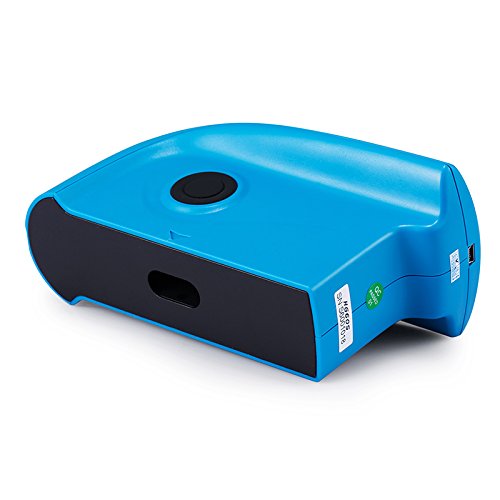
Image 4: Rear view of the 3nh HG60S Gloss Meter, highlighting the USB and RS-232 ports for connectivity.
| Specification | Value |
|---|---|
| Model | HG60S |
| Measuring Angle | 60° |
| Compliance Standards | ISO 2813, GB/T 9754, ASTM D 523, ASTM D 2457 |
| Measuring Area | 9x15 mm |
| Measuring Range | 0~200 GU (Gloss Units) |
| Division Value | 1 GU |
| Repeatability | ± 1 GU |
| Reproducibility | ±1 GU |
| Measurement Standard | Conform with JJG696 first class glossmeter working requirement |
| Chromaticity Corresponding | CIE 1931(2°) under CIE C light source |
| Errors | ±1.5, ± 1.5% |
| Measuring Time | 0.5 s |
| Dimensions (L*W*H) | 160mm * 75mm * 90mm |
| Weight | 350g |
| Language | Chinese/English |
| Battery | 3200mAh Li-ion Battery, >10000 times (within 8 hours) |
| Display | TFT 3.5 inch |
| Interface | USB/RS-232 |
| Storage | Basic mode: 1000 data points |
| Operation Temperature | 0~40℃ (32~104°F) |
| Storage Temperature | -20~50℃ (-4~122°F) |
| Humidity | <85% relative humidity, no condensation |
| Standard Accessories | Power Adapter (1 pc) |
| UPC | 783103514772 |
8. Warranty and Support
8.1 Warranty Information
Specific warranty terms and conditions for the 3nh HG60S Gloss Meter are provided by the manufacturer or the authorized seller at the time of purchase. Please refer to your purchase documentation or contact the seller for detailed warranty information, including coverage period and claim procedures.
8.2 Customer Support
For technical assistance, operational questions, or service requests, please contact the seller or the manufacturer directly. Ensure you have your product model number (HG60S) and purchase details available when seeking support.