
1. Introduction
Thank you for choosing the CubiCubi L-Shaped Computer Desk with Storage Shelf. This manual provides essential information for the safe assembly, operation, and maintenance of your new desk. Please read these instructions carefully before beginning assembly and retain them for future reference.
This L-shaped desk is designed for home office environments, offering a modern and simple aesthetic that complements various interior styles. It provides a spacious work area and integrated storage for enhanced organization.
2. Safety Information
- Read all instructions: Ensure you understand all assembly steps before starting.
- Keep children away: Small parts can be a choking hazard. Keep children and pets away from the assembly area.
- Use appropriate tools: Only use the tools provided or recommended in the instructions.
- Assemble on a soft surface: To prevent scratches, assemble the desk on a clean, soft surface like a carpet.
- Do not overtighten screws: Overtightening can damage threads or crack components.
- Check stability: Before use, ensure all connections are secure and the desk is stable.
- Weight capacity: Do not exceed the desk's recommended weight capacity to prevent damage or injury.
- Scratch-resistant surface: While the desk surface is scratch-resistant, avoid using sharp objects directly on it.
3. Package Contents
Please verify that all components are present before beginning assembly. If any parts are missing or damaged, contact customer support.
- Desktop Panels (L-shaped sections)
- Storage Shelf Panels
- Metal Frame Components (legs, support bars, iron struts)
- Assembly Hardware (screws, bolts, nuts, Allen wrench)
- Instruction Manual
4. Setup and Assembly Instructions
Assembly typically requires two people and takes approximately 1 hour. Follow the numbered steps in the included diagram carefully. Ensure all parts are correctly oriented before tightening screws.
4.1. Overview of Components and Dimensions

This image illustrates the overall dimensions of the L-shaped desk and its components. The main workspace measures approximately 59.1 inches (150.1 cm) by 47.2 inches (119.9 cm), with a height of 29.5 inches (74.9 cm). The integrated storage shelf measures approximately 35.4 inches (89.9 cm) in length, 11.8 inches (30 cm) in width, and features two shelves with 8.3 inches (21.1 cm) and 14.2 inches (36.1 cm) of vertical clearance respectively.
4.2. Assembly Steps
- Unpack and Identify: Carefully unpack all components and lay them out on a soft, clean surface. Identify each part using the labels and the parts list.
- Assemble Metal Frame: Begin by connecting the main metal pipe frames (legs and horizontal supports) using the provided screws and Allen wrench. Do not fully tighten screws until all frame parts are loosely assembled.
- Attach Iron Struts: Secure the iron struts to the frame for added stability. Ensure they are correctly aligned with the pre-drilled holes.

The iron struts are crucial for the desk's structural integrity, providing additional support and stability to the metal frame.
- Install Desktop Panels: Place the wooden desktop panels onto the assembled metal frame. Align the pre-drilled holes in the desktop with the holes in the frame. Secure the desktop panels using the appropriate screws.
- Assemble Storage Shelf: The storage shelf can be installed on either the left or right side of the L-shaped desk, depending on your preference and space requirements.

This image demonstrates the flexibility of the storage shelf, allowing users to customize their workspace layout. The two-tier open shelves provide convenient storage under the desk.
- Final Tightening: Once all components are in place and aligned, gradually tighten all screws and bolts. Ensure all connections are firm and secure.
- Leveling: If the desk is uneven, adjust the leveling feet at the bottom of the legs to ensure stability.
4.3. Structural Elements

The desk features a sturdy and durable thick metal frame constructed from robust metal pipes, ensuring long-lasting stability and support for your equipment.
5. Operating Instructions (Usage)
Your CubiCubi L-Shaped Computer Desk is designed for versatile use in various settings:
- Computer Workstation: The spacious L-shaped surface accommodates multiple monitors, keyboards, and other peripherals, making it ideal for computing tasks.
- Study and Writing Desk: Provides ample space for books, notebooks, and writing materials, suitable for academic or creative work.
- Gaming Setup: The large surface area and sturdy construction support gaming equipment, offering a comfortable and organized gaming environment.
- Storage: Utilize the two-tier open storage shelves to keep books, files, computer towers, or other office supplies organized and within reach.
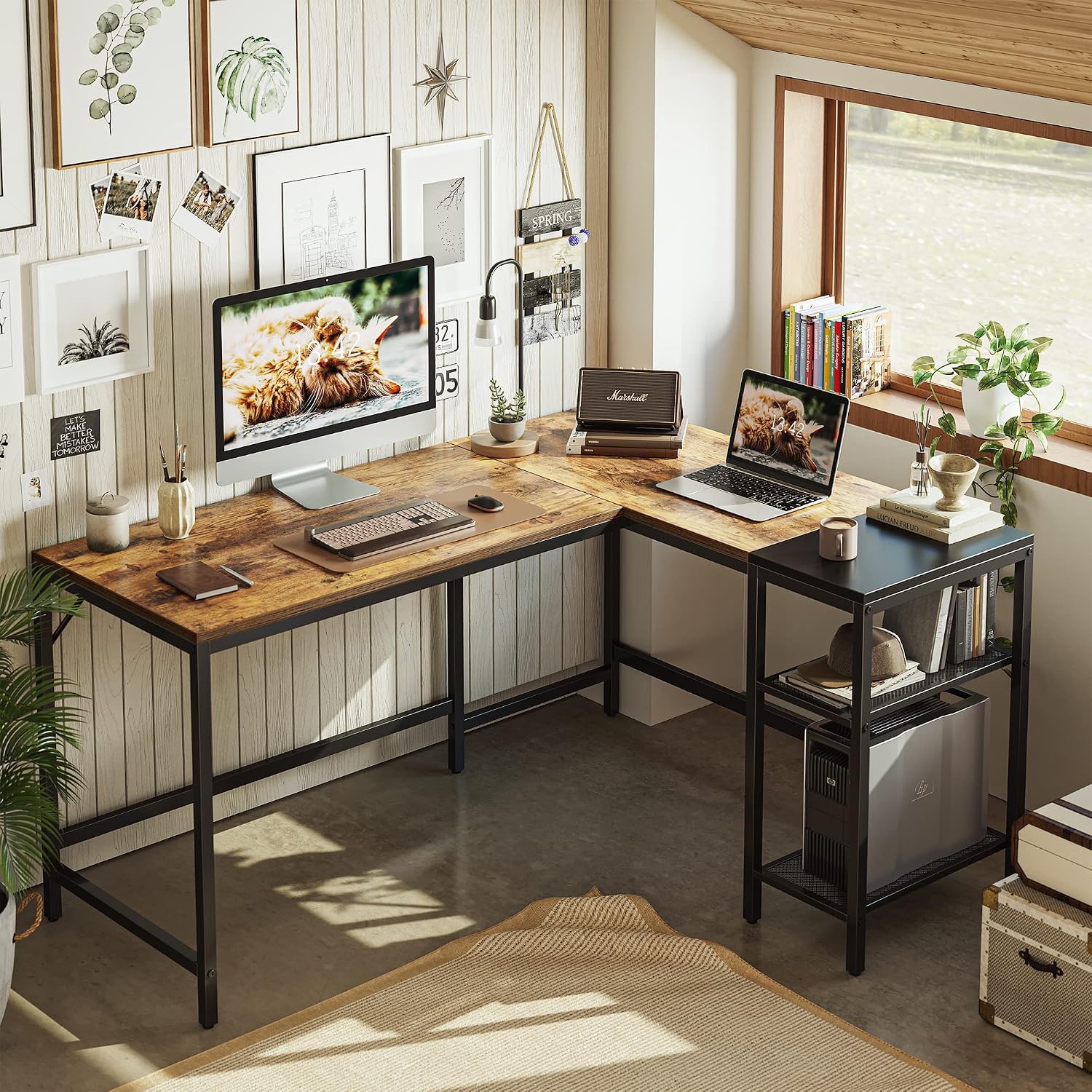
This image shows the CubiCubi L-shaped desk configured as a functional home office workstation, demonstrating its capacity for multiple devices and organized storage.

This image provides an alternative perspective of the desk in use, emphasizing its ample surface area and the convenience of the integrated storage shelves for various items.
6. Maintenance
- Cleaning: Wipe the desk surfaces with a soft, damp cloth. Avoid harsh chemicals or abrasive cleaners, as they may damage the finish.
- Spills: Clean up spills immediately to prevent staining or damage to the wood top.
- Heat Protection: Use coasters or protective pads under hot items to prevent heat marks.
- Regular Checks: Periodically check all screws and bolts to ensure they remain tight. Retighten if necessary to maintain stability.
- Avoid Overloading: Do not place excessively heavy items on the desk or shelves beyond their intended capacity.
7. Troubleshooting
- Desk is wobbly:
- Ensure all screws and bolts are fully tightened.
- Check that the desk is on a level surface. Adjust the leveling feet if needed.
- Verify that all frame components, especially the iron struts, are correctly installed and secured. - Parts do not fit:
- Double-check the assembly diagrams to ensure you are using the correct parts for each step and that they are oriented correctly.
- Some parts may appear similar but have subtle differences in hole placement. - Missing hardware or damaged parts:
- Review the package contents list carefully. If any items are missing or damaged upon arrival, contact CubiCubi customer support immediately for assistance.
8. Specifications
| Brand | CubiCubi |
| Model Number | EU-Y-LDL-G |
| Shape | L-Shaped |
| Desk Design | Computer Desk |
| Product Dimensions (L x W x H) | Approx. 59.1 x 47.2 x 29.5 inches (150.1 x 119.9 x 74.9 cm) |
| Color | Black (Frame), Brown (Wood Top) |
| Style | Modern |
| Frame Material | Steel |
| Top Material Type | Wood |
| Special Feature | Scratch Resistant |
| Number of Shelves | 3 (including the top surface of the storage unit) |
| Item Weight | Approx. 19.07 kg |
| Assembly Required | Yes |
9. Warranty
CubiCubi products are manufactured to high-quality standards. This product comes with a limited manufacturer's warranty against defects in materials and workmanship. Please refer to the warranty information provided with your purchase or contact CubiCubi customer support for details regarding warranty coverage and claims.
10. Support
If you have any questions, require assistance with assembly, or need to report missing/damaged parts, please contact CubiCubi customer support. For the quickest service, please have your model number (EU-Y-LDL-G) and purchase information ready.
Customer Support Contact:
Website: www.cubicubi.com (Note: This is a placeholder URL. Please refer to your product packaging or official CubiCubi documentation for actual contact information.)
Email: support@cubicubi.com (Note: This is a placeholder email.)