1. Introduction
This manual provides detailed instructions for the safe and effective operation of your YONGNUO YN360III PRO LED Video Stick Ice Light. Please read this manual thoroughly before use and retain it for future reference.
The YN360III PRO is a versatile LED video light designed for professional photography and videography. It features dual-mode lighting with 360 high-definition lamp beads and 60 RGB full-color patch lights, a high Color Rendering Index (CRI) of 95+, and multiple control options including a 2.4G remote controller and mobile phone application support.

Image 1.1: YONGNUO YN360III PRO LED Video Stick Ice Light. This image displays the full length of the YN360III PRO light stick, highlighting its sleek black design and the integrated control panel with a color wheel for RGB adjustments.
2. Safety Precautions
- Do not look directly into the light when it is on.
- Keep the device away from water and flammable liquids.
- Use only recommended power sources and batteries.
- Do not disassemble or modify the device.
- Ensure proper ventilation during operation to prevent overheating.
3. Package Contents
Verify that all items are present in the package:
- YONGNUO YN360III PRO LED Video Stick Ice Light
- 2.4G Wireless Remote Controller
- Orange Color Filter
- Storage Bag
- Wrist Strap for Remote Controller
- User Manual (this document)
Note: Batteries and AC power adapter are not included and must be purchased separately. The device supports NP-F series batteries or an external DC power supply (12V, 2A).

Image 3.1: Package contents of the YN360III PRO. This image shows the YN360III PRO light stick, a black carrying bag, an orange color filter, and the remote control with a wrist strap.
4. Component Identification
4.1. YN360III PRO Light Stick

Image 4.1: Detailed view of the YN360III PRO light stick. This image highlights the control buttons, display screen, and battery compartment on the light stick itself.
- LED Panel: Main light source.
- Control Panel: Buttons and display for direct control.
- Battery Compartment: For NP-F series batteries.
- DC Power Input: For external power adapter (12V, 2A).
- 1/4" Screw Hole: For mounting on tripods or light stands.
4.2. Remote Controller

Image 4.2: The YN360III PRO remote controller. This image shows the remote with its color wheel, display, channel buttons, and power button.
- Color Wheel: For adjusting RGB colors.
- Display Screen: Shows current settings and battery status.
- CH Button: To select control channel.
- Power Button: To turn the remote on/off.
- Directional Pad: For navigation and adjustment.
5. Setup
5.1. Powering the Device
The YN360III PRO can be powered by an NP-F series battery or an external DC power adapter.
- Battery Installation: Insert a fully charged NP-F series battery into the battery compartment on the light stick, ensuring correct polarity.
- AC Power Connection: Connect a compatible 12V 2A DC power adapter to the DC power input port on the light stick.
5.2. Attaching the Color Filter
To modify the light's color temperature or add diffusion, attach the provided orange color filter to the front of the LED panel. Align the filter with the grooves and slide it into place.
5.3. Mounting the Light
The YN360III PRO features a 1/4" screw hole at its base for mounting on standard light stands, tripods, or other compatible accessories.
6. Operating Instructions
6.1. Power On/Off
- Light Stick: Press and hold the power button on the light stick's control panel to turn it on or off.
- Remote Controller: Press and hold the power button on the remote controller to turn it on or off.
6.2. Mode Selection
The YN360III PRO offers two main lighting modes: White Light Mode (5600K) and RGB Full Color Mode.
- Switching Modes: Use the 'MODE' button on the light stick or remote to cycle between White Light Mode and RGB Mode.
- White Light Adjustment: In White Light Mode, use the directional pad on the remote or the adjustment buttons on the light stick to control brightness.
- RGB Color Adjustment: In RGB Mode, use the color wheel on the remote or the corresponding buttons on the light stick to select desired colors and adjust saturation/brightness.

Image 6.1: Illustration of the YN360III PRO's dual mode and remote control features. This graphic shows the light stick in both white light and RGB modes, emphasizing the 2.4G remote controller and mobile app control.
6.3. Remote Control Pairing
The remote controller is pre-paired with the light stick. If re-pairing is needed:
- Ensure both the light stick and remote are powered on.
- On the light stick, enter pairing mode (refer to the light stick's display for instructions, usually by holding a specific button).
- On the remote, select a channel using the 'CH' button and confirm pairing.
6.4. Mobile App Control
Download the official YONGNUO app from your smartphone's app store. Enable Bluetooth on your phone and follow the in-app instructions to connect to the YN360III PRO. The app allows for advanced control over color, brightness, and special effects.
6.5. Special Scene Supplementary Lighting Mode
The YN360III PRO includes 10 special lighting modes such as lightning, sunrise, and police vehicle flashing lights. Access these modes via the remote controller or mobile app and adjust parameters as needed.
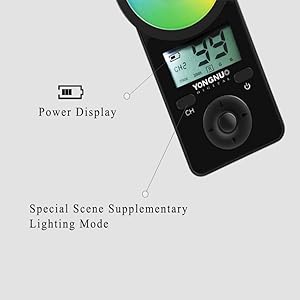
Image 6.2: Close-up of the remote control display. This image shows the remote's screen indicating power display and the option for special scene supplementary lighting modes.
7. Maintenance
- Cleaning: Use a soft, dry cloth to clean the light stick and remote controller. Do not use abrasive cleaners or solvents.
- Storage: When not in use, store the device in its protective bag in a cool, dry place, away from direct sunlight.
- Battery Care: Remove batteries if the device will not be used for an extended period. Recharge batteries regularly to maintain their lifespan.
8. Troubleshooting
| Problem | Possible Cause | Solution |
|---|---|---|
| Light does not turn on. | Low or depleted battery; power adapter not connected or faulty. | Charge or replace battery; ensure power adapter is securely connected and functional. |
| Remote control not responding. | Remote battery low; not paired; interference. | Replace remote battery; re-pair the remote with the light stick; move away from sources of interference. |
| App control not working. | Bluetooth off; app not connected; outdated app version. | Enable Bluetooth on phone; reconnect via app; update app to the latest version. |
| Inconsistent color output. | Incorrect mode selected; faulty LED. | Verify correct mode (White Light or RGB); contact customer support if issue persists. |
9. Specifications
| Feature | Detail |
|---|---|
| Model | YONGNUO YN360III PRO |
| Light Source | 360pcs LED lamp beads (5600K), 60pcs RGB SMD LEDs |
| Color Temperature | 5600K (White Light Mode), Full RGB (RGB Mode) |
| Color Rendering Index (CRI) | ≥95 |
| Control Distance | Up to 15 meters (2.4G wireless) |
| Power Output | 21.6W (White Light), 10.8W (RGB) |
| External Power Supply | 12V 2A DC power adapter (not included) |
| Compatible Batteries | NP-F series lithium batteries (not included) |
| Dimensions | Approximately 25.2 x 2.87 x 2.87 inches (640 x 73 x 73 mm) |
| Weight | Approximately 1.79 pounds (812 grams) |
| Connectivity | Bluetooth, 2.4G Wireless |

Image 9.1: Light output comparison and CRI demonstration. This graphic illustrates the light intensity at various distances and compares the color rendering index (CRI) of the YN360III PRO (Ra≥96) against a lower CRI light (Ra<80).
10. Warranty and Support
YONGNUO products typically come with a limited manufacturer's warranty. Please refer to the warranty card included with your product for specific terms and conditions, or visit the official YONGNUO website for detailed warranty information.
For technical support, troubleshooting assistance, or service inquiries, please contact YONGNUO customer service through their official website or the contact information provided in your product packaging.
Official YONGNUO Website: www.yongnuo.com.cn


