
360 S9
360 S9 Robot Vacuum and Mop User Manual
Model: S9
Important Safety Instructions
Please read this manual carefully before using the 360 S9 Robot Vacuum and Mop and retain it for future reference. Follow all safety precautions to prevent injury or damage.
- This appliance can be used by children aged 8 years and above and persons with reduced physical, sensory or mental capabilities or lack of experience and knowledge if they have been given supervision or instruction concerning use of the appliance in a safe way and understand the hazards involved.
- Children should be supervised to ensure that they do not play with the appliance.
- Cleaning and user maintenance shall not be made by children without supervision.
- Only use the original power adapter provided by the manufacturer.
- Do not use the robot in environments with open flames or fragile objects.
- Ensure the robot operates on a stable surface and avoid dropping it.
- Keep hair, loose clothing, fingers, and all parts of the body away from openings and moving parts.
Product Overview
The 360 S9 Robot Vacuum and Mop is an intelligent cleaning device designed to efficiently vacuum and mop your floors. It features advanced LiDAR navigation, powerful suction, and smart app control for a customized cleaning experience.

Image: The 360 S9 Robot Vacuum and Mop, a white circular device, is shown alongside a smartphone displaying its control application. The robot features a central LiDAR sensor and two control buttons on its top surface.
Package Contents
Verify that all components are present in the package:
- 360 S9 Robot Vacuum and Mop
- Charging Dock
- Power Adapter
- Main Brush
- Side Brushes (2 pairs)
- High-Efficiency Filter
- Water Tank
- Mopping Pads (2)
- Cleaning Tool
- User Manual
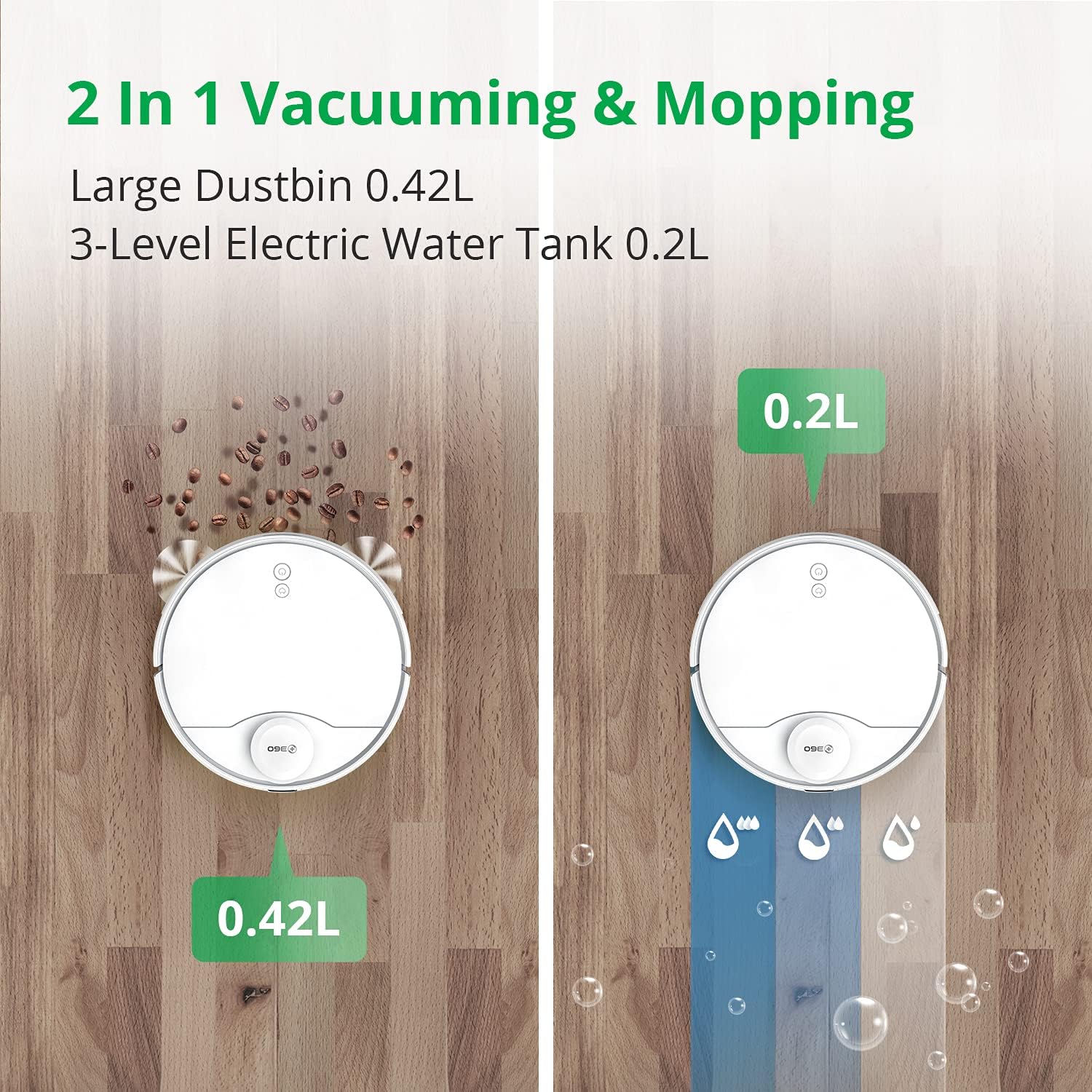
Image: An overhead view displaying the 360 S9 Robot Vacuum and its various accessories, including the main unit, a rectangular filter, two pairs of side brushes, a main roller brush, and the charging dock.
Setup
1. Unpacking and Placement
- Remove all packaging materials and protective films from the robot and charging dock.
- Place the charging dock against a wall on a hard, level surface. Ensure there is at least 0.5 meters (1.6 feet) of clear space on both sides and 1.5 meters (4.9 feet) in front of the dock.
- Connect the power adapter to the charging dock and plug it into a power outlet.
2. Charging the Robot
- Place the robot onto the charging dock, ensuring the charging contacts align. The robot will announce that it is charging.
- For first-time use, fully charge the robot before operation (approximately 4-5 hours).
3. App Installation and Connection
- Download the '360Robot' app from your mobile device's app store (Google Play Store or Apple App Store).
- Open the app and follow the on-screen instructions to create an account and add your 360 S9 robot.
- Ensure your mobile device is connected to a 2.4 GHz Wi-Fi network during the initial setup process, as the robot only supports 2.4 GHz Wi-Fi.
- Once connected, the robot will perform an initial mapping run to create a layout of your home. This map is crucial for advanced features like no-go zones and selective room cleaning.

Image: A hand holds a smartphone displaying the 360 Robot app interface, which shows a floor plan map, cleaning status, and control options for the robot vacuum. The image also highlights compatibility with Amazon Alexa and Google Assistant.
Operation
1. Cleaning Modes
- Automatic Cleaning: The robot intelligently navigates and cleans your entire home based on the generated map.
- Edge Cleaning: The robot cleans along walls and furniture edges.
- Spot Cleaning: Direct the robot to clean a specific small area with concentrated effort.
2. Vacuuming and Mopping
The 360 S9 can vacuum, mop, or perform both functions simultaneously. Attach the water tank and mopping pad for mopping operations.
- 3-Stage Water Adjustment: Control the water flow level (low, medium, high) via the app to suit different floor types and cleaning needs.
- Ensure the water tank is filled with clean water before mopping. Do not use detergents or cleaning solutions not approved by the manufacturer.

Image: A split image illustrating the 360 S9 Robot Vacuum's dual functionality. On the left, the robot vacuums debris into its 0.42L dustbin. On the right, it mops with water from its 0.2L 3-level electric water tank.
3. Smart Navigation and Mapping
The 360 S9 utilizes advanced LiDAR navigation to create precise maps of your home, enabling efficient and systematic cleaning.
- Real-time Mapping: View the robot's cleaning path and map in real-time on the app.
- No-Go Zones & Virtual Walls: Set virtual boundaries in the app to prevent the robot from entering specific areas or crossing certain lines.
- Selective Room Cleaning: Divide your home into rooms on the app and select specific rooms for cleaning, or schedule different rooms for different times.

Image: The 360 S9 Robot Vacuum is depicted in a modern living space, emitting green laser lines to illustrate its advanced LiDAR navigation and high-precision mapping capabilities.

Image: The 360 S9 Robot Vacuum is shown cleaning a living room floor, with a child playing nearby. The image highlights customized cleaning features such as No-go Zones, Scheduled Cleaning, and Selected Room Cleaning, indicated by icons above the scene.
4. Battery Management
- The robot has a long battery life, providing up to 180 minutes of runtime on a single charge.
- When the battery is low, the robot will automatically return to its charging dock to recharge. Once fully charged, it will resume cleaning from where it left off.

Image: The 360 S9 Robot Vacuum is shown approaching its charging dock, with icons indicating its long battery time (160-180 min runtime, 5200mAh) and self-charging capability.
5. Suction Power
The 360 S9 features 2650Pa powerful suction, capable of effectively cleaning various floor types. It also includes a carpet boost function.

Image: The 360 S9 Robot Vacuum is shown on a carpet, illustrating its 2650Pa powerful suction with a carpet boost feature, designed to effectively clean rugs and carpets.
6. Voice Control Integration
The 360 S9 is compatible with smart home assistants, allowing for convenient voice control:
- Amazon Alexa: Connect your 360Robot account to Alexa for voice commands.
- Google Assistant: Integrate with Google Home for hands-free control.
Maintenance
Regular maintenance ensures optimal performance and extends the lifespan of your robot vacuum.
1. Dustbin and Filter
- Empty Dustbin: Empty the dustbin after each cleaning cycle.
- Clean Filter: Tap the filter to remove loose dirt. Rinse the filter with water if necessary, ensuring it is completely dry before reinstallation. Replace the filter every 3-6 months depending on usage.
2. Brushes
- Main Brush: Remove the main brush cover and lift out the brush. Use the provided cleaning tool to remove hair and debris tangled around the brush. Clean weekly.
- Side Brushes: Check side brushes for damage or entanglement. Remove any hair or debris. Replace if worn or damaged. Clean monthly.
3. Water Tank and Mopping Pad
- Empty Water Tank: After mopping, empty any remaining water from the tank.
- Clean Mopping Pad: Remove and wash the mopping pad after each use. Allow it to air dry completely.
4. Sensors and Charging Contacts
- Wipe all sensors (LiDAR, cliff, wall sensors) and charging contacts on both the robot and the charging dock with a clean, dry cloth. Clean monthly.
Troubleshooting
If you encounter issues with your 360 S9, refer to the following common problems and solutions:
- Robot not charging: Ensure the charging dock is powered on and the robot's charging contacts are aligned with the dock's contacts. Clean contacts if dirty.
- Robot getting stuck frequently: Clear obstacles from the cleaning path. Check for tangled wires or small objects. Ensure no-go zones are correctly set in the app for problematic areas.
- App connectivity issues: Verify your Wi-Fi network is 2.4 GHz. Restart your router, robot, and smartphone. Re-pair the robot with the app if necessary.
- Poor cleaning performance: Empty the dustbin and clean the filter. Check and clean the main brush and side brushes for tangled hair or debris. Ensure the water tank is filled for mopping.
- Unusual noises: Check brushes for foreign objects. Ensure all components are correctly installed.
For further assistance, please contact customer support through the 360Robot App.
Specifications
| Brand | 360 |
| Model | S9 |
| Special Feature | LiDAR Navigation, No-Go Zone, Selective Room |
| Color | White |
| Product Dimensions | 13.78"L x 13.78"W x 3.94"H |
| Item Weight | 14.33 pounds |
| Filter Type | Cartridge |
| Battery Life | 180 minutes |
| Voltage | 127 Volts |
| Dustbin Capacity | 0.42 Liters (from image) |
| Water Tank Capacity | 0.2 Liters |
| Power Source | Battery Powered |
| Control Method | Remote, Voice (App, Amazon Echo, Google Home) |
Warranty and Support
The 360 S9 Robot Vacuum and Mop comes with a 12-month warranty from the date of purchase.
For technical support, warranty claims, or any product-related inquiries, please contact 360 Smart Life customer support:
- Via 360Robot App: Access the support section within the application for direct assistance.
- Online Support: Visit the official 360 Smart Life website for FAQs and contact options.
- Response Time: Customer support aims to respond within 24 hours.
- A local after-service center is available in California, US.
Related documentsS9


Ask a question about this manual
Ask about setup, troubleshooting, compatibility, parts, safety, or missing instructions. Manuals+ will review the question and use this page’s manual context to help answer it.