
1. Introduction and Overview
The Panasonic LUMIX S 20-60mm F3.5-5.6 is a compact and lightweight standard zoom lens designed for LUMIX S-Series Full-Frame mirrorless digital cameras with an L-Mount. This versatile lens covers an ultra-wide 20mm to a standard 60mm focal length, making it suitable for a variety of shooting scenarios, from expansive landscapes and indoor scenes to everyday snapshots and portraits.
Key features include a minimum focusing distance of 5.9 inches (0.15m) for close-up photography, excellent video recording performance with suppressed focus breathing for smooth transitions, and a rugged dust/splash/freeze-resistant design for reliable use in diverse environmental conditions. The front element also features a fluorine coating to repel water and oil.

Figure 1: Front view of the Panasonic LUMIX S 20-60mm F3.5-5.6 L Mount Lens.
2. Setup
2.1 Attaching the Lens
- Align the red dot on the lens barrel with the red dot on your L-Mount camera body.
- Gently insert the lens into the camera's lens mount.
- Rotate the lens clockwise until it clicks into place, indicating it is securely locked.
2.2 Detaching the Lens
- Press and hold the lens release button on your camera body.
- Rotate the lens counter-clockwise until it detaches from the camera body.
- Immediately attach the rear lens cap to protect the lens and camera sensor from dust.
2.3 Attaching the Lens Hood
The included lens hood helps to prevent stray light from entering the lens, reducing flare and ghosting, and also offers physical protection to the front element.
- Align the mark on the lens hood with the mark on the front of the lens.
- Push the lens hood onto the lens and rotate it clockwise until it locks into place.
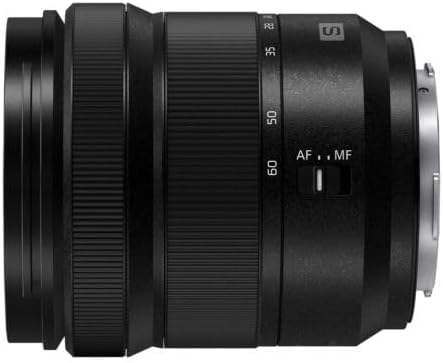
Figure 2: Side view of the lens, showing the AF/MF switch.

Figure 3: Rear mount of the lens, showing electrical contacts.
3. Operating Instructions
3.1 Zooming
Rotate the zoom ring on the lens barrel to adjust the focal length between 20mm (wide-angle) and 60mm (standard zoom). The lens extends physically when zooming towards 60mm.
3.2 Focusing
Use the AF/MF switch on the side of the lens to select between Autofocus (AF) and Manual Focus (MF) modes. In MF mode, rotate the front focus ring to achieve sharp focus. The lens offers a close minimum focusing distance of 0.15m (5.9 inches), allowing for detailed close-up shots.
3.3 Aperture
This lens features a variable aperture of F3.5 at 20mm, gradually closing to F5.6 at 60mm. This means the maximum amount of light the lens can gather decreases as you zoom in. Adjust your camera's ISO or shutter speed settings to compensate for changes in light when zooming.
3.4 Video Performance
The lens is designed to minimize focus breathing, a phenomenon where the angle of view changes slightly during focusing. This feature ensures smoother and more professional-looking video recordings.
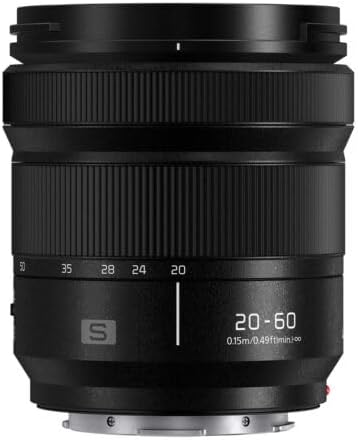
Figure 4: Front view of the lens, highlighting the LUMIX branding and filter thread size.

Figure 5: Angled front view of the lens, showing the zoom ring and focal length markings.
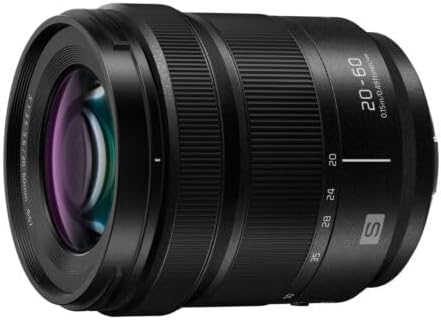
Figure 6: Angled rear view of the lens, showing the L-Mount connection.
3.5 Official Product Video
Video 1: An official overview video of the LUMIX S 20-60mm lens by Panasonic CE, highlighting its features and capabilities.
4. Maintenance
4.1 Dust, Splash, and Freeze Resistance
The lens features a robust construction that is dust, splash, and freeze-resistant, allowing operation in temperatures as low as 14°F (-10°C). While designed for harsh conditions, this resistance does not guarantee that damage will not occur if the lens is subjected to direct contact with excessive dust or water.
4.2 Fluorine Coating
The front element of the lens is treated with a fluorine coating, which helps to repel water, oil, and other contaminants, making it easier to clean and maintain the lens surface.
4.3 Cleaning
To clean the lens, use a soft, lint-free cloth. For stubborn smudges, use a lens cleaning solution specifically designed for optical surfaces. Avoid using abrasive materials or harsh chemicals that could damage the lens coatings.
5. Troubleshooting
If you encounter any issues with your Panasonic LUMIX S 20-60mm lens, please consider the following general troubleshooting steps:
- Lens Not Attaching Securely: Ensure the red dots on the lens and camera body are correctly aligned and that the lens is rotated until it clicks.
- Focus Issues: Check the AF/MF switch on the lens and ensure it is set to the desired mode. If in AF, ensure your camera's autofocus settings are appropriate for your subject.
- Image Quality Concerns: Verify that the lens elements are clean and free from dust or smudges. Ensure appropriate camera settings (aperture, shutter speed, ISO) are used for the lighting conditions.
- Environmental Protection: While resistant, avoid prolonged exposure to extreme conditions beyond the specified operating limits.
For more detailed troubleshooting or persistent issues, refer to your camera's instruction manual or contact Panasonic customer support.
6. Specifications
| Feature | Detail |
|---|---|
| Product Dimensions | 3.43 x 3.05 x 3.05 inches |
| Item Weight | 12.3 ounces |
| Item Model Number | S-R2060 |
| Focal Length Description | 20-60 millimeters |
| Lens Type | Wide Angle Zoom |
| Compatible Mountings | Leica L |
| Aperture Range | F3.5-5.6 |
| Filter Diameter | 67 mm |
| Dust/Splash/Freeze Resistant | Yes (down to 14°F / -10°C) |
7. What's in the Box
The following items are included with your Panasonic LUMIX S 20-60mm F3.5-5.6 L Mount Lens:
- Panasonic LUMIX S 20-60mm F3.5-5.6 L Mount Lens
- Front Lens Cap
- Rear Lens Cap
- Lens Hood
8. Warranty and Support
This product is covered by Panasonic's standard manufacturer's warranty. For specific warranty terms, registration, and support, please refer to the warranty card included in the packaging or visit the official Panasonic support website. Keep your proof of purchase for warranty claims.