
1. Introduction
The Jackson Audio Broken Arrow is a versatile overdrive pedal designed for guitarists seeking a wide range of tonal options. It features four distinct clipping options, an innovative GAIN CYCLE adjustment, and a highly flexible 3-band active equalizer. Additionally, the pedal incorporates a MOSFET boost circuit, providing extra volume and saturation when needed.
2. Setup
2.1 Power Requirements
The Broken Arrow pedal requires a 9V DC power supply with a minimum current draw of 100 milliamps. Ensure the power supply is center-negative. Using an incorrect power supply can damage the unit and void the warranty. A compatible 9V power supply is included with the pedal.
2.2 Connecting the Pedal
Connect your guitar to the INPUT jack on the rear of the pedal using a standard 1/4-inch instrument cable. Connect the OUTPUT jack to your amplifier or the next pedal in your signal chain, also using a 1/4-inch instrument cable. The pedal also features a MIDI input for external control, allowing integration into more complex setups.
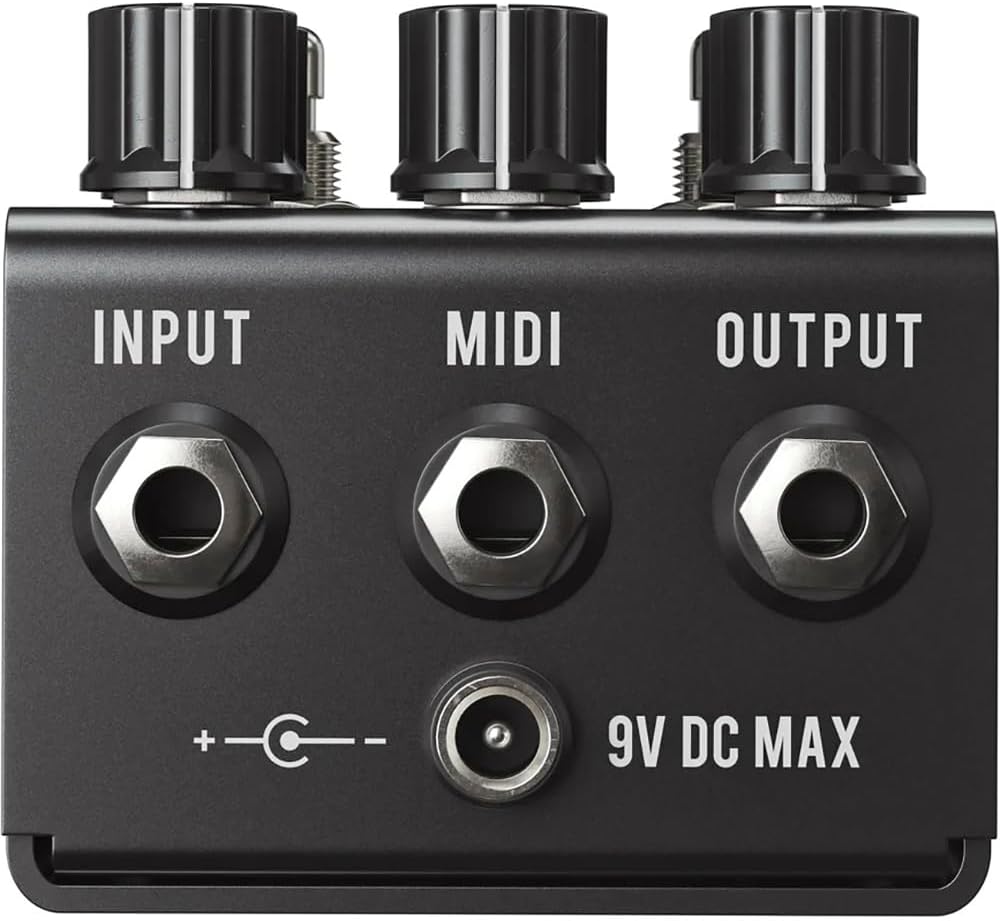
Image: Rear panel connections including Input, MIDI, Output, and 9V DC power input.
3. Operation
3.1 Controls Overview
The Broken Arrow pedal features several control knobs and two footswitches to shape your tone. Familiarize yourself with the layout:

Image: Top view of the pedal showing control knobs and footswitches.
- DRIVE Knob: Adjusts the amount of overdrive gain.
- VOLUME Knob: Controls the overall output level of the overdrive circuit.
- BOOST Knob: Adjusts the level of the independent MOSFET boost circuit.
- BASS Knob: Controls the low-frequency response of the active EQ.
- MIDDLE Knob: Controls the mid-frequency response of the active EQ.
- TREBLE Knob: Controls the high-frequency response of the active EQ.
- DRIVE Footswitch: Engages or bypasses the overdrive effect.
- BOOST Footswitch: Engages or bypasses the independent boost circuit.
3.2 GAIN CYCLE Feature
The GAIN CYCLE feature provides an innovative way to adjust the gain structure of the overdrive. This allows for fine-tuning the feel and response of the pedal, offering a broader range of overdrive textures beyond what a single gain knob typically provides. Refer to the detailed instructions in the full manual for specific GAIN CYCLE operation.
3.3 Clipping Options
The Broken Arrow offers four distinct clipping options, allowing you to select different diode configurations for varied overdrive characteristics. These presets range from smooth, symmetrical clipping to more aggressive, asymmetrical tones. Experiment with each option to find the one that best suits your playing style and desired sound.
3.4 3-Band Active EQ
The active 3-band EQ (Bass, Middle, Treble) provides significant control over the pedal's tonal output. Unlike passive EQs, an active EQ allows for both boosting and cutting frequencies, offering greater flexibility to sculpt your sound and match it to different amplifiers or guitars.
4. Maintenance
To ensure the longevity and optimal performance of your Broken Arrow pedal, follow these maintenance guidelines:
- Cleaning: Use a soft, dry cloth to clean the pedal's exterior. Avoid abrasive cleaners or solvents.
- Storage: Store the pedal in a cool, dry place away from direct sunlight and extreme temperatures.
- Power: Always disconnect the power supply when the pedal is not in use for extended periods.
- Connections: Periodically check all cable connections for wear and tear.
5. Troubleshooting
If you encounter issues with your Broken Arrow pedal, consider the following troubleshooting steps:
- No Sound:
- Ensure the power supply is correctly connected and functioning.
- Check all instrument cables for proper connection and integrity.
- Verify that the pedal is engaged (DRIVE footswitch LED is lit).
- Confirm that the VOLUME knob is not set to zero.
- Unwanted Noise/Hum:
- Ensure you are using a regulated 9V DC power supply. Unregulated power supplies can introduce noise.
- Check for ground loops in your signal chain.
- Test with different cables and power outlets.
- Boost Not Functioning:
- Verify the BOOST footswitch LED illuminates when pressed.
- Ensure the BOOST knob is turned up.
- Distorted/Garbled Sound:
- Reduce the DRIVE knob setting.
- Check the GAIN CYCLE setting; some settings may produce more aggressive clipping.
- Ensure your amplifier's input is not being overdriven excessively by the pedal's output volume.
If these steps do not resolve the issue, please contact Jackson Audio customer support.
6. Specifications
| Brand | Jackson Audio |
| Model Name | Broken Arrow V2 |
| Model Number | BROKENARROWV2 |
| Item Dimensions (L x W x H) | 7 x 5 x 4 inches |
| Item Weight | 0.98 Pounds |
| Voltage | 9 Volts DC |
| Amperage | 100 Milliamps (minimum) |
| Power Source | Corded Electric |
| Audio Output Effects | Overdrive, Preamp |
| Controls Type | Knob |
| Hardware Interface | 1/4-inch Audio |
| Signal Format | Analog |
| Connector Type | 1/4 inch audio jack |
| Included Components | Power supply (9V), Pedal |
7. Warranty and Support
7.1 Warranty Information
The Jackson Audio Broken Arrow Overdrive Pedal comes with a Limited Lifetime Warranty. This warranty covers defects in materials and workmanship under normal use. Please refer to the official Jackson Audio website or contact customer support for full warranty terms and conditions.
7.2 Customer Support
For technical assistance, troubleshooting beyond the scope of this manual, or warranty claims, please contact Jackson Audio customer support through their official website or the contact information provided with your purchase. Ensure you have your product model number (BROKENARROWV2) and purchase details available when contacting support.