
Cigii S36
Cigii S36 Portable Bluetooth Speaker User Manual
1. Introduction
Thank you for choosing the Cigii S36 Portable Bluetooth Speaker. This manual provides detailed instructions for the proper setup, operation, and maintenance of your device. Please read this manual thoroughly before use to ensure optimal performance and to prevent damage.
2. Product Overview
2.1 Key Features
- Wireless Bluetooth connectivity for audio streaming.
- Integrated 8-inch subwoofer for enhanced bass.
- Multiple audio inputs: USB, SD card, and Line-in (AUX).
- Built-in FM radio tuner.
- Two microphone inputs, including one wireless microphone.
- Rechargeable 4400 mAh battery for portable use.
- Convenient side panel controls for volume and other functions.
- Retractable trolley handle and rear wheels for easy transport.
2.2 Product Components and Controls

Figure 1: Front view of the Cigii S36 speaker, showcasing the main unit, attached microphone, and the base with a retractable trolley handle.

Figure 2: Top view of the speaker's control panel, featuring power switch, display, media controls, mode button, USB/SD card slots, microphone inputs, and volume/bass knobs.

Figure 3: Angled perspective of the speaker's top control panel, providing a clearer view of the various buttons, ports, and the attached microphone.

Figure 4: The Cigii S36 speaker shown with its retractable trolley handle fully extended, illustrating its portability feature.
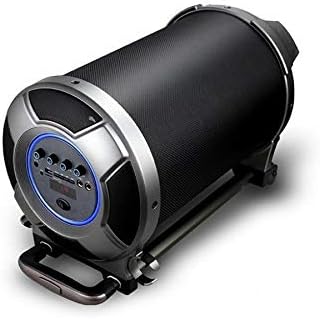
Figure 5: The Cigii S36 speaker positioned horizontally, highlighting the side panel where additional controls and ports may be located.
3. Setup
3.1 Initial Charging
Before first use, fully charge the speaker's internal battery. Connect the provided power adapter to the DC 9V input port on the speaker and plug it into a power outlet. The charging indicator will illuminate. Charging typically takes several hours.
3.2 Powering On/Off
- To power on: Locate the power switch on the control panel and slide it to the 'ON' position. The display will light up.
- To power off: Slide the power switch to the 'OFF' position.
4. Operating Instructions
4.1 Bluetooth Mode
- Power on the speaker. The speaker will automatically enter Bluetooth pairing mode, indicated by a flashing Bluetooth icon or a voice prompt.
- On your mobile device (smartphone, tablet, etc.), enable Bluetooth and search for available devices.
- Select "Cigii S36" from the list of found devices.
- Once paired, the speaker will confirm the connection, and you can now play audio from your device.
4.2 USB/SD Card Mode
- Insert a USB flash drive or SD card (with MP3 audio files) into the corresponding slot on the control panel.
- The speaker will automatically detect the storage device and begin playing audio. If not, press the 'MODE' button to switch to USB or SD mode.
- Use the play/pause, next, and previous track buttons to control playback.
4.3 FM Radio Mode
- Power on the speaker and press the 'MODE' button repeatedly until "FM" appears on the display.
- Press and hold the play/pause button to initiate an automatic scan for available FM stations. The speaker will save detected stations.
- Use the next and previous track buttons to navigate between saved FM stations.
4.4 Line-in (AUX) Mode
- Connect one end of a 3.5mm audio cable (not included) to the AUX input port on the speaker.
- Connect the other end of the cable to the audio output jack of your external device (PC, TV, MP3 player, etc.).
- Press the 'MODE' button until "LINE" or "AUX" is displayed.
- Control audio playback from your connected external device.
4.5 Microphone Usage
- For the wireless microphone: Ensure the microphone has batteries and is powered on. It should automatically connect to the speaker.
- For wired microphones: Plug a wired microphone into one of the MIC input jacks.
- Adjust the microphone volume using the dedicated 'MIC VOL' knob on the control panel.
- Adjust echo effects using the 'ECHO' knob (if available).
5. Maintenance
- Cleaning: Use a soft, dry cloth to clean the speaker's exterior. Do not use abrasive cleaners, waxes, or solvents.
- Storage: Store the speaker in a cool, dry place away from direct sunlight and extreme temperatures when not in use for extended periods.
- Battery Care: To prolong battery life, avoid fully discharging the battery frequently. Charge the speaker regularly, even if not in use, to maintain battery health.
- Water Exposure: This speaker is not waterproof. Avoid exposing it to water or excessive moisture.
6. Troubleshooting
| Problem | Possible Solution |
|---|---|
| Speaker does not power on. | Ensure the battery is charged. Connect the power adapter and try again. Check the power switch position. |
| No sound from the speaker. | Check the volume level on both the speaker and the connected device. Ensure the correct input mode is selected (Bluetooth, USB, AUX, FM). |
| Bluetooth pairing fails. | Ensure the speaker is in Bluetooth mode and discoverable. Move your device closer to the speaker. Turn off and on Bluetooth on your device. Forget the device and try pairing again. |
| USB/SD card not playing. | Ensure the USB drive or SD card is inserted correctly. Verify that the audio files are in a supported format (e.g., MP3). Press the 'MODE' button to select USB/SD mode. |
| FM radio reception is poor. | Extend the antenna fully. Move the speaker to a location with better signal reception. Perform an auto-scan again. |
| Microphone not working. | Check if the microphone is powered on (for wireless). Ensure it is properly connected (for wired). Adjust the 'MIC VOL' knob. |
7. Specifications
| Feature | Specification |
|---|---|
| Model Number | S36 |
| Brand | Cigii |
| Connectivity Technology | Bluetooth, USB, SD Card, Line-in (AUX), RCA |
| Speaker Type | Portable Bluetooth Speaker with Subwoofer |
| Nominal Output Power | 20 - 30 Watts |
| Maximum Output Power | 30 Watts |
| Subwoofer Diameter | 8 Inches |
| Battery Capacity | 4400 mAh (Rechargeable) |
| Transmission Distance | Up to 10 meters (Bluetooth) |
| Compatible Devices | Personal Computer, Smartphone, Television, other audio devices |
| Product Dimensions | 306 mm x 428 mm (approximate) |
| Special Features | FM Radio, Microphone Input (x2), Wireless Microphone included, Retractable Trolley Handle, Rear Wheels |
8. Safety Information
- Do not expose the speaker to extreme temperatures, direct sunlight, or high humidity.
- Avoid dropping or subjecting the speaker to strong impacts.
- Do not attempt to disassemble or modify the speaker. This will void the warranty and may cause damage or injury.
- Keep the speaker away from children and pets.
- Use only the provided or recommended charging adapter.
- Dispose of the battery and electronic components responsibly according to local regulations.
9. Warranty and Support
Specific warranty information is typically provided at the point of purchase or included with the product packaging. Please refer to your purchase documentation for details regarding warranty coverage and how to obtain support. For technical assistance or inquiries, please contact Cigii customer service through their official channels.
Ask a question about this manual
Ask about setup, troubleshooting, compatibility, parts, safety, or missing instructions. Manuals+ will review the question and use this page’s manual context to help answer it.