
1. Introduction
Thank you for choosing the EDM KOMA TOOLS 08773 125W Fast Charger. This manual provides essential information for the safe and efficient operation, maintenance, and troubleshooting of your charger. Please read this manual thoroughly before first use and keep it for future reference.
2. Safety Instructions
Always observe basic safety precautions when using electrical appliances to reduce the risk of fire, electric shock, and personal injury.
- Read all instructions: Before using the charger, read all instructions and cautionary markings on the charger, battery, and product using the battery.
- Indoor use only: This charger is designed for indoor use only. Do not expose it to rain or wet conditions.
- Proper ventilation: Ensure adequate ventilation during charging. Do not cover the charger.
- Use correct voltage: Connect the charger to a power supply with the correct voltage as indicated on the charger label.
- Avoid charging damaged batteries: Do not attempt to charge damaged or non-rechargeable batteries.
- Unplug when not in use: Disconnect the charger from the power outlet when not in use or before cleaning.
- Keep away from children: This appliance is not intended for use by persons (including children) with reduced physical, sensory or mental capabilities, or lack of experience and knowledge, unless they have been given supervision or instruction concerning use of the appliance by a person responsible for their safety.
- Do not modify: Never attempt to open or modify the charger. Refer all servicing to qualified service personnel.
3. Package Contents
Verify that all items are present upon opening the package:
- 1 x EDM KOMA TOOLS 08773 125W Fast Charger

Image: The EDM KOMA TOOLS 08773 Fast Charger shown in its retail packaging, indicating the product as it appears when purchased.
4. Product Features
The EDM KOMA TOOLS 08773 is a high-performance fast charger designed for 20V Li-Ion batteries, offering efficient and quick charging capabilities.
- High Power Output: 125W charging power for rapid battery replenishment.
- Fast Charging Times: Charges 2.0Ah batteries in approximately 30 minutes and 4.0Ah batteries in approximately 60 minutes.
- 20V Li-Ion Technology: Specifically designed for KOMA TOOLS 20V Lithium-Ion battery series.
- Compatibility: Compatible with various KOMA TOOLS 20V Li-Ion battery models, including 08770, 08772, 08773, 08771, and 08774.
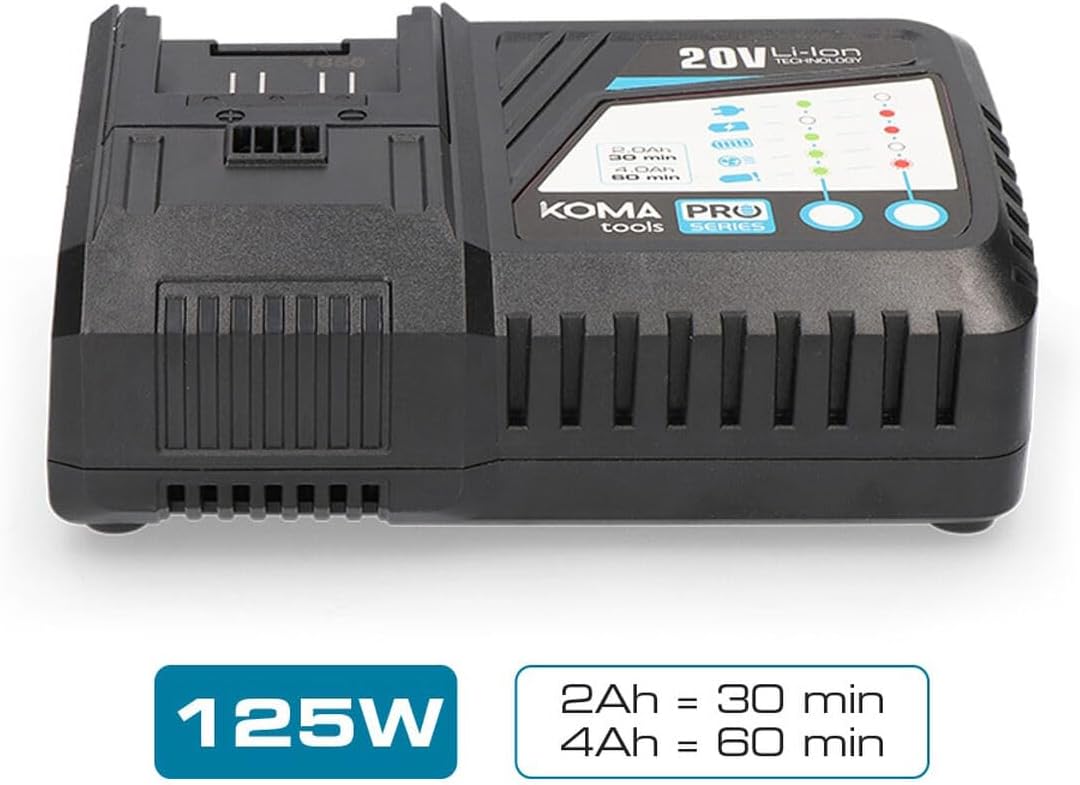
Image: The EDM KOMA TOOLS 08773 Fast Charger, highlighting its 125W power and approximate charging times for 2Ah (30 min) and 4Ah (60 min) batteries.

Image: A diagram illustrating the compatibility of the KOMA TOOLS 08773 charger with various 20V Li-Ion battery models (08770, 08772, 08773, 08771/08774) and their respective charging durations.
5. Setup
Follow these steps to set up your fast charger:
- Unpack: Carefully remove the charger from its packaging.
- Placement: Place the charger on a stable, flat, and dry surface in a well-ventilated area. Ensure there is sufficient space around the charger for heat dissipation.
- Power Connection: Plug the charger's power cord into a standard electrical outlet (100-240V AC, 50/60Hz). The charger is designed to operate within this voltage range.
6. Operating Instructions
To charge a KOMA TOOLS 20V Li-Ion battery:
- Insert Battery: Align the battery with the charging slot on the charger. Slide the battery firmly into the slot until it clicks into place.
- Charging Indicator: The charger features LED indicators to show the charging status. Refer to the diagram on the charger for specific indicator meanings (e.g., charging, fully charged, error). Typically, a blinking light indicates charging, and a solid light indicates a full charge.
- Charging Time: Charging times vary depending on the battery capacity. For example, a 2.0Ah battery will charge in approximately 30 minutes, and a 4.0Ah battery in approximately 60 minutes.
- Remove Battery: Once the battery is fully charged (indicated by the LED), press the battery release button (if present) and slide the battery out of the charger.
- Unplug Charger: For energy saving and safety, unplug the charger from the power outlet when not in use.
7. Maintenance
Proper maintenance ensures the longevity and optimal performance of your charger.
- Cleaning: Disconnect the charger from the power supply before cleaning. Use a soft, dry cloth to wipe the exterior of the charger. Do not use abrasive cleaners or solvents.
- Storage: Store the charger in a clean, dry place, away from direct sunlight, moisture, and extreme temperatures.
- Inspect: Periodically inspect the charger and its power cord for any signs of damage. If any damage is found, discontinue use and contact customer support.
8. Troubleshooting
If you encounter issues with your charger, refer to the following common problems and solutions:
| Problem | Possible Cause | Solution |
|---|---|---|
| Charger not powering on | No power from outlet; loose connection; damaged cord. | Check power outlet with another device; ensure cord is securely plugged in; inspect cord for damage. |
| Battery not charging | Battery not properly inserted; battery is faulty; charger is faulty; battery too hot/cold. | Re-insert battery firmly; try charging a different battery; allow battery to reach room temperature. |
| Charging indicator shows error | Battery fault; charger fault; extreme battery temperature. | Remove and re-insert battery; allow battery to cool down or warm up; if error persists, battery or charger may be faulty. |
If the problem persists after attempting these solutions, please contact customer support.
9. Specifications
| Specification | Value |
|---|---|
| Model Number | 8773 |
| Power Output | 125 W |
| Input Voltage | 100-240V AC, 50/60Hz (Standard) |
| Output Voltage (for battery) | 20V DC (Nominal for Li-Ion batteries) |
| Compatible Battery Type | 20V Li-Ion (KOMA TOOLS PRO Series) |
| Approx. Charging Time (2.0Ah) | 30 minutes |
| Approx. Charging Time (4.0Ah) | 60 minutes |
| Product Dimensions | 3.94 x 0.79 x 1.06 inches |
| Item Weight | 1.72 pounds (0.78 Kilograms) |
| Certification | CE |
| Manufacturer | KOMA TOOLS |
10. Warranty and Support
For warranty information, technical support, or service inquiries, please refer to the warranty card included with your product or contact your retailer. Keep your purchase receipt as proof of purchase.
