
1. Introduction
Thank you for purchasing the Xtrike me SK-402 Stereo 2.0 RGB Speakers. These speakers are designed to provide clear stereo audio for your computer, gaming console, or other compatible devices, enhanced with dynamic RGB lighting. Please read this manual carefully before use to ensure proper operation and to maximize your listening experience.
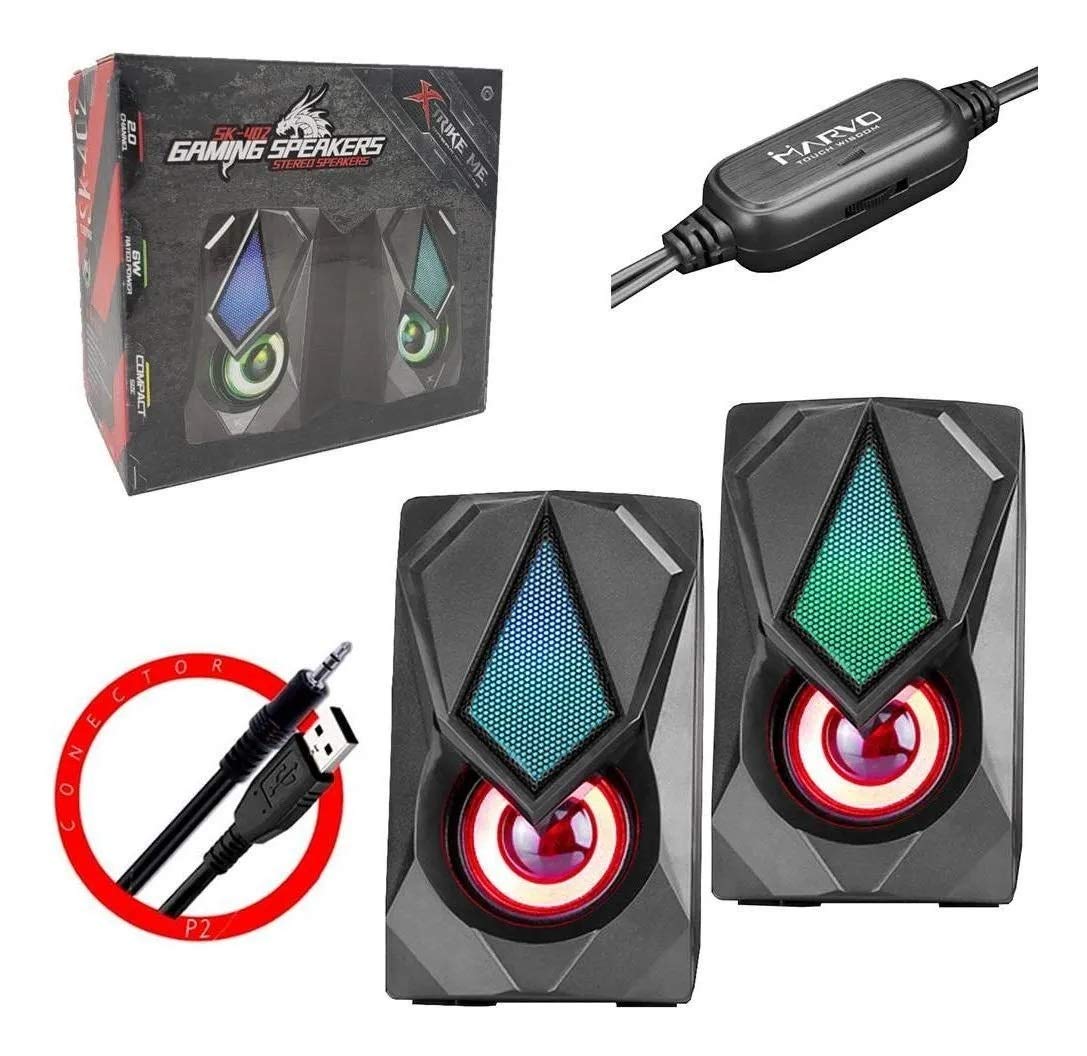
Figure 1.1: Xtrike me SK-402 Speakers in their retail box.
2. Safety Information
- Do not expose the speakers to water or excessive moisture. The product is not waterproof.
- Avoid placing speakers near heat sources or in direct sunlight.
- Do not attempt to disassemble or repair the speakers yourself. Refer all servicing to qualified personnel.
- Keep out of reach of children.
- Ensure proper ventilation around the speakers.
- Use only with compatible power sources (USB 5V).
3. Package Contents
The package should contain the following items:
- 1 set of Xtrike me SK-402 Stereo 2.0 RGB Speakers
- Integrated 3.5mm audio jack cable
- Integrated USB power cable

Figure 3.1: Integrated 3.5mm audio jack and USB power cables.
4. Setup Instructions
- Speaker Placement: Place the two speakers on either side of your monitor or listening area for optimal stereo separation. Ensure they are on a stable, flat surface.
- Audio Connection: Locate the 3.5mm audio jack cable extending from one of the speakers. Plug this 3.5mm jack into the audio output port (headphone jack) of your computer, laptop, smartphone, tablet, or gaming console.
- Power Connection: Locate the USB power cable extending from one of the speakers. Plug this USB connector into an available USB port on your computer, a USB wall adapter (not included), or a power bank. The speakers will power on automatically, and the RGB lighting will activate.
- Volume Control: Adjust the volume using the inline controller on the speaker cable or through your device's system volume settings.

Figure 4.1: Speakers connected and displaying RGB lighting.

Figure 4.2: Inline volume controller for easy audio adjustment.
5. Operating Instructions
5.1 Power On/Off
The speakers power on automatically when the USB cable is connected to a powered USB port. Disconnect the USB cable to power off the speakers.
5.2 Volume Adjustment
Adjust the audio volume using the rotary dial on the inline controller (refer to Figure 4.2). You can also control the volume through your connected device's operating system settings.
5.3 RGB Lighting
The speakers feature integrated RGB lighting that activates automatically when powered on. The lighting cycles through various colors, enhancing your audio experience with visual effects.

Figure 5.1: Speakers displaying red and green RGB lighting.

Figure 5.2: Speakers displaying blue RGB lighting.
6. Maintenance
- Cleaning: Use a soft, dry cloth to clean the exterior of the speakers. Do not use liquid cleaners or aerosols.
- Storage: When not in use for extended periods, store the speakers in a cool, dry place, away from direct sunlight and extreme temperatures.
- Cable Care: Avoid bending or crimping the cables excessively to prevent damage.
7. Troubleshooting
| Problem | Possible Cause | Solution |
|---|---|---|
| No sound from speakers. |
|
|
| RGB lighting is not working. |
|
|
| Sound is distorted or unclear. |
|
|
8. Specifications
| Model Name | SK-402 |
| Speaker Type | Stereo 2.0 Multimedia Speakers |
| Rated Power | 2 x 3W (Total 6W) |
| Frequency Response | 150 Hz - 20 kHz |
| Impedance | 4Ω x 2 |
| Drive Unit | 2 inches x 2 |
| Backlight | RGB |
| Connectors | 3.5mm jack (audio), USB (power) |
| Cable Length | 1.1 m |
| Dimensions (W x D x H) | 72 x 82 x 120 mm (approx. 2.8 x 3.2 x 4.7 inches) |
| Weight | 520 grams (approx. 1.15 lbs) |
| Compatible Devices | Desktop Computer, Laptop, Smartphone, Tablet, Gaming Console |
| Material | Plastic |

Figure 8.1: Product packaging with approximate dimensions.
9. Warranty and Support
Xtrike me products are designed for reliability and performance. For warranty information or technical support, please refer to the warranty card included with your purchase or visit the official Xtrike me website. Please have your model number (SK-402) and proof of purchase ready when contacting support.
Product Identifier: X001UMZ267