
1. Introduction
Thank you for choosing the PEAKCOLD Curved Glass Deli Case, Model IM48DC-B. This manual provides essential information for the safe and efficient installation, operation, and maintenance of your new commercial refrigeration unit. Please read these instructions thoroughly before use and retain them for future reference.
This deli case is designed for commercial use, specifically for displaying meat, seafood, and other refrigerated items at optimal temperatures.
2. Safety Information
Always follow basic safety precautions when using electrical appliances to reduce the risk of fire, electric shock, and injury.
- Ensure the unit is properly grounded.
- Do not operate the unit with a damaged power cord or plug.
- Keep ventilation openings clear of obstructions.
- Do not store explosive substances such as aerosol cans with a flammable propellant in this appliance.
- Only qualified personnel should perform repairs.
- Disconnect power before cleaning or maintenance.
3. Setup and Installation
3.1 Unpacking
Carefully remove all packaging materials. Inspect the unit for any shipping damage. Report any damage immediately to the carrier and supplier. Retain all packaging materials for inspection.
3.2 Placement
Place the deli case on a flat, stable surface. Ensure adequate clearance around the unit for proper ventilation. Avoid direct sunlight or proximity to heat-generating equipment. The unit is equipped with heavy-duty casters for easy movement, but it should be locked in place once positioned.
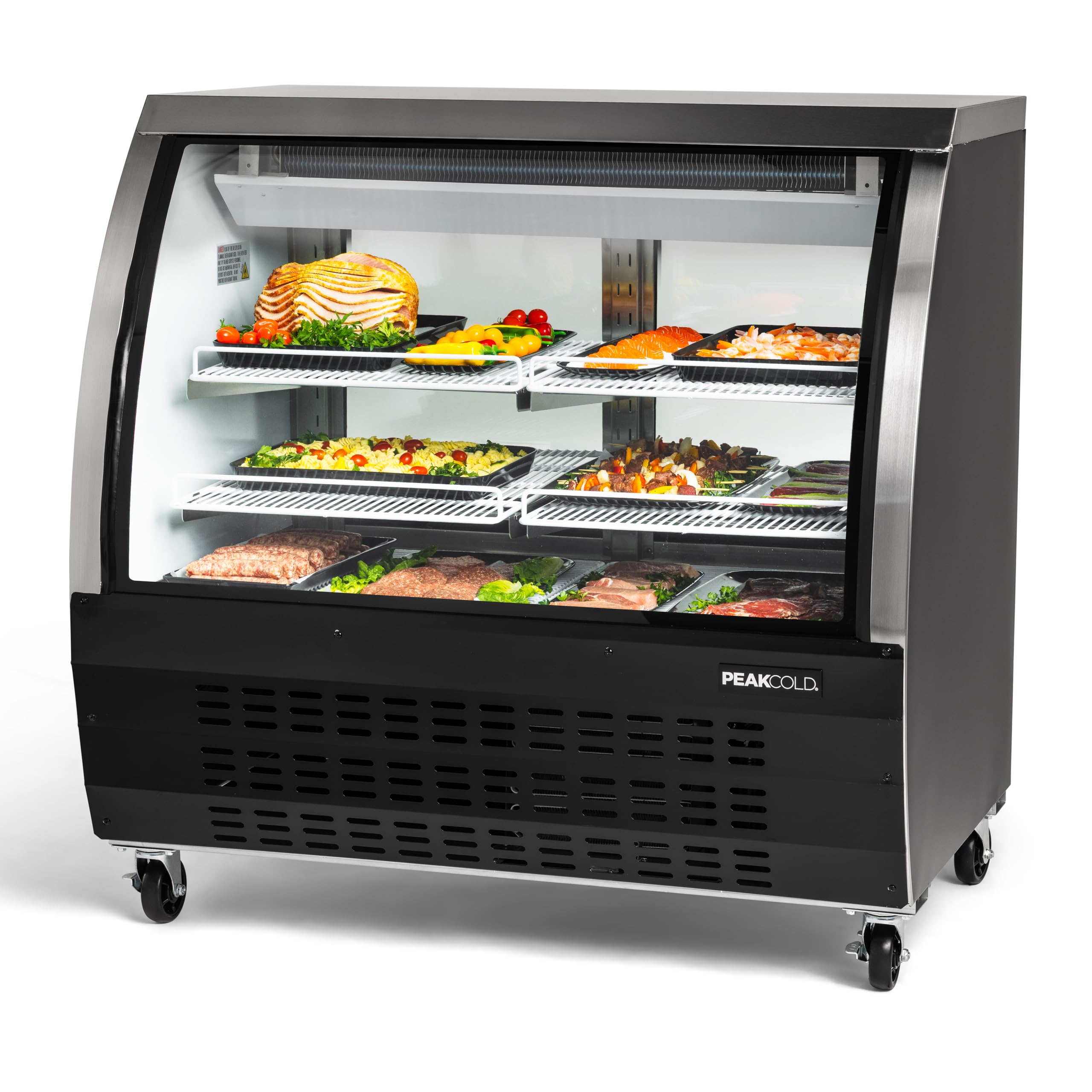
Image: Front view of the PEAKCOLD Curved Glass Deli Case IM48DC-B, showcasing its design and display area.
3.3 Shelf Installation
The unit comes with adjustable wire shelves. Install them according to your display needs. Ensure shelves are securely seated in their brackets.
Video: Instructions on how to install shelves in a PEAKCOLD Deli Case. This video demonstrates the proper method for securing the adjustable wire shelves within the unit.

Image: Close-up view of the adjustable wire shelves inside the deli case, highlighting their design for flexible product display.
3.4 Electrical Connection
Connect the unit to a dedicated 110-volt power outlet. Do not use extension cords or adapter plugs. Allow the unit to stand for at least 2 hours before plugging it in to allow refrigerants to settle.
4. Operation
4.1 Power On/Off
Locate the power switch, typically at the rear or side of the unit. Flip the switch to the "ON" position to start the refrigeration cycle. To turn off, flip the switch to "OFF".
4.2 Temperature Control
The unit features a digital temperature control system. The factory preset temperature range is 32-43°F (0-6°C). Refer to the digital controller's specific instructions for adjusting the temperature settings. Avoid frequent and drastic temperature changes.

Image: Rear view of the deli case, highlighting the digital temperature control panel and power switch for easy access and monitoring.
4.3 Lighting
The interior is equipped with LED lighting to enhance product visibility. The lighting can typically be controlled independently via a switch, if available, or it operates automatically with the unit.

Image: Close-up of the interior LED lighting, illuminating the display area for clear product presentation.
4.4 Loading Products
Arrange products to allow for proper air circulation. Do not block the internal air vents. The unit features a stainless steel floor for durability and hygiene.

Image: A PEAKCOLD deli case filled with various meat products, demonstrating effective product display.

Image: A PEAKCOLD deli case filled with various cheese products, illustrating another type of product display.
5. Maintenance
Regular maintenance ensures optimal performance and longevity of your deli case. Always disconnect power before performing any maintenance.
5.1 Cleaning the Interior
Clean the interior regularly with a mild soap and water solution. Rinse thoroughly and dry with a soft cloth. Do not use abrasive cleaners or sharp objects that could damage surfaces.
5.2 Cleaning the Exterior
Wipe down the exterior surfaces with a damp cloth and mild detergent. For stainless steel parts, use a non-abrasive stainless steel cleaner. Ensure the glass surfaces are clean for optimal product visibility.
5.3 Condenser Coil Cleaning
The condenser coil should be cleaned every 30 days or as needed to maintain cooling efficiency. Dust and debris can accumulate, reducing performance. Use a brush or vacuum cleaner to remove dirt from the condenser fins. This task should ideally be performed by a qualified technician.
5.4 Automatic Defrost
This unit features an automatic defrost system, minimizing the need for manual defrosting. Ensure the drain pan is clear and unobstructed to allow for proper water evaporation.
6. Troubleshooting
Before contacting service, review the following common issues and solutions:
| Problem | Possible Cause | Solution |
|---|---|---|
| Unit does not power on | No power supply; Power switch off; Circuit breaker tripped | Check power cord connection; Ensure power switch is ON; Reset circuit breaker |
| Temperature is too high | Door not closed properly; Blocked air vents; Dirty condenser coil; Ambient temperature too high | Ensure doors are sealed; Clear obstructions from vents; Clean condenser coil; Relocate unit if ambient temperature is excessive |
| Excessive noise | Unit not level; Loose components; Fan obstruction | Adjust leveling feet/casters; Check for loose parts; Clear fan area |
| Water on floor | Clogged drain line; Drain pan overflow | Clear drain line; Ensure drain pan is correctly positioned and not overflowing |
If the problem persists after attempting these solutions, please contact PEAKCOLD customer support.
7. Specifications
Detailed technical specifications for the PEAKCOLD Curved Glass Deli Case IM48DC-B:
- Model Number: IM48DC-B
- Exterior Dimensions (W x D x H): 47.25" x 32.5" x 42.8"
- Interior Dimensions (W x D x H): 43.25" x 26.75" x 26.75"
- Capacity: 18 cubic feet
- Temperature Range: 32-43°F (0-6°C)
- Refrigerant: R290 (Environmentally Friendly and Energy Efficient)
- Compressor: 1/4 HP Embraco compressor
- Voltage: 110 volts
- Defrost System: Automatic
- Special Features: Adjustable Shelves, Digital Temperature Control, LED Lights, Wheels
- Number of Doors: 2 (sliding)
- Shelf Type: Wire
- Construction: Curved Glass, Black exterior, Stainless Steel Floor
- Item Weight: 343 pounds
- Annual Energy Consumption: 913 kilowatt hours per year
- Certification: ETL

Image: Diagram showing the exterior dimensions (width, depth, height) of the PEAKCOLD Curved Glass Deli Case.
8. Warranty and Support
8.1 Warranty Information
This PEAKCOLD deli case is covered by a seller warranty: 1 year labor, 3 year parts, and 5 year compressor part. Please retain your proof of purchase for warranty claims.
8.2 Customer Support
For any questions, technical assistance, or warranty claims, please contact PEAKCOLD customer support. Our US-based support team is available to provide:
- In-house parts & servicing
- Setup & programming assistance
- Commercial & residential product coverage
Contact information can typically be found on the manufacturer's website or your purchase documentation.